Website platform migration is worth considering when the current site is slowing campaigns, content, SEO, integrations, or team workflow. It is not worth doing just because a newer framework looks cleaner. The question is whether the platform is now taxing growth more than it is helping the business ship.
That is the difference between a normal website backlog and platform drag. A backlog means there is work to do. Platform drag means the foundation keeps turning ordinary work into recurring friction: a landing page takes too long, a tracking change needs too many people, a content model cannot support the next campaign, or every SEO fix risks breaking something else.
This checklist is for non-technical buyers who are asking a practical question: should we stay on WordPress, Webflow, Framer, Squarespace, or a legacy custom site, clean it up, migrate content only, or move the website to Astro?
The honest answer is sometimes “do not migrate.” If the current platform is fast enough, secure enough, easy enough for the team, and not blocking revenue work, migration may be a distraction. But if the site is becoming a tax on every campaign, a structured diagnostic is better than another redesign brief.
If budget and scope are the open questions, use the Astro migration cost guide after this checklist. If the content model is the real blocker, compare CMS options in the best CMS for Astro guide before rebuilding templates.
Website platform migration starts with business drag
A website platform migration should start with the business constraint, not the platform name. WordPress, Webflow, Framer, and custom stacks can all be right at one stage and wrong at another.
The trigger is usually one of five patterns:
- Campaigns are delayed because new pages, forms, scripts, or analytics changes require too much coordination.
- Content teams cannot create, update, reuse, or govern pages without workarounds.
- SEO feels fragile because redirects, metadata, canonicals, structured data, or sitemap behavior are hard to control.
- Integrations depend on patches, plugins, embeds, manual exports, or undocumented custom code.
- Performance keeps getting worse as pages, scripts, media, tracking, and CMS complexity accumulate.
If none of those are happening, migration is probably not the first move. Fix the backlog, improve governance, clean up the design system, or audit analytics before rebuilding the foundation.
The common symptoms by platform
The platform label is less important than the symptoms. A small WordPress site can be healthier than a messy headless build. A Webflow site can be a strong marketing asset until the CMS model, collaboration model, or integration needs get more complex. A Framer site can be excellent for fast campaign pages until the team needs a reusable content engine.
| Current platform | Common platform-drag symptoms | What it usually means |
|---|---|---|
| WordPress | Plugin chains for SEO, caching, forms, security, page building, analytics, redirects, schema, and performance | The team may have outgrown WordPress as an all-in-one operating layer, or it may need a cleanup before a migration |
| Webflow | CMS item limits, collection modeling friction, component governance issues, custom code embeds, and sequential designer bottlenecks | The visual builder is doing more than a visual builder should do |
| Framer | One-off pages, animation-heavy layouts, manual design updates, limited structured content, and SEO work that depends on page-level fixes | The canvas was fast early, but the site may need reusable templates and stronger content operations |
| Squarespace | Simple editing becomes limiting when the site needs reusable content types, deeper SEO controls, custom integrations, or campaign templates | The site may have outgrown a simple business-site builder, even if the brand pages still look fine |
| Legacy custom code | Old dependencies, undocumented templates, fragile deploys, no owner, and slow redesign cycles | The problem may be ownership and maintainability, not just the CMS |
| Any platform | Simple requests need a developer, an agency, a plugin, a workaround, and a second QA pass | The site has stopped being a growth tool and has become operational overhead |
WordPress deserves nuance. The plugin ecosystem is one reason it became so useful: the WordPress plugin directory offers extensions for many publishing and business needs. That breadth is valuable when the site is small or the team needs quick extensions. It becomes drag when core business functions depend on many overlapping plugins with different update cycles, security profiles, and performance costs.
The same is true for Webflow. The official Webflow pricing table, reviewed September 8, 2026, specifies plan-dependent CMS item, collection, bandwidth, and governance limits. Plan names, limits, add-ons, billing, region, and legacy account entitlements can change. Record the selected plan and options against the expected content volume, locales, integrations, and publishing workflow before quoting a move. These limits can accommodate many marketing sites. They become a planning constraint when the roadmap includes large directories, programmatic SEO, multi-market content, complex filtering, or many reusable content types.
Framer has a different ceiling. It is useful when the team needs design speed, animation, and landing page velocity. The drag appears when the site starts needing durable content models, repeatable SEO workflows, reusable page systems, and integration discipline across many pages. At that point, the buyer is not asking “Framer vs Astro” as a design preference. They are asking whether the website needs to become a cleaner owned system.
For narrower builder decisions, use the Webflow to Astro and Framer to Astro guides before turning a platform issue into a full rebuild.
Compare the current platform before choosing a migration path
A website migration brief is better when it names the tradeoff the current platform is forcing. “Move us to Astro” is less useful than “we need faster campaign pages, safer SEO controls, cleaner content models, and fewer page-builder workarounds.”
Use this comparison before choosing whether to optimize, rebuild templates, move content, or migrate the whole site.
| Platform | Usually good for | Migration pressure appears when | Better first move |
|---|---|---|---|
| WordPress | Flexible publishing, plugins, editorial familiarity, broad agency support | Plugin chains control performance, security, redirects, schema, forms, and page building | Audit plugins, templates, hosting, redirects, and content model before assuming a full rebuild |
| Webflow | Marketing pages, visual control, polished static and CMS sites | CMS structure, roles, custom code, large content libraries, or page velocity become constraints | Separate design debt from CMS and integration debt |
| Framer | Fast landing pages, visual experimentation, animated product marketing | Reusable content, SEO governance, structured publishing, or integration ownership becomes important | Keep it for campaign experiments if it works; migrate durable content if it does not |
| Squarespace | Simple business sites, quick publishing, low-maintenance brand pages | The business needs custom templates, deeper tracking, stronger SEO workflows, or system integrations | Avoid overbuilding; migrate only if the site is now part of a repeatable growth system |
| Legacy custom site | Highly specific old requirements, custom templates, historical SEO footprint | No one owns the code, deploys are fragile, dependencies are stale, or page changes are slow | Decide whether ownership repair is enough before redesigning |
| Astro | Fast content-heavy sites, owned components, cleaner HTML, SEO control, migration-friendly content models | The team has no code owner or needs a pure visual editing canvas | Pair Astro with the right CMS and maintenance model, not just a frontend rebuild |
The right destination depends on the operating model after launch. A founder-led brochure site may not need Astro. A marketing site with recurring campaigns, SEO pages, structured content, forms, analytics, and internal workflows often needs a cleaner foundation than a visual builder can comfortably provide.
If the current issue is only that the first site was built cheaply, the best free website builder for small business guide can help frame when a builder is still enough and when the site is starting to cost more than it saves.
Score your platform drag
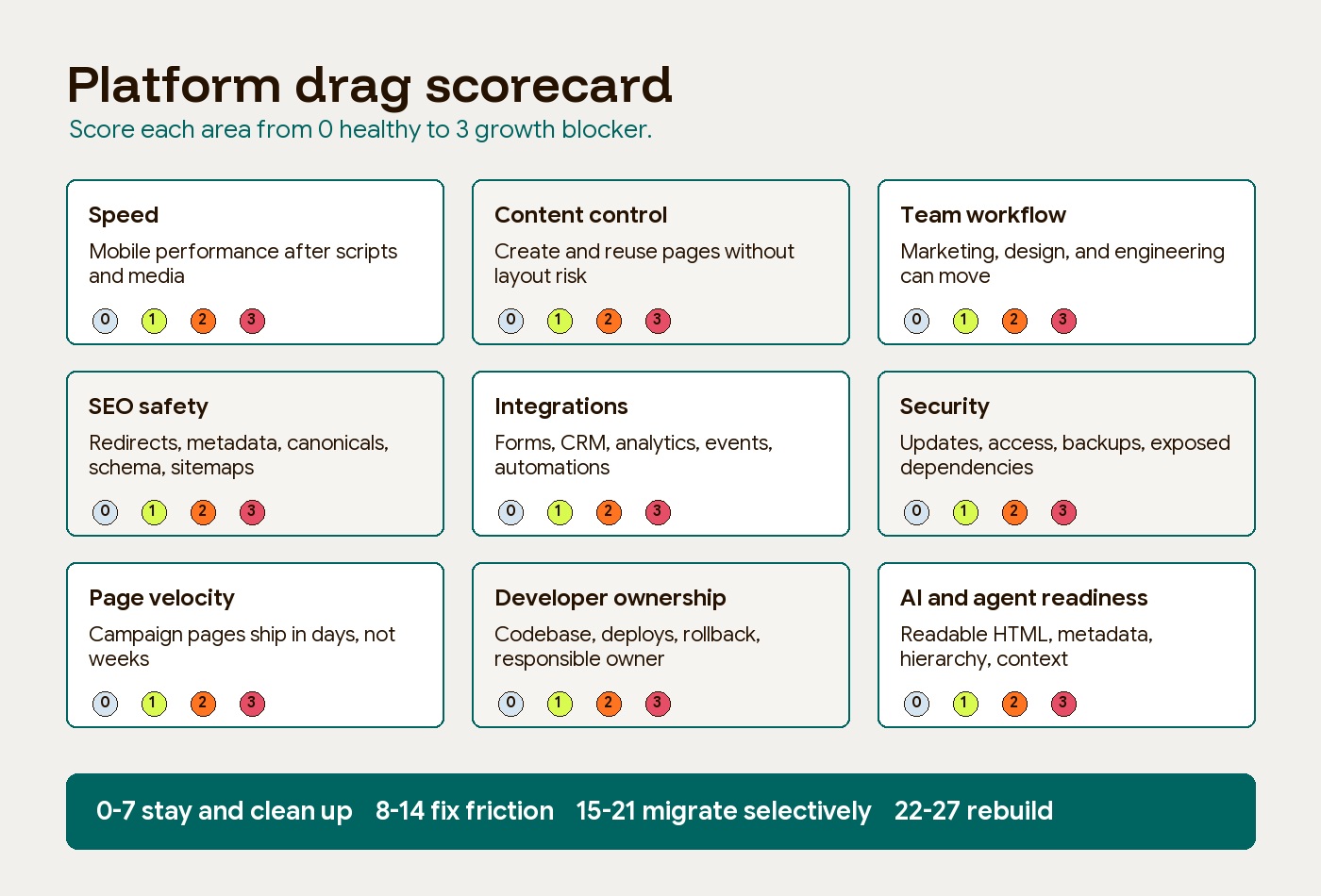
Use this scorecard before starting a website platform migration. Score each area from 0 to 3. The scores and bands below are Hapy planning heuristics, not a validated model or an automatic purchasing rule. To recalibrate them, score completed projects before reviewing the outcome, record the delays, defects, and ownership problems that actually occurred, then adjust the score descriptions and band boundaries to match your evidence. A critical security or continuity failure requires action regardless of the total, and migration may not be the quickest remedy.
| Score | Meaning |
|---|---|
| 0 | Healthy. The current platform handles this well. |
| 1 | Mild friction. Annoying, but not blocking important work. |
| 2 | Recurring drag. The same issue slows campaigns, content, SEO, or integrations. |
| 3 | Growth blocker. The platform is now creating measurable risk, delay, or cost. |
| Diagnostic area | What to check | Score |
|---|---|---|
| Speed | Are priority pages fast on mobile after scripts, media, forms, and tracking are included? | 0-3 |
| Content control | Can the team create, edit, reuse, and archive content without breaking layout or SEO? | 0-3 |
| Team workflow | Can marketing, design, content, and engineering work without waiting on one bottleneck? | 0-3 |
| SEO safety | Are redirects, canonicals, metadata, schema, sitemap behavior, and indexation controls dependable? | 0-3 |
| Integrations | Are forms, CRM, analytics, events, attribution, and automations owned and documented? | 0-3 |
| Security | Are updates, dependencies, access, backups, and exposed plugins or scripts managed cleanly? | 0-3 |
| Page velocity | Can the team ship a new campaign page in days, not weeks, using reusable components? | 0-3 |
| Developer ownership | Is there a clear codebase, deploy process, rollback path, and responsible owner? | 0-3 |
| Public-content readability hypothesis | Can the team provide clean HTML, metadata, sitemaps, structured content, and readable public context where useful? | 0-3 |
How to read the score
| Total score | Recommended action |
|---|---|
| 0-7 | Stay and clean up. Migration is probably premature. |
| 8-14 | Fix the highest-friction areas first. Re-score after cleanup. |
| 15-21 | Consider migrating content, templates, or the marketing layer. |
| 22-27 | Investigate a deeper rebuild alongside targeted repair; validate the cause and cost before committing. |
The score matters less than the pattern. A site with a total score of 12 can still need migration if all the drag is concentrated in SEO safety and page velocity before a major campaign. A site with a score of 18 may be fine to clean up if the pain is mostly old content, unused plugins, or weak governance.
Choose the right migration outcome
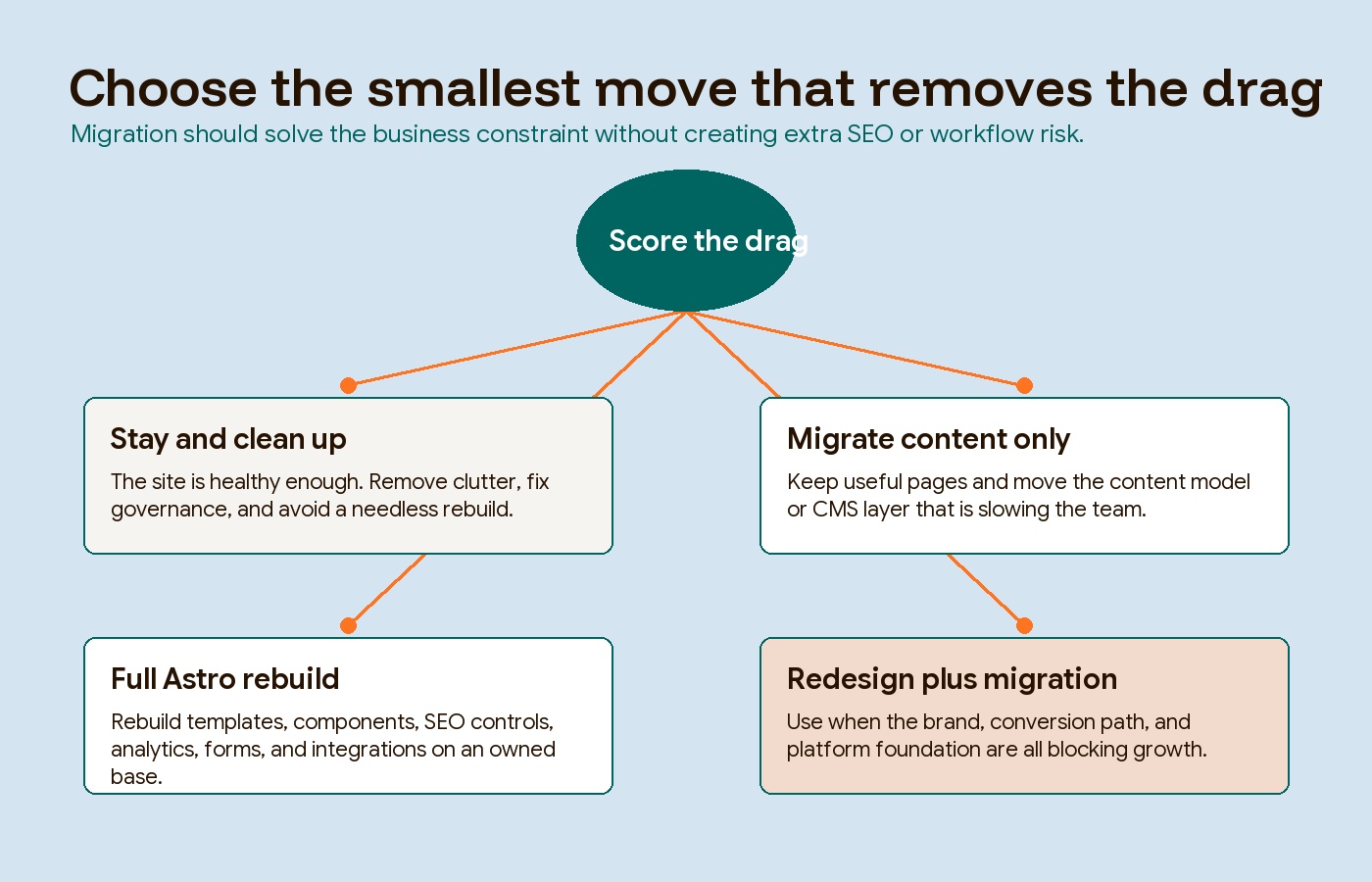
Not every platform problem needs the same solution. The buyer mistake is treating “new website” and “new platform” as one decision. They are related, but they are not identical.
| Outcome | When it fits | What to avoid |
|---|---|---|
| Stay and clean up | The platform is not blocking growth, but the site has clutter, unused plugins, weak governance, or old templates | Do not replatform just to avoid maintenance discipline |
| Migrate content only | The design and content are mostly useful, but the CMS, page model, or publishing workflow needs a cleaner base | Do not move bad content models unchanged |
| Full Astro rebuild | The site needs speed, ownership, reusable components, structured content, safer SEO controls, and cleaner integrations | Do not rebuild without mapping URLs, metadata, forms, and analytics |
| Redesign plus migration | The platform is blocking growth and the current design no longer supports positioning, conversion, or page velocity | Do not use redesign as cover for skipping migration risk planning |
The right outcome usually becomes obvious once the team names the real blocker. If content production is the bottleneck, do not start with visual redesign. If SEO risk is the bottleneck, do not start by changing URLs. If integrations are the bottleneck, do not assume a static rebuild solves the operating system around the site.
When Astro is a good destination
Astro is a strong destination when the website is primarily a content, marketing, product, documentation, or hybrid site where speed, SEO, ownership, and maintainability matter. Astro describes itself as a framework for content-driven websites and emphasizes reduced client-side JavaScript, server-first rendering, content collections, and integrations.
That matters because many platform-drag problems are not about whether the current site can render a page. They are about whether the team can keep improving the site without accumulating more hidden cost.
Moving to Astro can help when the business needs:
- A cleaner owned codebase instead of a rented builder layout.
- Reusable components for repeatable campaign and content pages.
- Markdown, MDX, or CMS-backed content models that match the team workflow.
- Better control over metadata, schema, canonical logic, sitemap behavior, redirects, and analytics.
- Lighter pages with less default JavaScript and fewer plugin or embed chains.
- Control over semantic HTML and public content formats, which can make crawlability and extraction easier to inspect and test.
Astro is not automatically the answer. The official Astro WordPress migration docs are explicit that a move changes how the site is maintained: WordPress uses an online dashboard, while Astro work typically happens in a code editor or development environment, unless a CMS is connected. The same docs note that WordPress stores content in a database, while Astro often uses Markdown or MDX files, or a connected CMS for content management.
That is a tradeoff, not a flaw. It is good when the company wants more ownership, cleaner components, and a technical partner or internal owner who can maintain the system. It is bad when the team needs a pure no-code editing canvas and has no appetite for code ownership.
Hapy’s Astro website migration engagement starts with that distinction: preserve what works, rebuild what is dragging the business down, and leave alone anything that is already doing its job.
When the score points toward migration, run a website migration audit before an Astro rebuild so URL, analytics, form, and SEO risk are visible before the quote. If speed is the main symptom, use the Core Web Vitals and Astro guide to separate measurable performance debt from platform preference. If the migration points to Astro, compare the Cloudflare and Astro deployment model before choosing Pages, Workers, redirects, and cache behavior.
For platform-specific decisions, use Astro vs WordPress when WordPress is the current system and Framer to Astro when the site is moving out of a design-first builder.
Protect SEO before touching the platform
SEO risk is one of the main reasons platform migrations go wrong. A faster new site can still lose organic traffic if the migration breaks URLs, redirects, canonicals, metadata, structured data, internal links, sitemap behavior, or analytics.
Google’s site-move guidance treats a URL-changing migration as a controlled process: prepare the new site, map old URLs to new URLs, implement redirects, test redirects, monitor traffic, and use Search Console tools where appropriate. That is why a migration plan should include an SEO migration checklist before design or development starts.
At minimum, audit:
- Current organic landing pages and top queries.
- URLs, titles, meta descriptions, headings, canonicals, robots directives, and schema.
- Redirects, 404s, parameter URLs, and legacy paths.
- Internal links, navigation, breadcrumbs, and XML sitemap behavior.
- Forms, conversion events, analytics tags, pixels, and CRM handoffs.
- Pages that should be preserved exactly because they already rank or convert.
This is where the “content only” option can be powerful. Sometimes the right move is not a full redesign. It is moving the content model, templates, and SEO-critical pages onto a cleaner foundation while preserving the parts of the site that already work.
AI and agent readiness is practical hygiene
Semantic HTML, stable URLs, and clear content structure support maintainable publishing. Additional AI-oriented formats are experiments, not established reasons to migrate or promises of citation.
For a marketing site, this starts with clean semantic HTML, readable metadata, stable URLs, clear page hierarchy, structured data where appropriate, useful sitemaps, robots and crawler decisions, and markdown-readable public context where it helps. It also means reducing unnecessary script noise, plugin bloat, and fragile page-specific hacks that make the site harder to read, maintain, and summarize.
This is a good reason to consider a website platform migration only when it overlaps with real business drag. If a team is already rebuilding for speed, SEO control, content governance, and integration ownership, agent-readable surfaces can be part of the same foundation. If the current platform already handles those things well, do not migrate just to chase AI search.
Execute the migration with explicit handoffs
Once a move is justified, use this sequence with a named owner and acceptance evidence for each step. It applies whether the destination is Astro or another platform.
| Stage | Work and deliverable | Handoff gate |
|---|---|---|
| Inventory | Export a crawl and content inventory, analytics baseline, media, forms, integrations, and account ownership | Every important URL and business function has an owner and destination decision |
| Export and model | Test representative records, relationships, images, dates, locales, and rich text in the new CMS | Editors can create, update, preview, and publish the migrated content |
| URL mapping | Preserve working URLs where possible; map changed URLs to relevant destinations and document intentional removals | Redirects are direct, destinations work, and no important URL is silently dropped |
| Staging QA | Crawl templates and migrated pages; verify metadata, canonicals, links, structured data, accessibility, performance, forms, and events | Content and technical owners sign off; staging index restrictions are documented for removal at launch |
| Launch preparation | Agree content freeze or delta import, DNS and hosting changes, backup, rollback triggers, and incident contacts | Latest content is reconciled and the team can execute the recovery plan |
| Launch | Apply routing and redirects, verify public index controls and sitemap, submit appropriate Search Console updates | Priority URLs and complete form-to-CRM or purchase paths pass production checks |
| Monitor and hand over | Compare errors, indexation, organic landing traffic, conversions, and publishing effort with the baseline | Issues have owners; editors have documentation, access, and a support route |
Platform exports differ. Webflow frontend export does not recreate hosted CMS behavior or form processing; Framer’s official documentation does not offer an HTML export for self-hosting. WordPress and Squarespace exports also require content and feature checks rather than an assumption of identical behavior. Run the export trial before signing off on a migration estimate. See Webflow’s export limits and Framer’s export explanation, checked September 8, 2026.
Define rollback around observable failures, such as unavailable priority pages or lost form submissions. Keep the old environment and a recoverable content snapshot for the agreed transition period. A domain or DNS reversal alone may not restore newly submitted data, so reconcile transactions and enquiries before rolling back.
An editor trial can provide evidence about one publishing task, but it is not proof of SEO or AI visibility gains. Measure production performance and search outcomes separately, allowing for traffic mix and the instability that can follow a site move.
A practical buyer checklist
Before approving a website platform migration, ask the team to answer these questions in plain language:
- What specific campaign, content, SEO, integration, or security work is the platform blocking?
- What evidence proves the issue is recurring and expensive enough to fix at the foundation?
- Which pages, rankings, forms, analytics, and workflows must be protected?
- What can be cleaned up inside the current platform before migration?
- Which content models need to exist after the move?
- Who will own the codebase, CMS, deploy process, QA, and post-launch monitoring?
- What is the smallest migration scope that removes the drag without creating unnecessary risk?
The best migration brief is not “move us from Webflow to Astro” or “we have outgrown WordPress.” It is more specific: “Campaign pages take two weeks because the CMS and component system are fighting us, SEO metadata is inconsistent, and every integration change creates QA risk.”
That kind of brief gives the migration a job.
The takeaway
Website platform migration is justified when the current site is slowing growth in a measurable way. WordPress plugin chains, Webflow limitations, Framer limitations, legacy custom code, and slow redesign cycles are symptoms. The decision should come from the drag they create, not from platform fashion.
Stay and clean up when the site is basically healthy. Migrate content only when the content model is the problem. Rebuild in Astro when speed, SEO control, page velocity, integrations, ownership, and agent-ready structure all need a cleaner base. Pair redesign with migration only when the brand, conversion path, and platform foundation are all blocking the next stage.
The platform should make the next campaign easier. If it does not, score the drag before you buy another redesign.