Use a website migration SEO checklist as the release control for a rebuild. Freeze ranking-critical URLs and signals, test redirects and indexation on a production-like build, and assign owners for analytics and conversion paths before launch. The checklist reduces preventable defects; it cannot guarantee unchanged rankings.
Use it before any platform change, redesign, CMS move, domain change, or Astro rebuild. Astro can be a strong destination for a fast marketing site, but the SEO risk is not unique to Astro. Rankings get damaged when teams change too many things at once, skip redirect mapping, ship the wrong canonicals, block crawlers, lose schema, break internal links, or forget to validate analytics after launch.
The practical rule is simple: migrate the platform intentionally, not casually. Freeze what already works, document what must change, validate the new build before launch, and monitor the first 90 days like a live revenue system.
If the move is specifically about speed, cleaner content ownership, and a safer rebuild from WordPress, Webflow, Framer, or a legacy site, Hapy’s Astro website migration engagement starts with that same migration-risk audit.
If you are still choosing the migration path, pair this checklist with the website migration audit, Astro vs WordPress, and Framer to Astro guides.
If the rebuild is moving into Astro specifically, use the Astro SEO guide to plan metadata, sitemaps, schema, content collections, redirects, and launch QA together. For WordPress projects, the WordPress to Astro migration checklist turns those controls into a more specific launch sequence.
Start with the migration scope
Before the checklist starts, define the type of migration. The risk profile changes depending on what is moving.
| Migration type | What changes | SEO risk level (Hapy planning heuristic) |
|---|---|---|
| Platform migration | WordPress, Webflow, Framer, Shopify, custom code, or a legacy CMS moves to a new stack | Medium to high |
| CMS migration | The editing system changes, but the public design may stay similar | Medium |
| Redesign | Layout, navigation, content hierarchy, or conversion paths change | Medium to high |
| URL migration | Slugs, folders, trailing slash behavior, or domains change | High |
| Domain migration | The site moves to a new domain or subdomain | High |
| Astro rebuild | The site moves to Astro for speed, content structure, ownership, or cleaner delivery | Medium to high |
These risk bands are planning heuristics, not measured probabilities. Reassess them for the site’s traffic, URL count, data quality, business criticality, team capacity, and number of changes combined.
The more categories you combine, the more conservative the SEO plan should be. A redesign plus CMS move plus URL restructure is not one project risk. It is three risks happening at once.
What not to change at the same time
Do not use migration as an excuse to change everything unless the business has agreed to that risk. The safest migration preserves as many ranking variables as possible while the platform changes.
Avoid changing these at the same time unless each change has an owner, reason, and validation plan:
- URL structure: Keep high-value ranking URLs stable when possible. If they must change, map each old URL to the closest new equivalent.
- Content meaning: Do not rewrite a ranking page so heavily that it no longer satisfies the same intent.
- Page design: A cleaner layout is fine, but do not remove useful tables, FAQs, comparison blocks, proof, or internal links that support rankings and conversions.
- CMS model: Do not move weak content structures unchanged, but do not invent new fields that make publishing slower.
- Tracking and attribution: Do not rebuild analytics, events, consent, CRM routing, and ad pixels without a test plan.
- Navigation: Do not remove important internal links just because the new design looks simpler.
- Schema: Do not drop structured data that helps search engines understand articles, services, FAQs, breadcrumbs, products, or organization data.
This does not mean a migration cannot improve the site. It means improvement should be controlled. Change the platform first, then optimize content and design in phases where ranking movement can be understood.
Before migration: crawl, export, and map the site
The before-migration work is where the team can address much of the preventable SEO risk. Google’s site move guidance recommends preparing URL mappings, testing redirects, submitting sitemaps, and monitoring traffic in Search Console when URLs change. Treat that as the baseline, not a nice-to-have.
1. Crawl the current site
Run a full crawl of the live site before design or development decisions lock. Capture:
- URL.
- Status code.
- Indexability.
- Canonical URL.
- Title tag.
- Meta description.
- H1.
- Word count or content depth.
- Internal links in and out.
- Images and missing alt text.
- Structured data.
- Current redirects.
- 404s and soft 404 candidates.
For larger sites, segment the crawl by template type: homepage, service pages, product pages, journal posts, category pages, landing pages, resources, legal pages, author pages, and campaign pages.
2. Export traffic, ranking, and conversion data
The crawl tells you what exists. Analytics and Search Console tell you what matters.
Export at least the last 3 to 6 months of:
- Organic landing pages.
- Organic clicks and impressions.
- Top queries by page.
- Conversions and assisted conversions.
- Paid landing pages.
- Referral landing pages.
- High-value backlinks, if backlink data is available.
- Core Web Vitals and page experience issues.
If seasonality is strong, use year-over-year data as a second view. The goal is to avoid treating a low-session page as unimportant when it carries backlinks, sales value, or a critical campaign path.
3. Create the master URL inventory
Combine the crawl, XML sitemap, Search Console landing pages, analytics landing pages, backlink exports, paid landing pages, and known sales URLs into one master inventory.
Each URL should have a decision:
| Decision | Use it when | SEO handling |
|---|---|---|
| Preserve | The page ranks, converts, earns links, or supports sales | Keep URL, intent, metadata, canonicals, schema, and internal links stable where possible |
| Improve | The page has value but weak copy, proof, or structure | Keep intent stable and document the content change |
| Merge | Several pages compete for the same search intent | Build one stronger page and redirect old pages to it |
| Redirect | The page will not exist, but has traffic, links, or a clear replacement | Use a direct permanent redirect to the closest matching page |
| Noindex | The page is useful for users but should not be in search | Keep accessible, but add the correct indexation rule |
| Remove | The page has no value, no traffic, no links, and no replacement | Return an intentional status and document the decision |
| Investigate | Data conflicts or ownership is unclear | Do not launch until the owner confirms |
Illustrative URL-inventory example (replace the assumptions with your data):
| Current URL | Evidence to record | Decision | Launch action |
|---|---|---|---|
/services/example/ |
Ranks for a service query and supports a sales path | Preserve | Keep the URL and intent; compare the rendered page and conversion path |
/journal/old-guide/ |
Overlaps a stronger guide but has external links | Merge | Keep the best material in one destination and test one direct redirect |
/campaign/expired/ |
No current campaign, no replacement, no traffic or links after review | Remove | Return the planned status and record the owner’s approval |
4. Build the redirect map
Redirect mapping is not a developer afterthought. It is a business record of what each old URL should become.
Use this hypothetical redirect mapping example; these are illustrative paths, not instructions to configure redirects on Hapy’s site:
| Old URL | New URL | Status | Priority | Validation owner |
|---|---|---|---|---|
| /services/webflow-development/ | /services/webflow-development/ | Preserve | High | SEO lead |
| /blog/astro-seo-migration-checklist/ | /journal/website-migration-seo-checklist/ | 301 planned | High | Content lead |
| /old-case-study.pdf | /resources/renamed-case-study.pdf | 301 to equivalent asset | Medium | Marketing ops |
| /tag/old-platform/ | No replacement | 410 planned | Low | SEO lead |
| /thank-you/ | /thank-you/ | Preserve | High | RevOps |
Every redirect should be one hop. Avoid chains such as old URL to interim URL to final URL. Avoid redirecting unrelated pages to the homepage just to make errors disappear. That may hide the 404, but it usually creates a worse relevance problem.
5. Preserve metadata, canonicals, and schema
For every important URL, export the current:
- Title tag.
- Meta description.
- H1.
- Canonical tag.
- Robots meta tag.
- Open Graph and social metadata.
- JSON-LD schema.
- Breadcrumb structure.
- FAQ content.
- Image alt text.
Do not copy bad metadata blindly, but do preserve the search intent. If a page ranks for “website migration SEO checklist,” do not launch the new version with a clever title that hides the topic.
Content intent and usefulness check
When a migration changes page copy, compare the old and new versions as a reader would. Confirm that the new page:
- Answers the same user question or clearly records an approved change in intent.
- Gives a direct next step and keeps important definitions, evidence, examples, or instructions.
- Adds useful information only when the team can support it; remove repetition and unsupported claims.
- Uses clear headings, readable structure, accurate links, and accessible text or media.
- Has an owner who can review the page after launch using user feedback, conversions, and search evidence.
Record the reviewer, the intended user task, the reason for each substantial rewrite, and the post-launch check. A page that no longer serves its former job should be marked improve, merge, redirect, or investigate instead of being treated as a routine platform copy.
6. Audit image paths and file dependencies
Image migrations create quiet SEO and UX problems. Missing images break pages. New image dimensions can create layout shift. Changed file paths can break social previews, journal content, PDFs, case studies, and legacy links.
Document:
- Important image URLs.
- PDFs and downloads.
- Open Graph images.
- Image dimensions.
- Alt text.
- File size.
- Whether each asset should preserve, optimize, redirect, or retire.
Astro-specific note: when using Astro’s image tooling, keep explicit width and height behavior in mind so browsers can reserve space and avoid layout shift. Astro’s image documentation supports optimized images and structured image handling, but the migration still needs an asset inventory.
7. Preserve internal links
Internal links are part of the site’s ranking system. Before launch, export internal links to important pages and check whether the new navigation, footer, breadcrumbs, related posts, and in-body links still support them.
Update hard-coded links during the rebuild. Do not rely on redirects for internal links unless the redirect is intentionally preserving legacy paths for users and external references.
8. Prepare sitemap, robots, analytics, and Search Console
Before launch, define:
- The new XML sitemap location.
- Which URLs should appear in the sitemap.
- Which URLs should be excluded.
- Robots.txt rules for production.
- Staging protection rules.
- Google Search Console properties.
- Analytics property, data stream, events, and conversions.
- Tag manager, pixels, consent mode, chat, forms, and CRM handoffs.
Google’s sitemap documentation is clear that sitemaps help search engines discover URLs, but they should contain canonical URLs you want crawled. Do not ship a sitemap full of redirects, staging URLs, noindex URLs, or duplicate variants.
During migration: validate before the switch
During migration, the job is to stop preventable launch defects before they reach production.
1. Keep staging out of the index
Protect staging with password authentication, IP restrictions, or another access control method. Do not rely only on robots.txt rules for confidential or unfinished staging environments. Search engines can still discover blocked URLs from links, and a blocked page can be hard to inspect because the crawler cannot see the page content.
When staging uses noindex tags, create a launch task to remove them from production. This is an easy migration mistake to make and can be difficult to diagnose after launch.
2. Test redirects against the actual environment
Do not validate the redirect map only in a spreadsheet. Crawl the old URLs against the staging or pre-production routing layer when possible.
Check:
- Correct destination.
- 301 or other planned permanent status.
- No redirect loops.
- No redirect chains.
- No accidental HTTP to HTTPS regression.
- No slash or non-slash duplicate behavior.
- No case-sensitive path surprises.
- Query parameter behavior where tracking or filters matter.
Astro-specific note: align route behavior with the host. Astro’s configuration reference includes options such as trailingSlash, and static hosts may have their own directory and slash behavior. Decide whether canonical URLs should use trailing slashes or not, then test production-like redirects on the real host.
3. Validate page-level SEO
Before launch, crawl the new site and compare important pages against the inventory.
For each priority page, confirm:
- HTTP 200 status.
- Correct canonical.
- Correct title and meta description.
- One clear H1.
- Intended robots directive.
- Preserved or intentionally improved schema.
- Useful internal links.
- Correct image paths and alt text.
- Correct Open Graph image.
- Correct language and hreflang rules if the site is multilingual.
4. Test analytics and conversion tracking
Run test conversions before launch, not after the first sales report looks wrong.
Verify:
- Page views.
- Form submissions.
- Thank-you pages.
- Booking links.
- CRM fields.
- Email notifications.
- UTM capture.
- Consent behavior.
- Ad pixels.
- Custom events.
- Ecommerce or payment events, if relevant.
For an Astro rebuild, this is where third-party scripts deserve extra attention. A faster site can still lose reporting if Google Tag Manager, consent mode, embedded forms, or CRM scripts are loaded in a different order than before.
5. Freeze risky edits before launch
Use a launch freeze for changes that are unrelated to migration. Content rewrites, design experiments, new tracking logic, and navigation changes should wait unless they are part of the approved migration scope.
That does two things. It reduces defects, and it makes post-launch traffic easier to interpret. If traffic drops after changing the platform, URLs, copy, navigation, and analytics at once, nobody knows which change caused the problem.
Launch day checklist
Launch day should be boring. The team should already know what to deploy, who validates what, and what rollback path exists.
Use this launch checklist:
| Launch item | What to confirm | Owner |
|---|---|---|
| DNS and hosting | Domain resolves to the new production environment | Engineering |
| Production crawl | Priority pages return 200 and blocked pages are intentionally blocked | SEO |
| Redirect map | Old URLs redirect to the right new URLs in one hop | SEO and engineering |
| Robots.txt | Production is crawlable where intended and blocks only what should be blocked | SEO |
| Noindex removal | Staging noindex rules are not present on live indexable pages | Engineering |
| Canonicals | Canonical tags point to final production URLs | SEO |
| Sitemap | XML sitemap lists canonical indexable URLs only | SEO |
| Search Console | Sitemap submitted and key pages inspected | SEO |
| Analytics | Page views, events, conversions, and source data are flowing | Marketing ops |
| Forms | Submissions reach the CRM or inbox with the right fields | RevOps |
| Cache | CDN and server cache are cleared where needed | Engineering |
| Rollback | Rollback owner and decision threshold are known | Project lead |
If the migration changes domain, follow the domain-move process in Search Console. If only URLs or platform changed on the same domain, focus on redirects, sitemap submission, inspection of priority URLs, and monitoring.
After migration: monitor the first 90 days
Post-launch SEO work is not just “check rankings.” It is a structured recovery watch.
First 24 hours
Check the production basics:
- Crawl the top organic landing pages.
- Crawl the redirect map.
- Check server logs or crawl stats if available.
- Inspect priority URLs in Search Console.
- Confirm the XML sitemap can be fetched.
- Confirm robots.txt is correct.
- Test forms and conversion tracking again.
- Watch 404s, 500s, redirect loops, and canonical errors.
First week
Run a full crawl and compare it to the pre-launch inventory.
Look for:
- New 404s.
- Pages missing from the sitemap.
- Sitemap URLs returning redirects or noindex.
- Duplicate title or canonical patterns.
- Internal links pointing through redirects.
- Missing schema.
- Missing images.
- Broken Open Graph images.
- Conversion tracking gaps.
- Mobile rendering issues.
Traffic and rankings may fluctuate while search engines recrawl the site. The question is not whether every keyword moves. The question is whether technical signals are clean enough for recovery.
Define comparison windows and escalation rules
Set the baseline and tolerance before launch. Do not invent a universal traffic percentage. Use the site’s normal volatility, seasonality, conversion value, and business risk to choose a threshold that the owner can explain.
| Signal | Comparison window | Escalation threshold and action |
|---|---|---|
| Critical technical path | First hour and first 24 hours, with repeat checks after fixes | Any priority page that is unavailable, has the wrong canonical or robots directive, or enters a redirect loop or chain. Freeze unrelated changes and assign an immediate fix; use a tested rollback only when the migration caused the defect and the rollback is safer. |
| Forms and conversions | Pre-launch test cases, then daily checks in the first week | Any critical form, booking path, or required event that fails a repeat test. Escalate to the conversion owner and keep a manual capture path available while the cause is diagnosed. |
| Organic traffic and clicks | Daily 7-day view against the pre-launch 28-day baseline; use a comparable prior-year window when seasonality matters | A deviation beyond the pre-agreed tolerance for two consecutive comparable checks. Investigate URLs, intent, redirects, canonicals, and tracking before changing content or design. |
| Indexing and crawl signals | First 24 hours, first week, first month, and months two to three | Any important URL excluded for an unintended reason, missing from the sitemap, or returning an unexpected status. Escalate to SEO and engineering and record the correction. |
The windows are decision aids, not promises about how quickly rankings recover. Log the signal, comparison period, threshold, owner, action, and next review time so normal volatility is not confused with a migration defect.
First month
Compare current performance to the baseline:
- Organic clicks and impressions.
- Ranking pages for priority queries.
- Non-brand traffic.
- Top landing-page conversions.
- Crawl errors.
- Index coverage.
- Core Web Vitals.
- Form conversion rate.
- Assisted conversions.
Fix high-impact issues first. A broken redirect on a page with backlinks matters more than a missing alt tag on a low-value archive page. A lost conversion event matters more than a cosmetic Lighthouse gain.
Comparison windows and escalation
Compare the first complete seven-day window with the same weekdays in the prior four weeks; then compare complete 28-day windows, adding year-over-year context where seasonality matters. Segment by page group, brand versus non-brand queries, device and country. Allow for reporting delay, holidays, campaign changes and low sample sizes.
Agree alert thresholds before launch. As a hypothetical starting policy, investigate a priority page group whose complete weekly organic clicks fall more than 20% below its prior four-week weekly average. That is an investigation trigger, not proof of migration damage or a universal SEO threshold. Check impressions, indexing, changed intent and conversion evidence before assigning a cause.
Broken priority redirects, widespread accidental noindex, site errors or failed lead delivery require immediate technical escalation regardless of traffic volume. Use the named launch owner to choose an isolated fix or a rehearsed rollback when a critical defect exceeds the agreed repair window. Do not roll back solely because one day’s rankings fluctuate; reverting again can introduce more changes and will not instantly reverse search processing.
Months two and three
By months two and three, separate normal volatility from persistent defects.
Investigate:
- Pages that lost rankings and also changed intent.
- URLs that are still not indexed.
- Old URLs still receiving traffic without correct redirects.
- Pages where canonicals conflict with sitemap URLs.
- Sections with fewer internal links than before.
- Conversion paths with weaker completion rates.
- Pages where the new design removed useful content or proof.
Keep redirects for the long term. Google’s site move documentation recommends keeping redirects in place for as long as possible, and at least one year when possible. In practice, high-value redirects are part of the site’s permanent infrastructure.
Astro-specific SEO notes
Astro can make a migration cleaner, but it does not remove migration discipline. The SEO checklist still applies.
For Astro rebuilds, pay attention to:
- Site URL: Set the canonical site value correctly so generated URLs and sitemap output use the right domain.
- Trailing slash policy: Pick one canonical pattern and align Astro, the host, redirects, sitemap, and internal links.
- Static build format: Test how the host serves static routes so
/pageand/page/do not create accidental duplicates. - Redirect handling: Decide whether redirects live in the host, CDN, adapter, middleware, or config layer.
- Image handling: Keep dimensions, alt text, priority loading, and optimized formats intentional.
- Content collections or CMS fields: Preserve slugs, publish dates, modified dates, author data, categories, and schema inputs where they matter.
- Scripts: Rebuild analytics, consent, forms, and CRM scripts deliberately rather than copying plugin behavior blindly.
Astro is strongest when the migration goal is a faster, cleaner, more owned marketing or content site. It is weakest when the team expects a pure visual builder experience with no code ownership or technical partner.
A compact SEO website migration checklist
Use this summary as the working checklist before signoff.
| Phase | Checklist |
|---|---|
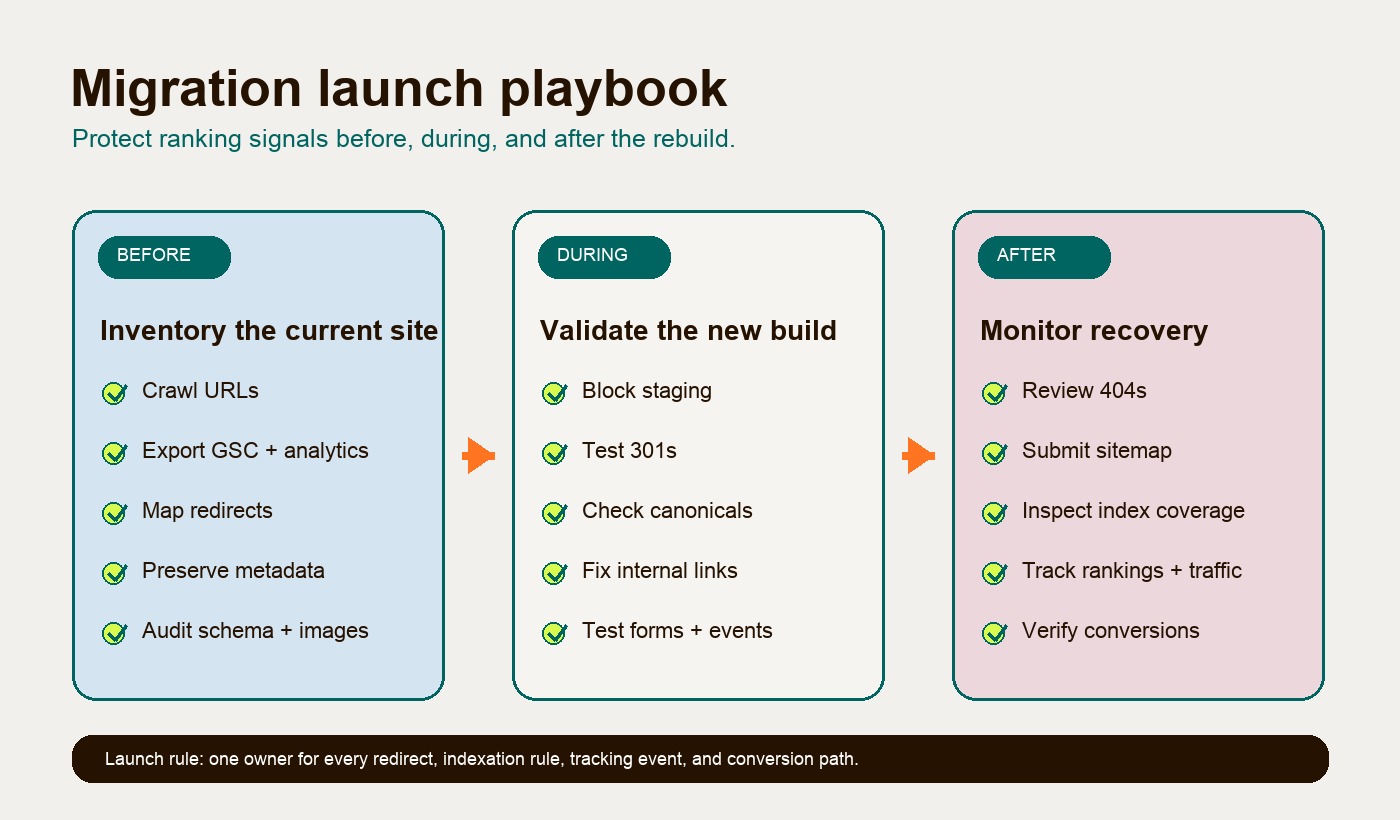
| Before | Crawl current site, export Search Console and analytics data, inventory URLs, map redirects, preserve metadata, preserve canonicals, export schema, audit images, audit internal links, define sitemap, define robots, verify Search Console, document tracking |
| During | Block staging from indexation, crawl staging, test redirects, compare priority pages, validate schema, check image paths, test forms, test analytics, remove staging noindex before production, freeze unrelated changes |
| Launch | Deploy redirects, check priority 200s, check robots, check canonicals, submit sitemap, inspect priority URLs, validate events, test conversion paths, clear cache, monitor errors |
| After | Review 404s, index coverage, sitemap fetch, rankings, organic traffic, conversion tracking, internal links, schema, Core Web Vitals, and redirect performance for 30 to 90 days |
The takeaway
A website migration SEO checklist protects the business value already inside the site. The platform may change. The design may improve. The CMS may become cleaner. But ranking URLs, redirects, metadata, canonical tags, schema, image paths, internal links, sitemap behavior, robots rules, analytics, Search Console visibility, and conversion tracking all need owners before launch.
For Astro, the checklist matters even more because the move is usually sold on speed, cleaner architecture, and stronger ownership. Those wins only count if the new site keeps the search equity and sales paths the old site already had.
Do the boring inventory first. Map the redirects. Preserve the signals that matter. Launch with a validation owner for every risk. Then improve the site from a stable foundation.