Webflow to Astro is not a referendum on whether Webflow is good. Webflow is often the right way to launch a polished marketing site quickly, especially when design and marketing need to move without waiting on a development queue.
The problem starts later. The same visual builder that helped the team ship can become the place where every new page, script, redirect, CMS workaround, localization rule, and SEO fix becomes a manual exception.
That is usually the migration trigger. A team launched fast in Webflow, proved the offer, built a content engine, and now needs cleaner page systems, code ownership, performance control, and reusable content models. Astro becomes attractive because the site is no longer just a set of designed pages. It is a growth system that needs to be versioned, tested, reused, and extended.
The practical question is not “Webflow vs Astro, which is better?” It is: which platform fits the next operating model for the marketing site? Use this with the broader website platform migration checklist and the Astro landing page system guide when the immediate pain is campaign velocity.
Webflow Astro decisions start with the growth bottleneck
A Webflow Astro decision should start with the bottleneck, not the tool preference.
Webflow usually wins the first stage because it compresses the gap between design and launch. A designer can build responsive pages visually. A marketer can update copy. The team can publish campaign pages without a full engineering cycle.
Astro usually wins when the marketing site needs repeatable architecture. Astro’s documentation describes its islands architecture as a way to ship mostly static HTML and hydrate only the interactive components that need JavaScript. For a content-heavy marketing site, that means the default can be fast pages, reusable components, and controlled scripts rather than a visual canvas exporting another one-off page.
The threshold often appears in ordinary work:
- A landing page needs the same proof block, FAQ, form, pricing table, and schema as six other pages.
- The CMS needs structured relationships, not just another collection with copied fields.
- Analytics and pixels are slowing pages because every campaign added another script.
- Redirects have grown from a short list into a launch-risk spreadsheet.
- The SEO team needs clean metadata, canonicals, internal links, and page templates at scale.
- Developers need to review changes in Git instead of inheriting silent visual edits.
None of these issues means Webflow failed. They mean the website has outgrown a page-first workflow.
Builder speed vs long-term platform drag
Builder speed is real. Platform drag is also real.
Webflow gives teams a visual production layer. That is valuable when the site is small, the CMS model is simple, and visual layout freedom is more important than long-term system discipline. But as page count, content types, traffic, localization, and compliance needs increase, the work shifts from “make this page look right” to “make this system hard to break.”
Here are the tradeoffs to inspect before approving a migration.
| Area | Webflow is strong when | Drag appears when | Astro helps by |
|---|---|---|---|
| CMS limits and models | The site has simple collections, blogs, case studies, and landing pages. | Content needs relationships, programmatic pages, strict field validation, or more scale than the plan supports. | Using typed content collections, MDX, or a headless CMS with reusable schemas. |
| Component reuse | Designers need visual control over a small set of pages. | Common sections are copied, tweaked, and hard to update consistently. | Turning sections into reusable components with shared props and design tokens. |
| Redirects | Redirect changes are occasional and low volume. | Migrations, blog restructures, campaign cleanup, and international URLs need bulk control. | Keeping redirects in code, config, or a CMS-backed redirect model. |
| Analytics scripts | The site runs a small number of trusted scripts. | Multiple pixels, embeds, consent rules, and campaign tags slow every page. | Loading scripts deliberately by template, route, or interaction. |
| Localization | A few translated pages are enough. | Locale routing, translated slugs, hreflang, content governance, and regional SEO need control. | Building locale routes and metadata as part of the site architecture. |
| Accessibility | Visual edits are simple and reviewed carefully. | New layouts introduce inconsistent headings, labels, focus states, and semantic markup. | Baking accessible patterns into reusable components and tests. |
| Developer handoff | Developers are rarely needed. | Developers are asked to debug compiled output, custom code blocks, embeds, and platform-specific behavior. | Moving the frontend into a normal codebase with review, testing, and deployment discipline. |
The commercial reason to migrate is not aesthetic control. It is operating leverage. A cleaner system should make future pages cheaper, faster, more consistent, and less risky to launch.
Webflow vs Astro for marketing sites
Webflow is a visual website platform. Astro is a code-first web framework. That difference matters because marketing sites tend to evolve from “pages” into “systems.”
Webflow can still be the right system if the team relies on visual editing every week, has a modest page count, and does not need complex content relationships. Its current pricing page lists CMS item tiers, bandwidth choices, localization add-ons, and API rate limits, which makes plan fit something teams should review directly before a migration decision on Webflow’s pricing page.
Astro is usually a better fit when the site is mostly public pages, journals, comparison pages, docs, product pages, landing pages, and lead forms. Astro’s Content Collections let teams define content schemas so required fields like title, description, author, image, category, and metadata can be validated before a build ships.
That matters for SEO and AI search. Search engines and answer systems do better with pages that have clear HTML, consistent metadata, descriptive internal links, structured sections, and fewer accidental script and layout problems. Astro does not guarantee rankings. It gives the team more control over the parts of the page that affect performance, crawlability, and maintainability.
Where Webflow can still be the better choice
Keep Webflow when speed of visual iteration is the highest-value job and the site is still small enough that the platform does not create material drag.
That often includes founder-led landing pages, early offer testing, event pages, simple service sites, investor-facing microsites, or campaign pages where the main need is a polished page this week. Webflow is also useful when the team does not have developer ownership for the site and would be slowed down by Git, Markdown, deployment rules, or headless CMS setup.
Where Astro starts to make commercial sense
Astro starts to make sense when page quality depends on repeatable systems.
For example, a B2B team may need comparison pages that all use the same structure, schema, author attribution, FAQ model, proof modules, CTA rules, and internal links. A SaaS team may need integration pages generated from structured data. A service business may need location pages, industry pages, and editorial pages that share components without becoming copy-paste debt.
In those cases, Astro is less a “Webflow alternative for marketing site” work and more a new operating model for the website.
What to preserve from Webflow
A good migration does not throw Webflow away emotionally. It audits what worked.
Preserve the parts that already help buyers understand and trust the business:
- Pages that rank, convert, or support sales conversations.
- Strong visual direction, layout ideas, motion concepts, and brand cues.
- Proven messaging from high-performing landing pages.
- Working forms, CRM routing logic, hidden fields, and thank-you flows.
- Analytics events that the team actually uses.
- Content hierarchy that users understand.
- High-quality assets, testimonials, case studies, and proof blocks.
The goal is not to punish the old platform. The goal is to protect the value already created and rebuild the fragile parts properly.
This is where many migrations go wrong. Teams treat the old site as either sacred or disposable. The better move is a page-by-page decision: preserve the buyer insight, rebuild the system underneath it.
What to rebuild properly in Astro
Rebuild anything that should be consistent, testable, reusable, or easier to change later.
Start with page architecture. A mature Astro site should not be a pile of copied HTML. It should have layout templates, reusable sections, typed content fields, shared metadata helpers, form components, analytics loading rules, and image handling that does not depend on each editor remembering the right steps.
Then rebuild the content model. If a Webflow collection mixed testimonials, logos, campaign fields, author data, and SEO fields into whatever was convenient at the time, Astro is the moment to separate those concepts. Some content can live in Markdown or MDX. Some teams need Sanity, Storyblok, Payload, Decap, or another headless CMS. Some can keep Webflow for selected experiments while the core marketing site moves to Astro.
Finally, rebuild the technical operations around launches. Astro supports redirects in configuration, and the rest of the deployment pipeline can be treated like normal software: branch previews, pull requests, accessibility checks, SEO validation, broken-link checks, and post-launch monitoring.
Migration checklist for Webflow to Astro
Use this checklist before estimating the rebuild. It keeps the migration grounded in risk, not taste.
| Workstream | What to collect | What to decide before build |
|---|---|---|
| Page inventory | Every live URL, traffic value, ranking value, owner, template type, and last update. | Which pages migrate, merge, redirect, rewrite, or retire. |
| CMS collections | Collections, fields, reference relationships, slugs, images, authors, categories, and SEO fields. | Which content becomes Astro collections, MDX, a headless CMS, or stays elsewhere. |
| Forms | Form fields, validation, spam controls, hidden fields, CRM routing, notifications, and thank-you pages. | Which forms are rebuilt, embedded, or replaced with a proper form service. |
| Embeds | Calendars, video, maps, chat, calculators, reviews, social embeds, and third-party widgets. | Which embeds are still worth the script cost and where they should load. |
| Redirects | Existing 301s, legacy URLs, campaign URLs, trailing-slash behavior, and old blog paths. | Redirect ownership, bulk import format, testing rules, and post-launch checks. |
| Custom code | Header code, footer code, page-level scripts, custom CSS, custom JavaScript, and tracking snippets. | What becomes a component, what becomes a layout script, and what should be removed. |
| Animations | Interactions, scroll effects, Lottie files, hover states, page transitions, and motion dependencies. | What improves comprehension, what hurts performance, and what should be simplified. |
| SEO metadata | Titles, descriptions, canonicals, Open Graph images, schema, alt text, sitemap rules, and robots rules. | Which metadata fields become required in the new content model. |
| Analytics | GA4, pixels, conversion events, consent rules, UTM handling, and dashboard dependencies. | Which events prove business value and how they will be tested after launch. |
| Accessibility | Heading order, form labels, focus states, keyboard behavior, contrast, image alt text, and motion preference. | Which patterns become component defaults and which pages need manual review. |
Webflow’s own code export help notes that exported code does not include dynamic CMS pages, collection items, ecommerce pages, user accounts, or localization data in a portable way. That makes the migration checklist more important than the export button. The code export can be a reference, but the rebuild needs an information architecture and content plan.
Keep Webflow, rebuild in Astro, or use both
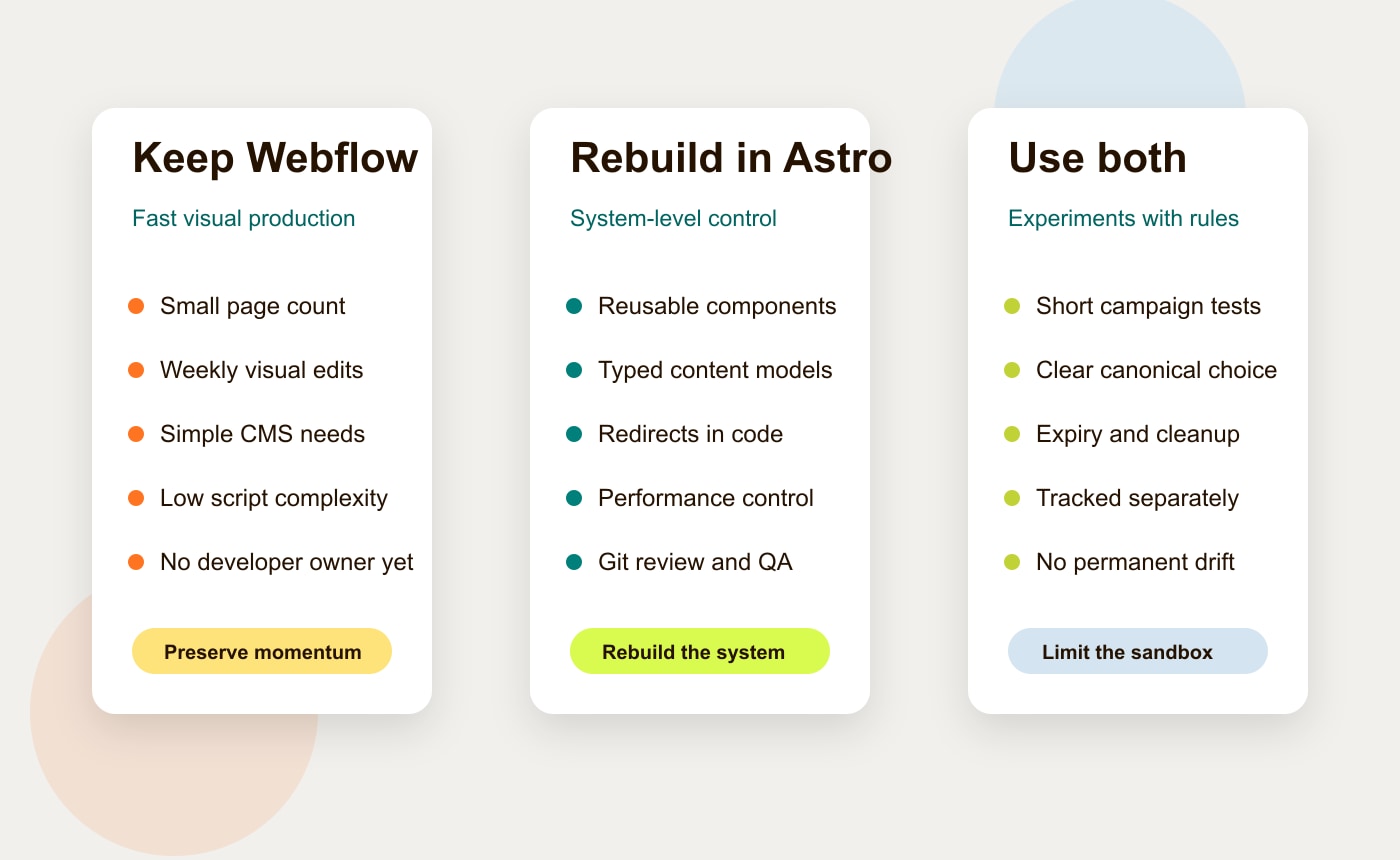
The right answer may be a blended model. Some teams should stay in Webflow. Some should move the core site to Astro. Some should keep Webflow as a campaign sandbox while Astro becomes the canonical marketing site.
| Option | Best fit | What it protects | Watch out for |
|---|---|---|---|
| Keep Webflow | Small marketing sites, visually edited pages, early-stage offers, low technical complexity. | Fast visual publishing and low process change for non-technical teams. | Copy-paste components, CMS limits, manual redirects, script creep, and weaker code ownership. |
| Rebuild in Astro | Content-led B2B, SaaS, service businesses, docs, comparison pages, integration libraries, SEO programs. | Performance control, reusable components, structured content, Git history, and cleaner developer handoff. | Requires owner for codebase, deployment, CMS model, QA, forms, and analytics. |
| Use Webflow only for selected experiments | Teams that want fast visual tests without letting the main site become fragile. | Campaign velocity while the core site stays consistent and controlled. | Experiments need clear expiration, canonical decisions, tracking rules, and redirect cleanup. |
This table is the simplest way to keep the conversation honest. Do not migrate because Astro is fashionable. Migrate because the current site is costing the team speed, confidence, SEO control, or launch quality.
A practical migration sequence
A Webflow to Astro migration should happen in stages.
First, freeze the source of truth. Crawl the current site, export page lists, capture screenshots of important templates, document forms and scripts, and identify the pages that must not lose rankings or conversions.
Second, design the new content model. Do this before rebuilding pages. Define which fields are required, how authors and categories work, how images and alt text are handled, what metadata is mandatory, and which components can be reused across page types.
Third, rebuild templates in Astro. Start with the pages that have the most reuse potential: service pages, comparison pages, articles, case studies, landing pages, and forms. Do not blindly copy compiled HTML. Use the old site as a reference and rebuild the patterns as components.
Fourth, migrate and QA the risky pieces. Redirects, canonical tags, schema, sitemap behavior, analytics events, form submissions, consent rules, and embedded tools all need testing before launch. Google’s Core Web Vitals guidance is a useful baseline for performance checks, but conversion events and form reliability matter just as much.
Fifth, launch with monitoring. Watch Search Console, analytics, form submissions, broken links, crawl errors, page speed, and revenue pages after the switch. A migration is not done when the new site is live. It is done when the new system is stable.
When not to migrate yet
Do not move from Webflow to Astro if the business cannot name the owner of the new system.
Astro gives control back to the team, but control needs ownership. Someone must own the repository, content workflow, deployment process, CMS decisions, redirects, forms, analytics, accessibility, and ongoing maintenance.
Also pause if the site is still mostly visual experiments and nobody is asking for structured content, reusable templates, programmatic pages, or deeper technical control. In that case, Webflow may still be doing its job.
The worst migration is the one that replaces a familiar constraint with an unmanaged codebase. The best migration replaces platform workarounds with a calmer operating model.
The bottom line
Webflow to Astro makes sense when a marketing site has outgrown visual-page production and now needs system-level control. Webflow helped the team launch. Astro can help the team scale the site with cleaner content models, reusable components, deliberate scripts, stronger SEO foundations, and code ownership.
The move is not only technical. It is operational. The team should know what to preserve, what to rebuild, who owns the new workflow, and how launch risk will be measured.
If your team is weighing Webflow Astro tradeoffs, start with a migration risk audit rather than a full rebuild commitment. Hapy Co helps teams map the current site, protect the rankings and workflows that matter, and rebuild the right parts in Astro. Start here: Migrate to Astro.
FAQ
Is Astro better than Webflow for a marketing site?
Astro is usually better when the marketing site needs reusable components, structured content, performance control, Git-based review, and cleaner technical SEO. Webflow is often better when the team needs fast visual editing and the site is still simple.
Can you migrate Webflow CMS content directly into Astro?
You can migrate the content, but it is rarely a one-click move. The work is mapping Webflow collections, fields, slugs, references, images, authors, and SEO metadata into Astro content collections, MDX, or a headless CMS.
Should Webflow be kept for campaign experiments?
Sometimes, yes. Webflow can stay useful for short-lived visual experiments while Astro runs the core marketing site. The key is to define tracking, canonicals, expiration dates, redirects, and ownership so experiments do not become permanent platform debt.