Journal

Best Free Website Builders for Small Businesses: A Practical Guide

Published

Modified

Categories

Web, Mobile & Commerce

Best Free Website Builders for Small Businesses: A Practical Guide

Free website builders are useful when a small business needs to get something online quickly: a temporary landing page, a simple portfolio, a local-service brochure site, or a low-risk test before investing in a better web presence.

They are not automatically the cheapest option. A free builder can cost more later if it traps the business on a weak subdomain, blocks useful SEO controls, adds platform ads, slows the site down, or makes it difficult to connect forms, analytics, ecommerce, CRM, booking, or multilingual content.

Hapy’s view is simple: use a free builder for validation, not for a serious operating channel. Once the website has to earn trust, capture leads, support paid traffic, rank in search, or sell products, the decision should shift from “which builder is free?” to “which platform gives us enough control without overbuilding?”

Before choosing a platform, compare the basics of how to design a website, the tradeoffs in Webflow vs WordPress, Webflow vs Shopify, the impact of Webflow SEO, and the ongoing website maintenance services each option will require.

How Hapy would choose a free website builder

For a real small business, we would shortlist a website builder by asking five questions:

  • Can the business use its own domain? A platform subdomain is fine for a test, but not for a serious brand.
  • Can the owner edit the site without breaking it? The builder should protect common layouts, navigation, and mobile behavior.
  • Can search engines understand the pages? Titles, meta descriptions, indexing controls, image alt text, redirects, and fast rendering matter.
  • Can the site collect useful customer intent? Forms, booking, ecommerce, analytics, and CRM handoff decide whether the website supports revenue.
  • Can the business leave later? If moving away requires a full rebuild, the “free” plan may only be postponing the real cost.
Top 22 Free Website Builders For Small Businesses

Top 22 Free Website Builders

These are some of the top free website builders available, but we only discuss the twenty-two best builders in this article.

  1. Wix

  2. GoDaddy

  3. Weebly

  4. Jimdo

  5. Site 123

  6. Strikingly

  7. Webflow

  8. Webnode

  9. UCraft

  10. Simple Site

  11. Webstarts

  12. Mozello

  13. One.com

  14. Bookmark

  15. 000webhost

  16. New Google Sites

  17. Zoho Sites

  18. WordPress.com

  19. Mobirise

  20. Adobe Express

  21. Websitebuilder.com or Sitey

  22. Squarespace

Free website builders worth considering

The free-plan details, ads, storage limits, domain rules, and upgrade pricing for website builders change often. Treat this as a shortlist and decision guide, not a static price ranking.

BuilderBest fitWatch out for
WixQuick brochure sites, portfolios, and local-service pages with strong template choice.Free-tier ads, platform branding, and migration limits if the business outgrows it.
GoDaddyVery fast setup for simple business presence and appointment-led sites.Less design control for teams that need a distinctive brand experience.
Weebly / SquareSmall businesses that want basic pages connected to simple commerce.Limited flexibility compared with modern CMS or custom storefront options.
JimdoSolo operators who want a simple guided setup.May feel limiting for SEO, content depth, or custom design needs.
SITE123Simple informational sites where speed matters more than control.Less suitable for brands that need rich content, custom layouts, or advanced integrations.
StrikinglyOne-page sites, portfolios, and lightweight launches.Not ideal for content-heavy SEO or multi-page business websites.
WebflowDesign-led teams that want more visual control and stronger production quality.The learning curve is higher, and serious business use usually requires a paid plan.
WebnodeSimple multilingual or small-business sites.Check SEO controls, design flexibility, and upgrade limits before committing.
UcraftLightweight landing pages and simple brand sites.Validate domain, form, and ecommerce requirements before building too much.
Google SitesInternal pages, team resources, and very simple public information pages.Weak fit for serious brand, SEO, ecommerce, or lead-generation work.
WordPress.comBlogs and content-led sites that may later need a larger ecosystem.Free-plan limitations can block professional branding and monetization.
SquarespaceVisual portfolios, service businesses, and polished brochure sites.It is better understood as a premium builder with trials rather than a permanent free-site solution.
ShopifyEcommerce businesses that need real product, checkout, and order management.Not a free website builder; use it when commerce is central, not for a basic free site.
Other free buildersQuick experiments and personal projects.Be careful with unknown platforms, weak support, poor performance, and hard migration paths.

How to compare free website builders

A business website should not be judged only by how quickly it can be launched. Before choosing a builder, test the platform against the work the site must do.

  1. Trust: Can you connect a real domain, remove ads, add legal pages, and present the brand professionally?
  2. SEO: Can you control titles, descriptions, indexing, redirects, structured content, image alt text, and page speed?
  3. Conversion: Can the site handle forms, booking, checkout, analytics, email capture, and CRM handoff?
  4. Content operations: Can the team add pages, update content, and publish without breaking layout quality?
  5. Growth path: Can the business upgrade, migrate, or rebuild without losing content and search visibility?

When a free builder is the wrong choice

Avoid a free website builder when the website is tied to revenue, reputation, or operations. That includes paid campaigns, SEO-led acquisition, ecommerce, appointment booking, multilingual pages, investor-facing pages, partner portals, or any site that needs integrations.

In those cases, the better comparison is usually Webflow vs WordPress, Webflow vs Shopify, or a custom website and systems build that connects to the rest of the business.

What Free Website Builder Offers–Must Think On it?

Free website builders might have appeared to be overly wonderful to be true in the past, but we sought to show that that’s not generally the situation.

1) Why do they offer free services?

How much “free website builders generate a profit” is a question we’re frequently asked.

Is there anything fishy going on around here!! Fortunately, everything is completely legal and secure. Most website builders use a ‘freemium’ business model, in which clients would like to spend for additional services.

Ultimately support others who are content with a restricted package with no conditions associated. However, there are a few factors to consider when picking which free website builder must choose.

We merged our extensive research and usability evaluation for every website builder. A complete with a particular emphasis on its free packages, spending close consideration to regardless of whether or not the builder selected certain criteria to develop this rank of the greatest free website builders:

2) Domain-name that is easy to remember

‍You won’t be able to link a personal-domain or website to a freemium website builder.

However, what would the auto-generated free version seem to satisfy all needs? Switching to a premium plan has a lot of advantages, so it’s important to understand how much it will cost.

3) SSL certification for free

Most reputable website builders include SSL support, but it is still worth checking before launch.

Visitors may see browser warnings if the site is not served over HTTPS, and that can damage trust before they read a word of your page.

4) Adequate memory

The number of content users may post to their site is usually limited with free website builders.

If you anticipate you’ll be including a lot of photographs or files, keep in consideration how rapidly you’ll reach this limit.

5) Simple to operate

It’s pointless to locate a website builder which checks all the categories mentioned just to acquire out it’s clumsy and difficult to use.

The best builder is the one your team can update without breaking the layout, navigation, forms, or mobile experience.

6) E-commerce competencies (optional)

This restricts your options if you need to sell products through a free website builder. Check checkout, taxes, payment methods, shipping, inventory, email receipts, and platform transaction fees before assuming the free plan can support commerce.

If ecommerce is central to the business, a platform built for selling is usually safer than stretching a free site builder beyond its intended use.

What Is The Best Way To Make A Free Website? (Step-by-Step)

Except for being free, all of the website builders in the rankings get one common factor: they’re all simple to set up – alternatively, they might not have made the final cut! Although the method and skill curve changes significantly from one builder to the next, the following are the stages to assume:

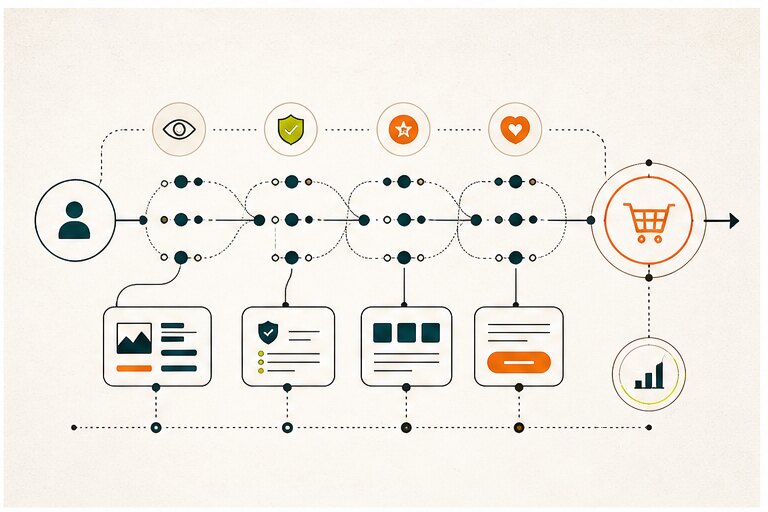
Website conversion path showing visitor trust signals, content checkpoints, calls to action, and analytics

  1. Create a website using the website builder. An email account, passwords, and maybe a login will indeed be required.

  2. Select a design or provide answers to the design supervisor’s queries. This is the first branching in the path; several builders would give you a choice of a framework to work with at this point. Whereas some will employ design help to create a mockup of a webpage for you depending on your responses to several queries. Whenever it is the situation, we’ve highlighted it.

  3. Fill in the blanks with your content. Replacing placeholder images and text using your own is a good idea.

  4. Adjust and personalise your layout. You could further personalise your appearance by experimenting with different designs and materials or even moving to a different template.

  5. Many builders allow you to change templates after they’ve been published, but Wix does not. The “domain-name” would be established at this moment, and the website will indeed be visible to the rest of the globe.

Regardless of how often you change up in phases 3 and 4, this procedure could take anywhere around 15 mins to many hours.

Upgrade to a Premium Plan, Is It Valuable?

Free website builders could do a little more, as we have now witnessed, but the premium version can handle a great deal. Paying doesn’t need to entail expensive; premium functionality could be had for as little as $5.99 per month.

The following are some of the most typical benefits of premium services:

  1. Getting rid of advertisements

Whenever it comes to projecting a professional appearance, no ads are far superior to discreet ads – and extending your subscription will remove adverts from any site.

  1. Adding a custom domain address to your website

Remember, yoursite.com is far superior to yoursite.yourwebsitebuilder.com, as well as far greater recognizable.

  1. Additional Capacity and Bandwidth Features

When a business site develops and your visitors grow, you might discover that your free version is no longer adequate.

You might have to purchase in order to have adequate capacity and to allow enough users to view the site at the same time.

Many premium plans include unrestricted storage as well as bandwidth, giving you complete peace of mind.

Tools for Sophisticated Sales and Marketing

Many of the features and tools you’ll need to carry your money or passion to another level will just be available in that paid version, so ensure you check it out!

Is it possible to rank a website high for free?

It’s not only necessary to have good content for ranking well on Google, however, but it is also necessary to efficiently modify various variables on your website. For instance, you must be capable of giving each of your web pages a title and a good description. Apart from Jimdo, all of the popular site builders include this.

As we’ve seen previously, almost all of the free versions have a drawback: you won’t be able to incorporate a real domain name. The domain-name has a significant impact on SEO, and typically subdomains do not rank at the top of the search engines.

The installation of SSL encryption on your desired website is also another aspect that could have a slight impact on your results.

Because you can’t connect a personalized domain to a free website, it isn’t very SEO-friendly. This means that your website is a section of the website builder’s website, making it more difficult for search engines such As google to detect, crawl, and analyze your page.

What about freemium “websites’ domain-names”?

You probably won’t be able to purchase a suitable domain name as .com and.net domains are usually expensive.

Usually, services providers will designate such subdomains, including such desired-name.company-name.com, as you’ll see.

For such purposes, an unlimited and free subdomain might well be suitable for a personal website. However, it is not recommended for official or professional sites:

  • It appears to be unprofessional.

  • In consideration of search engine results, you’re providing yourselves with no benefits.

  • It’s difficult to recall such a long name.

You can genuinely acquire customized web addresses that are just not subdomains anywhere. You could get very few (albeit obscure) top-level domains for free via Freenom, including. tk,.ml,.ga, and a few others.

As an example, your website could be called mycoolsite. ml. However, I wouldn’t advise launching your company on a free domain.

However, if it’s only for a private project, it’ll be OK. Freenom permits you to transfer your web address to a webpage or route it to a URL (such as your free website’s subdomain), somewhat of a technical procedure.

Referring to the domain is the professional manner to go because it will run solely on this domain, and no one will be able to access it.

Ending Thoughts

In our opinion, Webnode and Wix are by far the top-most impressive free website builders.

Webnode has a non-obtrusive advertisement and offers a straightforward solution with a good range of responsive templates. Wix’s benefit is its large lot of characteristics, the majority of which are freemium. If you ever choose a premium upgrade, this must be the most possible in the future.

Try out Ucraft if you’re searching for a free or cheap website builder that allows you to link any domain name without any cost. While it isn’t the most user-friendly website builder, we considered it adequate.

Switching a website to a different provider after constructing it can be a pain. So, when assessing your alternatives, keep in mind your long-term goals, people who are planning to get a real domain name, corresponding email addresses, or perhaps an ad-free version of the website at a certain point ahead.

Whenever you plan to subscribe to a premium subscription in the coming years, you must also look at Wix and Weebly, two of our paid favorites. Although their free packages have some drawbacks, they are more sophisticated in terms of the whole offering.

Further questions

Is a free website builder good enough for a small business?

A free website builder can be good enough for a temporary brochure site, early validation page, or simple portfolio. It becomes risky when the business needs strong SEO, custom forms, ecommerce, multilingual content, integrations, or full control over performance and branding.

What should I check before choosing a free website builder?

Check domain control, ads, storage limits, page speed, SEO settings, mobile editing, export options, analytics, ecommerce support, form handling, and whether the platform lets you move to a paid plan without rebuilding the site.

Can I use a free website builder with my own domain?

Usually not on the free tier. Many builders require a paid plan before you can connect a custom domain. That matters because a branded domain is one of the simplest trust signals for customers and search engines.

When should a small business stop using a free website builder?

Move beyond a free builder when the website starts generating leads, supporting paid campaigns, taking orders, ranking for important searches, or representing a brand where ads, platform subdomains, slow pages, and limited customization create business risk.


Share with others

Continue reading

More journal notes worth your time