Moving from Framer to Astro makes sense when a design-first website still looks good but has become hard to maintain, extend, integrate, or govern for serious content and SEO work. It is not a judgment that Framer is bad. It is a sign that the website has changed jobs.
Framer is strong when the team needs fast visual launch, designer-led iteration, polished interactions, simple landing pages, and a hosted publishing workflow. Astro is stronger when the site needs an owned codebase, reusable components, structured content models, CMS flexibility, performance control, and public content surfaces that search engines and AI systems can read cleanly.
The commercial question is not “Framer vs Astro” in the abstract. It is whether the current site is still a visual publishing surface, or whether it has become a marketing system that needs durable ownership.

If the current site is already creating campaign, content, SEO, or integration drag, start with Hapy’s Astro website migration engagement. This article gives the buyer decision framework behind that move.
For adjacent migration choices, compare Astro vs WordPress, the broader website platform migration checklist, and the website migration SEO checklist before touching production URLs.
Framer to Astro is a system decision
Framer to Astro is a system decision, not a visual-design preference. A Framer site can be beautiful, fast enough, and commercially useful. The migration case appears when the same design-led workflow starts making ordinary growth work harder.
That usually happens in five places:
- Content needs repeatable models, not one-off page edits.
- SEO needs consistent metadata, schema, canonicals, redirects, and sitemap behavior.
- Campaign pages need reusable components instead of copied sections.
- Forms, CRM handoff, analytics, consent, and event tracking need cleaner ownership.
- The team wants a codebase it can version, test, deploy, and extend without being limited by visual-builder assumptions.
This is why the migration should begin with a risk audit, not a rebuild brief. A strong Framer site may only need cleanup. A mixed site may need a hybrid approach. A site with repeated platform drag may be ready for Astro.
Where Framer is strong
Framer is strongest when speed of visual expression matters more than deep system ownership. It lets design, marketing, and founder-led teams move quickly from concept to published page without a traditional design-to-development handoff.
Visual publishing can be a real advantage. Measure the current site’s loading, interaction, and editing experience on representative pages before making a performance case for migration. Vendor optimization claims do not predict the improvement for your content, scripts, and visitors. For many teams, that package is enough. Keep Framer when:
- The site is mostly landing pages, campaign pages, portfolios, launch pages, or simple marketing pages.
- Designers are the main site operators and visual iteration speed is the priority.
- The CMS model is small and simple.
- Metadata, redirects, forms, analytics, and structured content do not require much custom logic.
- The team does not want to own a codebase, deploy process, or CMS integration.
Portability needs a direct check. As checked on 8 September 2026, Framer’s official export guidance says it does not offer HTML export for self-hosting. Inventory your content and assets and test the available extraction routes before estimating a migration.
Rebuilding in Astro means creating component structure, content models, interactions, and operating workflows; it is not an automatic conversion of a hosted site into maintainable source code. That distinction is where Astro starts to matter.
Where Framer starts to drag
Framer starts to drag when the site stops being a set of designed pages and becomes a working marketing operation. The pain is usually operational before it is technical.
A content team may need repeatable resource pages, comparison pages, case studies, landing page variants, partner directories, or localization. A sales team may need clean form routing, CRM fields, hidden attribution, and post-submit logic. An SEO team may need schema, redirects, canonical rules, internal linking patterns, markdown-readable content, or cleaner page templates. A technical lead may need source control, automated QA, preview environments, and rollback discipline.
These needs can exist inside Framer, but the more they accumulate, the more the team may feel like every change is happening at the page level instead of the system level.
The pricing and capacity model can also become part of the decision. Check Framer’s pricing and billing guidance for the actual plan and editor types. The billing guidance was reviewed on 8 September 2026; quotes and account entitlements still need confirmation. That does not make Framer expensive by default. It means buyers should model the next 12 to 24 months of content growth, localization, editors, and campaign volume before deciding whether the visual-builder operating model is still the right fit.
The common warning sign is repetition. If the team keeps rebuilding the same section, patching the same metadata issue, remapping the same form fields, or manually QAing the same responsive behavior, the website needs more than a prettier page. It needs a system.
What Astro changes
Astro changes the website from a hosted visual canvas into an owned codebase built from pages, components, layouts, content collections, integrations, and deployment rules.
The strongest Astro argument is control. Astro’s migration docs position it as a destination for moving existing websites into an Astro project. Its islands architecture renders most of a page as static HTML, then adds JavaScript only where interactivity or personalization is needed. The docs are explicit that, by default, Astro renders UI components to HTML and CSS and strips out client-side JavaScript unless a component is marked with a client:* directive.
For a marketing site, that matters because many pages do not need a full client-side runtime. They need fast, crawlable HTML, clear metadata, optimized media, and a small number of interactive pieces such as menus, calculators, forms, carousels, or search.
Astro also gives teams cleaner content modeling. Its content collections let teams query content, use frontmatter metadata in templates, generate static routes from collection entries, and fetch remote content from a CMS, database, or API through custom loaders. That is the difference between editing pages and operating a content system.
Astro is especially useful when the site needs:
- Reusable components for campaign pages, journals, case studies, comparison pages, service pages, and product pages.
- Content collections for structured articles, resources, people, locations, features, or industries.
- A CMS chosen around the team’s workflow, such as Sanity, Storyblok, Payload, Decap, Contentful, or file-based Markdown.
- Centralized metadata, schema, canonical, Open Graph, and sitemap behavior.
- Cleaner deployment, previews, branch review, rollback, and source control.
- Markdown-friendly or agent-readable content surfaces where they are useful for public discovery.
Astro is not automatically easier for a non-technical team. It usually requires a developer, technical partner, or internal owner. That is the tradeoff: less visual-builder convenience in exchange for more ownership, repeatability, and long-term control.
Migration considerations before moving from Framer to Astro
A Framer to Astro migration should protect what is already working before it rebuilds what is dragging. The goal is not to flatten the design into generic templates. The goal is to preserve the brand and useful UX while turning the site into a cleaner system.
Use this checklist before approving the migration scope:
| Area | What to check | Migration implication |
|---|---|---|
| Animations | Which interactions are essential to brand, conversion, or comprehension? | Keep simple motion in CSS where possible; rebuild important interactive motion selectively instead of copying every flourish. |
| Responsive behavior | Which breakpoints, layouts, and mobile sections are currently working? | QA desktop, tablet, and mobile against the live Framer site before and after implementation. |
| Forms | Where do leads go, what fields matter, and what automations depend on them? | Rebuild forms with validation, spam protection, attribution, CRM mapping, and success states. |
| Redirects | Which old URLs, campaign URLs, and CMS slugs must keep working? | Build a one-to-one redirect map and avoid multi-hop chains. |
| Metadata | Which titles, descriptions, canonicals, schema, Open Graph images, and robots rules need preserving? | Centralize metadata in Astro layouts or content schemas so it is not page-by-page guesswork. |
| Image assets | Which assets are essential, oversized, duplicated, or no longer used? | Export, rename, compress, and map images into the new content or public asset structure. |
| CMS needs | Who edits what, how often, and with what approval process? | Choose file-based content, a headless CMS, or a lightweight admin based on real editing workflows. |
| QA | What would count as a failed launch? | Test visual parity, forms, analytics, event tracking, redirects, SEO tags, sitemaps, page speed, and crawlability before DNS cutover. |
Google’s site-move guidance is useful even when the domain does not change. It recommends preparing and testing the new site, preparing URL mapping, configuring redirects, and monitoring traffic on old and new URLs after the move. That discipline should apply to a Framer-to-Astro migration too.
Keep Framer, run hybrid, or move to Astro
The best decision is the smallest move that removes the actual platform drag. Do not migrate just because Astro is cleaner. Do not stay just because the current site looks good.
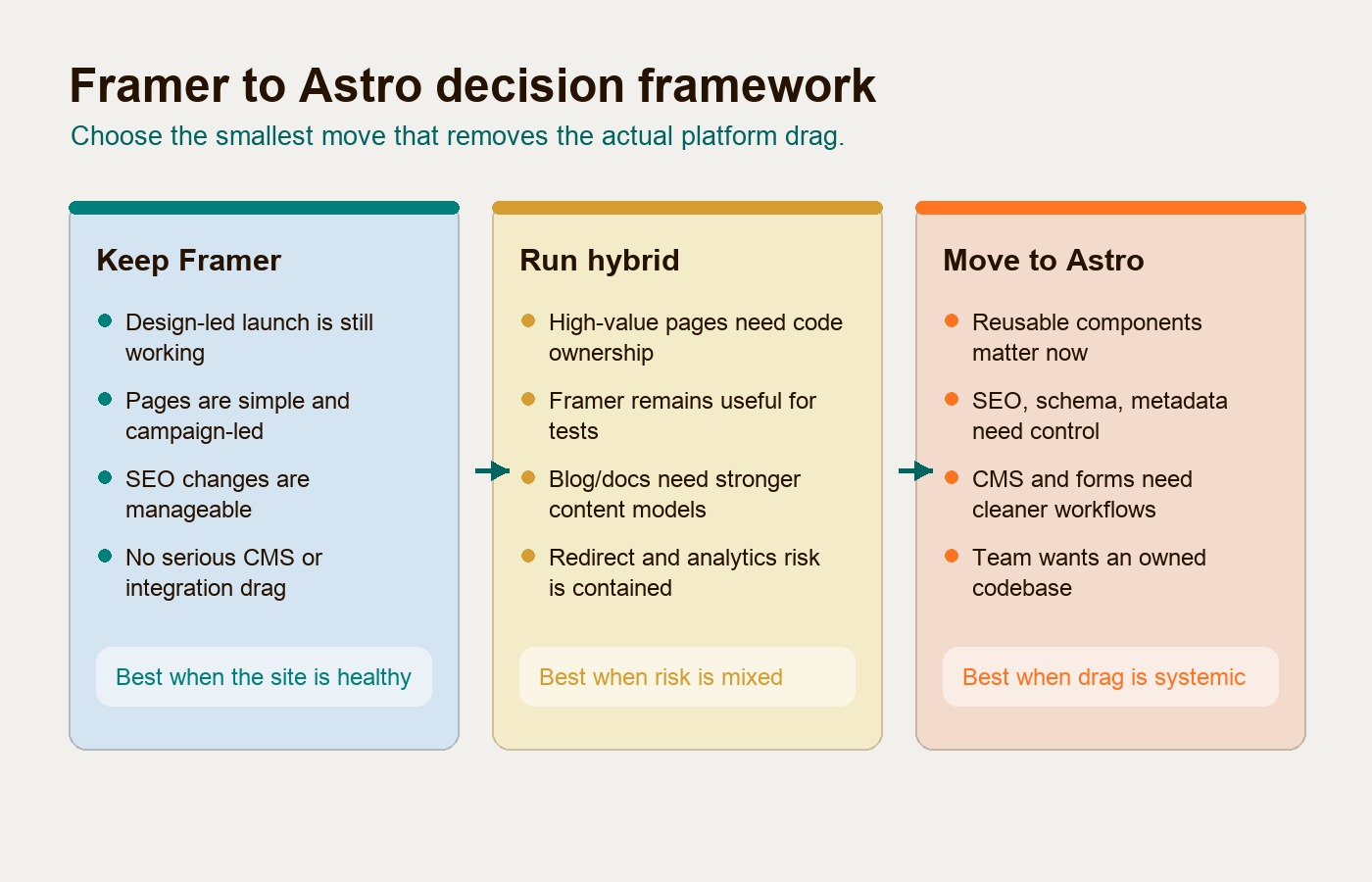
| Decision | Choose this when | Watch out for |
|---|---|---|
| Keep Framer | The site is simple, visual iteration speed is the priority, and content or SEO workflows are not blocking growth. | Do not confuse a small backlog with platform drag. Fix governance, unused pages, and metadata hygiene first. |
| Run hybrid | Framer is still useful for campaign experiments, but journals, docs, SEO pages, or high-value content need stronger structure. | Define ownership clearly. Hybrid gets messy when URLs, analytics, design tokens, and CMS rules are split without governance. |
| Move to Astro | The site needs reusable components, structured content, better SEO control, cleaner integrations, and an owned codebase. | Do not migrate without a URL inventory, redirect map, metadata audit, form plan, CMS plan, analytics QA, and post-launch monitoring. |
Hybrid is often underrated. A team may keep Framer for short-lived campaigns or prototypes while moving the durable website, journal, documentation, or high-intent SEO pages into Astro. That can reduce risk while still removing the part of the stack causing the most drag.
A full move is appropriate when the durable site and the campaign layer are both suffering from the same issue: too much important work depends on one-off visual pages and hidden platform behavior.
How to plan the migration
Plan a Framer to Astro migration in phases. The sequence matters because visual parity is only one part of the work.
First, audit the current site. Crawl the URL set, export or inventory CMS content, list images and files, capture page templates, document forms, record analytics and conversion events, and identify top organic landing pages. This is where the team decides what to preserve, rebuild, merge, archive, or redirect.
Second, define the new system. Decide which layouts, components, content types, fields, slugs, metadata rules, and CMS workflows the Astro site needs. This is the point where a migration becomes more valuable than a page copy. A good Astro build should make the next page easier to create.
Third, rebuild priority templates and content. Preserve useful design details, but translate them into reusable components and content schemas. Recreate animations intentionally. If an animation supports comprehension or conversion, keep it. If it only adds maintenance risk, simplify it.
Fourth, wire up the operating layer. Plan forms, CRM handoff, analytics, consent behavior, sitemap generation, and robots rules before launch. Markdown mirrors and llms.txt are optional experiments for identified consumers, not required migration safeguards or established ranking factors. Add them only with a clear consumer, freshness owner, and validation method.
Fifth, QA the site before cutover. Compare the live Framer site and the Astro preview across key pages and devices. Check redirects, metadata, canonicals, image alt text, form submissions, conversion events, page speed, crawlability, and Search Console readiness. For launch, monitor organic traffic, indexed URLs, 404s, conversions, and form quality.
That process may sound heavier than a visual rebuild. It is. That is the point. Teams move to Astro when they need the website to behave like an owned business system, not only a designed surface.
What agent-readable content means here
Agent-readable content does not mean stuffing pages with AI keywords or promising AI citations. It means the public website is easier for search engines, AI assistants, and future buying agents to parse.
In practice, that includes:
- Clean HTML that contains the important content without relying on fragile rendering behavior.
- Stable URLs, descriptive titles, useful headings, and consistent internal links.
- Structured metadata and schema where it helps explain pages, articles, services, and entities.
- Markdown-friendly content surfaces where useful, such as article markdown mirrors or a root-level
llms.txt. - Public pages that explain services, pricing logic, decision criteria, and capabilities in language buyers can use.
- Less script noise, fewer hidden workarounds, and fewer page-specific hacks.
Framer can support good visibility and has its own SEO and performance tooling. Astro gives teams more direct control when the content and metadata model needs to be designed around discovery, reuse, and long-term maintenance.
For a broader checklist, Hapy’s guide to an agent-ready website with Astro explains how HTML, metadata, discovery files, markdown surfaces, and accessible actions fit together.
That is why agent readiness should be a byproduct of better website ownership. The real promise is not “move to Astro and get cited by AI.” The promise is a cleaner public website that is easier for people, crawlers, and agents to understand.
FAQ
Is Astro always better than Framer?
No. Astro is better when the website needs code ownership, structured content, reusable components, CMS flexibility, SEO control, and custom integrations. Framer is often better when the team needs visual speed, designer control, and simple hosted marketing pages.
Can a team move from Framer to Astro without redesigning?
Yes. A migration can preserve the current design and rebuild the underlying system. The key is to translate visual patterns into Astro layouts, components, content schemas, image assets, and QA rules instead of treating the work as a fresh redesign.
What is the biggest risk in a Framer to Astro migration?
The biggest risk is breaking what already works: URLs, rankings, metadata, forms, analytics, responsive behavior, image assets, and conversion paths. A migration risk audit should happen before implementation.
Should Framer and Astro run together?
Sometimes. A hybrid setup can work when Framer remains useful for short-lived campaign pages while Astro owns durable content, SEO pages, journals, documentation, and structured content. Hybrid needs clear URL, analytics, design, and ownership rules.
The buyer takeaway
Framer to Astro is the right move when a design-first site has become a content, SEO, integration, and maintenance system that the current workflow cannot support cleanly. Framer is still a strong choice for fast visual launch and simple marketing pages. Astro becomes stronger when the business needs repeatable components, content models, performance control, CMS choice, clean metadata, and agent-readable public content.
Keep Framer if the site is healthy. Run hybrid if only durable content and SEO pages need stronger structure. Move to Astro when platform drag is systemic and the website needs an owned foundation.
The best migration does not start with a framework preference. It starts with a clear inventory of what to preserve, what to rebuild, and what to leave alone. That is the difference between moving pages and building a website system.