Core web vitals SEO is best understood as a quality and friction problem, not a shortcut to higher rankings. Google uses Core Web Vitals as part of page experience, but it also says good scores do not guarantee top rankings. Relevance still leads. Performance helps when the content is already useful and the user experience is one of the deciding factors.
For a marketing team, the business version is simpler: Core Web Vitals measure whether visitors can see the page quickly, interact without delay, and read without the layout jumping around. When those basics are weak, the site can lose conversions, frustrate paid traffic, and make important tasks harder to complete. Measure any effect on conversions or search separately.
Astro can help content-heavy sites because it is built around fast HTML delivery, server-first rendering, and less client-side JavaScript by default. That does not make Astro a ranking hack. It makes it a practical architecture choice when a blog, resource library, landing page system, or documentation site is carrying too much frontend weight for the business job it needs to do.
If the question is broader than performance, pair this with the website platform migration checklist and the website migration audit before changing the frontend stack.
Does Core Web Vitals affect SEO?
Yes, Core Web Vitals can affect SEO, but not in the exaggerated way many performance vendors describe. Google Search Central says Core Web Vitals are used by ranking systems, while also warning that passing Search Console or third-party tool reports does not guarantee top placement.
That distinction matters. A site with weak content, poor search intent match, thin topical coverage, or no authority will not solve those problems by shaving a second off LCP. But when two pages are both relevant and useful, page experience can help the faster, more stable page compete.
The better commercial case is broader than rankings:
- Better UX: visitors see the main content sooner and can interact without waiting.
- Conversion hypothesis: reducing delays may improve completion; test it against comparable traffic.
- Crawlability: inspect whether important content is available in HTML; Core Web Vitals do not measure crawler behavior.
- User experience: measure task success and frustration separately from search visibility.
- Better publishing operations: performance budgets catch regressions before a template update hurts the whole site.
This is why the right question is not “Will Core Web Vitals boost rankings?” The right question is “Which important pages are losing business value because they are slow, unstable, or overloaded with JavaScript?”
LCP, INP, and CLS in business language
Core Web Vitals focus on three parts of user experience: loading, interactivity, and visual stability. The official thresholds, checked September 8, 2026, apply at the 75th percentile of real-user measurements, segmented by mobile and desktop. Passing requires all three metrics to meet their good thresholds; a single Lighthouse run is not a field-data pass. If field coverage is insufficient, report that limitation.
| Metric | Business language | Good threshold | What a bad score feels like |
|---|---|---|---|
| Largest Contentful Paint (LCP) | Load speed: how quickly the main content appears | 2.5 seconds or less | The page looks blank or half-loaded for too long |
| Interaction to Next Paint (INP) | Responsiveness: how quickly the page reacts after a click, tap, or keypress | 200 milliseconds or less | Buttons feel stuck, menus lag, forms hesitate |
| Cumulative Layout Shift (CLS) | Layout stability: whether content moves unexpectedly | 0.1 or less | Text, buttons, ads, or images jump while the user reads or taps |
LCP is usually affected by hero images, slow server responses, render-blocking scripts, heavy fonts, and pages that wait too long to show meaningful content.
INP is often a JavaScript problem. The page may look ready, but the browser is busy parsing scripts, hydrating components, running tag managers, or handling large event callbacks. INP replaced First Input Delay because it looks across the visit, not only at the first interaction.
CLS is a trust problem. If a “Book a call” button moves while someone is trying to tap it, the site feels broken even if the content is good. Common causes include images without dimensions, ads without reserved space, late-loading banners, font swaps, embeds, and injected third-party widgets.
Why Astro performance SEO works for content-heavy sites
Astro performance SEO works because many marketing sites do not need to behave like full web apps. They need to publish useful content, load quickly on mobile, keep landing pages stable, and let a small number of interactive elements do their job without forcing the whole page to ship as a large JavaScript application.
Astro’s official positioning is clear: it is built for content-driven websites such as blogs, marketing sites, publishing sites, documentation, portfolios, landing pages, and ecommerce. The framework emphasizes server-first rendering, fast defaults, and zero JavaScript by default.
The useful architectural idea is Astro Islands. Astro renders most of a page as static, lightweight HTML and adds JavaScript only to the interactive components that need it. The Astro Islands documentation describes this as a way to avoid monolithic JavaScript payloads that slow responsiveness in many modern frameworks.
That maps directly to Core Web Vitals:
- LCP improves when the browser can receive meaningful HTML and critical assets without waiting on a heavy client app.
- INP improves when the main thread is not overloaded by unnecessary JavaScript and hydration work.
- CLS improves when templates reserve space for images, embeds, ads, and dynamic components before they load.
Astro is not always the answer. A logged-in SaaS dashboard, complex collaborative workspace, or highly interactive product may justify a heavier client-side architecture. But for content-heavy acquisition surfaces, Astro often matches the job better: server-render the page, keep most of it static, and hydrate only the pieces that need browser-side behavior.
Common builder and CMS causes of Core Web Vitals problems
Most Core Web Vitals failures on marketing sites come from patterns that feel harmless in a page editor: one more plugin, one more tracking tag, one more animation, one more high-resolution hero image. The problem is that these choices compound across templates.
| Cause | Where it usually appears | Core Web Vitals risk | What to check |
|---|---|---|---|
| Plugin scripts | WordPress, page builders, ecommerce add-ons | INP, LCP | Scripts loaded site-wide even when the feature appears on one page |
| Render-blocking JavaScript | Themes, animation libraries, A/B testing tools | LCP, INP | Main-thread time, unused JS, hydration cost, blocking requests |
| Large images | Heroes, case studies, blog covers, galleries | LCP, CLS | File size, format, dimensions, responsive srcset, lazy loading |
| Layout shifts | Ads, cookie banners, embeds, fonts, late media | CLS | Missing width and height, unreserved ad slots, font display strategy |
| Third-party tags | Analytics, heatmaps, chat, forms, pixels | INP, LCP | Tag count, load order, consent logic, tag manager duplication |
| Visual builders | Drag-and-drop sections, global styles, nested wrappers | LCP, INP, CLS | CSS bloat, duplicated components, unnecessary DOM depth |
| Client-only rendering | SPA landing pages, embedded widgets, search apps | LCP, INP | Whether useful content exists in initial HTML |
This is why “optimize the site” is too vague. A useful performance review names the template, the payload, the third parties, and the business page type affected.
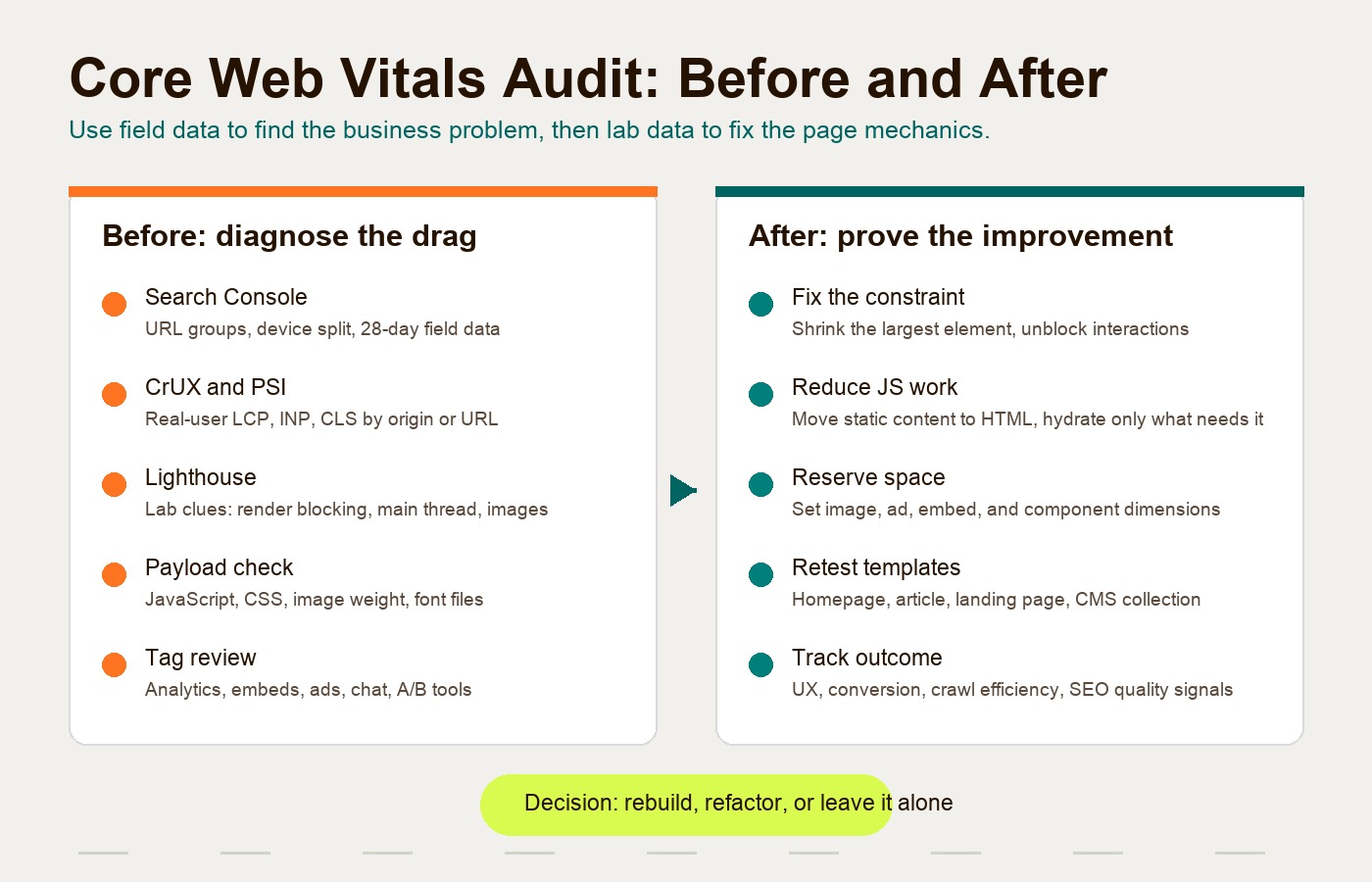
A before and after Core Web Vitals audit structure
A good Core Web Vitals audit should compare the current site against a measurable target state. Do not start by changing frameworks. Start by proving where the drag is.
| Audit layer | Before: diagnose | After: verify |
|---|---|---|
| Lighthouse | Run mobile and desktop tests on priority templates. Capture LCP element, render-blocking resources, Total Blocking Time, unused JS, image issues, and CLS sources. | Re-run on the same templates and document which diagnostics improved, stayed flat, or got worse. |
| CrUX | Check real-user origin or URL-level field data where available. Separate mobile and desktop because mobile usually exposes the pain first. | Confirm whether field data begins moving after deployment. Remember that CrUX and Search Console use real usage data, so changes take time to show. |
| Search Console Core Web Vitals report | Review URL groups, device type, status, and the worst metric per group. Google says the report is based on real-world usage data. | Track validation after fixes and watch the 28-day monitoring window before calling the issue closed. |
| JavaScript payload | Measure total JS, unused JS, hydration cost, long tasks, and third-party scripts. Identify what ships globally. | Remove scripts, split components, defer low-priority widgets, and hydrate only interactive islands. |
| Image weight | List the heaviest LCP images and recurring media patterns. Check dimensions, compression, modern formats, and responsive sizes. | Serve appropriately sized images, reserve dimensions, compress hero assets, and lazy-load non-critical media. |
| Third-party scripts | Inventory analytics, pixels, embeds, chat, consent tools, heatmaps, forms, and A/B testing tags. | Keep business-critical tags, remove duplicates, defer non-critical scripts, and test whether tags hurt INP or LCP. |
The output should be a decision, not a dump of screenshots. For each page type, decide whether the best move is to optimize the current template, rebuild the frontend, move content into a cleaner CMS architecture, or leave the page alone because the business impact is low.
What to do when Core Web Vitals assessment failed
“Core Web Vitals assessment failed” is a diagnosis, not the fix. The first move is to identify which metric failed, which URL group is affected, and whether the issue appears in field data, lab data, or both.
| Failed metric | What it usually means | First checks | Better fix path |
|---|---|---|---|
| LCP failed | The main content appears too slowly | LCP element, server response, hero image, render-blocking CSS/JS, font loading | Improve hosting/cache, optimize the LCP asset, inline or preload critical resources, remove blocking scripts |
| INP failed | The page looks loaded but reacts slowly | Long tasks, hydration cost, tag managers, heavy listeners, third-party widgets | Remove unused JavaScript, defer non-critical scripts, split interactive components, hydrate only what needs interaction |
| CLS failed | The page shifts after loading | Image dimensions, ad/embed slots, cookie banners, font swaps, injected widgets | Reserve dimensions, stabilize banners and embeds, use predictable font loading, avoid late layout injection |
Search Console groups URLs by similar problems, so do not fix one page and assume the issue is solved. If a blog template fails INP, every article using that template may need the same JavaScript cleanup. If a landing page template fails LCP, the shared hero pattern may be the real problem.
Use this order:
- Check Search Console’s affected URL group and device type.
- Run PageSpeed Insights or Lighthouse on a representative URL from that group.
- Name the failing metric and the likely template-level cause.
- Fix the shared pattern first, not only the single URL.
- Re-test the same representative URLs.
- Start validation only after the deployed fix is live.
- Wait for field data before calling the assessment recovered.
This is where Astro can be useful, but only after the cause is clear. If the failure comes from oversized images or missing dimensions, a framework migration is probably too heavy. If the failure comes from builder bloat, global plugin scripts, hydration cost, or client-only rendering across many important pages, Astro becomes a stronger rebuild candidate because the public page can ship mostly HTML and only hydrate the interactive pieces.
When an Astro rebuild is worth evaluating
An Astro rebuild is worth evaluating when the site is content-heavy, commercially important, and repeatedly slowed down by the same platform constraints. The strongest candidates are blogs, resource centers, landing page libraries, documentation, SEO glossary pages, product marketing pages, and campaign microsites.
Look for these signals:
- Important organic pages fail LCP or INP because of global JavaScript.
- The CMS or builder injects scripts and styles that editors cannot control.
- Landing pages depend on paid traffic but load slowly on mobile.
- Search Console groups many URLs together because one shared template is poor.
- The team keeps adding optimization plugins instead of reducing the underlying payload.
- Editors need publishing speed, but visitors mostly need fast content, not app-like interactivity.
Astro is especially attractive when marketing wants to keep a CMS workflow but the frontend needs cleaner performance. A headless CMS can remain the editing layer while Astro becomes the public-facing delivery layer. That separation gives marketing publishing control without forcing every visitor to pay for editor convenience in the browser.
There are tradeoffs. A rebuild requires migration planning, URL mapping, redirects, component design, image handling, analytics continuity, and QA. If the site has strong organic traffic, the SEO plan matters as much as the framework choice. Rebuild only when the expected gains in performance, maintainability, publishing speed, or conversion justify the migration risk.
If the audit points to migration rather than cleanup, Hapy’s Astro website migration engagement is designed around preserving working pages while rebuilding the parts that create platform drag. Use the Astro vs WordPress, Astro vs Next.js, Webflow to Astro, Framer to Astro, and Astro landing page system guides when the current platform decision is the open question.
What to measure before promising commercial impact
Avoid promising ranking jumps. Promise a better measurement system.
Core Web Vitals improvements can support business outcomes, but the impact depends on traffic quality, search intent, page purpose, offer strength, and what else changes at the same time. Google and web.dev publish case studies showing business improvements after performance work, but those are examples, not guarantees for every site.
Before making a business case, collect:
| Metric | Why it matters |
|---|---|
| Organic landing page sessions | Shows which templates deserve attention first |
| Conversion rate by landing page | Connects speed work to revenue or lead quality |
| Mobile versus desktop performance | Mobile often reveals the real constraint |
| LCP element by template | Identifies the visible asset or content block causing delay |
| JS transferred and executed | Shows whether responsiveness is a payload problem |
| Third-party script cost | Separates marketing tools from core site code |
| Image transfer weight | Finds heavy assets that hurt LCP and bandwidth |
| Search Console URL groups | Shows whether one template problem affects many URLs |
Then set practical performance budgets. The LCP, INP and CLS targets below are for the 75th percentile of field data for the relevant device segment:
- LCP target: main content visible in 2.5 seconds or less.
- INP target: page responds in 200 milliseconds or less.
- CLS target: layout shift stays at 0.1 or less.
- JavaScript budget: only ship code the page actually needs.
- Image budget: serve responsive, compressed, dimensioned media.
- Third-party budget: every tag needs a business owner and a loading strategy.
The budget matters because performance decay is usually gradual. One new embed will not look like a strategic risk. Ten embeds, three trackers, a heavier hero component, and a new page-builder add-on will.
How this supports AI search and answer engines
AI search optimization still starts with useful, accessible content. Speed alone will not make a weak article citable. But a fast, clean, server-rendered content page gives crawlers and retrieval systems fewer obstacles.
The following are readability practices, not evidence of improved AI visibility. Whether a retrieval system uses or cites a page must be observed separately:
- Important text is present in HTML and easy to extract.
- Pages are not dependent on client-side rendering before the answer appears.
- Internal links help systems understand topical relationships.
- Tables and concise definitions make the content easier to summarize.
- Stable pages reduce the risk that crawlers miss late-loading content.
That is the connection between core web vitals SEO and GEO. The goal is not to create AI-only pages. The goal is to publish pages that humans can use quickly and machines can read clearly.
If the next question is agent-readiness rather than speed alone, use the agent-ready website checklist to connect performance with readable HTML, metadata, routes, and actions.
The practical takeaway
Core web vitals SEO is a performance discipline with marketing consequences. LCP tells you whether the main content loads quickly. INP tells you whether the page responds when the visitor acts. CLS tells you whether the layout stays put.
Astro helps when the site mostly needs to deliver content and only a few components need interactivity. By reducing unnecessary client-side JavaScript and leaning on server-first rendering, it can make content-heavy marketing sites easier to load, crawl, maintain, and improve.
The decision should still be evidence-led. Run the audit, identify the templates that matter, measure the payload, review third-party scripts, and connect the findings to conversions, organic visibility, and maintenance cost. If the current platform can be fixed cleanly, fix it. If the platform keeps recreating the same performance debt, evaluate a cleaner frontend architecture.
For teams weighing that decision, Hapy’s capabilities and MVP development work can help turn the audit into a rebuild plan, migration path, or focused performance sprint without treating Core Web Vitals as a magic SEO switch.
FAQ
Does Core Web Vitals affect SEO directly?
Core Web Vitals are used by Google ranking systems as part of page experience, but they are not a standalone ranking guarantee. They matter most when your content is already relevant and page experience becomes one of the differentiators.
What is the Core Web Vitals impact on SEO?
Google uses Core Web Vitals in ranking systems, but the size of an effect for a specific page is not established by a score. Track field performance, task completion and search traffic separately, accounting for content and traffic changes.
Why can Astro help with performance SEO?
Astro can help because it renders content as HTML first and ships little or no client-side JavaScript by default. Interactive components can be hydrated selectively, which reduces the frontend work that often hurts INP and LCP on content-heavy sites.
Should every slow WordPress or Webflow site move to Astro?
No. Some slow sites can be fixed with image compression, better hosting, script cleanup, caching, and template changes. Astro is worth evaluating when the current builder or CMS repeatedly creates frontend bloat that the team cannot control.
What should a first Core Web Vitals audit include?
Start with Search Console’s Core Web Vitals report, CrUX or PageSpeed Insights, Lighthouse, JavaScript payload review, image weight, and third-party tags. Then prioritize the page types tied to organic traffic, paid campaigns, or conversion value.