A website migration audit is the inventory you run before anyone quotes a rebuild, redesign, or move to Astro. It answers a practical question: what has to be preserved, improved, redirected, rewritten, merged, noindexed, or removed so the new site does not break the parts of the current site that already work?
That matters because migration is not the same as redesign. A redesign changes how the site looks, explains the company, and guides visitors. A migration changes the operating layer underneath the site: URLs, content models, redirects, analytics, forms, scripts, metadata, schema, media handling, CMS fields, and deployment behavior.
After the audit, use the Astro migration cost guide to compare scope assumptions, the Astro migration timeline guide to sequence the work, and the best CMS for Astro guide when editor workflow or content structure changes the rebuild.
When the inventory and redirect map are approved, the zero downtime Astro migration launch plan turns those findings into staging, switch, rollback, and production verification steps.
Those details are where good migrations are won or lost. A beautiful new site can still lose search traffic, break lead capture, damage attribution, or confuse editors if the team never audited the old system. The point of this guide is to help a founder or marketing lead get quote-ready before asking an agency, freelancer, or internal team to move the site.
If the audit shows that Astro is the right move, Hapy’s Astro website migration engagement is built around the same idea: keep what already earns traffic or revenue, rebuild what creates platform drag, and leave alone what is not causing a real problem.
If you are still deciding whether the current platform is actually the constraint, start with the website platform migration checklist. If a full migration is too risky right now, use the partial Astro migration guide to decide whether a smaller first slice is safer. If performance is the main concern, the Core Web Vitals and Astro guide gives the measurement layer. If SEO protection is the launch risk, use the website migration SEO checklist. If deployment is the next decision, the Cloudflare and Astro guide covers hosting, redirects, caching, Workers, previews, and rollback.
For the implementation layer, the Astro SEO guide shows how metadata, sitemaps, schema, content collections, and redirects should be modeled before launch.

What a website migration audit should capture
A website migration audit should capture the current site as a working business asset, not just a set of pages. The minimum inventory should include URLs, content, organic search performance, landing pages, backlinks, redirects, analytics, forms, scripts, media, schema, CMS fields, and conversion paths.
Use this as the core audit list before a quote:
| Audit area | What to collect | Why it matters |
|---|---|---|
| URL inventory | Every crawlable URL, status code, canonical, indexability rule, and current template | Prevents missing pages, duplicate pages, and accidental crawl changes |
| Content inventory | Page type, owner, last updated date, target audience, content quality, and business role | Shows what to preserve, rewrite, merge, or retire |
| Top landing pages | Organic, paid, referral, direct, and campaign landing pages by sessions and conversions | Protects the pages already doing work |
| Search traffic | Queries, impressions, clicks, ranking pages, and non-brand pages from Search Console | Makes the SEO migration audit evidence-based |
| Backlinks | Linked URLs, linking domains, anchor context, and high-value referring pages | Protects authority and avoids losing link equity |
| Redirects | Current redirects, legacy redirects, future redirect target, and redirect chain notes | Keeps old URLs pointing to the right new destination |
| Forms | Form location, fields, validation, thank-you behavior, CRM destination, and notification path | Protects lead capture and sales handoff |
| Scripts | Analytics, pixels, chat, consent, heatmaps, embeds, A/B tests, and tag manager rules | Prevents broken reporting and page-speed surprises |
| CMS fields | Content types, required fields, repeaters, media fields, taxonomy, slugs, and relationships | Helps the new Astro content model match real editorial work |
| Media | Images, PDFs, videos, favicons, downloads, file sizes, alt text, and source domains | Avoids missing assets, layout shift, and unoptimized media |
| Schema | JSON-LD types, article data, FAQ data, product/service data, breadcrumbs, and organization data | Preserves structured meaning for search and AI systems |
| Conversion paths | CTA pages, forms, booking flows, thank-you pages, email automations, and CRM events | Keeps the new site tied to revenue behavior |
The audit does not need to be fancy. A spreadsheet, crawl export, analytics export, backlink export, and a few annotated screenshots are enough for most marketing sites. The goal is to remove ambiguity before estimation. A vague brief gets a vague quote. A clean migration audit gets a better scope, a better risk conversation, and fewer surprises.
Build the audit spreadsheet before the proposal
The spreadsheet is the working document. It should be plain enough for marketing to use and structured enough for developers to build from.
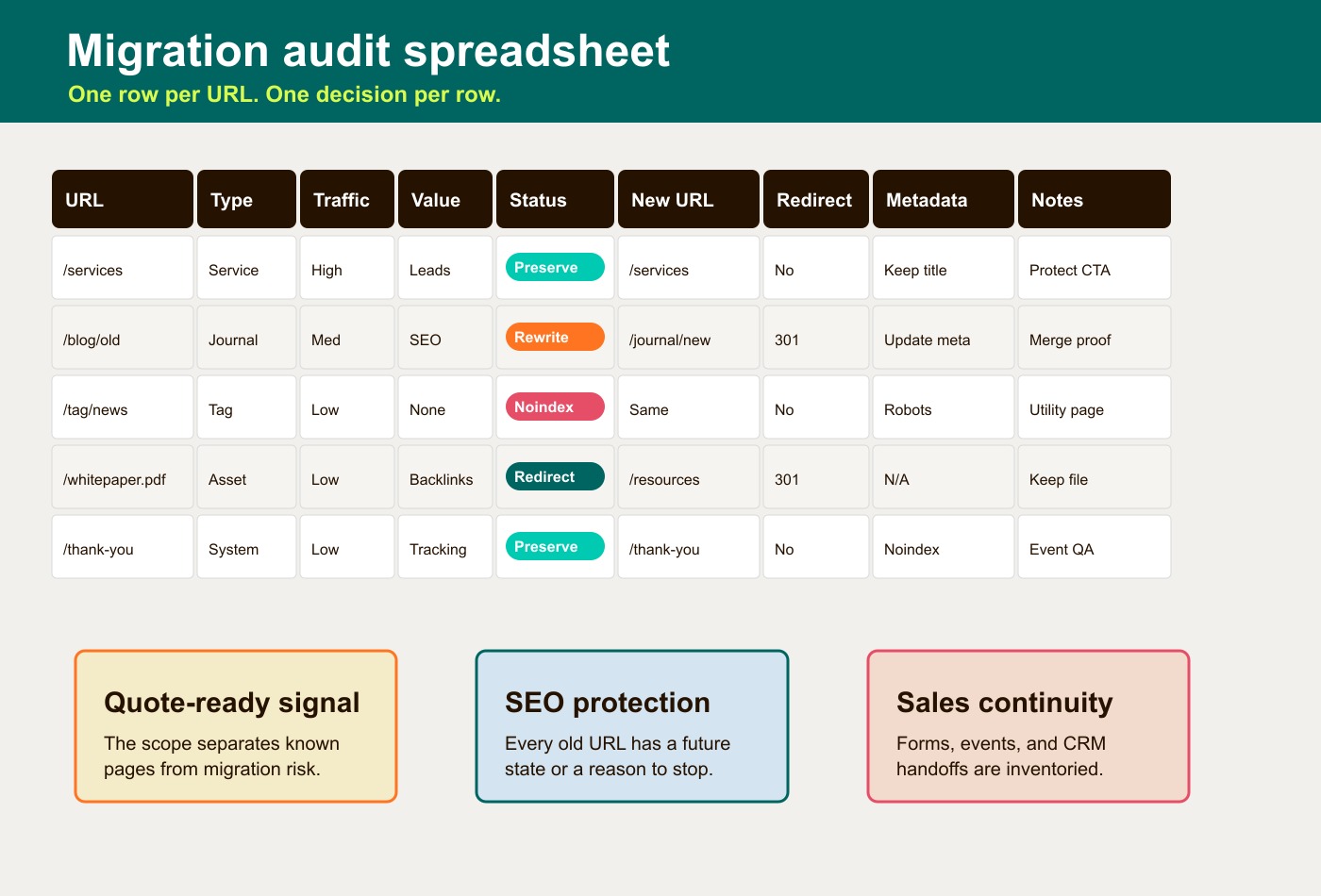
Start with one row per URL and use these columns:
| Column | What to enter |
|---|---|
| URL | Current live URL |
| Type | Homepage, service page, blog post, landing page, legal page, resource, author page, tag page, thank-you page, or asset |
| Traffic | Sessions, organic clicks, impressions, or another consistent performance measure |
| Conversion value | Leads, demo requests, purchases, assisted conversions, sales importance, or qualitative value |
| Status | Preserve, rewrite, merge, noindex, redirect, remove, or investigate |
| New URL | Future Astro URL if the page will exist after migration |
| Redirect | Yes/no, plus old URL to new URL mapping |
| Metadata | Current title, meta description, canonical, robots rule, Open Graph, and schema notes |
| Notes | Ownership, dependencies, rewrite instructions, assets, forms, scripts, or risks |
Add optional columns when the site is larger:
- Primary query and top supporting queries.
- Backlinks and referring domains.
- Internal links pointing to the URL.
- Template or component type.
- CMS collection and field mapping.
- Last updated date.
- Image or download dependencies.
- Form, event, or CRM dependency.
- Priority: launch, phase two, archive, or redirect only.
For an Astro migration audit, add one technical column: “static, island, or server.” That does not need to be perfect, but it helps the team separate mostly static marketing pages from interactive pieces such as calculators, search filters, gated forms, account tools, or embedded scheduling flows. Astro’s docs describe Astro as especially suited to content-based sites such as blogs, landing pages, marketing sites, and portfolios, while still allowing static, dynamic, or mixed rendering through project control over rendering behavior.
Decide what each page deserves
The hardest part of a website redesign audit checklist is not collecting the pages. It is deciding what to do with them.
Do not move everything unchanged. Do not delete everything old. Use the audit to make a page-level decision:
| Decision | Use it when | Migration note |
|---|---|---|
| Preserve | The page ranks, converts, attracts backlinks, supports sales, or explains a durable offer clearly | Keep URL, intent, metadata, internal links, schema, and conversion path as stable as possible |
| Rewrite | The page has value but the copy, positioning, examples, or proof are weak | Keep the intent, improve the page, and watch ranking changes after launch |
| Merge | Several thin or overlapping pages compete for the same intent | Build one stronger destination and redirect the old pages to it |
| Noindex | The page is useful for users but should not be indexed, such as internal search, duplicate utility pages, or campaign variants | Keep the page accessible but remove it from search results intentionally |
| Redirect | The old page should no longer exist, but it has traffic, links, or a clear replacement | Use a direct 301 to the closest relevant new page |
| Remove | The page is obsolete, has no traffic, has no links, and has no user or sales value | Return the right status, document the decision, and avoid redirecting unrelated pages to the homepage |
| Investigate | The data conflicts or the page depends on an unclear business process | Pause the decision until marketing, sales, or operations confirms its role |
This is where migration discipline saves money. If a 120-page site only has 35 pages worth preserving or rewriting, the quote should not assume all 120 pages need the same treatment. If 10 low-traffic pages have strong backlinks, they may deserve careful redirects even if they do not look important in analytics.
Google’s site move guidance is direct about this: in more complex moves, teams should generate a list of old URLs and map them to new destinations, starting with important URLs from sitemaps, analytics, logs, and links. Google also recommends server-side permanent redirects from old URLs to mapped new URLs and warns against long redirect chains or irrelevant homepage redirects.
Separate migration work from redesign work
Migration and redesign often happen together, but they are different workstreams.
A redesign answers questions like:
- Does the positioning still match the market?
- Are the page sections persuasive?
- Is the visual system current?
- Are CTAs clear?
- Does the site explain the offer to the right buyer?
A migration answers different questions:
- What URLs exist today?
- Which URLs should change?
- Where will old URLs redirect?
- Which pages already rank or convert?
- Which scripts, forms, and events must still work?
- What CMS fields and content types does the team need?
- What schema, metadata, sitemap, and canonical logic must be preserved?
- Which images, downloads, embeds, and third-party domains does the site depend on?
Treating migration as “the technical part of the redesign” is how teams miss risk. The migration plan should exist before design decisions lock. Otherwise, the new navigation, page model, or URL structure may accidentally discard search equity, break campaign links, or remove conversion paths the sales team depends on.
The practical rule: redesign can change the wrapper, hierarchy, and message. Migration must account for the old site’s assets, behavior, and search footprint before those changes ship.
Run the SEO migration audit first
An SEO migration audit should start with the URLs and pages that already have evidence behind them. Pull from Google Search Console, analytics, crawl data, backlink tools, sitemap files, and any paid campaign landing page lists.
For each important page, capture:
- Current title, meta description, H1, canonical, robots rule, and schema.
- Organic clicks, impressions, primary queries, and ranking trend.
- Conversions or assisted conversions.
- Backlinks and high-value internal links.
- Current indexability and status code.
- New URL, redirect target, and whether the page will be preserved, rewritten, merged, or removed.
Then check the migration risks:
- Will any ranking URL change?
- Will any title or H1 change materially?
- Will the page lose schema, FAQ content, table content, or internal links?
- Will old campaign URLs still land on relevant pages?
- Will old PDF or image URLs still resolve or redirect?
- Will the new sitemap include only canonical, indexable pages?
- Will
noindexor staging blocks be removed before launch?
Google recommends verifying old and new site variants in Search Console, using analytics to monitor the move, submitting updated sitemaps, checking crawl errors, and keeping redirects for as long as possible, generally at least one year. That guidance is not glamorous, but it is exactly the kind of operating detail that protects a migration.
Audit forms, scripts, and conversion paths
Marketing sites often break in small places first. A form submits, but the hidden source field is gone. A thank-you page exists, but the conversion event is not firing. A scheduling embed loads, but consent mode blocks the script. The new site looks right and the reporting is suddenly wrong.
Before migration, list every conversion path:
| Conversion asset | Questions to answer |
|---|---|
| Forms | Where is the form, what fields are required, where does the submission go, and who gets notified? |
| Thank-you pages | Does the page still exist, is it indexable or noindex, and does it trigger the right event? |
| CRM handoff | Which fields map into the CRM, marketing automation tool, email list, or sales notification? |
| Booking links | Which pages use scheduling embeds, and do they require scripts, query parameters, or routing rules? |
| Analytics events | Which events define a conversion, micro-conversion, or funnel step? |
| Pixels and tags | Which tools are active, who owns them, and are any unused or risky? |
| Consent | Does the cookie banner or consent platform change script behavior by region or category? |
This is also where the quote should become more honest. A site with three brochure pages and one form is not the same project as a site with gated resources, multi-step forms, dynamic thank-you pages, paid campaign parameters, CRM field mapping, and several third-party scripts. The second project is not just a design build. It is a small business system.
Map content and CMS fields for Astro
Astro can work with Markdown, MDX, local content, CMS-backed content, and structured collections. The audit should decide what editing model the business actually needs instead of assuming the current CMS shape should be copied.
Astro’s content collections are meant for groups of related content that share a structure, such as blog posts, product descriptions, recipes, or other structured data. That is useful during migration because it forces the team to name the fields that matter:
- Title.
- Meta description.
- Slug.
- Publish date and modified date.
- Author.
- Category or topic.
- Cover image and alt text.
- Excerpt.
- Body content.
- Related pages.
- FAQ blocks.
- Schema data.
- CTA variant.
For a founder or marketing lead, the key question is simple: can the new content model support the way the team will publish after launch? If every future edit requires a developer because the CMS fields are wrong, the migration has only moved the bottleneck.
For an Astro migration audit, also flag content that depends on dynamic behavior:
- Search and filtering.
- Calculators.
- Personalized content.
- Account-specific pages.
- Form steps.
- Interactive charts.
- Embedded apps.
- Cross-page state.
Astro’s islands architecture matters here. By default, Astro renders UI components to HTML and CSS and strips unnecessary client-side JavaScript. Interactive areas can then be hydrated intentionally. That is one reason Astro can be a strong migration destination for content-heavy sites, but it also means the audit should identify where interactivity truly belongs before development starts.
Audit media, schema, and AI-readable structure
Media and structured data are easy to under-scope. They rarely dominate the proposal, but they often dominate QA.
For media, collect:
- Every image used on preserved pages.
- Every PDF, download, video, and externally hosted asset.
- Alt text for important images.
- File sizes and obvious performance problems.
- Remote image domains.
- Images that need dimensions to prevent layout shift.
Astro’s image documentation distinguishes between images that are processed through project imports or image components and files in public/, which are served directly and are not optimized. It also requires authorized sources for processing remote images. That means the migration audit should identify which assets can be optimized locally and which remote domains must be handled intentionally.
For schema, collect the current JSON-LD and decide what should survive:
- Organization.
- LocalBusiness, if relevant.
- Article or BlogPosting.
- FAQPage, only where the page genuinely has FAQs.
- BreadcrumbList.
- Product or Service, where appropriate.
- Review or AggregateRating, only if the evidence is real and policy-safe.
For AI search and answer engines, the boring fundamentals still matter most: clear HTML, descriptive headings, crawlable content, sensible schema, useful tables, current metadata, and content that answers the buyer’s real question. Do not create fake AI-only sections. Verify that the rendered page exposes its primary answer, headings, links, tables, and accurate metadata. These checks support accessibility and machine interpretation; they do not guarantee indexing, ranking, or inclusion in an AI answer.
What to hand over before asking for a migration quote
A good migration quote should be based on evidence, not vibes. Before asking for pricing, gather this package:
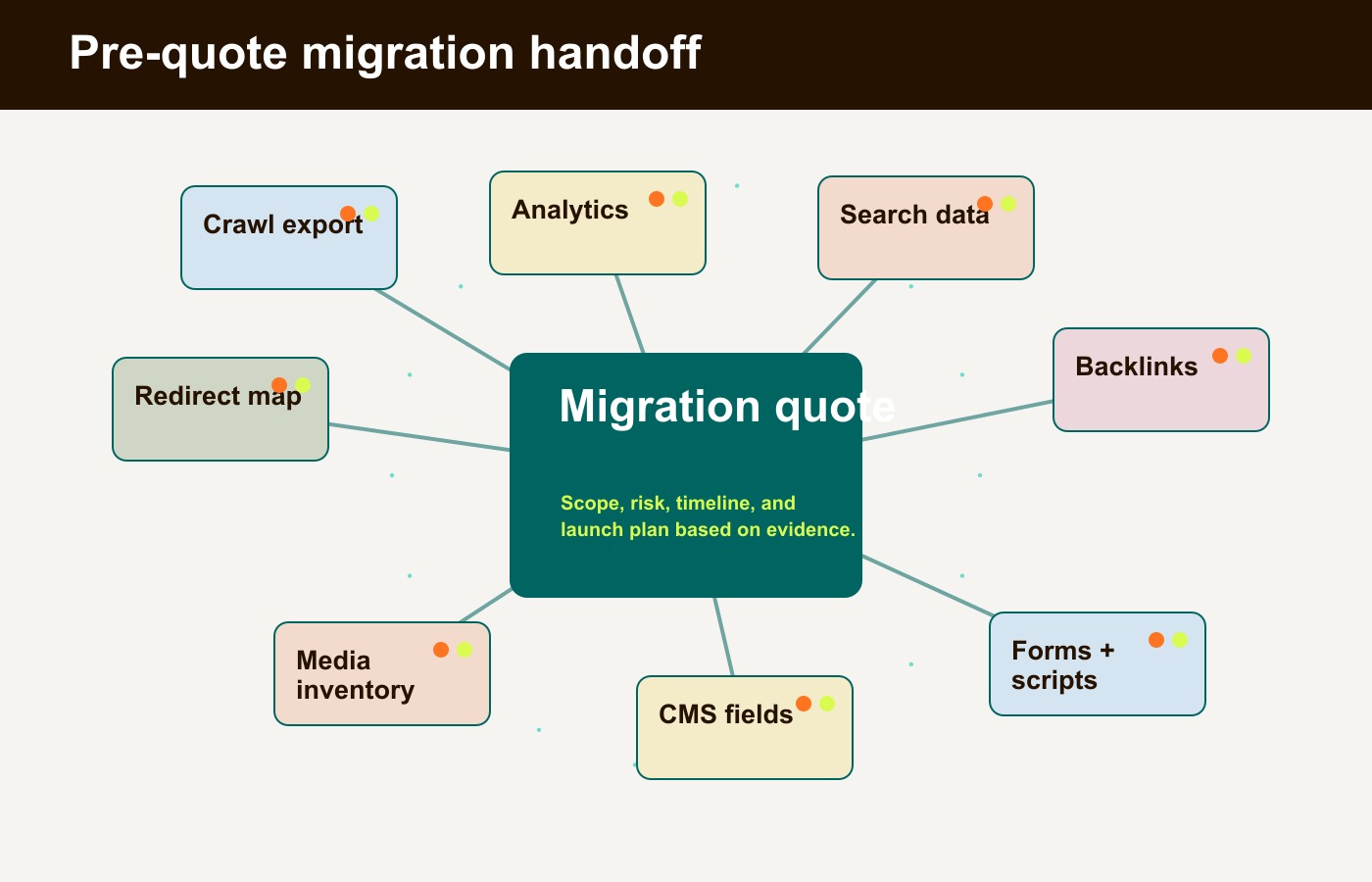
| Handoff item | Minimum version |
|---|---|
| Crawl export | All indexable URLs, status codes, canonicals, titles, meta descriptions, H1s, robots rules, and schema notes |
| Analytics export | Top landing pages, traffic sources, conversions, and important campaign URLs |
| Search Console export | Queries, clicks, impressions, ranking pages, and sitemap status |
| Backlink export | Linked URLs and referring domains for pages that may change |
| Audit spreadsheet | URL, type, traffic, conversion value, status, new URL, redirect, metadata, and notes |
| Form and script inventory | Forms, fields, scripts, events, pixels, consent behavior, and CRM destinations |
| CMS field map | Content types, required fields, relationships, editors, and publishing workflow |
| Media inventory | Images, videos, PDFs, downloads, remote domains, and optimization notes |
| Decision rules | Preserve, rewrite, merge, noindex, redirect, remove, or investigate |
| Launch risks | Pages, integrations, or workflows that cannot break during launch |
This handoff does not eliminate discovery. It makes discovery useful. The team quoting the migration can see where the work is simple, where it is risky, and where the business needs a decision before the build starts.
A simple pre-migration checklist
Use this checklist when you do not have time for a perfect audit but need a disciplined first pass.
- Crawl the current site and export all URLs.
- Pull top landing pages and conversions from analytics.
- Pull organic pages, queries, clicks, and impressions from Search Console.
- Export backlinks for pages that may change.
- Mark each URL as preserve, rewrite, merge, noindex, redirect, remove, or investigate.
- Map every preserved, merged, or removed URL to a new URL or final status.
- List every form, thank-you page, CRM handoff, and conversion event.
- List every third-party script, tag, pixel, embed, and consent dependency.
- Inventory images, PDFs, videos, downloads, and remote media domains.
- Capture current titles, meta descriptions, canonicals, robots rules, and schema.
- Map CMS content types and fields to the future editing workflow.
- Identify interactive components that need Astro islands or server-rendered behavior.
- Decide what must be tested before launch and monitored after launch.
The checklist is not a substitute for judgment. It is a way to make sure the conversation starts in the right place.
The real output is quote readiness
A website migration audit makes the quote sharper because it separates known work from unknown risk. It tells the team which pages matter, which URLs are fragile, which conversion paths create revenue, which scripts slow or support the business, which content can be retired, and which parts of the old site should not be touched casually.
For an Astro migration, that clarity is especially useful. Astro can give a marketing site a faster, cleaner, more maintainable foundation, especially when the site is content-heavy and the interactive pieces can be isolated intentionally. But the framework is not the strategy. The audit is what keeps the strategy honest.
Before you ask for a migration quote, build the spreadsheet. Decide what each page deserves. Protect the pages that already rank or convert. Map the redirects. Check the forms and scripts. Audit the CMS fields. Then ask for a proposal.
That is the difference between buying a redesign and planning a migration that the business can trust.
An illustrative audit record
For a hypothetical service site, keep /services/ at the same URL, verify its title and canonical, and test its lead form through to the authorized CRM destination. Flag a PDF linked from that page as a separate asset dependency. If a campaign page must move, map its old URL directly to the relevant replacement and check status, destination, and query-parameter behavior.
Record the pre-launch baseline and proposed acceptance evidence: form submission arrives once with the expected source fields, the PDF resolves, no staging block reaches production, and mapped URLs return the intended statuses. Monitor crawl and conversion changes after launch; those checks are a plan, not a claimed Hapy migration outcome. The primary documentation links in this edition were checked on September 8, 2026; verify behavior for the project’s Astro version and hosting adapter.