Astro on Cloudflare is a good fit when a marketing site needs fast static delivery plus controlled redirects, caching, previews, or small server-side features. For a new Astro project, start with Cloudflare Workers: Astro’s current deployment guide recommends Workers for new projects. Keep Pages in the decision when an existing project is stable there and its version and adapter path are supported.
For most marketing teams, the win is not “edge computing” as a slogan. The win is faster global delivery, fewer platform plugins, versioned deploys, clean redirect files, better control over headers and caching, and a path for lightweight APIs or personalization without moving the whole site back into a heavy application platform.
That makes Cloudflare a natural follow-on decision after an Astro migration. Astro gives the site a lean, content-first codebase. Cloudflare decides where that codebase runs, how static assets are served, how redirects and headers are enforced, and which routes need runtime logic.
Two official guides now describe different deployment paths. Cloudflare’s Pages guide still documents Astro SSR on Pages, while the Astro adapter’s Astro 6 notes say Pages deployment support was removed and recommend Workers. Treat Pages as a compatibility question for an existing deployment, not the default for a new build.

If you are still deciding whether the website should move to Astro at all, start with Hapy’s Astro website migration engagement. This guide assumes the Astro direction already makes sense and focuses on where Cloudflare fits in the deployment and operating model.
For the planning layer before deployment, pair this with the website migration audit, website platform migration checklist, and website migration SEO checklist. If performance is the main driver, the Core Web Vitals and Astro guide gives the measurement frame.
Where Cloudflare fits after an Astro migration
Cloudflare fits after an Astro migration as the delivery and edge-control layer. Astro builds the site. Cloudflare hosts the output, serves static assets globally, handles redirects and headers, exposes preview deployments, and can run dynamic routes through Workers when the site needs APIs, forms, localization, or request-time content.
The official Astro deployment docs now say Cloudflare can deploy static assets, back-end APIs, and on-demand rendered sites, and note that Cloudflare recommends Workers for new projects. Cloudflare’s own Astro Pages guide still documents Astro Cloudflare Pages deployment with npm run build and dist as the build output, so the real choice is not “can Astro run there?” It can. The choice is which Cloudflare surface best matches the site.
Use Cloudflare for these jobs:
- Hosting: serve the compiled Astro output from Cloudflare’s network.
- Redirects: keep migration redirects in a plain
_redirectsfile or move larger rulesets into Cloudflare redirect products. - Caching: control browser and edge cache behavior instead of relying on a CMS plugin chain.
- Image handling: use Astro’s Cloudflare adapter image options where runtime image transformation is needed.
- Workers: run selected dynamic routes for forms, API endpoints, personalization, content negotiation, or authenticated previews.
- Security headers: enforce headers through
_headersfor static assets or directly in server code for SSR/function responses. - Preview and rollback: give marketing, design, and sales a real preview URL before production and a fast revert path if launch behavior is wrong.
That is buyer-readable infrastructure. It is not a wholesale replacement for product engineering, analytics discipline, or content governance. It is the layer that makes a migrated Astro site easier to ship and operate.
Pages vs Workers for Astro Cloudflare
Choose Workers for a new Astro project unless a documented compatibility constraint points to Pages. Astro’s current deployment guide recommends Workers for new projects, and Cloudflare’s Workers guide supports both pre-rendered assets and on-demand rendering. Existing Pages projects need a migration and compatibility check: Cloudflare’s Pages guide still documents SSR, but the Astro adapter’s Astro 6 notes say Pages deployment support was removed. Do not start a new SSR build on Pages without confirming the adapter and deployment path.
Then decide whether the site is static or needs runtime behavior. A static site can deploy its built dist assets. On-demand routes need @astrojs/cloudflare and a Worker entrypoint.
Use Pages when:
- The site is already on Pages and a current, documented compatibility path is verified.
- The project is static and Pages’ Git-connected previews and simple build are an explicit fit.
- The site does not depend on adapter features that require Workers.
- Redirect and header needs fit within the chosen Pages or hosting configuration.
Use Workers when:
- The Astro project is new or is migrating from Pages.
- The Astro site uses on-demand rendering, API routes, form handlers, content negotiation, authenticated previews, or server-side personalization.
- You need Cloudflare bindings such as KV, R2, D1, Durable Objects, or Images.
- You want the Cloudflare adapter to run closer to the same runtime in development, preview, and production.
Cloudflare’s Workers docs describe full-stack applications as builds that produce HTML, client resources, and a Worker script, with server-side rendering and request-time data fetching where needed. Astro is listed among the frameworks natively supported by Workers. For Astro 6, the adapter’s upgrade notes add two checks: astro dev and astro preview use Cloudflare’s workerd runtime, and SSR deployments use @astrojs/cloudflare/entrypoints/server as the Wrangler entrypoint. Those checks make Workers the clearer default for new work.
The Astro Cloudflare adapter decision
The Astro Cloudflare adapter is needed when the site uses server rendering or Cloudflare runtime features. Static-only Astro sites can be deployed as assets without an adapter. Hybrid and on-demand sites should treat the adapter as part of the architecture, not a late deploy setting. If the project uses Astro 6, use @astrojs/cloudflare v13 or later and review the Pages support change before deployment.
Astro’s deployment guide says to install the @astrojs/cloudflare adapter when the site uses on-demand rendering. The adapter also handles Cloudflare-specific runtime access, environment variables, bindings, image services, sessions, and local preview behavior.
For a marketing site, the adapter decision usually turns on five needs:
| Need | Static Astro output | Astro Cloudflare adapter |
|---|---|---|
| Mostly static pages | Usually enough | Optional |
| Dynamic form/API endpoint | Not enough by itself | Strong fit |
| Request-time localization or content negotiation | Limited | Strong fit |
| Cloudflare KV, R2, D1, Images, or Durable Objects | Not available directly | Strong fit |
| Production-like local runtime checks | Limited | Strong fit |
Astro 6 also changed the Cloudflare development experience. The Astro Cloudflare adapter docs say Astro 6 requires @astrojs/cloudflare v13 or later and that astro dev and astro preview use Cloudflare’s workerd runtime more closely, so bugs tied to the Workers environment are easier to catch before production. The same upgrade notes remove Astro.locals.runtime and change the Wrangler entrypoint to @astrojs/cloudflare/entrypoints/server. Treat those as migration checks when updating an existing site. This matters when the site includes forms, previews, bindings, or any code that used to behave differently in local Node.js and production edge runtime.
There is one caution: the edge runtime is not the same as a full Node.js server. Astro’s Cloudflare docs note that nodejs_compat can support many Node.js runtime APIs, but teams should still audit dependencies and server-side code that assume Node-specific behavior. For a marketing site, this is usually manageable. For a complex app hiding inside the marketing site, it can become a real architecture decision.
What Cloudflare can clean up for buyers
Cloudflare is useful after an Astro migration when it replaces several fragile website chores with clearer deployment rules. The value is operational control.
Redirects are the easiest example. During a migration from WordPress, Webflow, Framer, or a legacy custom site, the redirect map is not optional. Cloudflare Pages lets teams declare redirects in a plain _redirects file in the static asset directory, and the docs explain that the file supports source, destination, and optional status code rules. Cloudflare also documents limits for that file: 2,000 static redirects and 100 dynamic redirects. If a migration exceeds that, the team should plan Bulk Redirects or another redirect layer instead of pretending the file will hold everything.
Headers are similar. Cloudflare Pages supports a plain _headers file for static asset responses, which can attach security and crawler headers such as X-Frame-Options, X-Content-Type-Options, Referrer-Policy, or X-Robots-Tag. The important caveat is in the docs: _headers rules do not apply to Pages Functions responses. If the Astro site has SSR or Worker-generated responses, the team should set important headers in code for those routes.
Caching is where Cloudflare can either simplify the site or create confusion. For static Astro pages, caching can be straightforward: hashed assets get long-lived cache headers, HTML gets more careful rules, and Cloudflare serves the site close to users. For dynamic pages, the team needs a policy. Cloudflare’s cache revalidation documentation explains stale responses and background validation scenarios. Use that as an engineering decision, not a marketing phrase.
Images deserve a practical check too. Astro’s Cloudflare adapter supports several image-service modes, including Cloudflare Image Resizing and a Cloudflare Images binding. The adapter docs explain options such as cloudflare, cloudflare-binding, compile, and passthrough. The buyer-level question is whether images should be transformed at build time, at request time, or before they ever enter the site.
Technical checklist for Cloudflare Astro deployment
Use this checklist before approving a Cloudflare Astro deployment. It keeps the conversation concrete enough for marketing, engineering, and leadership to make the same decision.
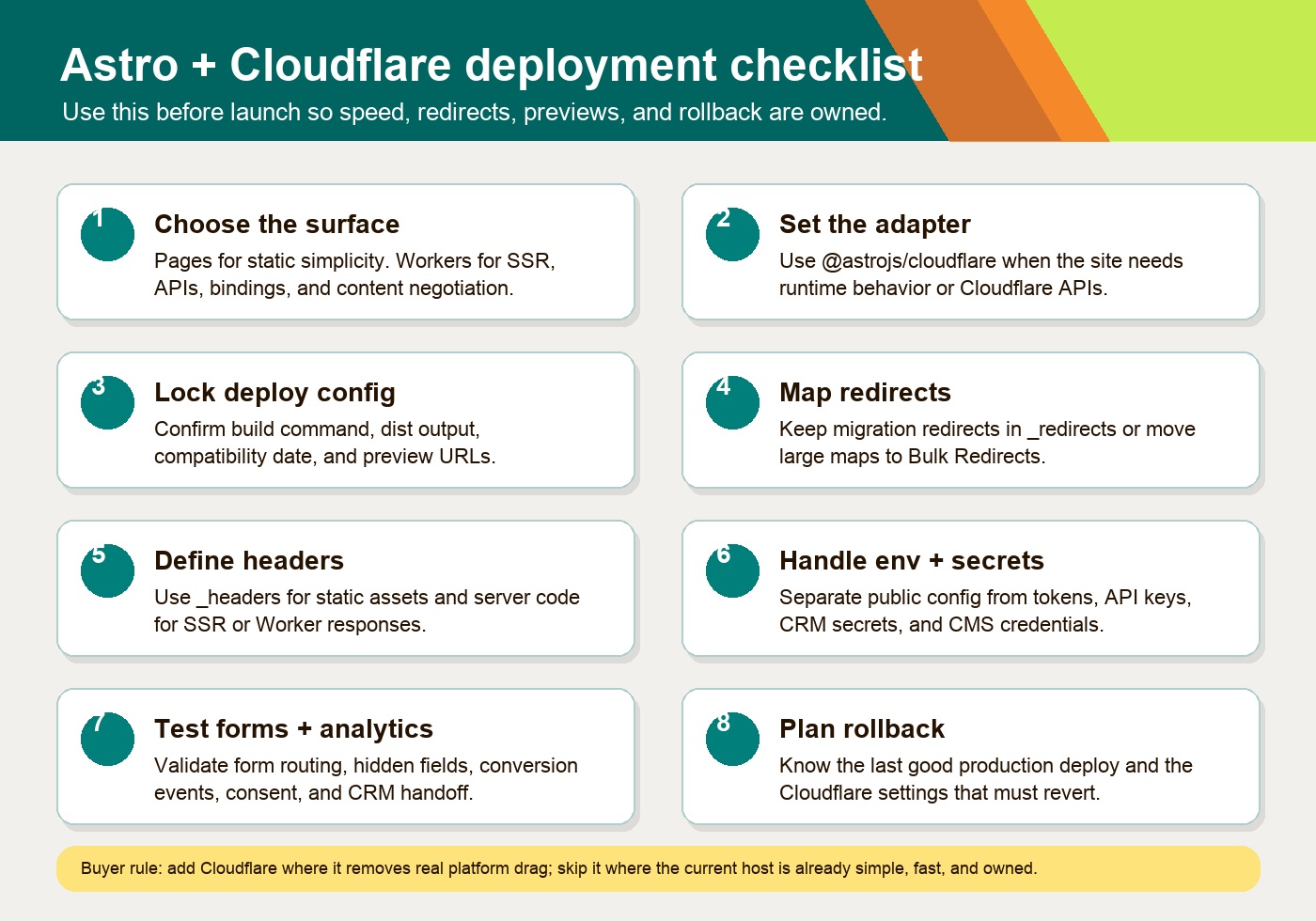
| Area | Buyer question | Implementation check |
|---|---|---|
| Pages vs Workers | Is this a new project, a Pages migration, or an existing static Pages site? | Choose Workers for new Astro projects. For Pages, verify the adapter and migration path before keeping it. |
| Adapter choice | Does the site need on-demand rendering or Cloudflare runtime APIs? | Use @astrojs/cloudflare v13+ for Astro 6 runtime behavior; static-only output can deploy without an adapter. |
| Build output | Does the deploy match Astro’s output and runtime? | Build to dist; use Wrangler for Workers and confirm the SSR entrypoint when the adapter is enabled. |
| Environment variables | Which values are public config, and which are secrets? | Keep non-sensitive vars in config; use Cloudflare secrets for tokens and credentials. |
| Redirects | How many old URLs need mapping? | Use _redirects for normal migrations; plan Bulk Redirects if the map exceeds file limits. |
| Headers | Which security, crawler, and cache headers matter? | Use _headers for static assets; set headers in function/Worker code for dynamic responses. |
| Forms and APIs | Will form handling stay third-party or move to the edge? | Keep simple forms simple; use Astro endpoints/Workers when validation, routing, or CRM logic belongs server-side. |
| Image handling | Are images optimized before build or transformed at runtime? | Pick build-time optimization, Cloudflare Images, or passthrough deliberately. |
| Analytics | What needs to fire after migration? | Validate page views, conversions, consent behavior, UTM capture, and CRM handoff in preview. |
| Preview deployments | Who signs off before production? | Use Pages previews for a verified Pages path, or astro preview/Wrangler for Workers, before production. |
| Rollback plan | How do you revert if launch breaks a page, form, or redirect? | Identify the previous production deployment and the non-code Cloudflare settings that must be reversible. |
Cloudflare Pages preview deployments are especially useful for marketing work because pull requests can get real preview URLs before production. Cloudflare’s docs say preview deployments do not affect custom domains and can be protected behind Cloudflare Access when previews should not be public. That gives stakeholders a real URL for QA without turning the migration into a production experiment.
Rollbacks should be planned, not discovered during a launch. Cloudflare’s Pages rollback docs say a successful production deployment can be used as a rollback target, while preview deployments are not valid rollback targets. That is enough for many website launches, but only if the team also tracks configuration outside the codebase: DNS, redirect products, cache rules, access rules, image settings, and environment variables.
Forms, APIs, and content negotiation at the edge
Cloudflare is most valuable when a migrated Astro site needs a small amount of server behavior without becoming a heavy application. Common examples include a lead form that validates and routes submissions, a preview route that fetches draft CMS content, a pricing or availability endpoint, or language negotiation based on request headers.
Astro can expose endpoints and server-rendered routes. The Cloudflare adapter then gives those routes access to Cloudflare runtime features. The adapter docs say the Cloudflare runtime provides environment variables, bindings, and request metadata, and they show access to the cf object for metadata such as country. That does not mean every site should personalize aggressively. It means the architecture can support targeted behavior where it is worth the complexity.
For content negotiation, keep the logic modest. Good uses include routing users to the right localized page, setting a default region, or serving a lightweight variant where the content and compliance need it. Bad uses include hiding content from crawlers, creating unstable canonical URLs, or building many automatic variants the content team cannot maintain.
The same rule applies to forms and APIs. If a simple embedded form is working, keep it. If the current form stack depends on fragile plugins, hidden fields, delayed scripts, and manual sales routing, a small Worker-backed endpoint can be cleaner. The migration decision should follow the operational pain, not the novelty of running code at the edge.
When Cloudflare is unnecessary or too much
Cloudflare is unnecessary when the current deployment already gives the business fast pages, clean previews, reliable rollbacks, simple redirects, and no meaningful runtime needs. Adding a new edge layer just to sound modern can create a second control plane that someone has to own.
Cloudflare may be too much when:
- The site has fewer than a few dozen pages and the current static host is already fast and dependable.
- The team has no one responsible for DNS, cache rules, preview access, environment variables, and deploy behavior.
- Redirect needs are small and already handled safely elsewhere.
- There are no forms, APIs, CMS previews, personalization, or content negotiation needs.
- The buyer expects a visual no-code operating model and does not want a code-owned site.
- The website is actually a logged-in application with long-running server processes, heavy Node dependencies, or backend complexity better suited to another runtime.
This is not an argument against Cloudflare. It is an argument for using it where it removes real drag. Hapy’s migration point of view is the same: preserve what works, rebuild what is dragging the business down, and leave alone anything that is already healthy.
How this supports agent-ready discovery
An edge-ready website is not automatically agent-ready. But Astro and Cloudflare can support the practical pieces: clean HTML, stable URLs, fast crawlable pages, clear redirects, dependable headers, structured metadata, well-handled images, and controlled public files such as robots.txt, sitemap XML, and llms.txt where appropriate.
The useful connection is maintainability. A code-owned Astro site on a controlled deployment layer is easier to inspect, version, update, and document than a pile of visual-builder pages, plugins, embeds, and hidden settings. That helps people first: buyers get faster pages and clearer paths. Search engines and AI systems benefit because the site is easier to crawl and interpret. Future agents benefit because the site has fewer black-box behaviors.
Do not promise AI citations because a site runs on Cloudflare. Promise better site hygiene: readable pages, fewer scripts, cleaner redirects, stronger metadata control, and public content that can be parsed without fighting the platform.
The buyer takeaway
Astro on Cloudflare is a strong fit when a marketing site has already outgrown its old platform and needs a cleaner foundation for speed, SEO control, global delivery, redirects, previews, rollback, small APIs, and edge-aware content. Workers is the current default for new Astro projects. An existing Pages site may still be workable, but its adapter and migration path must be verified. Cloudflare is less compelling when the current host is already simple, fast, and low-risk.
The decision should happen in this order:
- Decide whether the site needs an Astro migration at all.
- Decide whether the migrated site is static, hybrid, or server-rendered.
- Choose Workers for a new Astro project. Keep Pages only when an existing deployment has a verified compatibility path.
- Add the Astro Cloudflare adapter only where the site needs Cloudflare runtime behavior, and use v13 or later with Astro 6.
- Lock the operational checklist before launch: redirects, headers, cache, images, environment variables, analytics, previews, and rollback.
That is the commercially useful version of an edge-ready website. It is not more infrastructure for its own sake. It is a faster, clearer, more controllable marketing site with fewer places for campaign work to get stuck.