Hapy’s published Astro migration service starts at US$1,499, as checked against this site’s service page on September 8, 2026. This is a Hapy offer, not a market average. Project cost depends on the agreed scope: pages, templates, content, CMS requirements, redirects, integrations, forms, analytics, animations, and the depth of QA.
The honest answer is not a fake average. A five-page marketing site that keeps the same design is a different project from a WordPress site with 400 posts, Elementor layouts, lead forms, campaign tracking, schema, and a new CMS. A Webflow site with static pages is also different from a Webflow CMS site, because Webflow’s exported code does not include CMS content, ecommerce databases, forms, site search, or localized content.
Use the ranges below as Hapy’s illustrative USD planning estimates, reviewed September 8, 2026, not quotes or observed market averages. The bands are organized by the scope assumptions in each row; no completed-project pricing dataset is supplied. Obtain a written estimate covering hours or deliverables, exclusions, recurring services, taxes, and launch support. They assume a business website, not a logged-in software product. Hapy’s Astro migration service pricing starts from $1,499 for teams that want to move a WordPress, Webflow, Framer, or legacy marketing site into Astro with the right audit, redirects, integrations, analytics, QA, and handoff. Pair this with the website migration audit, platform migration checklist, and best CMS for Astro guide before comparing proposals.
When the quote includes SEO migration work, use the Astro SEO guide to separate metadata, sitemap, schema, redirect, and launch-QA scope from visual rebuild scope.
For schedule planning, use the Astro migration timeline guide alongside these cost bands so scope, sequencing, and stakeholder review are visible before the quote.
To decide whether the spend is justified, compare these price bands with the Astro migration ROI model for maintenance, hosting, publishing speed, conversion potential, and migration risk.
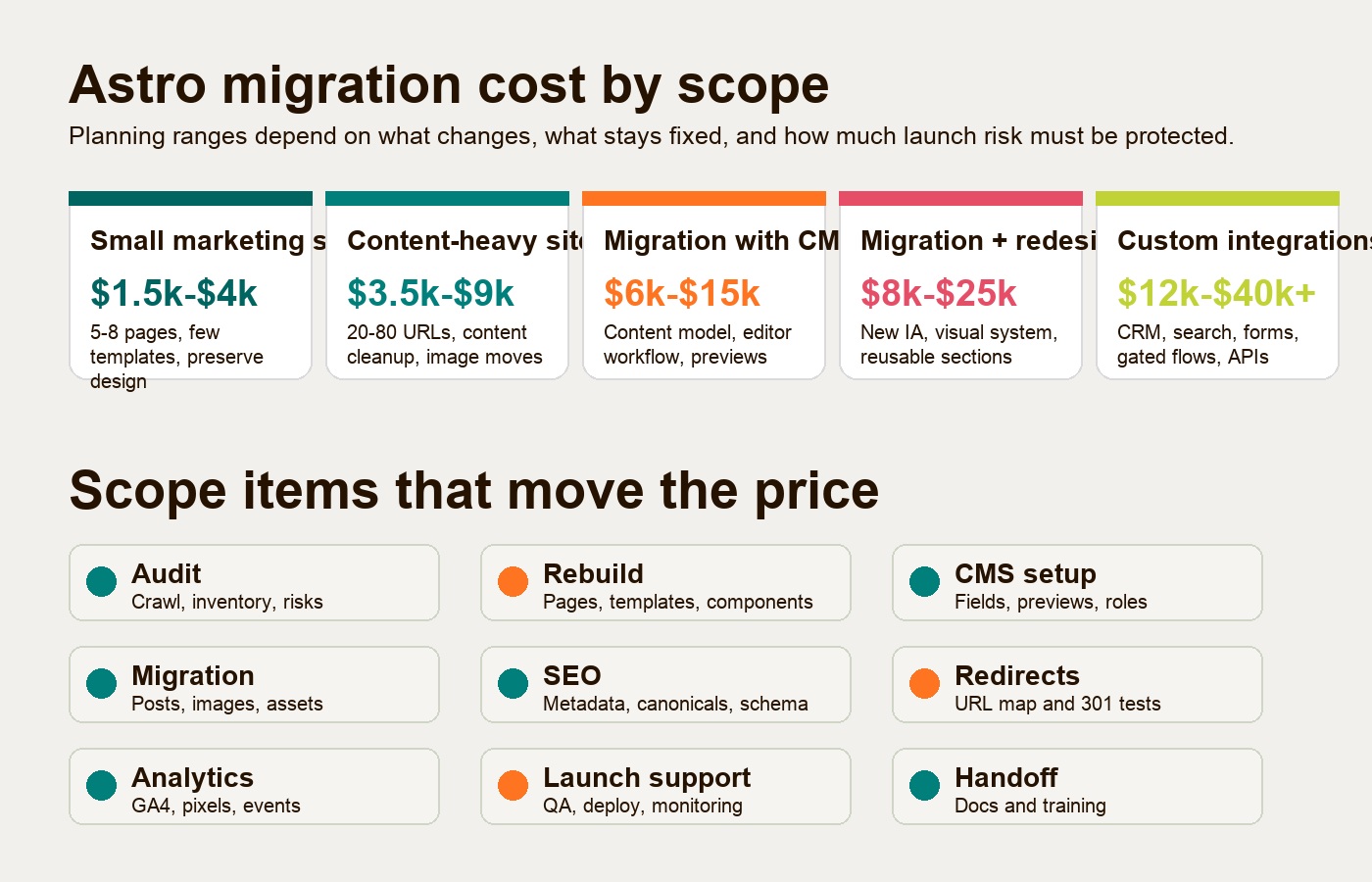
Astro website migration cost by project type
The price moves with the business risk of the migration. Page count matters, but template count, content structure, redirects, CMS workflow, and integrations usually matter more.
| Migration type | Planning range | Assumptions |
|---|---|---|
| Small marketing site | $1,499-$4,000 | 5-8 pages, 1-3 templates, same design direction, basic metadata, simple contact form, small redirect map, light QA. |
| Content-heavy site | $3,500-$9,000 | 20-80 pages or posts, content cleanup, image migration, journal or resource templates, metadata review, redirects, sitemap, launch checks. |
| Migration with CMS | $6,000-$15,000 | Content model, fields, editor workflow, preview needs, image rules, reusable sections, roles, training, and CMS integration. |
| Migration with redesign | $8,000-$25,000 | New information architecture, visual design polish, reusable components, conversion path changes, copy support, design QA. |
| Migration with custom integrations | $12,000-$40,000+ | CRM routing, advanced forms, search, gated content, third-party APIs, personalization, ecommerce-adjacent flows, deeper testing. |
These bands assume the site is moving to Astro because the business wants a faster, cleaner, more owned website foundation. They do not assume a full brand system, a custom web app, or a complex ecommerce rebuild.
What changes the price of an Astro migration?
Astro migration pricing changes when the project moves from “rebuild the public pages” to “rebuild the operating system behind the site.” The biggest drivers are the number of unique templates, content volume, CMS needs, URL changes, integrations, form logic, analytics, animations, and the depth of QA required before launch.
Page count and template count
Page count tells you how much content must be reviewed and moved. Template count tells you how much frontend system work must be rebuilt.
Ten pages can be cheap if they use two repeatable layouts. Ten pages can be expensive if every page has a one-off hero, custom animation, comparison module, pricing block, interactive calculator, or embedded form behavior.
For Astro, the cost discipline comes from turning one-off pages into reusable components and templates. The migration should not simply copy old platform mess into a faster framework. It should preserve the parts that work and rebuild the parts that make future campaigns slower.
Content volume and content cleanup
Content volume affects migration cost when pages, posts, images, metadata, internal links, embeds, and old formatting need cleanup.
WordPress exports can include posts, pages, comments, categories, tags, and links to media, but WordPress.com’s export documentation notes that the export file does not include theme design, customizations, plugins, or the actual image files themselves. That is why WordPress to Astro cost rises when the site depends on page-builder layouts, shortcode content, plugin-generated fields, or media libraries that need manual review.
If the content is already clean Markdown or MDX, the move can be lighter. If the content is buried in builder markup, copied tables, inline styles, broken embeds, or inconsistent headings, the migration becomes editorial and technical work at the same time.
CMS needs
Astro can work with local Markdown, MDX, content collections, a Git-based CMS, a hosted headless CMS, or a headless WordPress setup. Astro’s documentation describes Astro as a fit for content-based sites such as blogs, landing pages, marketing sites, and portfolios, with support for CMS integrations and mixed static or dynamic rendering.
That flexibility is useful, but it creates a pricing decision. A developer-owned Markdown site is usually cheaper than a CMS with visual preview, custom roles, field validation, localization, and editorial workflows.
Ask these questions before choosing the CMS:
- Who edits the site after launch?
- How often will new pages be published?
- Do editors need visual preview?
- Are reusable landing page sections required?
- Does content need approval, localization, or permissions?
- Should posts, case studies, glossary entries, and landing pages share fields?
The wrong CMS can make a migration look cheaper at launch and more expensive every month after.
Redirects and SEO risk
Redirects are not a small detail. They are one of the main differences between a casual rebuild and a professional website migration.
Google’s site move guidance recommends preparing URL mappings, testing the new site, configuring redirects, submitting sitemaps, and monitoring traffic when URLs change. It also warns that significant site changes can cause temporary ranking fluctuations while Google recrawls and reindexes the moved URLs.
The more URLs you change, merge, remove, or restructure, the more time should go into the redirect map. SEO scope should also include titles, meta descriptions, canonicals, robots rules, schema, internal links, sitemap behavior, and Search Console checks.
Forms, analytics, and integrations
Forms and analytics often look small in the design file and large in the launch checklist.
A basic contact form might only need fields, validation, spam protection, notifications, and a success state. A sales form might need CRM routing, hidden UTM fields, consent logic, Slack alerts, calendar handoff, lead source tracking, and attribution events.
Analytics scope can include GA4, tag management, ad pixels, conversion events, consent behavior, heatmaps, call tracking, CRM attribution, and post-launch validation. If those systems drive pipeline reporting, they should be treated as launch-critical work, not optional polish.
Animation and interactivity
Astro is strong because it does not force unnecessary JavaScript onto every page. Astro’s migration docs specifically call out designing with islands and adding interactivity only where it is needed.
That means static pages are usually cheaper than pages with scroll animations, calculators, filters, carousels, map embeds, live search, product selectors, gated resources, or complex navigation behavior. Existing React, Vue, Svelte, or other UI components can sometimes be reused, but they still need integration, styling, performance checks, and browser QA.
QA depth and launch support
QA is where migration risk becomes visible. A light migration may only need browser checks, mobile review, form testing, redirects, metadata, and analytics validation. A higher-risk migration may need full URL crawling, visual regression checks, accessibility review, staging approval, performance testing, structured data validation, and post-launch monitoring.
If the site has organic traffic, paid campaigns, lead forms, or investor-facing pages, QA should be part of the estimate from the start.
Scope table: what should be included
A clear Astro migration scope should show what is included, what is assumed, and what is out of scope. This is the table to ask for before comparing proposals.
| Scope area | What it includes | Cost impact |
|---|---|---|
| Audit | Current platform review, page inventory, template inventory, SEO footprint, form and analytics review, migration risk notes. | Sets the plan and prevents surprise work. |
| Rebuild | Astro project setup, layouts, components, responsive pages, assets, navigation, performance-minded frontend implementation. | Rises with template count and interaction depth. |
| CMS setup | Content model, fields, collections, editor workflow, preview, media handling, permissions, documentation. | Rises when non-technical editors need independence. |
| Migration | Moving pages, posts, images, metadata, embeds, internal links, and reusable content. | Rises with content volume and cleanup needs. |
| SEO | Titles, descriptions, H1s, canonicals, schema, sitemap, robots rules, internal links, indexability checks. | Rises with traffic risk and number of templates. |
| Redirects | Old-to-new URL map, 301 rules, testing, 404 review, merged/removed content decisions. | Rises with URL changes and legacy site size. |
| Analytics | GA4, pixels, events, UTM handling, consent behavior, CRM attribution, form tracking. | Rises with reporting complexity. |
| Launch support | Staging QA, deployment, DNS or hosting coordination, crawl checks, Search Console review, monitoring. | Rises with business-critical launch risk. |
| Handoff | Documentation, content editing guidance, CMS training, component usage notes, backlog for phase two. | Rises with team size and CMS complexity. |
WordPress to Astro cost
WordPress to Astro cost depends on whether WordPress is only storing content or powering the whole site through themes, plugins, and page builders.
A simpler WordPress migration might export posts and pages, rebuild a few templates in Astro, move media, preserve URLs, and replace a contact form. A harder migration has Elementor or Divi layouts, custom post types, plugin shortcodes, forms, membership rules, SEO plugins, redirects, schema, custom scripts, and years of inconsistent content.
The key question is not “How many WordPress pages do we have?” It is “How much of the current site is real content versus platform behavior?”
Typical WordPress to Astro cost drivers:
- Page-builder layouts that must be rebuilt as Astro components.
- Custom post types that need a clean content model.
- SEO plugin data that must become Astro metadata and schema.
- Forms, comments, search, or membership behavior that need replacement.
- Media libraries that need download, compression, naming, and alt text review.
- Legacy redirects, categories, tags, and archive URLs that may still receive traffic.
If the current WordPress design is staying mostly intact, the cost can sit in the lower bands. If the migration also cleans up the content model, redesigns templates, and replaces plugin behavior, it moves into a larger rebuild.
Webflow to Astro cost
Webflow to Astro cost depends on how much of the site is static design versus CMS, forms, search, localization, ecommerce, or custom interactions.
Webflow’s code export documentation says exported code can include HTML, CSS, JavaScript, and assets, but CMS content, ecommerce databases, user accounts, localized content, forms, site search, and several functional features are not included in exported code. That makes many Webflow migrations rebuilds rather than simple exports.
A small Webflow marketing site can be relatively straightforward if the design is stable and the page count is low. A Webflow CMS site needs extra work: crawl the site, export collection content where possible, map fields, rebuild collection templates, replace form handling, recreate redirects, and validate SEO metadata.
Typical Webflow to Astro cost drivers:
- CMS collections and collection templates.
- Interactions, Lottie files, sliders, tabs, and custom scripts.
- Webflow forms that need replacement.
- SEO fields and redirects that need mapping.
- Design drift across pages that should become reusable components.
- Localized pages or ecommerce-like behavior that export poorly.
The practical advantage of the move is control. Astro lets the team turn important page patterns into a maintainable codebase instead of continuing to stack one-off builder workarounds.
What is not included by default
An Astro migration service should make exclusions clear. Otherwise a migration proposal can quietly become a brand project, product build, or ongoing marketing retainer.
These are usually not included by default unless the scope says so:
- Full brand redesign, logo work, brand messaging, or visual identity system.
- Net-new copywriting for every page.
- Ongoing content production after launch.
- Custom web app development, dashboards, portals, or logged-in product features.
- Complex ecommerce rebuilds, checkout migration, subscriptions, inventory, or payment logic.
- Large-scale SEO content pruning across hundreds or thousands of URLs.
- Photography, video production, illustration systems, or advanced motion direction.
- CRM implementation beyond the form and routing needs tied to the website.
- Long-term analytics reporting, experimentation programs, or CRO retainers.
This does not mean those things are unimportant. It means they should be scoped as their own work so the migration estimate stays honest.
When a cheaper migration is enough
A lower-cost Astro migration can be enough when the site is small, the design already works, the content is clean, the URL structure is mostly stable, and there are only a few forms or tracking scripts to preserve.
This is common for founder sites, small service businesses, early SaaS marketing sites, landing page systems, simple blogs, and teams that want to get out of WordPress, Webflow, Framer, or a fragile legacy setup without turning the project into a full redesign.
In that case, the best use of budget is not invention. It is disciplined preservation: keep the pages that work, rebuild the templates cleanly, protect redirects and metadata, validate analytics, and hand the team a site they can maintain.
When the migration should be a larger rebuild
A larger migration is justified when the current site is not just on the wrong platform, but organized around the wrong operating model.
Choose a larger scope when:
- Marketing cannot launch pages without developer rescue.
- The site has many one-off layouts that should become reusable sections.
- Organic traffic depends on many old URLs.
- The CMS no longer matches how the team edits.
- Forms and analytics are tied to revenue reporting.
- The design is hurting conversion or trust.
- There are important integrations with CRM, scheduling, search, gated resources, or automation.
- The migration is part of a broader go-to-market change.
In those cases, paying only for a page-for-page migration may save money upfront and preserve the same problems in a new stack.
How to compare Astro migration proposals
Compare proposals by assumptions, not only by price.
A useful proposal should answer:
- How many pages and unique templates are included?
- Is the current design being preserved, polished, or redesigned?
- What CMS model is assumed?
- How many posts, images, or resources are being migrated?
- Are redirects included, and how will they be tested?
- Which SEO fields and schema types are included?
- Which forms, analytics events, pixels, and integrations are included?
- What browsers, devices, and breakpoints are tested?
- What happens after launch if redirects, forms, or analytics break?
- What is explicitly out of scope?
The cheapest proposal is risky if it does not name these assumptions. The most expensive proposal is wasteful if it includes a redesign, CMS, or integration layer the business does not need.
Turn the scope into an estimate
Astro website migration cost depends on scope, not the word “Astro.” Hapy’s published starting price is US$1,499; the actual scope needs a written quote. A content-heavy, CMS-backed, SEO-sensitive, or integration-heavy migration costs more because the work is protecting more business value.
Use the migration to answer three questions: what should stay, what should be rebuilt, and what must not break at launch. That is where the real estimate comes from.
For a practical starting point, review Hapy’s Astro migration service and pricing and bring the current URL, platform pain, important pages, CMS needs, integrations, forms, analytics, and any known SEO risks.
FAQ
How much does an Astro migration service cost?
Hapy’s Astro migration service starts from $1,499. A small marketing site may fit in the $1,499-$4,000 planning band, while content-heavy, CMS-backed, redesign, or integration-heavy migrations can move into higher ranges.
Why does website migration cost vary so much?
Website migration cost varies because the work is not only moving pages. It can include rebuilding templates, cleaning content, setting up a CMS, mapping redirects, preserving SEO metadata, replacing forms, validating analytics, and testing the launch.
Is WordPress to Astro cost higher than Webflow to Astro cost?
Not always. WordPress to Astro cost is higher when the site depends on page builders, plugins, custom post types, and messy media. Webflow to Astro cost is higher when the site depends on CMS collections, interactions, forms, localization, or exported-code limitations.
Do I need a CMS with Astro?
Not always. A small or developer-owned site can use Markdown, MDX, or Astro content collections. A marketing team that needs regular editing, previews, permissions, and reusable page sections may need a Git-based or headless CMS.
Can an Astro migration include a redesign?
Yes, but it should be scoped clearly. A migration preserves and rebuilds the site foundation. A redesign changes the visual system, page hierarchy, conversion flow, and often the copy. Combining them can make sense, but it changes the cost.