The best CMS for Astro is the one that matches how your marketing team actually edits. For a developer-owned site, Astro content collections with Markdown or MDX are usually the cleanest choice. For a small marketing team that wants a friendly editor but can live with Git-based publishing, Decap, Keystatic, or TinaCMS can work well. For structured content, multi-author workflows, permissions, previews, and localization, Sanity, Storyblok, Payload, or headless WordPress are stronger candidates.
That is the core decision. Do not start by asking, “Which CMS integrates with Astro JS?” Most serious CMS options can feed Astro. Start by asking who edits, how often they publish, what needs approval, how content is reused, whether pages need visual preview, and how much workflow complexity the site can justify.
Astro is flexible because content can come from local files, a hosted headless CMS, a self-hosted backend, or WordPress. Astro’s own docs describe content collections as a way to load and query content stored locally or fetched from remote sources. That flexibility is useful, but it also means the CMS decision belongs before template design, migration planning, and content modeling.

If your team is already planning a rebuild, choose the CMS before rebuilding templates. Hapy’s Migrate to Astro work starts with the operating model for content, not just the frontend stack, because the CMS determines fields, previews, media rules, permissions, and publishing flow. Use this with the website migration audit, Astro migration cost, and Astro vs Next.js guides when the CMS choice affects scope.
If the decision is really about ownership, compare this with Astro content collections vs headless CMS before choosing a dashboard, file-based workflow, or hybrid content model.
Compare editing models before comparing CMS tools
A CMS with Astro JS can mean four very different editing models.
| Editing model | Best fit | Watch out for |
|---|---|---|
| Developer-owned Markdown | Small sites, docs, technical journals, controlled service pages | Marketers may need developer help for routine edits |
| Git-based CMS | Small marketing teams that want an editor UI while content stays in the repo | Publishing, media, roles, and conflict handling can still feel technical |
| Hosted headless CMS | Growing marketing sites with structured fields, previews, workflows, and multiple editors | Requires content modeling and integration ownership |
| Headless WordPress | Teams that want to keep WordPress authoring while replacing the public frontend with Astro | Adds preview, caching, API, security, and plugin compatibility work |
This distinction is more useful than a feature checklist. A journal with three posts a month does not need the same system as a multi-region SaaS site with localized landing pages, approval workflows, and reusable comparison modules.
The wrong CMS usually fails in ordinary operations. A developer-owned Markdown site becomes a bottleneck when marketing needs to update landing pages daily. A visual builder becomes risky when every page can drift away from the design system. A headless CMS becomes overbuilt when a simple file-based content model would have been faster and easier to govern.
Astro content collections: best for controlled content
Astro content collections are often the best CMS for Astro when the “CMS” can be a structured content layer in the codebase. They work well for journals, documentation, case studies, landing page entries, comparison pages, changelogs, and other content that benefits from type-safe frontmatter and reusable templates.
The official Astro docs say content collections can organize structurally similar content, provide type checking, and load content from local files or remote sources. Build-time collections are especially useful when content is relatively static, performance is important, and data can be fetched once and reused across builds.
This model is strongest when developers own the site and marketers are comfortable submitting content through a defined process. It gives the team clean version history, required fields, reusable components, schema validation, and predictable build output. It also keeps the public site lean because content is compiled into the site instead of fetched through a live CMS for every visitor.
Use Astro content collections when:
- The site is mostly marketing pages, docs, journals, guides, case studies, or campaign entries.
- Content changes weekly or monthly, not minute by minute.
- Developers or technical marketers can manage Markdown, MDX, or structured data files.
- You want strict metadata, image alt text, categories, authors, redirects, and schema fields enforced before publishing.
- You do not need a full editorial dashboard, complex roles, or visual page building.
Do not choose this path if non-technical editors need daily independence. A clean developer workflow is not the same thing as a good marketing workflow.
Git-based CMS: best when editors need a UI but content should stay in Git
Git-based CMS tools sit between developer-owned Markdown and a full headless CMS. Decap CMS, Keystatic, and TinaCMS give editors a web interface while content remains versioned as files in the repository.
Decap CMS describes itself as an open-source CMS for a Git workflow where content is stored in the repository alongside code. It uses providers such as GitHub, GitLab, or Bitbucket to let editors create content updates without working directly in Git. Astro also maintains a Decap CMS integration guide, which makes it a practical option for static-first sites.
This model is attractive for small teams because it preserves many Astro advantages: content is close to templates, changes can be reviewed, and builds remain predictable. It also gives marketers a cleaner interface than editing raw Markdown files.
Use a Git-based CMS when:
- The team wants a simple editor UI for Markdown or structured files.
- Content volume is modest.
- The site does not need enterprise permissions, deep workflow automation, or complex localization.
- Git history and code review matter.
- The publishing process can tolerate build-based deploys.
The tradeoff is that Git is still underneath the workflow. Media handling, branch conflicts, editorial approvals, preview setup, and authentication all need planning. For a small Astro marketing site, that is usually manageable. For a large content operation, it can become the wrong kind of clever.
Break the Git CMS tie with an editor trial
This is a documentation-based shortlist reviewed September 8, 2026, not a hands-on ranking. Run the same draft-to-publish task with a real editor before choosing.
| Candidate | Authentication and roles to verify | Preview and ongoing cost questions |
|---|---|---|
| Decap | Its Astro integration guide requires an authentication setup. Confirm the selected Git backend, editor access, and approval permissions. | Check whether the editor preview matches your Astro components and whether deploy previews are needed. Budget for authentication hosting, builds, media, and maintenance even when the CMS software has no license fee. |
| Keystatic | In documented GitHub mode, collaborators need repository write access. Decide whether that authority is acceptable; evaluate Cloud separately if it is not. | Test draft previews in the actual Astro deployment. Confirm runtime requirements, Cloud terms if used, build costs, and who maintains credentials. |
| TinaCMS | Choose a production backend and access model; TinaCloud’s production overview is the starting point for its hosted route. Verify who may edit, review, and publish under the selected plan. | Demonstrate visual editing on your actual templates. Record paid seats, projects, media and usage limits, plus hosting or self-hosting support costs. |
Have an editor add an image, preview an unpublished article, request approval, publish, and undo the change. Repeat with two simultaneous edits and an expired login. Record the exact plan, role limits, quote date, and any developer intervention. A tool that fits one editor may fail when a contractor needs restricted access or publishing approval.
Sanity: best for structured content and reusable content models
Sanity is a strong Astro headless CMS when the site needs structured content that can be reused across pages. The official Sanity Astro docs say Astro and Sanity pair for fast static pages, visual editing, and component flexibility, and point teams to the @sanity/astro integration, embedded Studio routes, GROQ queries, Portable Text, and visual editing.
Sanity is usually a better fit when the website is not just pages and posts. It works well when content types relate to each other: authors, services, industries, case studies, testimonials, integrations, resources, comparison criteria, reusable calls to action, and regional variations.
For Astro, the key advantage is modeling discipline. Developers define content structures, editors fill them in, and Astro renders those fields through controlled templates. That is useful for AI-search-ready pages because the same fields can power answer-led intros, comparison tables, FAQ sections, metadata, schema, and internal links without asking editors to rebuild layout every time.
Sanity is a good fit when:
- You need structured content that appears in multiple places.
- Editors need a serious dashboard, not just Markdown files.
- Content models are likely to evolve.
- You need preview, draft, and staging workflows.
- Your team has developer ownership for schema changes and GROQ queries.
The main caution is ownership. Sanity is flexible because developers model the content in code. If marketing wants to redesign field structures every week without technical support, the workflow can slow down. Sanity works best when content modeling is treated as product architecture, not admin setup.
Storyblok: best for visual page assembly with guardrails
Storyblok is a strong headless CMS with Astro when marketers need visual page assembly, especially for landing pages and regional campaign pages. Astro’s Storyblok integration docs show an integration pattern where Storyblok content is rendered through matching Astro components, and Storyblok’s own visual editor centers on an iframe preview of the frontend.
That model is useful for marketing sites because editors can arrange approved blocks while developers keep control of the components. A marketer can build a landing page from hero, proof, comparison, FAQ, CTA, and form sections without inventing new layout code. The design system stays in Astro, while content and page composition live in Storyblok.
Use Storyblok when:
- Marketing needs to clone and assemble landing pages often.
- Visual preview matters to the publishing workflow.
- The team wants component guardrails rather than free-form design drift.
- Multi-region or localized page structures are part of the roadmap.
- Developers can maintain the Astro components that correspond to Storyblok blocks.
The tradeoff is implementation detail. Visual preview, draft rendering, webhooks, content deletion behavior, and localized routing all need to be designed carefully. Storyblok is strongest when page assembly speed is a real business requirement, not a nice-to-have.
Payload: best when the CMS should be owned infrastructure
Payload CMS is worth considering when the team wants a self-hosted, code-first headless CMS rather than a hosted SaaS content platform. Astro’s Payload guide describes Payload as an open-source headless CMS that can provide content to Astro through its API.
For marketing sites, Payload can make sense when the CMS is part of a broader application or operational system. For example, a company might want custom admin workflows, internal tools, gated resources, account-aware content, or deep integration with product data. In that case, Payload can be more than a publishing dashboard.
Use Payload when:
- The organization wants to own CMS infrastructure and data.
- The site connects to custom workflows or application data.
- Developers are comfortable maintaining a backend, database, hosting, backups, and upgrades.
- The CMS needs to behave like a tailored internal system.
Do not choose Payload just because it is powerful. If the site only needs pages, journals, and simple landing pages, a hosted CMS or Astro content collections will often be cheaper to run and easier to explain.
Headless WordPress: best when editors need to keep WordPress
Headless WordPress with Astro is useful when the editing workflow is already built around WordPress but the public site needs a faster, cleaner frontend. Astro’s WordPress CMS docs note that WordPress includes its own frontend but can also act as a headless CMS, with the REST API available at /wp-json/wp/v2/ by default. Astro can fetch posts, pages, and other content through that API, and teams can optionally use GraphQL plugins.
This option is often the least disruptive for editorial teams. Editors keep Gutenberg, the media library, revisions, scheduling, familiar roles, and existing publishing habits. Astro handles the public templates, performance rules, metadata, and frontend architecture.
Use headless WordPress when:
- Editors strongly prefer WordPress and publish often.
- The site already has years of posts, media, authors, and custom fields.
- Migration risk is mostly about preserving editorial continuity.
- The public frontend needs better speed, SEO control, and template consistency.
The risk is hidden complexity. WordPress plugins do not automatically behave the same way in a decoupled frontend. Forms, shortcodes, embeds, SEO plugin fields, redirects, previews, media transforms, custom post types, and permissions all need audit work. Headless WordPress is a migration strategy, not a free frontend upgrade.
CMS selection matrix for Astro marketing sites
Use this matrix as a starting point, then adjust for the team behind the site.
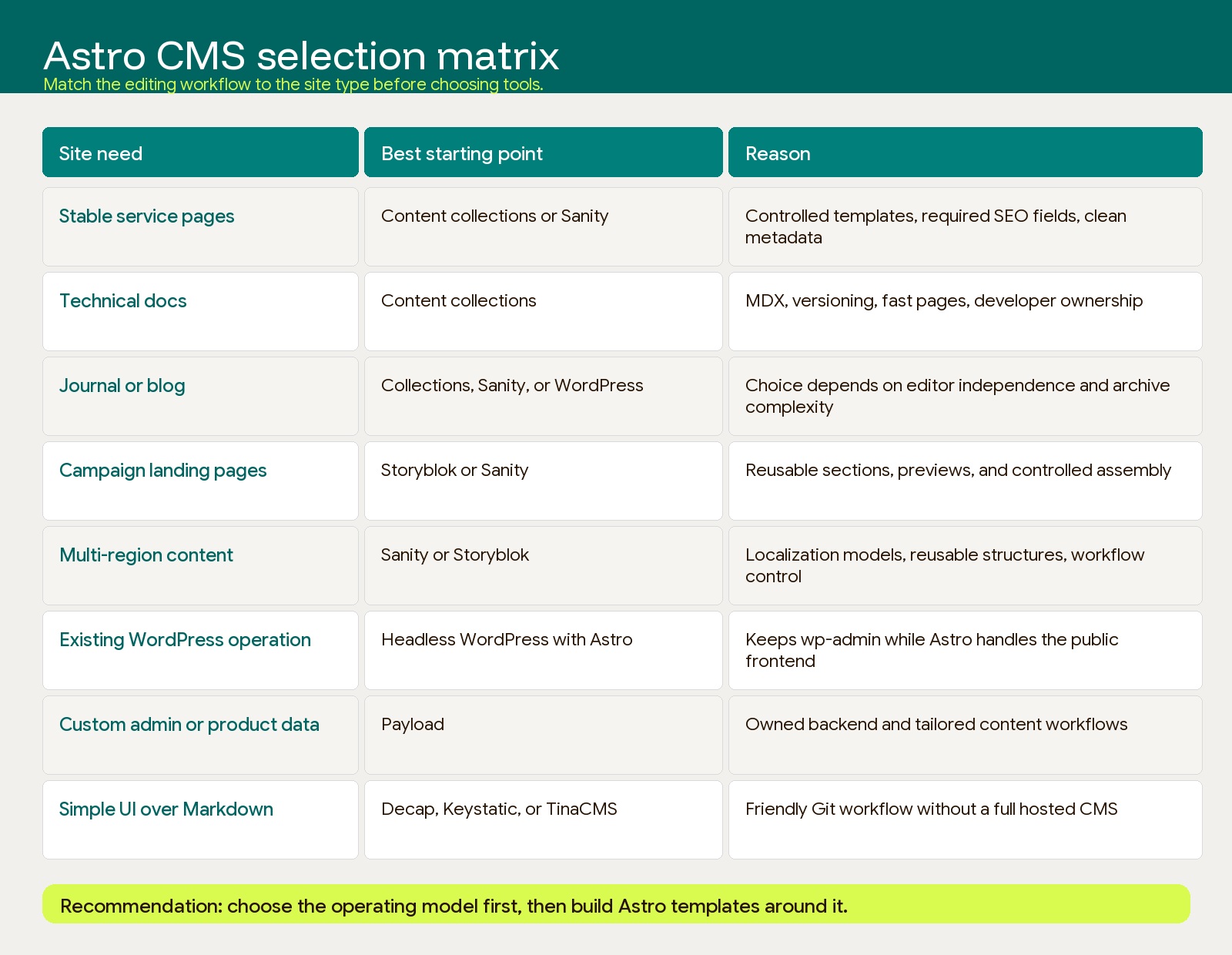
| Site need | Best starting point | Why |
|---|---|---|
| Marketing site with stable service pages | Astro content collections or Sanity | Strong templates, structured fields, and clean metadata |
| Technical docs | Astro content collections | Versioned content, fast builds, MDX support, and developer ownership |
| Journal or blog | Astro content collections, Sanity, or WordPress | Choose based on editor independence and archive complexity |
| Campaign landing pages | Storyblok or Sanity | Reusable sections, previews, and controlled page assembly |
| Multi-region content | Sanity or Storyblok | Better localization models, reusable structures, and workflow control |
| Existing WordPress editorial operation | Headless WordPress with Astro | Keeps the dashboard while improving the public frontend |
| Custom admin or product-connected content | Payload | Owned backend, custom workflows, and deeper application logic |
| Small team that wants a simple UI over Markdown | Decap, Keystatic, or TinaCMS | Editor-friendly Git workflow without a full hosted CMS |
There is no universal best headless CMS for Astro. There is only the best fit for the current content operation and the next 12 to 24 months of site growth.
Buyer questions to answer before choosing
The CMS decision should be written down before migration starts. Use these questions to pressure-test the choice.
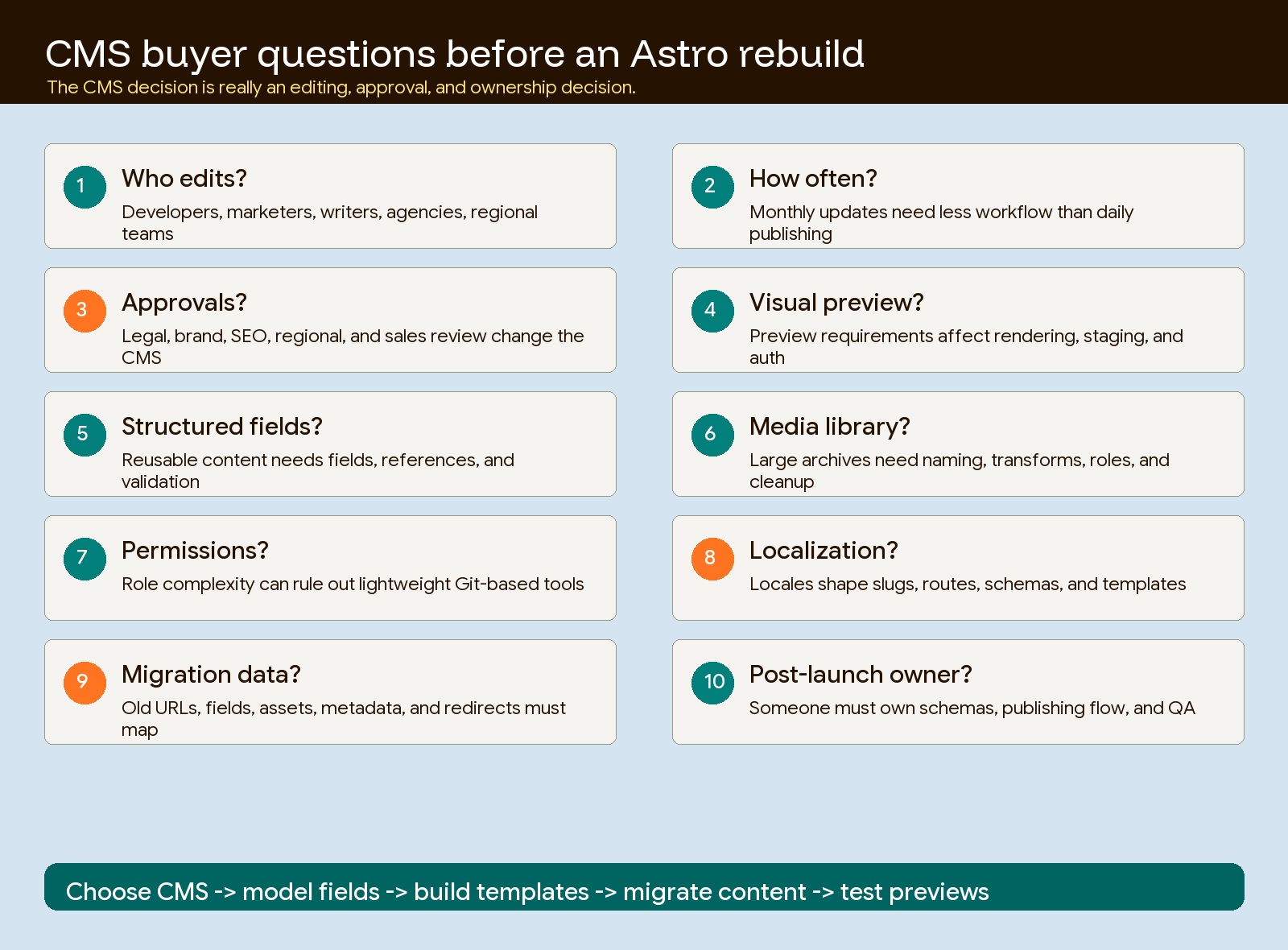
| Question | Why it matters |
|---|---|
| Who edits content: developers, marketers, writers, agencies, regional teams, or sales? | Determines whether Markdown, Git-based UI, or a full CMS is needed |
| How often does content change? | High publishing frequency usually needs better previews, roles, scheduling, and rollback |
| What requires approval? | Approval workflows change the CMS from storage to operations |
| Do editors need visual page assembly? | If yes, Storyblok or another visual CMS may be worth the complexity |
| Are fields structured or mostly prose? | Structured content favors Sanity, Payload, Storyblok, or disciplined content collections |
| Will content be reused across pages? | Reuse requires clean references, not copied page sections |
| How important are previews? | Preview requirements affect rendering mode, staging, auth, and deploy flow |
| Is there a media library requirement? | Large media archives need governance, transforms, naming rules, and permissions |
| Are permissions simple or complex? | Role complexity can rule out lightweight Git-based tools |
| Is localization coming? | Locale strategy should shape slugs, schemas, routes, and CMS selection before templates are built |
| What must migrate from the old site? | WordPress fields, Webflow collections, media, redirects, and SEO metadata change the CMS plan |
| Who owns the CMS after launch? | A system nobody owns becomes the next platform problem |
The hardest question is usually not technical. It is: who gets to change the website without asking a developer? The answer determines most of the architecture.
Choose the CMS before rebuilding templates
CMS selection is part of migration planning. If the team chooses the CMS after template development starts, the rebuild will usually produce avoidable rework.
Templates depend on content fields. Content fields depend on editor workflow. Editor workflow depends on approvals, previews, permissions, localization, and media rules. If those decisions happen late, developers end up rebuilding page models, rewriting imports, changing preview logic, and remapping metadata after the site is already in motion.
For an Astro migration, decide these items first:
- Which content types exist: pages, journals, case studies, landing pages, FAQs, authors, services, industries, locations, integrations, resources, and redirects.
- Which fields are required for SEO and AI extraction: title, description, canonical, summary, image, image alt, author, category, updated date, structured FAQ, comparison criteria, and internal links.
- Which content is edited in the CMS and which content stays in code.
- Which pages need visual preview, draft mode, approval, scheduling, or rollback.
- Which old URLs, media assets, custom fields, and redirects need migration.
- Which team owns schema changes after launch.
This is why CMS choice belongs near the beginning of the migration plan. The frontend can be beautiful and fast, but if the editing model is wrong, the site will still feel expensive to operate.
The practical recommendation
For most small to mid-sized Astro marketing sites, start simple. Use Astro content collections when developers own publishing and the content model is controlled. Add a Git-based CMS when marketers need a friendlier interface but the team still wants repository-based content.
Choose Sanity when structured content and reuse matter more than visual page building. Choose Storyblok when marketers need to assemble and preview campaign pages from approved components. Choose Payload when the CMS is part of owned infrastructure or custom internal workflows. Choose headless WordPress when preserving WordPress authoring is more important than a clean-slate content model.
The best CMS for Astro is not the one with the longest feature list. It is the one that lets the right people edit the right things without weakening performance, SEO control, content governance, or migration safety. Pick that operating model first, then rebuild the templates around it.
If you are deciding CMS architecture during an Astro rebuild, start with the migration plan and the content workflow. Hapy can help map the current site, choose the right CMS path, and rebuild the marketing site without carrying old platform drag into the new stack: Migrate to Astro.