Astro vs WordPress is not a fair fight if the question is “which one can build any website?” WordPress can run a magazine, membership site, store, course platform, directory, community, and marketing site from one admin dashboard. Astro JS is a modern web framework built for fast, content-heavy frontends.
For a business marketing site, that narrower comparison is exactly the point. If the site is mostly public pages, landing pages, blog posts, case studies, docs, and lead capture, Astro can remove a lot of weight that WordPress teams have learned to manage: plugin conflicts, database maintenance, theme bloat, update risk, and slow landing pages.
This guide is about Astro JS, the web framework, not the Astra WordPress theme. The practical question is: when does a WordPress marketing site become expensive enough, slow enough, or brittle enough that moving to Astro makes sense?
The short answer: migrate when your public site needs speed, tighter SEO control, lower maintenance, and a cleaner developer workflow more than it needs WordPress’s all-in-one editing and plugin ecosystem. Stay on WordPress when the editorial process, WooCommerce setup, memberships, or custom plugin workflows are still central to how the business operates.
For the larger migration path, use the WordPress to Astro migration checklist, website platform migration checklist, website migration SEO checklist, and Cloudflare and Astro deployment guide alongside this comparison.
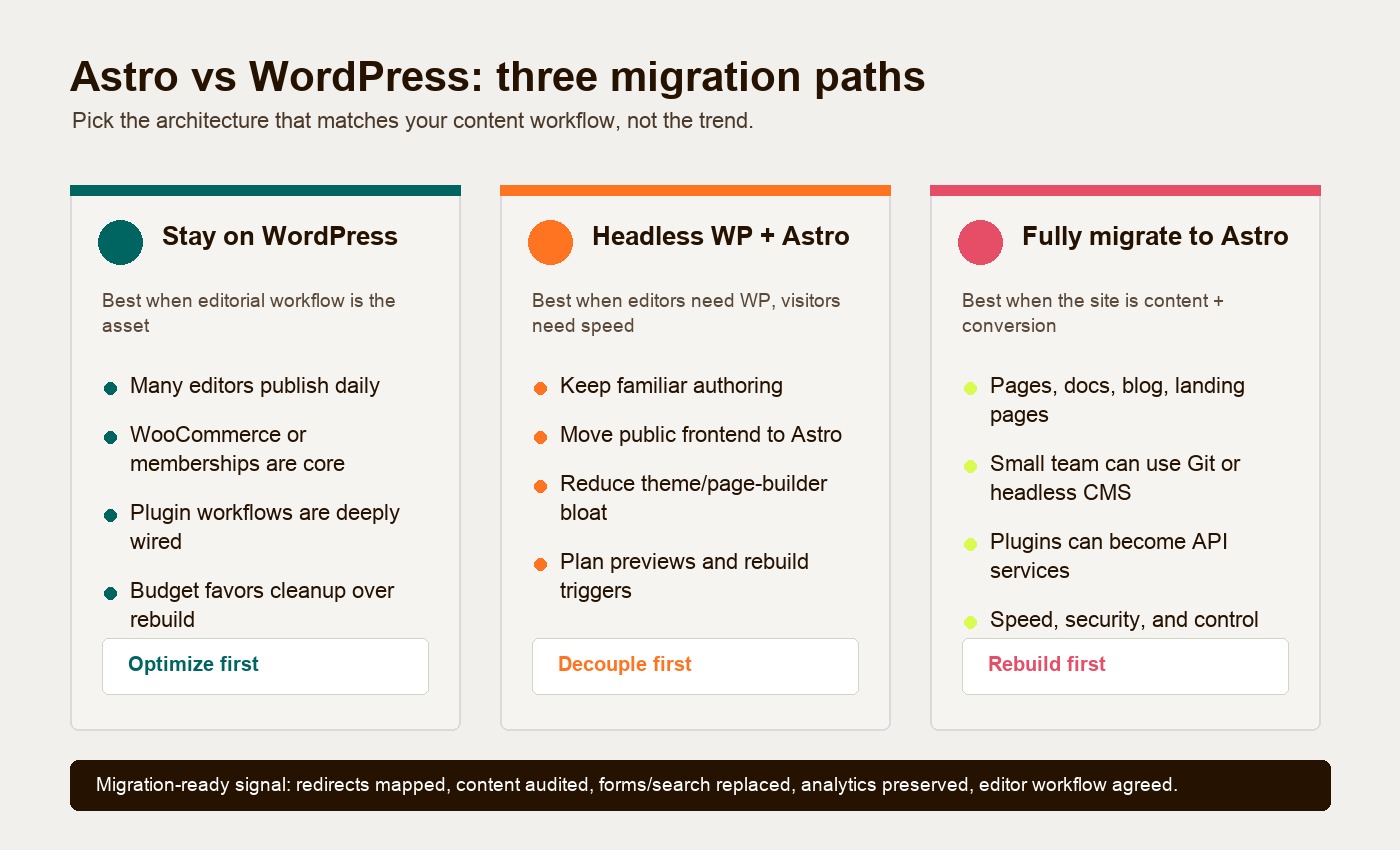
Astro framework vs WordPress for marketing sites
WordPress is a content management system. It stores content in a database, renders pages through PHP themes, and extends functionality through plugins. It remains the default for a reason: W3Techs reported on June 18, 2026 that WordPress is used by 41.5% of all websites and 59.3% of sites whose CMS is known.
Astro is a frontend framework. It can read content from Markdown, MDX, a headless CMS, WordPress, APIs, or structured files, then build fast pages that ship less JavaScript by default. Astro’s own documentation explains its islands architecture as a way to render most of the page as static HTML and load JavaScript only for the interactive components that need it.
That difference changes the buyer decision.
WordPress is strongest when the website is also the operating system for content, ecommerce, roles, workflows, forms, page building, and business logic. Astro is strongest when the website is primarily a public-facing growth asset: it needs to load fast, rank well, keep templates consistent, and make landing-page experiments easier for a technical team.
Where Astro usually wins
Astro usually wins on performance because it starts from a static-first model. A typical marketing page does not need to query a database, execute plugin code, load a page builder runtime, and hydrate a large JavaScript bundle for every visitor. It needs to deliver content, trust signals, CTAs, images, forms, and tracking without making the browser fight the page.
That matters because Core Web Vitals measure how real users experience loading, responsiveness, and visual stability. Google treats Core Web Vitals as part of the page experience signal, and slow pages also hurt conversion before SEO ever enters the room.
Platform averages compare different sites with different content, traffic, hosting, and engineering investment. They do not isolate the effect of changing frameworks. For a decision you can act on, compare representative pages from your current site and a pilot using the same content, third-party scripts, device conditions, and user journeys. Record the test date, payload, lab results, and field Core Web Vitals where enough traffic exists.
That does not mean every Astro site beats every WordPress site. A sloppy Astro build with oversized images, blocking scripts, and bad analytics loading can still be slow. A disciplined WordPress build on excellent hosting can perform well. But for marketing sites with years of plugins, page-builder blocks, abandoned scripts, and inconsistent templates, Astro gives the rebuild team a cleaner baseline.
Astro also gives developers stronger control over what ships to the browser. Interactive elements can be loaded only when needed. Content schemas can catch missing metadata before publishing. Redirects, canonical tags, sitemap generation, image handling, and reusable page sections can be managed in code instead of scattered across theme settings and plugins.
Where WordPress still wins
WordPress still wins when the editor experience is the main requirement. Gutenberg, custom post types, media libraries, scheduling, revisions, user roles, forms, ecommerce plugins, SEO plugins, and page builders are familiar to non-technical marketing teams. That familiarity has real value.
If a company has a heavy editorial team publishing multiple pieces per day, WordPress may be the better system even if the frontend is slower than ideal. The hidden cost of migration is not only development work. It is retraining editors, replacing workflows, rebuilding previews, moving media, rewriting shortcodes, recreating forms, rebuilding redirects, and deciding who can change what without breaking a page.
WordPress also wins when plugins are doing meaningful business work. WooCommerce stores, paid memberships, gated content, learning systems, directories, booking workflows, calculators, forums, and user accounts are not just “website features.” They are mini-products. Moving those into Astro without a plan can create more risk than it removes.
The best WordPress teams treat this honestly. If the site is working, the team publishes confidently, and the main pain is a few slow templates, fix the WordPress implementation first. Compress images, remove unused plugins, clean up tracking scripts, improve hosting, simplify the page builder, and standardize templates. Migration should solve a business problem, not scratch a technology itch.
Content ownership and editor workflow
The biggest operational difference in Astro JS vs WordPress is content ownership.
In WordPress, content lives in the WordPress database. Editors work in the dashboard. Developers work around the theme, plugins, and database-driven settings. That is comfortable for marketers, but it can make large-scale cleanup hard. Bulk edits, code review, structured content rules, and repeatable page patterns often depend on plugin behavior or custom admin work.
In Astro, content can live in files, a headless CMS, or WordPress itself. A file-based Astro site puts pages and posts into Git, usually as Markdown or MDX. That gives technical teams version history, branch previews, reusable components, and code review. Astro’s Content Collections can enforce required fields such as title, description, author, category, image, and image alt text before the site builds.
That is powerful for content quality. It is also a change-management issue. Some marketing teams will love the discipline. Others will hate losing the familiar dashboard.
For many companies, the right answer is not “WordPress or Astro.” It is headless WordPress with Astro. Astro’s official docs note that teams can continue using WordPress as the CMS while Astro handles the frontend. Editors keep the dashboard. Visitors get a faster public site. Developers get a cleaner frontend architecture.
The tradeoff is that headless adds integration work: previews, webhooks, rebuild timing, content modeling, media URLs, authentication, redirects, and deployment rules all need planning. It is a good middle path, not a shortcut.
If the team is deciding what should stay in files and what should move into a CMS, use the Astro content collections vs headless CMS guide before scoping the migration.
If the decision is less about WordPress and more about framework boundaries, compare Astro vs Next.js for marketing sites. If the editing workflow is still open, use the best CMS for Astro guide before choosing templates.
Plugins, maintenance, and security exposure
Plugins are WordPress’s superpower and its tax.
For a small business, installing a form plugin, SEO plugin, redirect plugin, page builder, popup tool, schema plugin, image optimizer, ecommerce plugin, security plugin, and analytics plugin can feel efficient. The site gains features quickly. The cost arrives later when updates conflict, a plugin is abandoned, scripts stack up, and nobody knows which settings affect revenue pages.
This is where a WordPress vs Astro marketing site decision becomes less about launch cost and more about operating cost. WordPress needs ongoing updates, plugin review, backups, security monitoring, database care, staging checks, and periodic cleanup. Astro shifts more of that work into the build process and hosting layer. There is no public WordPress admin login, no production PHP theme layer, and no live database powering every marketing page.
Astro is not magically maintenance-free. Dependencies still need updates. Forms, search, analytics, CMS webhooks, and hosting configuration still need owners. A fully static deployment can remove a public CMS runtime, but that is a specific architectural change, not a security guarantee. A headless CMS, build credentials, forms, dependencies, and hosting accounts remain in scope. WordPress’s hardening guide also makes clear that updates, access controls, and hosting practices affect security; assess both proposed deployments against those responsibilities.
Security exposure is especially important for lead-gen sites. A marketing site may not hold the company’s core product data, but it often touches forms, tracking scripts, CRM integrations, pixels, customer uploads, and campaign pages. Reducing exposed admin surfaces and unnecessary plugins is a practical risk reduction, not a theoretical engineering preference.
SEO control and landing-page speed
SEO control is one of the strongest reasons to consider Astro for a marketing site.
WordPress SEO plugins are useful, but they can create a false sense of control. A green plugin score does not guarantee a fast template, clean HTML, stable internal links, good image handling, or a sane content model. WordPress can absolutely rank well, but old themes and page builders often make technical cleanup slower than it should be.
Astro gives developers direct control over templates, schema, metadata, canonicals, image components, internal link patterns, structured content fields, and page-specific JavaScript. For comparison pages, docs, and content-led B2B sites, that control matters. Teams can inspect rendered HTML, heading order, crawlable links, canonical metadata, and accessible tables before release. Those are testable publishing properties; they do not guarantee inclusion or citation by an AI system.
Landing-page speed is the other side of the same decision. Paid campaigns, founder-led launch pages, sales enablement pages, webinar pages, and product comparison pages should not inherit the entire historical weight of the CMS. If a team is constantly building campaign pages that fight the theme, Astro can turn landing pages into reusable components instead of one-off page-builder artifacts.
Decision table: stay, go headless, or migrate
Use this table before approving a rebuild. The right answer depends on the site workflow, not only the benchmark.
| Path | Choose this when | Main benefit | Main risk |
|---|---|---|---|
| Stay on WordPress | Editors publish frequently, WooCommerce or memberships are central, plugin workflows are mature, or budget only supports cleanup. | Lowest workflow disruption and fastest path to incremental improvement. | Performance and maintenance problems may return if the theme and plugin stack stay messy. |
| Use headless WordPress with Astro | Editors need the WordPress dashboard, but the public site needs better speed, SEO control, and frontend consistency. | Keeps familiar authoring while replacing the public frontend. | Adds integration complexity around previews, webhooks, media, redirects, and deployment timing. |
| Fully migrate content into Astro | The site is mostly public marketing pages, blog, docs, case studies, landing pages, and lead capture. | Maximum control over performance, templates, versioning, and maintainability. | Requires a new editing workflow or a separate CMS, plus careful content and redirect migration. |
Companies that should not migrate yet
Do not migrate to Astro yet if the business cannot explain what will replace the WordPress workflows it relies on.
Heavy editorial teams should be cautious. If a newsroom-style marketing team publishes constantly, manages complex approvals, schedules content, reuses media libraries, and depends on custom fields, WordPress may still be the most productive system. Headless WordPress might be worth exploring, but a full Markdown migration can slow the team down.
Large WooCommerce stores should not migrate without a commerce architecture plan. Astro can work with headless commerce, but inventory, checkout, refunds, taxes, customer accounts, product feeds, payment flows, and operational reporting need deliberate replacement. A fast frontend is not enough.
Companies with complex plugin workflows should audit before they move. If lead routing, gated content, event registration, partner directories, calculators, CRM sync, or localization depends on WordPress plugins, each workflow needs an Astro-era replacement. Some can become API services. Some should stay in WordPress. Some may need a proper product build.
Also pause if the company has no developer ownership. Astro is a better fit when someone owns the codebase, deployment, content model, and integrations. Without that ownership, WordPress may be easier to keep alive.
Companies that should migrate
Service companies are often strong candidates. If the site is mostly service pages, proof, case studies, articles, location pages, and forms, Astro can make the site faster and easier to control. The team gets fewer plugin dependencies and a cleaner path for conversion-focused templates.
SaaS companies are another good fit. SaaS marketing sites need pricing pages, comparison pages, docs, changelog content, product pages, landing pages, integration pages, and fast experiments. Those pages benefit from structured components and consistent metadata.
Content-led B2B teams should consider Astro when content quality and page structure matter more than visual drag-and-drop freedom. If the team is building comparison guides, industry pages, glossary entries, technical explainers, and long-form SEO assets, Astro can make the content system more disciplined.
Docs and developer marketing sites are natural Astro territory. Docs need speed, search, versioned content, reusable components, and clean information architecture. WordPress can run docs, but Astro often fits the mental model better.
Lead-gen teams should consider Astro when paid traffic and SEO pages are slowed down by a WordPress stack built for general publishing. If every campaign page loads a page builder, slider scripts, unused forms, and legacy tracking code, the site is carrying cost that does not help the buyer convert.
Migration-readiness checklist
Before moving from WordPress to Astro, answer these questions in writing:
- Which pages make money, generate qualified leads, support sales, or protect rankings?
- Which WordPress plugins are essential, and what replaces each one?
- Which content types move to Markdown, which move to a headless CMS, and which stay in WordPress?
- Who owns content editing after launch: marketers, developers, or a shared workflow?
- How will previews, approvals, publishing, and rollback work?
- Have all URLs, redirects, canonicals, metadata, Open Graph images, and sitemap rules been mapped?
- Are forms, CRM routing, analytics, pixels, consent tools, site search, and downloads tested outside WordPress?
- Are image sizes, alt text, schema fields, and internal links part of the new content model?
- Will the new site preserve historical SEO value while improving template quality?
- Is there a post-launch monitoring plan for rankings, conversions, Core Web Vitals, broken links, and form submissions?
If the answers are clear, Astro can be a strong move. If the answers are fuzzy, start with an audit and a pilot: rebuild one high-value landing page, one article template, and one form flow. Measure speed, workflow, and lead quality before committing the whole site.
The bottom line
Astro vs WordPress is really a question of operating model. WordPress is a strong CMS when the dashboard, plugins, and editorial workflows are central to the business. Astro is a strong marketing-site framework when the public site needs speed, cleaner SEO control, tighter templates, and lower maintenance overhead.
For many companies, the move makes sense when WordPress has become a dependency pile instead of a publishing advantage. For others, the best decision is to keep WordPress, clean it up, and revisit headless or Astro later.
If your team is evaluating a move from WordPress to Astro, start with the workflows and revenue pages. Hapy Co can help you audit the current stack, pick the right migration path, and plan a rebuild that preserves content and reduces migration risk. Search visibility can still fluctuate during a move. Start here: Migrate to Astro.