Astro SEO is not a plugin checklist. For a marketing site, it is the way the codebase preserves search intent: static HTML that crawlers can read, metadata that is generated consistently, URLs that do not fragment, structured data that describes the page clearly, and a content model that prevents editors from publishing incomplete SEO fields.
That matters most during a migration. Moving from WordPress, Webflow, Framer, Next.js, or a custom site to Astro can improve performance and control, but the move can also break rankings if URLs, metadata, canonicals, schema, images, analytics, or internal links are treated as afterthoughts.
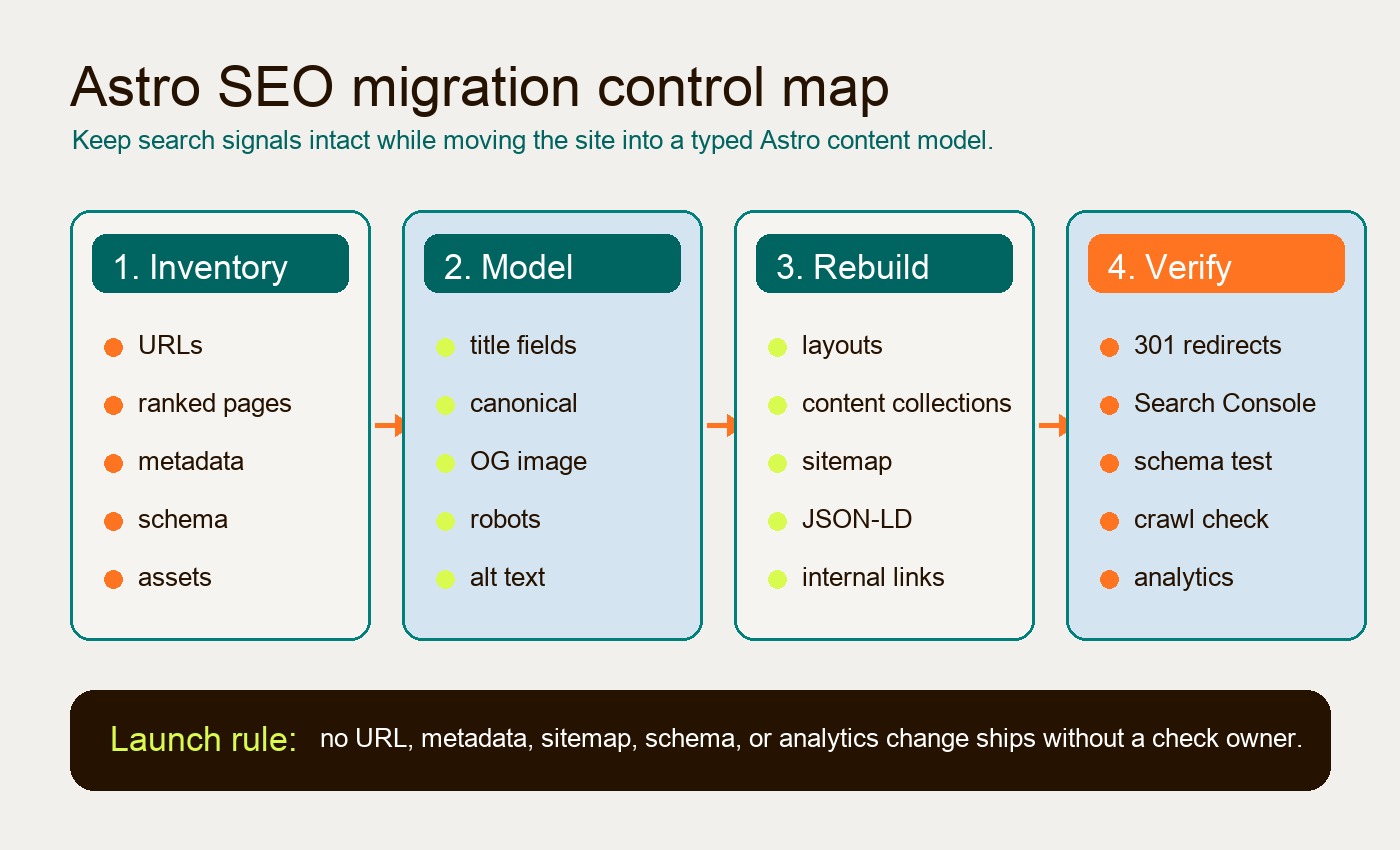
The practical goal is simple: build the new Astro site so every important page has a validated SEO record before launch, and every old URL has a clear destination after launch. Hapy Co’s Astro website migration work starts there because the risk is rarely “Can Astro rank?” The risk is whether the migration preserves the signals the current site already earned.
Use this with the website migration audit, website migration SEO checklist, Astro migration cost, and best CMS for Astro guides before changing production URLs.
Why Astro changes the SEO baseline
Astro’s SEO advantage starts with its delivery model. Astro renders pages to HTML first and only ships JavaScript for components that explicitly need it. Its islands architecture lets a marketing page stay mostly static while interactive pieces hydrate separately.
For search engines, that baseline is useful because the primary content, headings, links, and page structure are available in the initial HTML response. For users, it usually means less JavaScript on the main thread, faster first render, and fewer hydration side effects. That does not automatically create great SEO, but it removes a common drag on SEO for modern marketing sites: too much client-side work before the page becomes readable.
The mistake is assuming Astro’s speed covers everything. It does not. A fast page with duplicate canonicals, missing redirects, broken image paths, vague title tags, or thin schema can still lose visibility. Astro gives the team a cleaner foundation; the SEO system still has to be designed.
Build metadata once, then reuse it everywhere
Astro metadata should be centralized in a layout, SEO component, or metadata helper rather than copied across individual pages. The goal is to make every route produce the same family of tags from the same source record:
- title tag
- meta description
- canonical URL
- robots directive
- Open Graph title, description, image, and URL
- Twitter card metadata
- JSON-LD schema
- image alt text where the page model owns the image
In a migration, this centralization prevents a common failure pattern: the old site had page-by-page SEO fields, but the new build only migrates visible body content. The page still looks correct, while the title tag, description, canonical, or social image silently changes.
A practical Astro metadata model can start with fields like this:
title: "Astro SEO Guide for Marketing Site Migrations"
metaTitle: "Astro SEO Guide for Marketing Site Migrations"
metaDescription: "Use Astro SEO to protect rankings during a migration with structured metadata, sitemaps, schema, content collections, redirects, and launch QA."
canonical: "https://example.com/journal/astro-seo-migration-guide/"
robots:
  index: true
  follow: true
openGraph:
  title: "Astro SEO Guide for Marketing Site Migrations"
  description: "A migration-focused Astro SEO checklist for metadata, sitemap, schema, content models, redirects, and launch QA."
  image: "/uploads/journal/astro-seo-migration-guide-featured-image.jpg"
image:
  src: "./featured-image.jpg"
  alt: "Abstract migration map showing fragmented pages flowing into structured Astro pages"
Not every site needs this exact shape. The important part is that the model distinguishes between the on-page heading and the search metadata. The H1 can serve the reader. The title tag can serve the search result. The canonical can preserve the preferred URL. The Open Graph image can be validated before the page ships.
Canonicals and clean routing protect the migration
Clean routing is one of the highest-risk parts of an Astro migration because it sits between content strategy and deployment behavior. A page can be technically rebuilt correctly and still lose equity if the new route structure creates unnecessary variants.
Before launch, decide how the new site handles:
- trailing slashes
- lowercase paths
/index.htmlvariants- query parameters
- old category folders
- removed pages
- merged pages
- paginated archives
- localized routes
Astro supports route and redirect configuration in astro.config.mjs, but the SEO decision should come before the code. As explained in Astro’s routing documentation, static output without an adapter can use HTML meta refresh, while adapter or hosting support determines server redirect behavior. Verify the deployed response: a permanent move should return the intended HTTP 301 or 308 and Location header, followed by a 200 destination. A browser landing on the right page does not prove an HTTP redirect exists. If the old page at /services/webflow-seo/ becomes /journal/webflow-seo/, the redirect map should be explicit. If /about and /about/ both work in the new environment, the canonical should still point to one preferred version.
Google treats canonical annotations as signals, not absolute commands, so canonicals should align with redirects, internal links, sitemap URLs, and Open Graph URLs. Google’s own guidance on consolidating duplicate URLs is worth following closely during any migration: do not send mixed signals if the goal is to preserve authority.
A simple helper can keep canonical generation predictable:
export function getCanonical(pathname: string, siteUrl: string) {
  const cleanPath = pathname
    .replace(/\/index\.html$/, "/")
    .replace(/[?#].*$/, "");

  const normalized = cleanPath.endsWith("/") ? cleanPath : `${cleanPath}/`;

  return new URL(normalized, siteUrl).toString();
}
The helper is not the strategy. It is only a guardrail. The strategy is deciding which URLs deserve to exist, which old URLs should redirect, and which pages should be kept out of the index.
Use content collections to make SEO fields hard to forget
Astro Content Collections are especially useful for SEO because they turn frontmatter into a typed content model. Instead of hoping every page has a title, description, date, author, image, and category, the build can validate those fields before deployment.
Astro’s official Content Collections use schemas powered by Zod. That means a marketing team can keep content in Markdown or MDX while engineering defines the minimum publishing requirements. A missing description, invalid author reference, or malformed date can fail the build. Character targets are optional house conventions, not universal SEO requirements. Review whether text accurately describes the page; do not pad it to pass a length rule. Decorative images need empty alt text, while informative images need a useful contextual description.
For an SEO-focused journal or resource library, the model might include:
const journal = defineCollection({
  schema: z.object({
    title: z.string().trim().min(1),
    metaDescription: z.string().trim().min(1),
    datePublished: z.coerce.date(),
    dateModified: z.coerce.date(),
    canonical: z.string().url().optional(),
    noindex: z.boolean().default(false),
    author: reference("authors"),
    categories: z.array(reference("journal-category")).max(2),
    coverImage: z.object({
      src: z.string(),
      alt: z.string(), // Empty for decorative images; review meaning in context.
    }),
    related: z.array(reference("journal")).default([]),
  }),
});
That kind of validation is more valuable after a migration than before it. Once the new Astro site is live, the team will keep adding landing pages, articles, case studies, and campaign pages. Content collections give the site a durable publishing contract instead of a one-time launch cleanup.
Sitemaps need to match the rendering mode
Astro sitemap implementation depends on how the site is built. For a static marketing site, the official @astrojs/sitemap integration is usually enough. It can generate sitemap files from the routes Astro knows at build time.
The edge cases appear when the site uses server rendering, database-driven pages, draft content, gated resources, localized routes, or test variants. In those cases, a build-time sitemap can miss important URLs or include pages that should stay out of search.
For a migration, treat the sitemap as a launch artifact, not a default file. It should include the canonical version of every indexable page and exclude:
- redirected old URLs
- noindex pages
- draft content
- duplicate tag or filter pages
- private campaign previews
- test variants
- internal search result pages
If the site has dynamic content, a custom src/pages/sitemap.xml.ts endpoint can query content collections or a CMS and return only the routes that should be indexed. That endpoint should still be cached and monitored because a broken dynamic sitemap can create a search problem at scale.
Robots rules should also be generated from the same site configuration where possible. A robots.txt.ts endpoint can reference Astro.site, include the sitemap location, and avoid hardcoded staging domains. The key is consistency: the sitemap, robots rules, canonical tags, and internal links should all describe the same URL system.
Schema should be connected, not sprinkled
Astro makes JSON-LD easy to render, but schema only helps when it describes the page accurately. For marketing sites, the useful pattern is a connected graph that ties the page to the organization, website, author, article, service, FAQ, or breadcrumb trail.
Google’s structured data documentation recommends JSON-LD for many search features, and its structured data introduction is a good baseline for implementation rules. For Astro, the implementation can be a component that serializes a schema object into a <script type="application/ld+json"> block.
For a journal article, the graph might include:
Organizationfor the company entityWebSitefor the domainPersonfor the authorBlogPostingorArticlefor the pageBreadcrumbListfor the pathFAQPageonly when real FAQs exist on the page
The important migration task is mapping old schema into the new templates. If the old WordPress site used an SEO plugin, the schema may have been generated automatically. If the old Webflow site had custom embeds, the schema may be inconsistent. During the migration, capture what exists, decide what is still valid, and rebuild it as part of the Astro layout system.
Schema should be tested with the Schema Markup Validator and Google’s Rich Results Test before launch. Do not wait for Search Console to discover schema errors after the site is already live.
Images affect both Core Web Vitals and search context
Astro’s image tooling is useful because SEO images are not only decorative. Hero images, article images, Open Graph cards, and product visuals all affect performance, accessibility, and how the page is understood.
Astro’s official image guide covers the core behavior: local images imported from src/ can be processed by Astro, while files in public/ are served as-is. The <Image /> and <Picture /> components can generate responsive output and preserve width and height attributes, which helps avoid layout shift.
During migration, build an image inventory with three decisions for each important asset:
| Image type | Migration decision | SEO risk if ignored |
|---|---|---|
| Hero image | Rebuild with explicit dimensions, optimized format, and descriptive alt text when meaningful | Layout shift, slow LCP, weak visual context |
| Article image | Move into the content model with required alt text | Broken references or empty alt fields |
| Open Graph image | Generate or preserve a 1200px-wide social image | Poor social previews and inconsistent sharing |
| Legacy inline image | Redirect, replace, or remove from body content | 404 image requests and weak content quality |
| CMS-hosted image | Allow the remote domain in Astro config if using Astro image optimization | Build or runtime image failures |
Alt text should describe the image’s function in context. It should not repeat the target keyword. If an image is decorative, the template should treat it that way. If it explains a framework, process, product screen, or technical pattern, the alt text should make that meaning clear.
Internal links should be rebuilt from intent, not copied blindly
Internal links often degrade during migrations because content is copied page by page while the old site architecture disappears. Astro gives the team a chance to rebuild links around actual reader paths.
For an Astro SEO migration, map internal links in three groups:
- preserve links that support ranking pages and user journeys
- update links that point to changed routes
- remove links that send readers to obsolete pages, thin archives, or dead campaign URLs
For example, an article about Astro SEO should naturally link to the migration service page because the reader may be planning a rebuild. It should not stuff links into every mention of SEO, CMS, schema, or performance. A smaller number of relevant internal links usually supports both readers and crawlers better than a dense block of generic links.
This is also where Astro content collections can help. Related posts, categories, authors, and CTAs can be references in the content model instead of hand-coded links that drift over time.
The migration checklist
Use this checklist before launching an Astro marketing site migration.
| Area | What to implement in Astro | How to verify |
|---|---|---|
| URL inventory | Map every current indexable URL to keep, redirect, merge, or remove | Crawl old site and compare against redirect map |
| Redirects | Add 301 redirects for moved pages and retired URLs with replacements | Inspect HTTP status and Location on the deployed host before launch and after DNS switch; check the final destination |
| Metadata | Centralize title, description, canonical, robots, and social tags | Crawl staging output and spot-check rendered HTML |
| Content model | Validate required SEO fields with content collections or CMS schema | Run build and fail on missing or invalid fields |
| Sitemap | Generate only canonical, indexable URLs | Compare sitemap against page inventory |
| Robots | Reference the production sitemap and block only intended paths | Fetch /robots.txt in staging and production |
| Schema | Rebuild connected JSON-LD in shared templates | Use schema validator and rich results testing |
| Images | Optimize key images and preserve dimensions, alt text, and OG cards | Check LCP image, CLS, broken image paths, and previews |
| Internal links | Update links to new routes and keep only useful reader paths | Crawl for 404s, redirect chains, and orphaned pages |
| Analytics | Rebuild tracking, forms, consent, and conversion events | Run test submissions and compare event names |
| Launch QA | Inspect top pages, redirects, sitemap, canonicals, and Search Console | Monitor crawl errors, indexing, rankings, and conversions |
The highest-risk rows are redirects, metadata, canonicals, sitemap, and analytics. Those are the rows that can make a migration look fine visually while quietly damaging search and reporting.
Post-launch checks matter as much as pre-launch build quality
Astro SEO work does not end at deployment. The first days after launch should be treated like a controlled handoff from the old URL system to the new one.
At minimum, check:
- The top organic landing pages return 200 status codes on the new site.
- Old priority URLs return one-step 301 redirects to the right new pages.
- Canonical tags point to the production URLs, not staging.
- The sitemap contains production canonical URLs only.
- Search Console can fetch the sitemap and inspect priority URLs.
- JSON-LD validates on representative templates.
- Forms, analytics, conversion events, and consent behavior still work.
- High-value pages keep their internal links and visible body content.
- Core Web Vitals checks do not reveal a new LCP image or layout shift problem.
- Logs or crawl tools do not show redirect loops, soft 404s, or broken assets.
Search traffic can fluctuate after any migration, but the team should not be guessing. A good Astro launch has a redirect map, a metadata export, a sitemap diff, a schema test log, and a post-launch monitoring owner.
Where Astro SEO best practices actually pay off
Astro SEO best practices pay off when they become a publishing system. The value is not only that Astro ships fast pages. The value is that the site can make SEO fields structured, URLs predictable, content relationships explicit, and launch checks repeatable.
That is why Astro is a strong fit for marketing sites, content hubs, product pages, service pages, and documentation-style resources. These sites need speed, but they also need a content model that marketing can keep using after the migration is over.
If the current site is slow, hard to edit, overloaded with plugins, or fragile every time the team ships a campaign, an Astro migration can be the right move. Just do not treat the framework as the SEO strategy. The strategy is preserving the search intent that already exists, then giving the new site a cleaner system for metadata, sitemaps, schema, images, internal links, and future content.
That is the real Astro SEO advantage: not a magic ranking lift, but a site architecture that makes good SEO harder to break.