Internal tools are software employees use to run the business. Customers usually never see them directly. They sit behind the scenes as admin panels, approval queues, dispatch boards, dashboards, support consoles, content operations tools, and integration monitors.
That plain definition matters because internal tools are easy to overcomplicate. A useful internal tool does not need to become an ERP, a full product platform, or a giant company operating system. It needs to make one important workflow easier to see, easier to control, and less dependent on manual handoffs.
The best internal tools are boring in the right way. They protect data quality, reduce repetitive work, make ownership visible, and give teams a cleaner interface for work that already matters. The worst ones become shadow systems: half-maintained apps, fragile scripts, private spreadsheets, and dashboards no one trusts.
This explainer is for operators, founders, and teams in early research mode. It explains what internal tools are, gives practical internal tool examples, compares them with spreadsheets, no-code tools, and ERP, and shows when custom internal tools are worth building.
If the workflow has grown beyond one focused employee-facing tool, compare it with enterprise application development before turning a narrow internal tool into a larger operating system.
Once the scope is clearer, use the internal web app development timeline to plan discovery, integrations, QA, launch, and rollout by complexity.
Before estimating that work, use the internal app feature checklist to define roles, permissions, workflow states, integrations, audit history, exports, and support needs.
If the need is primarily a trusted, role-specific decision view, the custom dashboard development guide explains when a tailored dashboard is more useful than a spreadsheet or standard BI report.
If the need is becoming a staff-facing operating layer across requests, approvals, documents, and reporting, use the custom employee portal guide to decide whether a portal is better than another narrow internal tool.
What are internal tools?
Internal tools are employee-facing software systems used to manage business work, data, workflows, approvals, reporting, or operations. They are different from customer-facing products because their users are inside the company: operations, support, sales, finance, HR, marketing, product, or leadership.
A customer-facing app might let a buyer place an order. The internal tool might let the operations team review exceptions, update inventory, assign a driver, approve a refund, or investigate a failed payment.
Baserow describes an internal tool as software built for employees to manage data, automate work, track processes, and complete tasks more efficiently. That is a useful starting point, but the deeper point is fit. Internal tools exist because the business has a workflow that standard software does not handle cleanly enough.
Common triggers include:
- A spreadsheet has become the unofficial system of record.
- People copy the same data between SaaS tools.
- Approvals happen in Slack, email, or meetings with no audit trail.
- A support team needs customer context from five systems.
- A dashboard shows the number, but not the action that should happen next.
- A recurring task depends on one person remembering the process.
That is why internal tools are often the middle layer between “we can still manage this manually” and “we need a full enterprise system.” They are focused enough to ship quickly, but structured enough to reduce operational risk.
Internal tool examples
Internal tool examples are easiest to understand by workflow, not by software category. The same company might need three or four small business internal tools before it needs one broad platform.
| Internal tool example | What it does | Useful when |
|---|---|---|
| Admin panel | Lets approved employees view, edit, create, or deactivate records without touching the database directly | Customer, order, inventory, or account data needs controlled manual updates |
| Approval queue | Routes requests through review steps with status, comments, permissions, and audit history | Finance, access control, refunds, procurement, publishing, or compliance needs traceable approval |
| Dispatch board | Shows jobs, orders, drivers, crews, locations, timing, and exceptions in one operational view | Field service, logistics, delivery, repair, or warehouse work changes throughout the day |
| Reporting dashboard | Turns live operational data into metrics, alerts, and follow-up actions | Leaders need faster visibility than weekly exports or static BI reports |
| Customer support console | Combines customer records, billing, tickets, product events, and action buttons | Support agents need context without switching between many tools |
| Content operations tool | Tracks briefs, drafts, approvals, SEO metadata, publishing status, owners, and assets | Marketing or content teams need repeatable production without scattered sheets |
| Integration monitor | Tracks sync jobs, failed payloads, latency, stale data, and downstream alerts | The business depends on background integrations between CRM, finance, product, or data tools |
Retool’s platform walkthrough offers vendor examples of internal applications. Treat these as implementation ideas, not independent evidence of results. The exact tool name matters less than the operating problem. A small approval queue that removes five risky email handoffs can be more valuable than a beautiful dashboard that no one acts on.
What makes internal tools succeed?
Successful internal tools usually have five traits: a clear owner, a narrow workflow, strong permissions, auditability, and low-friction adoption. Miss one of those and the tool can still look finished while quietly failing in daily use.
Clear owner
Every internal tool needs an owner. That owner does not have to write the code, but they must be responsible for the workflow, data definitions, access rules, and ongoing usefulness of the system.
Without ownership, business internal tools decay. Fields stop matching reality. API changes break automations. New team members inherit a tool no one fully understands. The system becomes another place people work around instead of work inside.
A good owner can answer:
- What workflow does this tool support?
- Which team depends on it?
- What data does it read and write?
- Who can change the process?
- How will we know if the tool is still useful six months from now?
Narrow workflow
Internal tools work best when they solve a specific operating loop. “Build an operations platform” is too broad for a first version. “Create a dispatch board for assigning same-day repair jobs” is specific enough to design, test, and improve.
Narrow scope also helps adoption. Employees do not want another system to manage. They want a faster way to finish real work. If the tool removes a daily bottleneck, adoption is much easier. If it asks people to change ten habits at once, they will drift back to spreadsheets and chat threads.
Good permissions
Internal software often touches sensitive data. That can include customer records, financial details, refunds, employee information, pricing rules, credentials, or operational exceptions.
Role-based access control is the normal starting point. The NIST RBAC model organizes permissions around roles rather than one-off permissions for every individual. In practice, that means a support agent may be allowed to view and comment on an account, while a finance manager can approve a credit adjustment, and an administrator can change the workflow itself.
Permissions should map to real responsibility, not job-title politics. If a user can change data, approve money, export sensitive records, or override rules, the tool should make that access explicit.
Auditability
An internal tool should make important actions traceable. The team should be able to see who changed a record, what changed, when it happened, and why the system allowed it.
OWASP’s logging guidance is useful here because it separates casual debugging from security and operational logging. For internal tools, the most important audit events usually include data creation, modification, deletion, exports, permission changes, admin actions, approval decisions, and failed access attempts.
Auditability is not just for compliance. It helps managers understand how the workflow behaves. It helps engineers debug bad states. It helps teams trust the tool when something goes wrong.
Low-friction adoption
Internal tools fail when they add more work than they remove. A technically correct tool can still lose if it is slow, confusing, mobile-unfriendly, or too far away from the way employees already operate.
Low-friction adoption usually means:
- The tool starts from the team’s real workflow, not a diagram made in isolation.
- Forms use the fields people actually need.
- Defaults reduce repetitive typing.
- Validation prevents bad data before it spreads.
- The tool connects to existing systems instead of creating duplicate records.
- The first version solves one painful task well.
This is where product thinking matters. Internal users are still users. They may not be paying customers, but their adoption decides whether the tool creates leverage or becomes shelfware.
For the rollout side of that work, the internal tool adoption plan covers training, champions, feedback loops, and adoption metrics after the build is ready.
Risks of custom internal tools
Custom internal tools can make a business faster and cleaner. They can also create risk if they are built before the process is clear or maintained without discipline.
The biggest risks are not exotic technical failures. They are everyday operating failures.
Shadow systems
Shadow systems appear when teams create their own unofficial tools because the official system does not fit the work. This can be a spreadsheet, a no-code database, a private automation, or a small app built outside normal governance.
Shadow systems are understandable. People build them because the business has a real gap. The risk is that each workaround creates another source of truth. Over time, teams disagree about numbers, approvals, status, and ownership.
The fix is not to ban every small tool. The fix is to give teams a path from useful workaround to governed workflow: named owner, data source, permission rules, change history, and maintenance plan.
Poor data quality
Spreadsheets are flexible, which is why teams start there. They are also easy to corrupt as workflows get more complex. Formula errors, duplicate records, missing fields, inconsistent naming, and copied exports can quietly distort decisions.
Spreadsheet error research has found that errors are common enough to matter in operational models. Ray Panko’s 2015 review, deposited on arXiv in 2016, argues that spreadsheet users and organizations are often overconfident about spreadsheet accuracy, especially because errors are hard to detect and correct after the fact.
Internal tools can improve data quality when they add validation, relationships, controlled forms, and source-of-truth rules. They make data quality worse when they simply create another place to enter the same information.
One-off scripts
One-off scripts often begin as clever fixes. Someone writes a script to sync a field, clean a CSV, send a report, or update records overnight. That can be fine as a prototype.
The danger comes when the script becomes business infrastructure without monitoring, documentation, version control, alerting, or an owner. When an API changes or a field name shifts, the failure may stay invisible until a customer, manager, or finance team notices bad data downstream.
If a script supports a recurring business process, treat it like product surface area. It needs logging, error handling, access control, and someone accountable for keeping it alive.
No maintenance owner
Internal tools need maintenance because the business changes. The team adds a new approval step. The CRM field changes. Finance asks for a new status. A vendor API deprecates an endpoint. A new compliance requirement appears.
If no one owns those changes, the tool freezes around last quarter’s process. People start exporting, editing, and reimporting data. Then the tool becomes the thing it was supposed to replace.
Overbuilding before process clarity
The most expensive internal tool mistake is building too much too early. If the workflow is chaotic, custom software can hard-code the chaos.
Before building, write down the actual workflow. Name the decision points, data sources, owners, exceptions, and success metric. If the team cannot agree on the process in plain language, software will not solve the disagreement. It will only make the disagreement more expensive.
Spreadsheet vs no-code tool vs internal tool vs ERP
Most teams do not choose between only “spreadsheet” and “custom software.” They move through a maturity curve. Each option has a place.
| Option | Best for | Strength | Main risk | Build signal |
|---|---|---|---|---|
| Spreadsheet | Small, flexible, early-stage tracking | Fast, cheap, familiar | Errors, weak permissions, unclear ownership, manual reporting | Use while the process is still being discovered |
| No-code tool | Simple workflow apps, forms, lightweight databases, small automations | Quick setup, less engineering effort | Can become a shadow system or hit limits under complexity | Use when the workflow is clear but not strategic enough for custom code |
| Custom internal tool | High-value workflow with specific rules, integrations, permissions, or dashboards | Fit, control, better UX, source-of-truth logic | Maintenance burden and overbuilding | Build when the workflow is stable, important, and poorly served by standard tools |
| ERP | Broad operational system across finance, inventory, purchasing, HR, production, or planning | Governance, standardization, integrated records | Heavy implementation, process mismatch, cost | Use when core operations need one governed system of record |
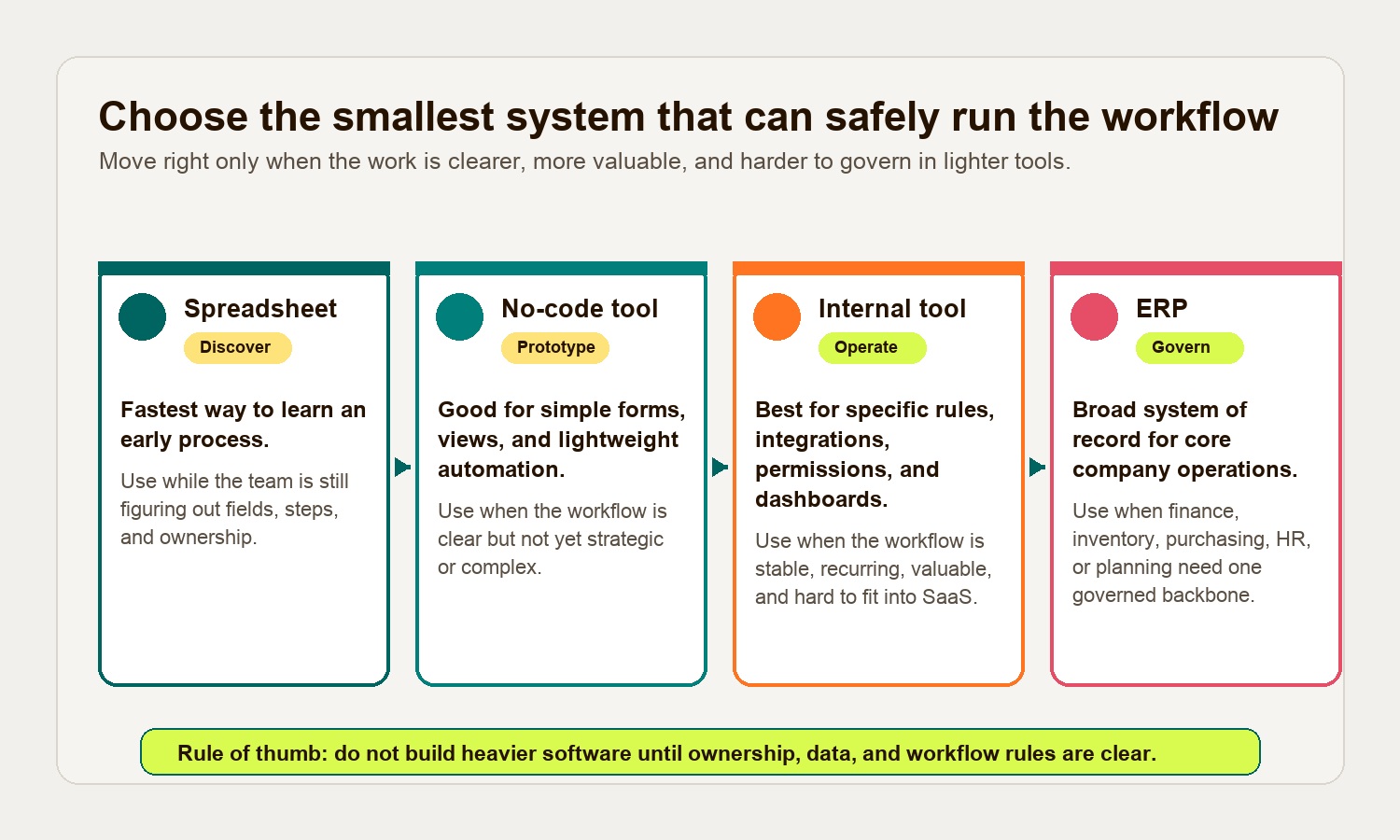
No-code generally targets visual configuration with little or no programming, while low-code allows developers to extend the system with code. These labels overlap; verify the actual extension and deployment limits of the product you select. That distinction matters because many internal tools live between these categories. A team may prototype in no-code, then rebuild the durable workflow as custom internal software once the process proves important.
If the decision starts to look bigger than a focused workflow, compare it with Hapy’s guide to custom ERP development vs internal tools. Internal tools are often the right first step when the company needs workflow clarity before making an ERP-level commitment.
When should you build a custom internal tool?
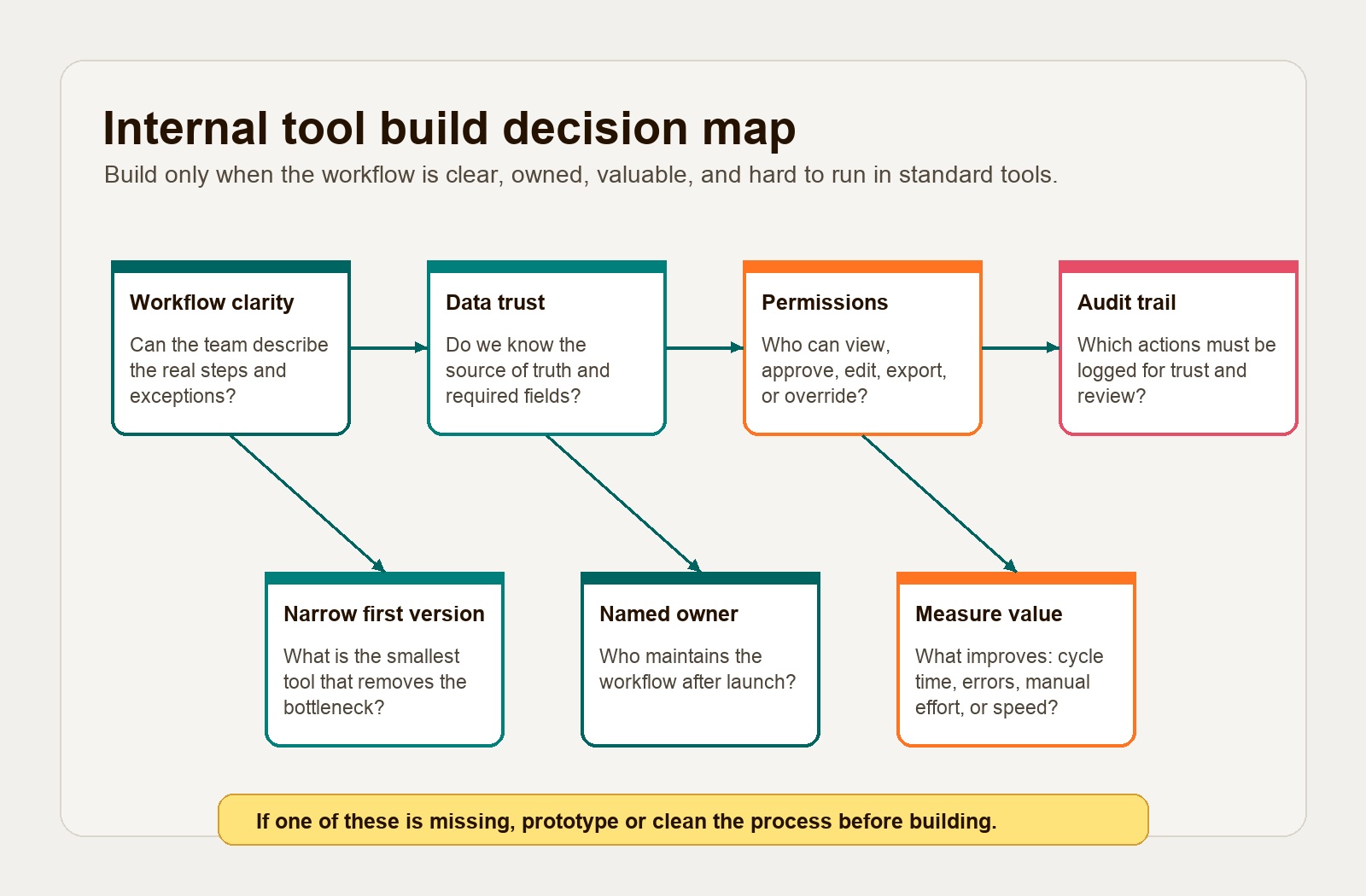
Build a custom internal tool when the workflow is clear, painful, recurring, and important enough that generic software is creating measurable drag.
Good build signals include:
- The workflow affects revenue, margin, customer experience, compliance, or delivery speed.
- The team is doing the same manual work every week.
- Multiple systems contain pieces of the truth.
- Standard tools require awkward workarounds.
- Employees need a simpler interface than the underlying database or SaaS tools provide.
- Permissions and audit trails matter.
- The workflow is specific to how the business operates.
Wait before building when the process is still unstable, the owner is unclear, the data is unreliable, or the pain is mostly annoyance rather than business risk. In that case, use a spreadsheet, no-code prototype, or lightweight automation to learn before investing in a custom system.
A practical sequence looks like this:
- Map the workflow in plain language.
- Identify the source of truth for each key record.
- Name the owner and users.
- Define permissions and audit events.
- Build the smallest version that removes the daily bottleneck.
- Measure whether cycle time, errors, manual effort, or decision speed improves.
- Expand only after the first workflow is trusted.
That is also the connection to business process automation. Automation should follow workflow judgment. If the team is still choosing which workflow matters most, use the business process automation strategy guide before choosing a platform or starting a build.
How internal tools fit a business operating system
Internal tools are often one layer inside a broader business operating system. They do not need to run the whole company. They make one part of the company more reliable.
Think of the operating model in layers:
- Systems of record hold core data.
- Internal tools make that data usable for specific teams.
- Automations move repeatable work between steps.
- Dashboards show performance and exceptions.
- Governance defines permissions, ownership, and change control.
Business process management is useful language here. IBM describes BPM as a way to discover, model, analyze, measure, improve, and optimize business processes. Internal tools should support that discipline. They should not become a shortcut around it.
For example, a customer support console is not just a prettier ticket view. It can connect support tickets, billing records, product events, refund rules, escalation paths, and account notes. But it only works if the company has defined who can issue credits, when an escalation is required, what data is trusted, and what should be logged.
That is the difference between an app and an operating improvement.
Internal tools checklist
Before building, use this checklist:
- The workflow can be explained in five to seven steps.
- One team owns the workflow.
- The source systems are known.
- The tool has a named maintenance owner.
- Permissions are role-based and reviewed.
- Important actions will be logged.
- The first version has a narrow success metric.
- Users have been observed doing the work manually.
- The build path is proportionate to the business value.
- The team knows what should stay in existing SaaS or ERP.
If most of these are true, custom internal software may be worth building. If not, the next step is usually process cleanup, a prototype, or a better connection between existing tools.
Hapy’s Business Systems & Automation work sits in this practical middle: clarify the operating problem first, then decide what should be bought, connected, automated, or built.
FAQ
What is an internal tool in simple terms?
An internal tool is software employees use to run work inside the business. It might manage approvals, customer records, reports, dispatching, support workflows, content operations, inventory, or integrations. Customers usually do not use it directly.
What are common internal tool examples?
Common internal tool examples include admin panels, approval queues, dispatch boards, reporting dashboards, customer support consoles, content operations tools, finance reconciliation tools, inventory trackers, and integration monitors.
Are internal tools the same as ERP?
No. ERP is usually a broad system of record for core business functions such as finance, purchasing, inventory, HR, manufacturing, or planning. Internal tools are narrower and often sit around existing systems to solve a specific workflow or operating problem.
When should a company build custom internal tools?
A company should build custom internal tools when the workflow is recurring, valuable, specific to the business, and poorly served by spreadsheets or generic SaaS. It should wait when the process is unclear, the data is not trusted, or no one owns maintenance.
The practical answer
Internal tools are not a sign that the company needs more software. They are a sign that one workflow has become important enough to deserve a better operating layer.
Start small. Pick the workflow where manual work, poor visibility, or bad data is creating real cost. Give the tool an owner. Keep permissions tight. Log important actions. Build only the surface area employees need to do the work well.
That is how internal tools become business infrastructure instead of another workaround.


