Enterprise application development builds software for core business workflows. It is not just public app development, and it is not always a full ERP rebuild. The work usually sits inside the business: approvals, inventory, customer records, finance operations, reporting, permissions, integrations, and the screens employees use to keep work moving.
That definition matters because growing companies often describe several different problems with the same phrase. One team wants a dashboard. Another wants to extend the CRM. Finance wants approval controls. Operations wants inventory visibility. Leadership wants one place to see the truth. Enterprise application development is the discipline of turning those needs into a governed system, not a pile of disconnected tools.
The buyer decision is practical: configure what already works, buy what is standard, and build only where the workflow is specific, valuable, and hard to support with off-the-shelf software. A custom enterprise application should make the company easier to operate. If it only recreates a common SaaS feature at a higher cost, the business is probably buying complexity.
If the problem is still narrow, compare this with internal tools examples before scoping a larger system. If the pain is spread across finance, inventory, purchasing, and reporting, the custom ERP vs internal tools guide is the better companion.
When stock accuracy is the main constraint, use the custom inventory management app decision guide to separate standard packaged capabilities from the workflows worth owning.
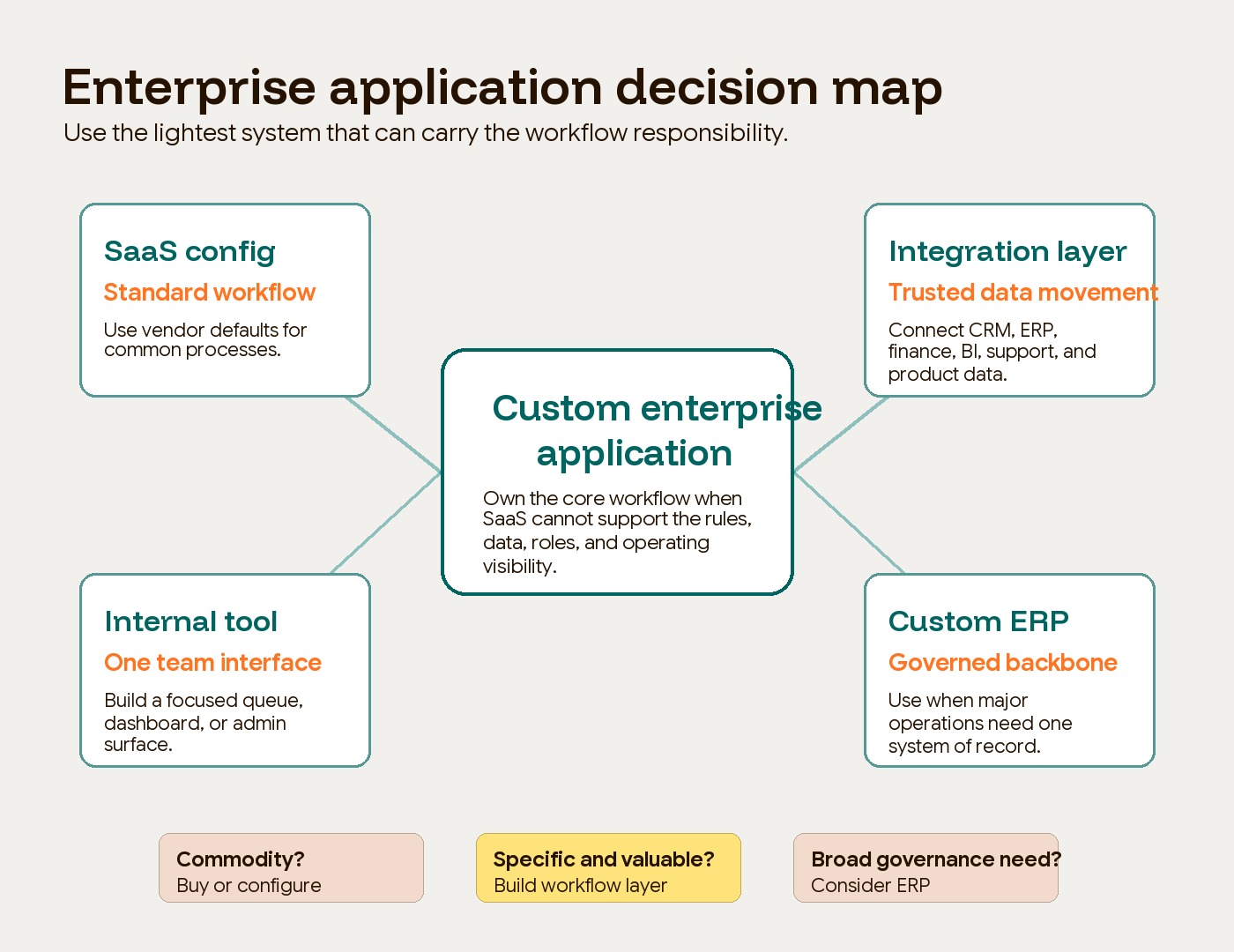
What enterprise application development means
Enterprise application development is the process of designing, building, integrating, and maintaining software that supports important business operations across teams, systems, and data sources. The output can be a web application, internal platform, customer portal, workflow engine, reporting layer, or integration service.
The useful distinction is not “big software.” The useful distinction is operating importance. An enterprise application touches the way the company actually runs. It may need role-based access, approval logic, audit history, system integrations, data validation, dashboards, uptime expectations, and a change process after launch.
If you want the broader category context first, start with Hapy’s guides to what an enterprise application is and the common types of enterprise applications. This article focuses on the build decision: when a growing company should move from configuring tools to developing a custom internal system.
When the system will handle sensitive business data or privileged actions, use the internal web app security checklist to define the minimum access, audit, backup, vendor, and incident controls before estimating the build.
Common enterprise application examples include:
- CRM extension for territory rules, account scoring, renewal workflows, or custom sales operations.
- ERP workflow for purchasing, approvals, vendor onboarding, inventory movement, or finance controls.
- Inventory system for stock levels, warehouse states, replenishment logic, and exception handling.
- Approval platform for spend, refunds, access requests, contracts, pricing exceptions, or publishing.
- Reporting dashboard that connects operational metrics to the actions teams should take next.
- Customer portal for self-service records, documents, support, billing, account status, or requests.
- Integration layer that moves trusted data between CRM, ERP, accounting, product, BI, and support tools.
- Operational command center for dispatch, fulfillment, field teams, incidents, escalations, or live exceptions.
Those examples are deliberately varied. Enterprise application development is not one product category. It is a build path for workflows that have outgrown scattered spreadsheets, generic SaaS settings, and manual handoffs.
SaaS configuration, internal tools, custom ERP, or custom enterprise application?
Most companies do not jump straight from SaaS to a large custom system. They move through a maturity curve. The right option depends on how standard the workflow is, how much control the business needs, and how much risk the system carries.
| Option | Best for | Strength | Main risk | Use when |
|---|---|---|---|---|
| SaaS configuration | Standard workflows inside CRM, ERP, HR, finance, support, or project tools | Fastest path, vendor support, lower initial build effort | The process bends around the tool instead of the business | The workflow is common, low-risk, and close to the vendor’s default model |
| Internal tools | Focused employee workflows, admin panels, queues, dashboards, and small operational apps | Narrow scope, faster delivery, easier adoption | Can become a shadow system without ownership and maintenance | One team needs a better interface for a clear workflow |
| Custom ERP | Broad operational system across finance, inventory, purchasing, production, HR, or planning | Strong governance and one system of record | Heavy implementation, migration risk, and process change | The business needs a governed operating backbone across major functions |
| Custom enterprise application development | High-value workflow with specific rules, integrations, roles, audit needs, or reporting | Fit, control, proprietary process logic, better operating visibility | Requires product ownership, architecture, QA, security, and ongoing support | The workflow is core, repeated, owned, and poorly served by standard tools |
This is where buyers should avoid false choices. The best answer is often hybrid. Buy commodity utilities such as authentication, payments, email delivery, analytics, or document signing when they are not differentiating. Build the workflow layer where the business has specific rules, proprietary data, or operational judgment that standard tools do not understand.
That is also why enterprise application development should not start with a feature list. It should start with the business process. IBM describes business process management as work that discovers, models, analyzes, measures, improves, and optimizes business processes. Custom software should support that discipline, not skip it.
When a growing company needs custom enterprise application development
A company should consider custom enterprise application development when the current software stack can no longer support a core workflow without manual workarounds, fragile integrations, or loss of control. The strongest signal is not frustration. It is operating drag attached to a business-critical process.
Good build signals include:
| Signal | What it usually means | Buyer question |
|---|---|---|
| The workflow crosses several systems | Data lives in CRM, ERP, spreadsheets, support tools, and finance systems | Which system owns each record, and where should people act? |
| Teams keep exporting and reconciling data | Reporting is lagging behind operations | What decision is delayed because the data is not trusted? |
| Permissions are too blunt | The SaaS role model does not match real responsibility | Who can view, edit, approve, export, override, or delete? |
| Exceptions drive the work | The important cases do not follow the happy path | Which exceptions happen often enough to deserve software support? |
| The customer or vendor needs controlled access | Email and PDF handoffs are slowing service | What can external users safely do for themselves? |
| The workflow affects revenue, margin, compliance, or delivery | Mistakes have real cost | What measurable risk or delay should the system reduce? |
A CRM extension is a good example. If the sales team only needs custom fields and a few automations, configure the CRM. If sales operations depends on territory logic, renewal risk scoring, approval controls, product usage data, pricing exceptions, finance checks, and customer-success handoffs, compare a custom CRM with an off-the-shelf CRM before adding another plugin.
Inventory is another clear case. A basic stock tracker may work inside SaaS. A multi-location operation with transfers, damaged goods, backorders, purchasing approvals, supplier lead times, fulfillment states, and live exception queues may need a custom inventory system or ERP workflow. The difference is not the word “inventory.” The difference is the level of operating control required.
When not to build
Do not build a custom enterprise application just because the existing tool is annoying. Build only when the workflow is important enough to own and stable enough to design.
Avoid custom enterprise software development when:
- The process is immature. If the team cannot describe the workflow in plain language, code will hard-code confusion.
- Ownership is unclear. Every enterprise application needs a business owner for rules, access, data quality, adoption, and change requests.
- Usage will be low. A system used by three people once a month may not justify the maintenance burden unless the risk is unusually high.
- The workflow is a commodity. Payroll, email, basic ticketing, generic CRM, document signing, and standard accounting are usually better bought than rebuilt.
- The data is not trusted. A new interface will not fix duplicate records, unclear definitions, missing fields, or unresolved source-of-truth decisions.
- The company only wants a dashboard. If no one will act on the dashboard, the real problem is not application development.
This is the trap in many build-vs-buy debates. Teams compare the visible license cost of SaaS with the visible build cost of custom software. They underweight the cost of maintenance, support, security, training, data migration, QA, and future change. Hapy’s guide to custom software development cost is useful here because the right estimate should include ownership risk, not only screens and features.
The cleaner question is: which workflow deserves to become company infrastructure? If the answer is not clear, keep learning with SaaS configuration, a focused internal tool, or a lightweight automation before funding a larger custom system.
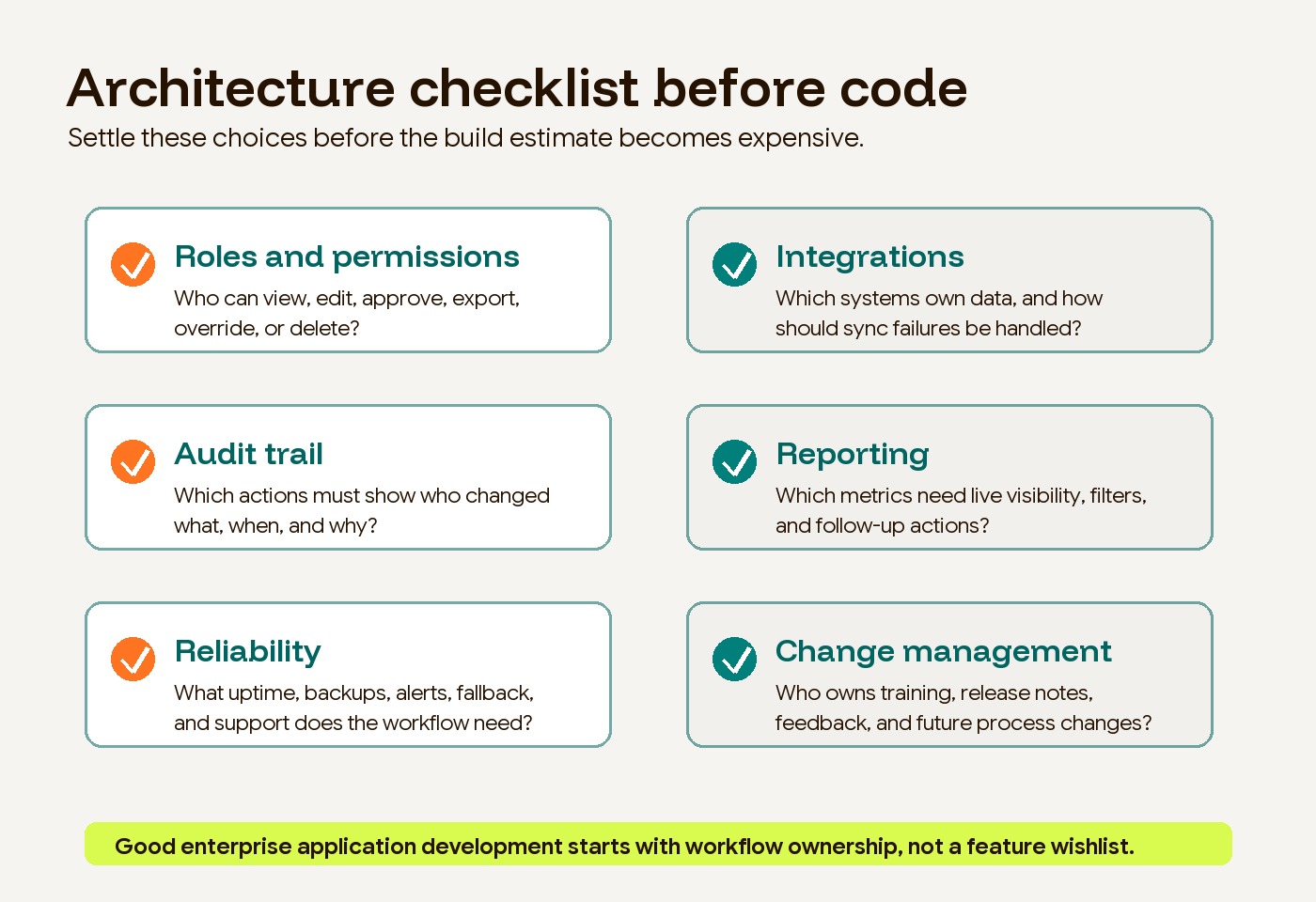
Architecture concerns to settle before code
Enterprise application development becomes expensive when architecture decisions are discovered late. Buyers do not need to design every table or service before hiring a team, but they should know which risks the system must handle.
Roles and permissions
Enterprise applications usually need more than “admin” and “user.” A support agent may view customer data but not approve refunds. A finance manager may approve credits but not change system settings. A regional manager may see only one territory. A customer may see their own account and documents, but nothing else.
The classic NIST role-based access control model is a useful starting point because it assigns permissions through roles instead of one-off individual rules. In practice, buyers should define roles around responsibility, risk, and workflow steps.
Integrations
Custom enterprise applications rarely live alone. They usually connect to CRM, ERP, accounting, ecommerce, BI, support, identity, storage, or communication tools. Integration planning should cover authentication, API limits, retries, sync direction, conflict rules, error handling, data ownership, and monitoring.
The dangerous integration is not the first successful API call. It is the failed sync no one sees, the stale field that drives a wrong decision, or the silent mismatch between two systems that both claim to be the source of truth.
Audit trail
If the system controls money, customer data, approvals, inventory, access, contracts, or compliance-sensitive actions, it needs an audit trail. A useful audit trail shows who did what, when, from where, and what changed.
OWASP’s logging guidance is helpful because it separates operational logging from security-relevant events. For enterprise applications, log the actions that matter to trust: permission changes, approvals, exports, failed access attempts, data edits, deletions, integrations, and administrative overrides.
Reporting
Reporting should not be an afterthought. If leaders need operational visibility, define the metrics, filters, dimensions, and refresh expectations before the build is priced.
Good reporting answers three questions:
- What is happening now?
- Which exception needs attention?
- What action should the team take next?
That third question is the difference between a dashboard and an operating system. A reporting dashboard can show late orders. An enterprise application can show late orders, route exceptions, trigger approvals, notify owners, and keep the history connected to the underlying record.
Reliability
Reliability requirements depend on business impact. A content operations tool can tolerate more downtime than a dispatch command center or finance approval platform. Buyers should define uptime expectations, recovery time, backup needs, incident alerts, support hours, performance targets, and data retention before deciding the architecture.
Reliability is also a product decision. If the system becomes the only way a team can work, the launch plan needs training, fallback procedures, support ownership, and a clear path for urgent fixes.
Change management
Enterprise applications change the way people work. That means change management is part of the build, not a side activity after launch.
Plan for process documentation, release notes, admin controls, training, feedback loops, phased rollout, and business ownership. A custom system can be technically correct and still fail if employees do not trust it or if managers keep approving work outside the system.
A practical decision framework
Use this sequence before approving enterprise application development:
- Name the business outcome. Reduce approval time, improve inventory accuracy, shorten customer response time, lower manual reconciliation, or create better operating visibility.
- Map the current workflow. Include owners, roles, handoffs, systems, data fields, exceptions, and manual workarounds.
- Classify the workflow. Decide whether it is commodity, supporting, or differentiating.
- Choose the simplest viable path. Configure SaaS if the workflow is standard. Build an internal tool if one team needs a focused interface. Consider ERP if the business needs a governed backbone. Build a custom enterprise application when the workflow is core and specific.
- Define architecture risks. Roles, integrations, audit trail, reporting, reliability, migration, security, and support should shape scope.
- Ship one trusted workflow first. Avoid a big-bang rewrite. Prove the operating loop, then expand.
This framework keeps the decision grounded. Custom enterprise application development is not a status symbol. It is a way to own a workflow that matters enough to justify the responsibility of maintaining it.
For many Hapy clients, this sits close to Business Systems & Automation: connect the tools, clean the handoffs, build the right operating layer, and make the business easier to run. Sometimes that means a custom enterprise application. Sometimes it means better SaaS configuration, a narrower internal tool, or an integration layer that removes the bottleneck without replacing everything.
FAQ
What is enterprise application development in simple terms?
Enterprise application development is building software that helps a company run important internal or customer-connected workflows. It usually includes business rules, user roles, integrations, reporting, and operational controls that standard SaaS tools cannot fully support.
Is an enterprise application the same as an internal tool?
Not always. An internal tool is usually narrower and employee-facing. An enterprise application can include internal tools, but it may also handle customer portals, ERP workflows, integration layers, reporting systems, and cross-department operating processes.
What is an example of a custom enterprise application?
A custom approval platform is a simple example. It can route requests, apply business rules, check budget or inventory data, enforce permissions, record decisions, notify owners, and produce reporting for managers. The value is not the form. The value is the governed workflow.
How do you know if custom enterprise application development is worth it?
It is worth considering when the workflow is important, repeated, owned by a clear team, and poorly served by available software. It is usually not worth it when the process is unstable, the usage is low, or a well-configured SaaS product solves the problem with less long-term risk.
The decision: own only what matters
Enterprise application development is strongest when it gives a growing company control over a workflow that standard software cannot support well enough. The goal is not to build everything. The goal is to own the small number of operating systems that make the business faster, clearer, safer, or more defensible.
Start with the workflow. Prove that ownership matters. Then choose the lightest system that can carry the responsibility.