A business operating system is the practical layer that connects how a company sees work, moves work, and improves work. It brings dashboards, workflows, permissions, data, and automation into one operating model so leaders can make decisions from the same reality their teams use every day.
That is the useful definition. The less useful version is “one tool to run the company.” Most companies already have too many tools. The real problem is not that the CRM, project board, finance sheet, support inbox, and dashboard exist separately. The problem is that no one has designed how those systems should work together. The internal app consolidation guide helps separate healthy specialization from duplicate systems and broken handoffs.
When teams talk about a business OS, Work OS, enterprise operating system, or AI operating layer, they are usually reaching for the same thing: less manual coordination, fewer stale reports, clearer ownership, and better decisions without adding another layer of meetings. The opportunity is real. So is the risk. If the system is built around weak data, vague workflows, and loose AI access, it becomes a faster way to spread confusion.
This article presents a practical build model for founders, operators, and executives who want a tighter operating layer across dashboards, workflows, and AI.
What is a business operating system?
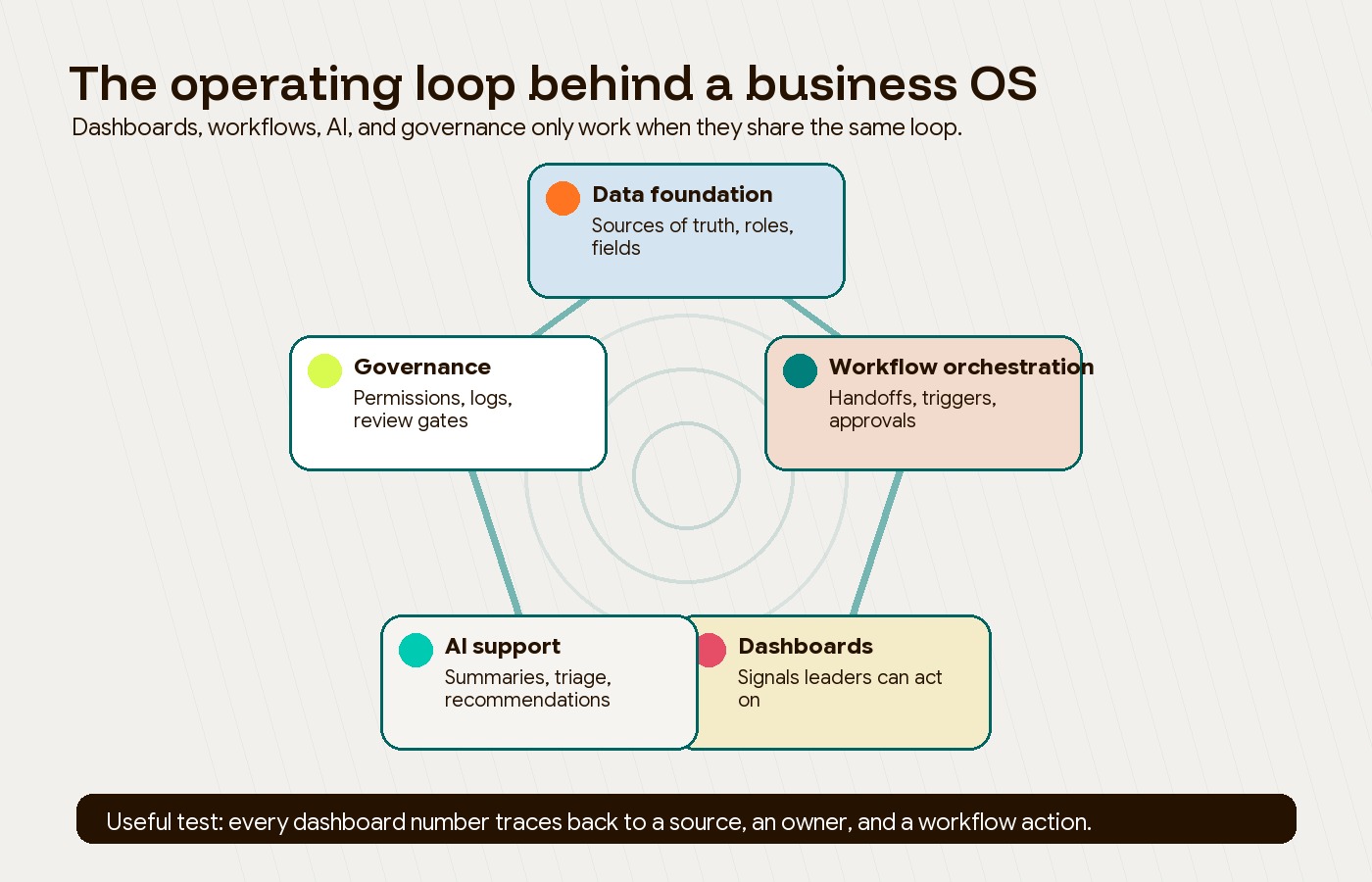
A business operating system is a connected operating layer for running a company. It does not replace every tool. It defines how data, workflows, dashboards, approvals, permissions, and automation work together so the business can see what is happening and act on it.
That distinction matters. A project management tool tracks tasks. A dashboard visualizes data. A CRM tracks customers. A workflow tool moves steps forward. A business operating system makes those pieces behave like one coordinated system.
In practice, it has three layers:
| Layer | What it controls | Practical question it answers |
|---|---|---|
| Data foundation | Sources of truth, roles, permissions, fields, system ownership | Can we trust the inputs? |
| Workflow orchestration | Handoffs, approvals, triggers, routing, task states | Does work move without manual chasing? |
| Decision layer | Dashboards, alerts, AI summaries, forecasts, review rhythms | Can leaders see and act fast enough? |
Moving from separate tools to a shared operating model requires discipline. The goal is not one giant platform for everything. The goal is one coherent model for how the business runs. If the choice is still between generic tools, vertical software, and custom systems, Hapy’s types of software guide is a useful way to separate the categories before choosing the operating layer.
This is also why Hapy treats Business Systems & Automation as an operating problem first and a tooling problem second. If a process is unclear, automation makes it unclear faster. If ownership is muddy, dashboards just display the mud in better colors.
Why dashboards alone do not create operating control
Dashboards are useful when they are connected to live work. They are weak when they sit downstream from manual exports, delayed updates, or numbers no one owns.
The common failure pattern looks like this:
- Teams update their own tools.
- Someone exports data into a spreadsheet.
- Someone else cleans it for a weekly report.
- Leadership reviews the report after the moment to act has already passed.
- The same issue appears again next week because no workflow changed.
That is reporting, not control.
A stronger operating layer closes the loop between work and visibility. When a deal closes, delivery planning should start. When a support theme repeats, product should see it. When margin slips, finance and operations should know which workflow created the leak. When an AI summary flags risk, the underlying task, source, and owner should still be visible.
Modern work platforms increasingly sell this promise. monday.com describes its category as an enterprise operating system for work, while tools like Asana, ClickUp, Smartsheet, Airtable, and Wrike combine task structures, automations, dashboards, and AI in different ways. Those platforms can be useful, but they are not a strategy by themselves.
The strategy is deciding what the business must know, what should happen automatically, and where a human still has to make the call.
How business process automation fits into a business operating system
Business process automation handles repeatable work. A business operating system decides which repeatable work deserves automation, what data it should update, which team owns it, and what signal leadership should see afterward.
That is the difference between “we automated a task” and “we improved how the business runs.”
For example, a sales-to-delivery workflow might include:
- A deal moves to closed-won in the CRM.
- A delivery workspace is created with the right template.
- Finance receives invoice data.
- Operations sees capacity impact.
- A client onboarding email is drafted.
- Leadership sees expected revenue, delivery load, and handoff status in one view.
The automation is only one piece. The business OS also needs the field logic, role permissions, naming rules, exception handling, dashboard design, and escalation path. Without those pieces, automation becomes a pile of invisible scripts that only one person understands.
If you are still deciding what should be automated first, Hapy’s guide to business process automation is a better starting point than a tool comparison. For a more operational scoring approach, use the business process automation strategy guide before choosing a platform. The first question is not “Which platform has the most features?” It is “Which workflow creates the most drag, risk, or decision delay today?”
Where AI belongs in the operating layer
AI belongs where it can reduce interpretation work, not where it hides accountability. The best uses are narrow enough to verify and close enough to the workflow to be useful.
Four AI patterns can support this operating model:
| AI capability | Useful role in a business OS | What to watch |
|---|---|---|
| Predictive analytics | Forecast demand, delays, risk, or capacity pressure | Bad historical data creates confident bad forecasts |
| Prescriptive support | Recommend next actions based on constraints | Humans still need decision rights for material changes |
| Task triage | Classify tickets, requests, incidents, and approvals | Routing logic needs feedback loops and exception handling |
| Natural language querying | Let non-technical users ask questions of business data | Answers need source trails, permissions, and definitions |
AI workflow tools make these patterns easier to prototype. For technical teams, n8n describes RAG workflows as a way to control ingestion, chunking, indexing, embedding, and retrieval inside automation pipelines. That matters because an AI operating layer is only as good as the context it can retrieve and the actions it is allowed to take. If the first use case is narrower workflow automation, compare the tradeoffs between an AI automation agency and a tech partner before assuming the company needs a full business OS. For implementation guardrails, Hapy’s AI automation guide explains how to separate model judgment from workflow control.
For a narrower buyer decision, the AI workflow automation tools guide explains what changes when a prototype becomes a deployed workflow inside the business.
The practical rule is simple: do not start with a “smart” layer. Start with a reliable layer. AI can summarize a weekly operations pulse, draft follow-ups, classify support tickets, or flag budget anomalies. But it should not become the only place where the business logic lives.
Governance is the difference between leverage and exposure
A business operating system becomes more powerful as it connects more systems. It also becomes more dangerous.
The moment AI agents, workflow tools, and dashboards can read across CRM, finance, HR, support, delivery, and internal documents, permissions are no longer a back-office concern. They are a product requirement for the operating layer.
Official platform guidance points in the same direction. monday.com says its MCP access operates within the user’s existing permission model, and its AI Trust Center says AI features should not retrieve board or column data a user cannot already access. Asana’s AI Teammates access-control documentation uses a similar model: the AI Teammate is bounded by the permissions of the triggering user. ClickUp’s Super Agent security guidance is more explicit about the risk: if private or external data is shared with a Super Agent, the agent may use that data when responding to people who can trigger it, even if those people do not directly have access to the original data.
That is the whole governance lesson in one sentence: agent access is not only about what the agent can read; it is about who can trigger the agent and where the answer can appear.
A serious business OS needs:
- Role-based access controls for people and agents.
- Clear source ownership for sensitive data.
- Approval gates for actions that change money, access, contracts, payroll, production systems, or client commitments.
- Logs that show what automation ran, what data it used, and who approved exceptions.
- Human override paths when the system is wrong.
This is where many AI automation projects underinvest. The demo works. The governance does not.
Build vs buy: when a platform is enough
Buying an existing work management platform is often the right move when the process is standard, the team can adapt to the platform’s model, and the business needs speed more than deep customization.
Custom systems make more sense when the workflow is specific to how the company creates value, integrates with unusual data sources, carries regulatory or security complexity, or needs to become a durable operating advantage.
| Situation | Better default | Why |
|---|---|---|
| Simple task tracking and approvals | Buy a work management platform | Fast setup, lower maintenance, familiar patterns |
| Cross-functional delivery with standard handoffs | Buy, then configure carefully | Templates, dashboards, and automations may cover most needs |
| Industry-specific operations | Evaluate vertical software first | Domain constraints may already be built in |
| Unique internal workflow tied to margin, capacity, or service quality | Consider custom or hybrid | The workflow may be too important to force into generic fields |
| AI layer over proprietary company data | Hybrid or custom | Retrieval, permissions, logs, and quality controls need careful design |
| Multi-system reporting with unclear ownership | Fix the operating model first | A tool will not solve undefined data responsibility |
For leaders comparing these options, the useful buying question is not “Can this tool do it?” Most tools can do more than the team will ever use. The better question is “Will this system make the right behavior easier every week?”
If the answer depends on bespoke integrations, data modeling, AI workflows, or internal tools, use Hapy’s custom software development cost guide to pressure-test the economics before building.
If the operating layer starts to look like ERP, Hapy’s custom ERP development vs internal tools guide helps decide whether to clean workflows first, build focused internal tools, configure ERP, or design a custom ERP layer.
A practical roadmap for building a business operating system
The safest way to build a business operating system is to start with one operational loop, not the whole company.
1. Pick the operating loop that hurts most
Choose a workflow where delays are visible and the business impact is real. Good candidates include sales-to-delivery, support-to-product, finance-to-operations, inventory-to-fulfillment, recruiting-to-onboarding, or executive KPI reporting.
Avoid starting with the most politically complex workflow. You want enough pain to matter, but enough control to learn quickly.
2. Map the current state without polishing it
Document the tools, sheets, owners, fields, approvals, messages, exceptions, and manual workarounds. The point is not to create a beautiful process map. The point is to see where the work actually moves.
Look for:
- Repeated copying between systems.
- Decisions made from stale numbers.
- Fields that mean different things to different teams.
- Approvals that live in chat threads.
- Exceptions that only one person knows how to handle.
- Reports no one trusts but everyone keeps using.
3. Define the few metrics that matter
A business OS should not turn into a wall of metrics. Pick the handful of signals that tell leaders whether the workflow is healthy.
For a sales-to-delivery loop, that might be handoff time, capacity load, gross margin, onboarding completion, client risk, and first milestone status. For support-to-product, it might be repeated issue themes, severity, response time, affected revenue, and roadmap impact.
Every metric needs an owner, a definition, a source, and a review rhythm.
4. Automate the boring handoffs before the judgment calls
Start with low-risk automation: creating records, routing tasks, syncing fields, sending reminders, drafting messages, and updating dashboards. These reduce drag without asking the system to make material decisions too early.
Then add AI where it helps interpretation: summarizing open risks, grouping support themes, drafting status updates, extracting intent, or flagging anomalies for review.
5. Add governance before scale
Before expanding across departments, document who can see what, who can trigger what, what requires approval, and where logs live. This is especially important when AI agents can access internal documents or act through connected tools.
The governance does not need to be heavy. It does need to be explicit.
Business operating system checklist
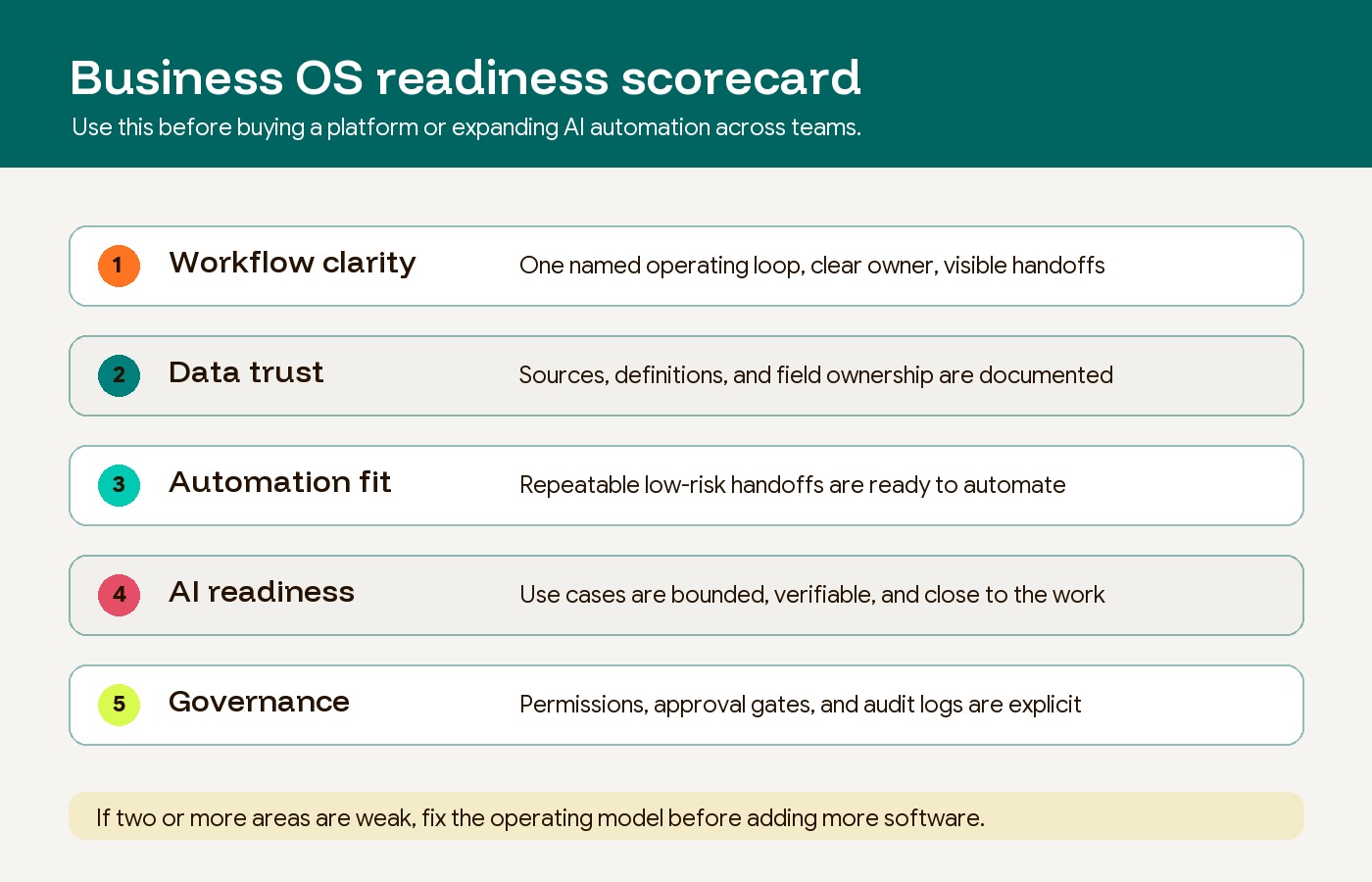
Use this checklist before investing in a platform, custom build, or AI automation layer:
| Question | Healthy answer |
|---|---|
| What workflow are we improving first? | One named operating loop with a clear business owner |
| What decision should become easier? | A specific recurring decision, not “better visibility” |
| What are the source systems? | CRM, finance, project, support, HR, product, or custom database named clearly |
| Who owns each field? | Every critical metric has a human owner |
| What should happen automatically? | Low-risk, repeatable handoffs are defined |
| What must stay human-approved? | Money, access, legal, client commitments, production changes, and sensitive people decisions |
| What will the dashboard show? | A small number of operating signals tied to action |
| What will AI do? | Summarize, classify, draft, retrieve, or recommend within bounded workflows |
| How will we audit it? | Logs, approvals, permissions, and exception handling are visible |
If you cannot answer these questions, the business is not ready for a bigger platform. It is ready for operational design.
What this means for growing companies
The business operating system conversation is becoming more important because AI has made weak operations more visible. Teams can now build automations, dashboards, agents, and internal tools faster than ever. That speed is useful only when the underlying business logic is sound.
For a growing company, the best business OS is rarely the most feature-rich one. It is the one that makes the company’s actual work easier to see, easier to move, and easier to improve.
That usually means:
- Fewer disconnected reports.
- Fewer manual handoffs.
- Fewer unclear owners.
- Better source data.
- More useful dashboards.
- AI that supports decisions instead of pretending to replace them.
- Governance that travels with the workflow.
This is why AI and automation should be treated as part of the operating model, not a separate experiment. The teams that get value will not be the ones with the flashiest AI layer. They will be the ones that turn messy workflows into reliable operating loops, then use automation and AI to remove the right friction.
FAQ
Is a business operating system the same as a Work OS?
Not exactly. Work OS is often used as a software category for platforms that combine work management, automation, dashboards, and collaboration. A business operating system is broader. It includes the platform, but also the operating model, data ownership, permissions, review rhythms, and governance around how the company runs.
Do we need to replace our current tools to build a business OS?
Usually, no. Most companies should start by connecting and simplifying the tools they already use. Replacing tools only helps when the current stack cannot support the workflow, data model, or governance the business needs.
Where should AI be used first?
Start with AI use cases that are easy to verify: summaries, classification, routing, draft responses, anomaly detection, and natural language search over approved sources. Avoid giving AI authority over money, access, contracts, production systems, or sensitive people decisions until governance is mature.
What is the biggest mistake companies make?
The biggest mistake is buying or building a system before defining the operating loop. If the workflow, data ownership, and decision rhythm are unclear, the new platform will only make the confusion more expensive.
The takeaway
A business operating system is not a dashboard, a project board, or an AI agent. It is the operating layer that makes dashboards, workflows, data, and AI work together in a way the business can trust.
Start with one workflow. Clean the inputs. Define the decision. Automate the handoffs. Add AI where it reduces interpretation work. Put governance around the whole loop before scaling it.
That is how a business operating system creates leverage instead of more software to manage.
If your operations are already running through scattered tools, spreadsheets, and manual handoffs, Hapy’s Business Systems & Automation engagement is built around this exact problem: turning the way the business actually works into a clearer system leaders and teams can use every day.


