Custom ERP development is the right move when a growing business needs one governed system of record for core operations such as finance, inventory, procurement, production, HR, and reporting. Internal tools are the better first build when the company needs to fix a narrow workflow, connect scattered data, or give teams a reliable operating layer before committing to a full ERP.
That distinction matters because most growing companies do not jump from clean operations to ERP. They move through a messier middle stage: spreadsheets, SaaS tools, manual approvals, dashboard exports, and a few fragile automations. The business feels bigger than its systems, but not always ready for a multi-month ERP program.
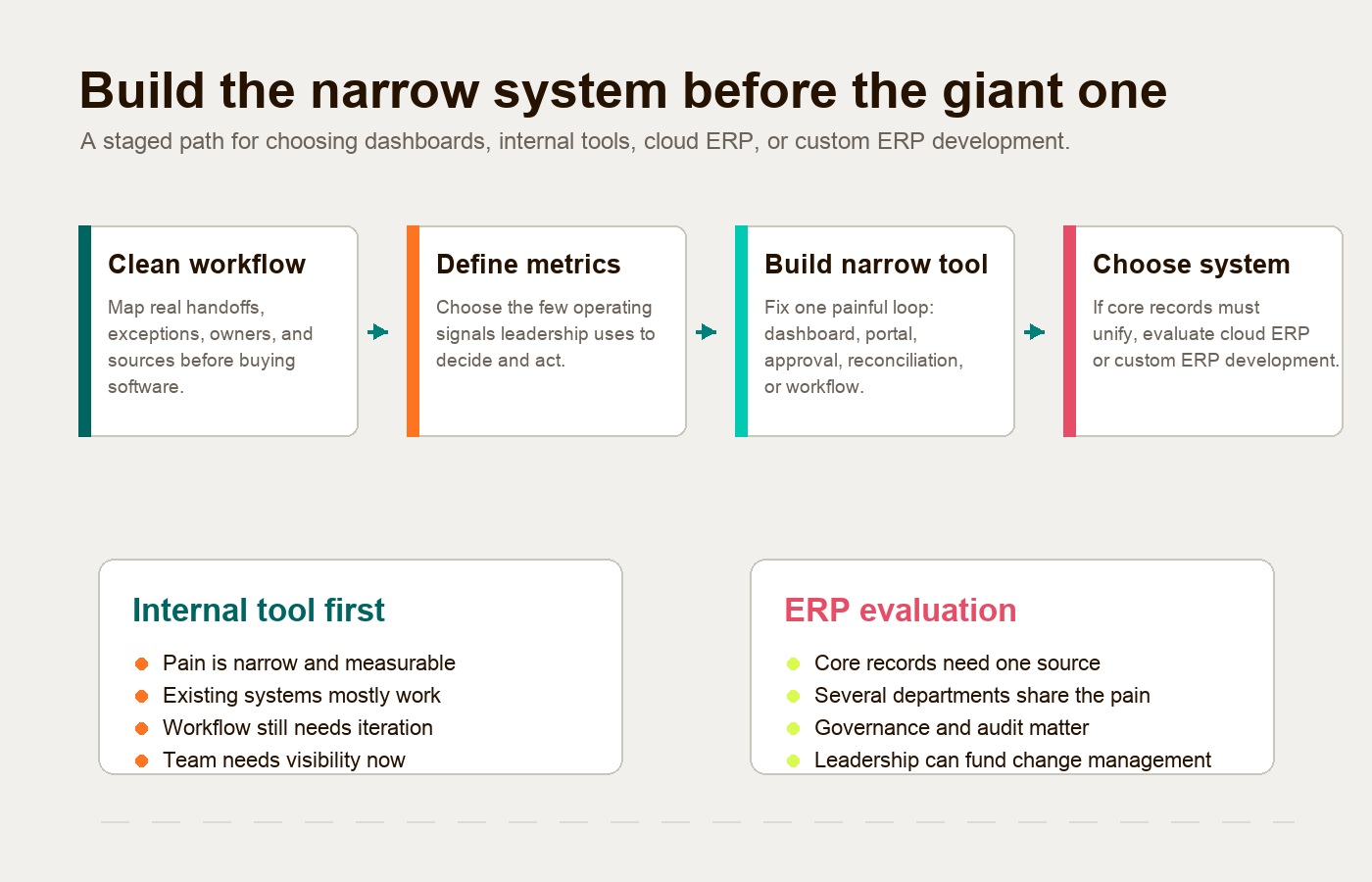
The practical answer is usually staged. Clean the workflow first. Define the few metrics leadership actually uses. Build the narrow internal tool or dashboard that removes daily friction. Then decide whether the business needs custom ERP software, a configured cloud ERP platform, or a hybrid operating layer.
If several overlapping tools now manage the same records and handoffs, use the internal app consolidation guide to decide what should be connected, replaced, or left separate before committing to an ERP program.
That is the Hapy view: avoid tool bloat, but do not underbuild the workflows that now carry the business. Software should make operations easier to see, easier to run, and easier to improve.
If the system needs custom roles, integrations, reporting, and auditability without becoming a full ERP, the enterprise application development guide covers that middle path.
Custom ERP Development vs Internal Tools in Plain English
Custom ERP development creates a broad operating system for the business. Internal tools solve specific operating problems inside or around the tools the business already uses.
IBM defines ERP as software designed to manage and simplify an organization’s functions, processes, and workflows through automation and integration, covering areas such as finance, HR, manufacturing, supply chain, procurement, and services. That breadth is why ERP can be powerful. It is also why ERP is risky when the business has not clarified its processes yet.
Internal tools are narrower. They might be a custom admin portal, order triage dashboard, job costing view, approval workflow, inventory reconciliation tool, partner portal, or operations command center. They can read from a CRM, write to a database, trigger automations, or sit on top of existing APIs. They do not need to replace every system to create value.
For a practical breakdown of narrower tool types, use Hapy’s internal tools examples guide before turning one workflow problem into an ERP brief.
| Decision factor | Custom ERP development | Custom internal tools |
|---|---|---|
| Best fit | Core operations need one governed system of record | One workflow or operating loop creates daily friction |
| Scope | Cross-departmental and multi-module | Narrow, workflow-specific, or department-specific |
| Data model | Centralized schema and strict source-of-truth rules | Connects, cleans, or writes to selected systems |
| Typical first win | Shared operational control across finance, inventory, purchasing, production, and reporting | Faster handoffs, cleaner dashboards, fewer spreadsheets, better approvals |
| Risk | High if processes, data, and ownership are unclear | Tool sprawl if every team builds without governance |
| Build sequence | Best after process maturity is clear | Best as an early proof layer around real work |
The mistake is treating these as two versions of the same thing. They solve different operating problems. ERP is about the business’s core record and process architecture. Internal tools are about removing friction from the workflows that the current stack cannot support well.
Why ERP Should Not Be the First Reflex
ERP should not be the first reflex when the real problem is unclear workflow ownership, unreliable metrics, or scattered manual work. A big system will not magically fix weak operating discipline. It can make the weakness more expensive.
A useful diagnostic scenario is the following; it is an illustrative pattern, not a reported Hapy client result. A team starts with spreadsheets, SaaS subscriptions, Zapier-style automation, and a few custom scripts. At first, that is enough. Later, teams spend more time reconciling data than improving the business. Leaders stop trusting reports. Operators create side sheets because the official system does not match the real workflow.
That is a system problem, but not always an ERP problem.
Before choosing an ERP path, ask what is actually broken:
- Are teams copying the same data between systems?
- Are leadership dashboards late, manual, or disputed?
- Are approvals happening in chat threads?
- Are finance, operations, sales, and delivery using different definitions?
- Are people working around the current tools because the workflow does not fit?
- Is the pain concentrated in one operating loop, or spread across the entire company?
If the pain is concentrated, build the narrow tool first. If the pain is structural across core business records, ERP may be justified.
For Hapy clients, this often starts inside Business Systems & Automation: review the tools, sheets, workflows, and dashboards already in use, then decide what should be cleaned, connected, automated, or built.
The Staged Path: Clean, Measure, Build, Then Decide
The safest path is not “ERP or internal tools.” It is a sequence.
1. Clean the workflow before changing the system
Start by mapping how the work actually moves, not how the SOP says it moves. Use value stream mapping to make delays, rework, duplicate entry, waiting time, approvals, and exception handling visible.
This step is usually uncomfortable because it shows how much the business depends on informal knowledge. That is the point. You cannot design a reliable system around a workflow nobody can describe clearly.
2. Define the metrics before building the dashboard
Dashboards are only useful when they reflect decisions. Do not start with “we need better reporting.” Start with the decisions leadership makes every week.
For an operations team, the useful metrics might be order cycle time, open exceptions, capacity load, margin by job, on-time delivery, inventory risk, and payment status. For a service business, they might be lead time, utilization, project margin, issue themes, handoff delays, and client risk.
Every metric needs four things: a definition, a source, an owner, and a review rhythm.
3. Build the narrow internal tool
The first build should remove the highest-friction workflow, not recreate the whole company. Good candidates include:
- A live operations dashboard across CRM, finance, and delivery.
- A custom approval workflow for purchase orders, refunds, or exceptions.
- A job costing or margin view that replaces spreadsheet reconciliation.
- A customer or partner portal that removes manual status updates.
- An inventory, fulfillment, or location dashboard that connects scattered records.
This is where internal tools are powerful. They let the business test the data model, workflow ownership, access rules, and adoption habits before investing in a full ERP program.
If the first system needs to be a staff-facing front door rather than a full operational backbone, a custom employee portal can be the right middle layer between scattered SaaS tools and ERP.
4. Decide whether ERP is needed
After the narrow tool is working, the decision gets clearer. If several workflows now need the same shared records, role model, audit trail, and reporting layer, a configured ERP or custom ERP system may make sense. If the business only needed cleaner visibility and a few automated handoffs, the internal tool layer may be enough.
Hapy’s cloud ERP software guide is a useful companion here because it separates ERP readiness from ERP enthusiasm. The goal is not to avoid ERP. The goal is to implement it only when the operating model is mature enough to benefit.
When Custom ERP Development Is the Right Move
Custom ERP development is justified when the business needs deep control over core operational logic and standard systems cannot model how the company creates value.
Consider custom ERP solutions when several of these are true:
- The workflow spans multiple departments and cannot be cleanly owned by one SaaS tool.
- Finance, inventory, purchasing, delivery, production, and reporting need one trusted record.
- The business has proprietary rules, pricing, scheduling, capacity, compliance, or fulfillment logic.
- Existing ERP platforms require heavy customization that would still not fit the workflow.
- Manual reconciliation is now a strategic drag, not a small annoyance.
- Leadership is ready to fund discovery, data cleanup, implementation, change management, and ongoing maintenance.
Custom ERP development services are not just engineering. They involve process design, data modeling, permissions, integration architecture, QA, user training, and post-launch ownership. If the project is treated as “build us software,” it is already under-scoped.
That is why ERP programs can take meaningful time even when the technology is modern. Panorama Consulting’s 2025 ERP Report release noted that the average ERP project timeline in its study decreased from 15.5 months to nine months, with SaaS adoption likely contributing to shorter deployment time. That survey average is context, not an estimate for custom development. Module count, company size, migration quality, integrations, geography, and implementation model can change the timeline materially. Build a schedule from your own dependencies and acceptance gates.
Custom ERP is strongest when the operating model is specific and durable. A manufacturer with multi-level bills of material, lot traceability, purchasing constraints, shop-floor data, and capacity planning has a different problem than a services firm that needs a better dashboard. A logistics company with route economics, vendor availability, customer SLAs, and location-level workflows may need owned logic. A small team trying to stop copying rows between tools probably does not.
For broader category context, Hapy’s guides to types of enterprise applications and what an enterprise application is help separate ERP from CRM, BI, workflow automation, and custom internal systems.
When Internal Tools Should Come First
Internal tools should come first when the business has a high-friction workflow but does not yet need one central ERP for every core record.
This is the common growth-stage reality. The CRM mostly works. The accounting platform mostly works. The project or ticketing tool mostly works. The problem lives between them. Data moves manually. Approvals are unclear. Reports require exports. Operations people become the integration layer.
Build the internal tool first when:
- One workflow is painful enough to justify focused investment.
- Existing systems contain useful data but do not connect cleanly.
- The team needs a better interface for a specific role or department.
- Leadership needs a trusted view before replacing the underlying stack.
- The process is still changing and should not be locked into a heavy platform yet.
- Speed matters, but the workflow still needs proper permissions, logs, and ownership.
Low-code and no-code tools can help here, but they are not a free pass. Gartner’s research abstract on no-code enterprise applications says application leaders need a strategy for using no-code tools when building and blending enterprise application capabilities. Another Gartner abstract warns that software created through no-code application development cannot be secured exactly like traditional SDLC-built software.
That is the right caution. Internal tools can reduce drag quickly, but only if they are governed. Otherwise the business replaces spreadsheet sprawl with tool sprawl.
ERP, Dashboards, Workflow Tools, and Custom Systems: What to Build First
The system to build first depends on the shape of the operating pain.
| Operating pain | Better first move | Why |
|---|---|---|
| Leadership cannot trust weekly reports | Metrics cleanup and dashboard layer | The business needs definitions, sources, and ownership before more software |
| One approval or handoff creates constant delay | Workflow automation or narrow internal tool | The pain is specific and measurable |
| Current SaaS tools are fine but disconnected | Integration layer and operating dashboard | Replacement may be unnecessary |
| Multiple departments disagree on core records | ERP readiness assessment | The issue may be source-of-truth architecture |
| Standard finance, HR, procurement, or inventory needs | Configure cloud ERP first | Standard processes should usually use standard platforms |
| Proprietary operations drive margin or service quality | Custom ERP system or custom internal platform | The workflow may justify ownership |
| AI or automation needs access to several systems | Governed business operating layer | Permissions, logs, and source definitions matter before scale |
This table is intentionally practical. Operators do not need a taxonomy debate. They need to know which next build will reduce friction without trapping the business in another system it has to work around.
Hapy’s article on a business operating system covers the same middle layer from a broader angle: dashboards, workflows, data, and AI working together as one operating model.
The Risk Is Different on Each Side
ERP risk is concentration risk. Internal tool risk is fragmentation risk.
A custom ERP system concentrates business logic into one major platform. If discovery is weak, the system can encode the wrong process. If data migration is rushed, people stop trusting the records. If adoption is poor, teams return to spreadsheets while the company still pays for the platform.
Internal tools create the opposite risk. They are easy to start, so teams can create too many. One team builds a dashboard. Another creates an approval app. A third builds a side database. Without governance, the business ends up with more software, more definitions, and more hidden maintenance.
The mitigation is the same in both cases: ownership.
Before building either path, define:
- Who owns the workflow?
- Who owns the source data?
- Who approves changes?
- Which actions need an audit log?
- Which users need access?
- What will happen when the system is wrong?
- How will the team know the system is improving the business?
If those answers are missing, the business is not ready for a bigger build. It is ready for operational design.
A Practical Scorecard for the Decision
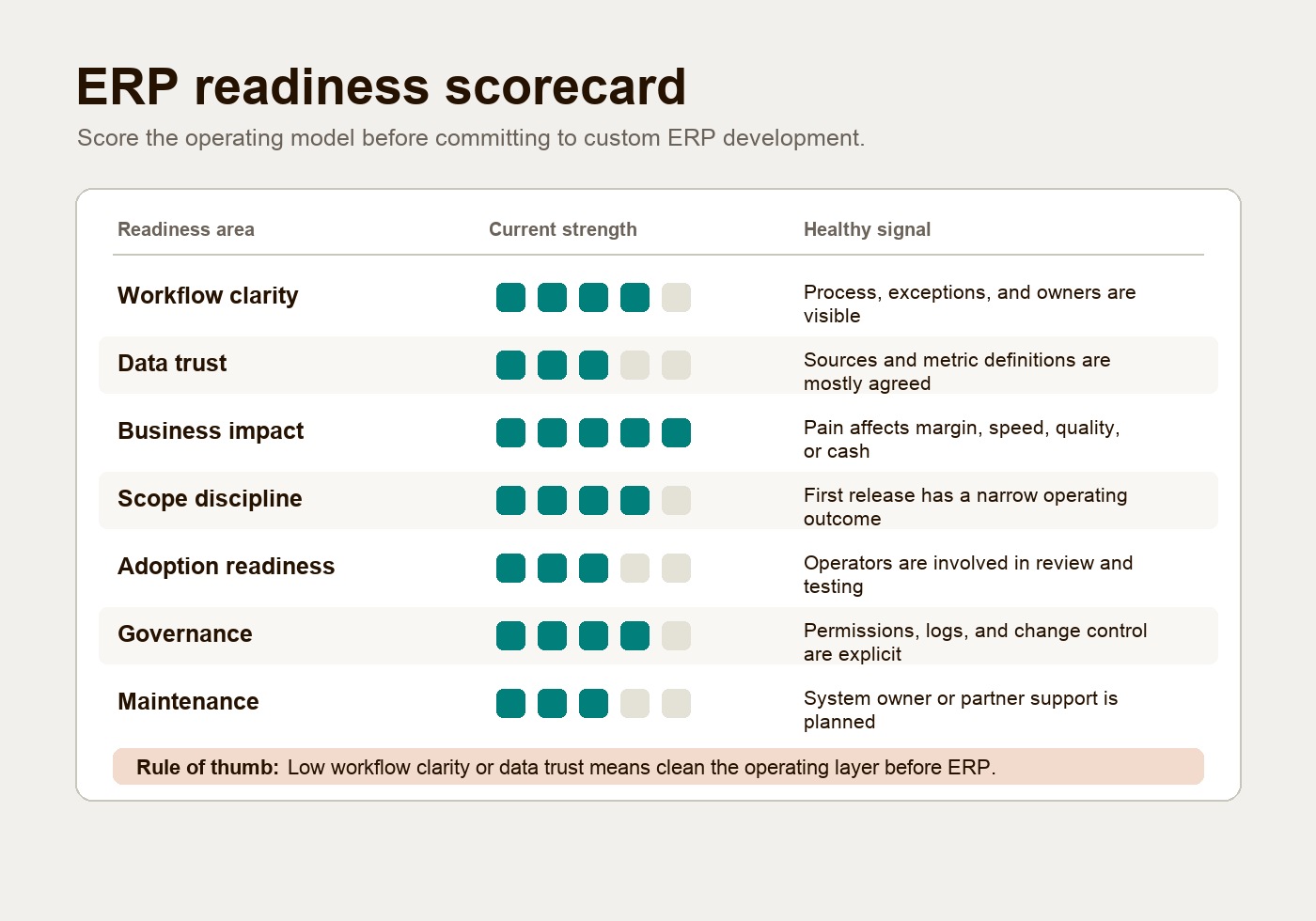
Use this scorecard as an unvalidated planning heuristic before approving a build. Score each area from 1 to 5, with 3 representing partial evidence. Record the reason for each score and recalibrate it after discovery. Unresolved access, data integrity, or operating ownership blocks a launch regardless of other scores.
| Readiness area | 1 looks like | 5 looks like |
|---|---|---|
| Workflow clarity | Nobody agrees how the process works | The current process, exceptions, and owners are mapped |
| Data trust | Reports are disputed or manually patched | Sources, definitions, and data owners are clear |
| Business impact | Pain is annoying but not costly | Pain affects margin, speed, cash, quality, or customer experience |
| Scope discipline | Everyone wants their wishlist included | The first release has a narrow operating goal |
| Adoption readiness | Users are not involved | Real operators review and test the workflow |
| Governance | Access, logs, and approvals are vague | Permissions, change control, and ownership are explicit |
| Maintenance | No one knows who owns the system later | Internal owner or partner support is planned |
If workflow clarity and data trust score low, do not start with ERP. Fix the operating model first. If business impact, governance, and maintenance score high across several departments, ERP may be worth evaluating.
The best early build is often the one that raises these scores. A narrow internal tool can expose the real data model, prove adoption, and show whether the company needs deeper ERP architecture.
Illustrative decision and measurement
A hypothetical distributor may have a reliable accounting system but spend ten hours each week reconciling order status in spreadsheets. A narrow status tool can test whether shared order IDs and exception ownership resolve the issue. If reconciliation falls to four hours and maintenance adds two, the potential capacity gain is four hours per week. Count mismatched orders and delayed shipments as well; faster reconciliation with more errors is a failed trial. These are assumptions, not a client outcome.
If the tool still cannot reconcile inventory and purchasing because the underlying records disagree, use that evidence to commission an ERP readiness assessment rather than adding another disconnected database.
The Hybrid Answer Is Often the Best Answer
The strongest architecture is often hybrid: use standard platforms for standard work, and build custom around the operating logic that makes the business different.
Standard accounting, payroll, basic procurement, simple CRM records, and common HR workflows usually do not need custom ERP software. The business can buy or configure those. But proprietary quoting logic, margin controls, capacity planning, service delivery workflows, partner operations, or multi-location exception handling may deserve a custom layer.
That hybrid approach avoids two common mistakes:
- Overbuying ERP before the business has process maturity.
- Underbuilding proprietary workflows that generic tools cannot support.
The question is not “custom or off-the-shelf?” The better question is: which parts of the business should be average, and which parts need to be owned?
FAQ
What is custom ERP development?
Custom ERP development is the design and build of an enterprise resource planning system tailored to a company’s workflows, data model, permissions, integrations, and reporting needs. It usually supports core functions such as finance, inventory, procurement, operations, production, HR, and management reporting.
Are internal tools the same as ERP?
No. Internal tools are usually narrower applications built for a specific workflow, role, dashboard, approval, or operational task. ERP is broader and usually acts as a system of record across multiple business functions.
Should a growing business build a custom ERP system first?
Usually not. A growing business should first clean the workflow, define metrics, and build a narrow internal tool or dashboard if the pain is concentrated. Custom ERP development becomes more sensible when several core workflows need one governed source of truth.
What are custom ERP solutions best for?
Custom ERP solutions are best for businesses with complex, proprietary, cross-functional operations that standard platforms cannot model without heavy compromise. Examples include specialized manufacturing, logistics, multi-location operations, regulated workflows, or unusual service delivery models.
When should internal tools come before ERP?
Internal tools should come before ERP when the business needs speed, visibility, or workflow control around one operating loop. They are especially useful when existing systems contain the right data but teams need a better layer for decisions, approvals, and daily work.
The Practical Takeaway
Custom ERP development is not the prize. A business that runs with less friction is the prize.
For most growing companies, the first system should not be a giant platform. It should be the smallest reliable operating layer that clarifies the workflow, improves the metric, and removes the manual work that is slowing the team down. Sometimes that layer becomes a custom internal tool. Sometimes it proves the need for cloud ERP. Sometimes it becomes the blueprint for a custom ERP system.
Start with the workflow. Define the source of truth. Build the narrow tool. Then decide how much of the operating system the business truly needs to own.
If your team is already feeling the drag of scattered tools, manual reports, and workflow workarounds, Hapy’s Business Systems & Automation work is built for that stage: clean the inputs, define what matters, and create systems your team can actually use before complexity hardens.