Business process automation is the use of software, integrations, bots, and AI to move repeatable work through a business with less manual effort, fewer errors, and better visibility. The hard part is not finding an automation tool. The hard part is deciding which workflow deserves automation, how much integration it needs, and where human judgment still belongs.
That distinction matters because automation can make a strong process faster, but it can also make a weak process fail at scale. A poorly designed approval flow becomes a faster bottleneck. A messy handoff becomes a messier alert stream. A brittle RPA bot can become another system the team has to babysit.
The better starting point is a business process automation strategy: map the work, score the candidates, choose the right automation architecture, and plan the rollout around the people who will live with the new workflow.
If you need the broader definition first, Hapy’s guide to business process automation covers BPA, RPA, workflow automation, and AI automation at a category level. If you already have candidate workflows, the business process automation strategies checklist turns that strategy into a week-one operator plan.
What business process automation actually includes
Business process automation (BPA) is the broad discipline. It covers the redesign and automation of multi-step workflows across teams, systems, and data sources.
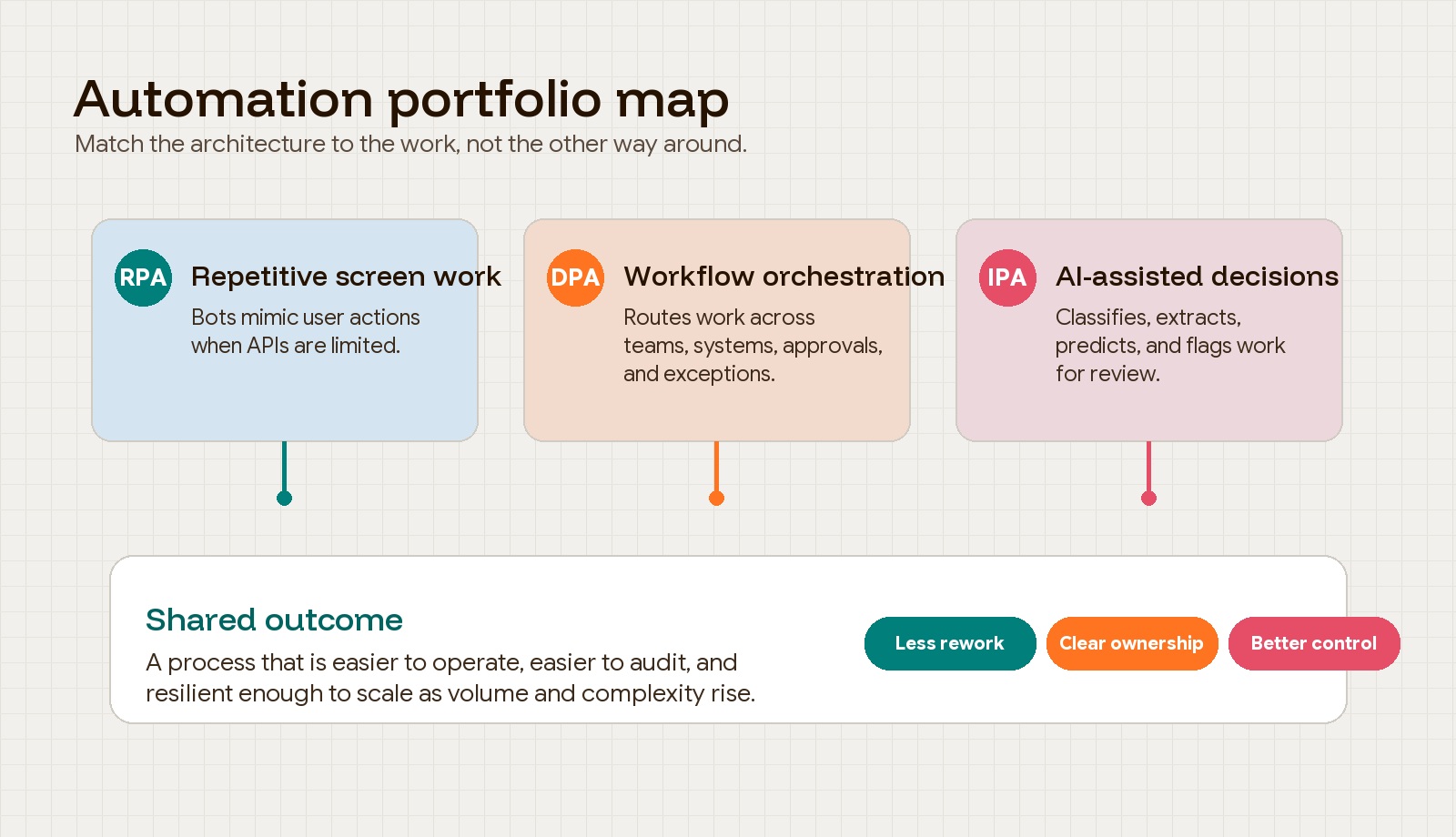
Robotic process automation (RPA) is narrower. It uses bots to mimic repetitive user actions, often at the screen or interface level. RPA is useful when a process is rules-based and a system lacks a clean API, but it can break when screens, fields, or layouts change.
Digital process automation (DPA) is broader than RPA. It orchestrates end-to-end workflows, routing, approvals, system updates, and human decision points across departments. Intelligent process automation adds AI, machine learning, natural language processing, and predictive analytics to help systems interpret unstructured inputs or support more complex decisions.
The practical lesson: do not ask, “Should we use RPA or AI?” Ask, “What kind of work are we automating, and what architecture can support it without creating new fragility?”
For a layer-by-layer comparison, the business process automation AI vs RPA guide shows when to use rules, RPA, AI interpretation, or human review.
Start with process analysis, not software selection
The strongest automation projects begin with process analysis. Teams need to know where the work starts, where it ends, who touches it, what systems it passes through, where exceptions happen, and which metrics define success.
IBM describes business process analysis as a detailed examination of a process to understand what works, what needs improvement, and how improvements should be made. That framing is useful because it keeps automation from becoming a tool-shopping exercise. The goal is not to “add automation.” The goal is to remove bottlenecks, reduce waste, improve quality, and make the work easier to manage.
A simple version of the analysis process looks like this:
- Define the workflow and the business outcome it supports.
- Measure the baseline: cycle time, wait time, error rate, rework, cost, throughput, and customer impact.
- Analyze handoffs, duplicate entry, approval delays, exceptions, and non-value-added steps.
- Improve the workflow before applying automation.
- Control the new process with dashboards, ownership, exception paths, and review cycles.
This is why Lean Six Sigma and the DMAIC cycle still matter in automation work. In one healthcare case study published on PubMed Central, a regional hospital used Lean Six Sigma and RPA to improve medical expense claims processing, reducing process time by 380 minutes and improving process cycle efficiency from 69.07% to 95.54%. The useful point is not that every company should copy that exact workflow. It is that the team measured the process, removed waste, and then automated the parts that made sense.
Use a readiness scorecard to choose the right candidates
Not every workflow should be automated first. Good candidates usually have high volume, stable rules, clear inputs and outputs, costly errors, measurable business impact, and enough standardization to support reliable execution.
Weak candidates usually have unclear ownership, too many judgment-heavy exceptions, poor data quality, undocumented business rules, or political disagreement about how the work should happen. Automating those too early turns ambiguity into software behavior.
Use a simple readiness scorecard before committing budget:
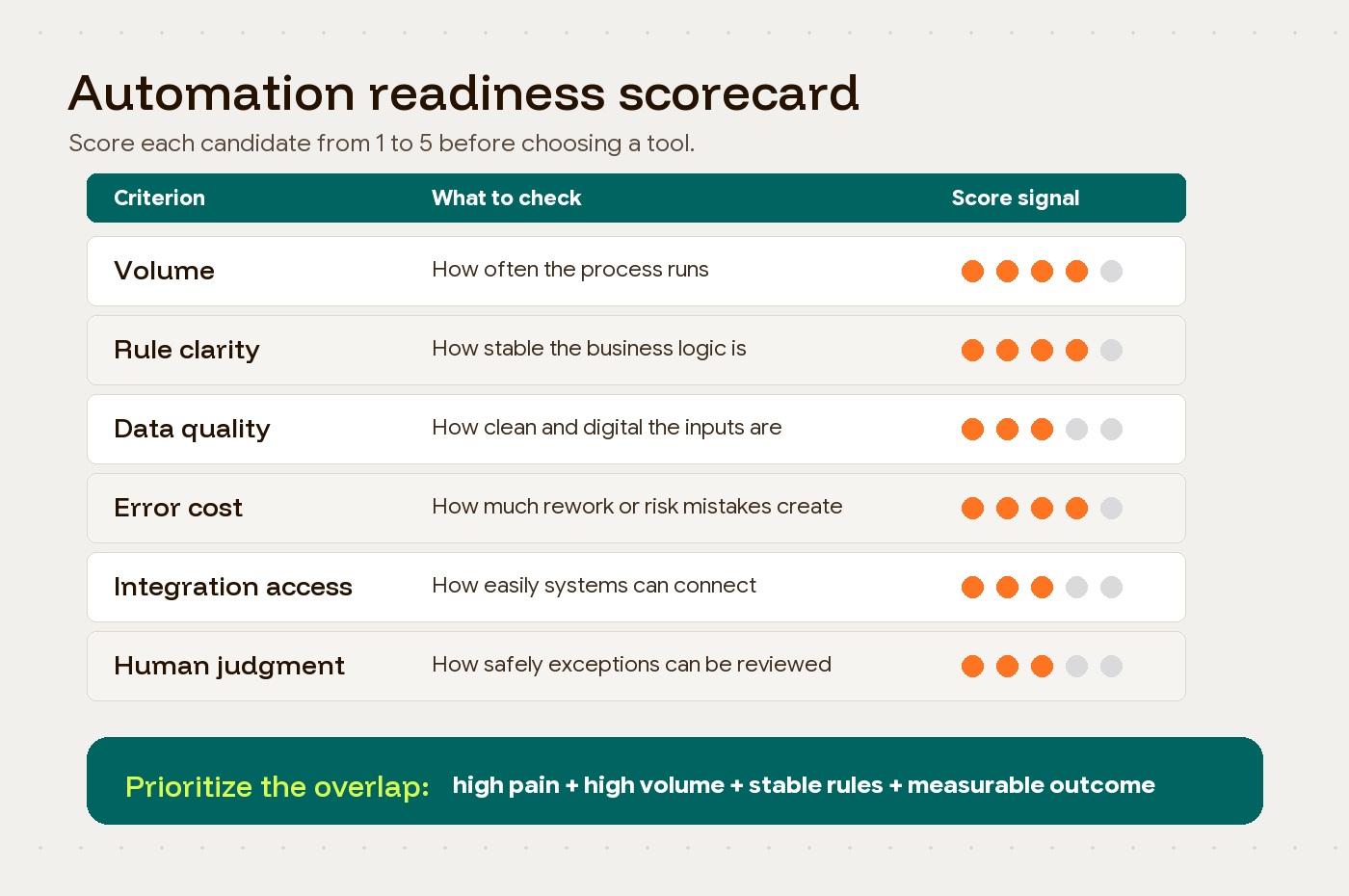
For a first comparison, use this unweighted Hapy planning heuristic. Score each dimension from 0 (unknown or weak), through 1 (partly evidenced), to 2 (demonstrated with recent cases). Keep the evidence beside the score; the total is a discussion aid, not a validated predictor of ROI.
| Dimension | Evidence for a score of 2 |
|---|---|
| Recurrence | Enough cases in the proposed pilot to observe normal and exception paths |
| Rules | Written decisions that operators apply consistently |
| Inputs | Required fields are available and validated in representative cases |
| Ownership | Named process and exception owners accept the new workflow |
| Value | A baseline and measurable target justify the operating cost |
| Feasibility | Access, integration, review, and recovery paths have been tested |
Illustrative comparison: supplier invoice routing scores 2/2/1/2/2/1 = 10 out of 12; bespoke contract approval scores 1/0/1/2/1/1 = 6. Pilot the former only after resolving its input and integration gaps. For the latter, start with document intake and reviewer preparation rather than automatic approval. These are invented scores, not client results.
A high total never overrides a missing permission, unsafe action, absent owner, or untested recovery path. Treat those as blockers and reassess after a small controlled test.
The highest-priority candidates are not always the most painful processes. They are the processes where pain, volume, standardization, and feasibility intersect. Invoice matching, support ticket routing, employee onboarding, reporting workflows, contract intake, access provisioning, and compliance documentation often score well because they are repeatable and measurable.
Custom contract generation, complex pricing decisions, and high-stakes approvals may still be automation candidates, but they need more careful architecture. In those cases, automation should support drafting, routing, audit trails, and exception handling rather than fully replacing human judgment.
Match the architecture to the workflow
Once the process is scored, the next decision is architecture. A business process automation strategy should usually mix several approaches rather than force every workflow into one platform.
| Workflow need | Better-fit approach | Why it works |
|---|---|---|
| Repetitive screen work in legacy tools | RPA | Fast to deploy when APIs are unavailable, but needs maintenance when interfaces change. |
| Cross-team approvals and routing | DPA or workflow platform | Coordinates handoffs, notifications, statuses, and human decision points. |
| Document extraction or unstructured inputs | AI-assisted automation | Helps classify, extract, summarize, or flag information before a human or system acts. |
| Standard business function with mature vendors | SaaS | Gives the team a proven tool without building commodity workflow logic. |
| End-to-end outsourced back-office process | BPaaS or managed service | Useful when the company wants a business outcome, not another internal system to operate. |
| Differentiated internal workflow | Custom software and integrations | Best when the process is strategic, specific, or tightly connected to proprietary data. |
The temptation is to overbuild. A custom system may be right for a workflow that shapes the customer experience or creates strategic advantage. It may be wasteful for a generic purchase approval flow. The opposite mistake is just as common: buying a generic platform for a workflow that actually needs deep product thinking, custom integrations, or careful exception design.
For a sharper build-or-buy decision, compare BPM vs custom automation after the workflow has been mapped.
Legacy systems add another layer. If a core system has stable APIs, use them. If it does not, RPA can bridge the gap, but treat that as a deliberate compromise, not a permanent architecture by default.
Add AI carefully, with governance from the start
AI is changing business process automation because more work now includes natural language, documents, images, prediction, and judgment support. McKinsey’s 2024 global AI survey found that organizational AI adoption jumped to 72%, after years of hovering around 50%. That acceleration is real, and it is pushing automation beyond static rules.
AI can help with invoice extraction, support triage, lead qualification, claims review, knowledge search, anomaly detection, and workflow recommendations. Microsoft’s Komatsu Australia case is a good example of AI-assisted automation in a practical finance workflow: the team used Power Automate and AI Builder to process supplier invoices, automate more than 1,000 invoices annually for one supplier, and save an estimated 300 hours per year.
But AI also raises the stakes. Automation systems that classify, recommend, approve, deny, or route work can introduce security issues, biased outcomes, model drift, and explainability problems. That is especially risky in finance, healthcare, HR, insurance, and procurement.
When AI is part of the workflow, use an AI automation rollout model that separates interpretation, control, execution, and assurance.
Good governance does not mean slowing everything down. It means being explicit about:
- Which decisions can be fully automated.
- Which decisions need human review.
- What data the system can access.
- How exceptions are escalated.
- How accuracy, bias, drift, and security are monitored.
- Who owns the workflow after launch.
Low-code and no-code tools create a similar tradeoff. They make automation faster and more accessible, but without standards they can create shadow systems, duplicated logic, weak permissions, and version-control problems. Citizen development works best when business teams can build within guardrails set by technical leadership.
Do not treat change management as a launch task
Automation can fail through quiet workarounds as well as dramatic technical incidents. People keep using spreadsheets. Managers approve outside the system. Exceptions pile up. The dashboard looks healthy while the real work happens in side channels.
That is why change management belongs inside the automation strategy, not after implementation. Prosci’s ADKAR model is useful here because it frames change at the individual level: Awareness, Desire, Knowledge, Ability, and Reinforcement. People need to understand why the workflow is changing, want to participate, learn how the new process works, practice it in real conditions, and see the new behavior reinforced.
For automation, that means leaders should be careful with the message. If the rollout is framed only as productivity extraction, employees may hear “job reduction.” If it is framed as removing repetitive work, improving visibility, reducing errors, and giving people more room for judgment-heavy work, adoption has a better chance.
The rollout should include role-specific training, clear exception paths, support during the first production cycles, and visible short-term wins. Start with a workflow that matters enough to prove value but is contained enough to learn from. Then scale.
What strong automation outcomes look like
The linked cases inform this article’s synthesis; there is no separate reader-facing report. They illustrate measured workflows, clear ownership, and architecture choices, but do not establish a universal success pattern.
Microsoft reports that Komatsu’s invoice automation case reached production in four weeks and saved time in a narrow supplier workflow. Cognizant’s healthcare automation case reports about $14 million in year-over-year savings, 105 processes automated, and a 2.6X ROI for a large managed healthcare organization. The Taiwan healthcare case shows how process redesign and RPA can improve efficiency when the team measures the work before changing it.
The Microsoft and Cognizant figures are vendor-reported customer outcomes, not independently established benchmarks or forecasts for your team. Use the examples to ask about conditions such as:
- The process was specific.
- The baseline was measurable.
- The technology matched the workflow.
- The organization knew who owned the outcome.
- The automation improved the business operation, not just the software stack.
Before scaling a promising workflow into a broader rollout, use Hapy’s AI automation ROI guide to connect baseline metrics, full cost, governance, and production evidence to the scale decision.
How to build a business process automation strategy
A strong business process automation strategy should answer seven questions before implementation starts:
- Which business outcome are we trying to improve?
- What is the current workflow, including handoffs and exceptions?
- What baseline metrics will prove improvement?
- Which process candidates score highest for value and feasibility?
- Which architecture fits each workflow: RPA, DPA, AI, SaaS, BPaaS, or custom software?
- What governance is needed for security, data quality, human review, and ownership?
- How will people be trained, supported, and reinforced after launch?
This is where Hapy’s work tends to sit: not “add automation everywhere,” but clarify the bottleneck, design the operating model, and build the right system around it. For teams outgrowing spreadsheets, manual approvals, disconnected tools, or fragile internal workflows, Hapy’s AI and automation capability and engagement model can help turn process pain into a workable execution plan.
If the next step is choosing outside help, compare business process automation companies by workflow analysis, integration depth, AI readiness, reporting, and support rather than broad transformation claims.
The most useful automation is rarely the flashiest. It is the workflow that removes real friction, gives the team better control, and keeps working when the business gets more complex.
Common questions about business process automation
What is the difference between BPA and RPA?
BPA is the broader strategy of automating business workflows across teams, systems, and decisions. RPA is one automation method inside that strategy. It uses bots to perform repetitive user actions, often in systems where deeper integration is unavailable or impractical.
Which business processes should be automated first?
Start with processes that are frequent, rule-based, measurable, error-prone, and connected to a clear business outcome. Avoid starting with processes that have unclear ownership, unstable rules, poor data quality, or too many judgment-heavy exceptions.
When should a company build custom automation instead of buying a tool?
Build custom automation when the workflow is strategically important, tightly connected to proprietary data, or poorly served by standard tools. Buy or configure existing tools when the process is common, mature, and not a source of competitive differentiation.


