Astro JS vs Next JS is not a neutral framework debate when the website is mostly content. For a marketing site, Astro is usually the better default because it starts from static HTML, ships little or no client-side JavaScript unless you ask for it, and keeps content pages easy to crawl, cache, and maintain. Next.js is usually the better choice when the public website behaves more like a product surface: authenticated areas, account-aware content, complex personalization, app-like navigation, or a React team that needs one shared system across marketing and product.
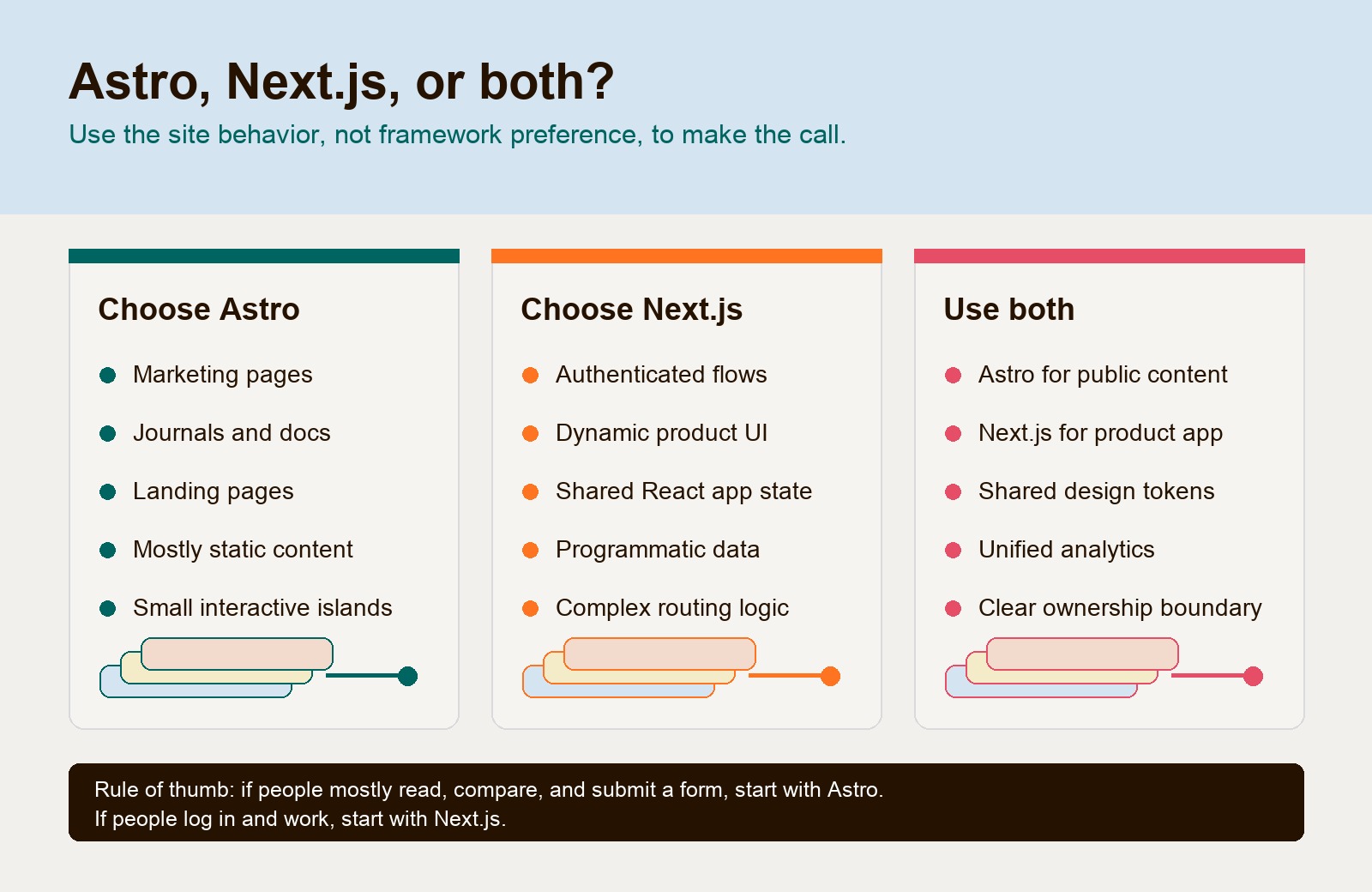
That is the practical answer. If the site is a journal, docs hub, landing page system, content-rich service site, or SEO-led website, start with Astro. If the site is really a logged-in application with marketing pages attached, start with Next.js. If the business has both, use both deliberately: Astro for the public content layer, Next.js for the product application.

If the reason you are asking this question is platform drag, slow pages, messy WordPress plugins, or a visual builder that makes every campaign harder to ship, start with the operating problem before the framework. Hapy’s Migrate to Astro work is built around that decision: preserve what works, rebuild what is slowing the site down, and avoid turning a website migration into a technology vanity project. For adjacent decisions, compare Astro vs WordPress, best CMS for Astro, and the Cloudflare and Astro stack.
Astro JS vs Next JS: the buyer decision
For content-first sites, choose the stack based on the kind of work the website must do after launch. A fast marketing site is not the same product as a dashboard, checkout flow, authenticated portal, or AI-heavy application. The wrong framework can still work technically, but it will create extra operating cost.
| Decision | Choose it when | Watch out for |
|---|---|---|
| Choose Astro | The site is mostly marketing pages, journal posts, docs, landing pages, service pages, case studies, or comparison content | Shared state across many interactive widgets takes more planning because Astro islands are intentionally isolated |
| Choose Next.js | The site includes app-like behavior, complex authentication, dynamic product surfaces, real-time data, dashboards, or deep React reuse | Content pages may carry more framework complexity than they need if the site is mostly static |
| Use both | The public website and logged-in product have different jobs | Requires clear ownership, shared design tokens, analytics discipline, and a routing plan across domains or subdomains |
The cleanest rule is this: Astro optimizes the page as content first. Next.js optimizes the experience as a React application first. Both can render static pages. Both can connect to a CMS. Both can deploy globally. The difference is the default posture.
Content performance and JavaScript payload
Astro is built for pages that should be readable before they are interactive. Its docs describe islands architecture as a way to render most of the page as static HTML while hydrating only the components that need browser JavaScript. That makes the default marketing-page baseline lean: text, images, metadata, links, and structured content do not need a full application runtime just to appear on screen.
Next.js has moved a lot of work back to the server through the App Router and React Server Components. The official docs explain that Server Components render on the server, while Client Components are used where browser interactivity is required. That model can be powerful, especially when the page needs authenticated data, streamed UI, or product logic. But the mental model is still a React application model, and interactive boundaries are managed through React’s server and client component split.
For marketing teams, the practical performance question is not “Can Next.js be fast?” It can. The better question is “How much framework behavior does this page need?” A service page with a headline, proof, pricing context, FAQs, a lead form, and a few small interactive sections should not behave like a full app unless there is a reason.
Astro’s advantage is that the default answer is no JavaScript for static content. Next.js can reduce client JavaScript with Server Components, careful boundaries, and disciplined component choices, but the team has to keep that discipline over time. On a content site where many people will add tracking scripts, embeds, forms, animations, and campaign widgets, the framework default matters.
Component islands versus a React application model
Astro’s island model is the main reason it fits marketing sites so well. You can build the page shell in Astro, then add a React calculator, a Svelte filter, a Vue carousel, or another interactive component only where it earns its place. Astro’s client directives let developers decide when an island should hydrate, such as on page load, when visible, when idle, or only in certain media conditions.
That gives marketing pages a useful constraint: interactivity is explicit. If a component does not need to run in the browser, it stays as HTML. That is good for SEO, accessibility, speed, and long-term maintenance.
Next.js is strongest when the interactive parts are not isolated widgets but the actual product experience. If users move through a complex flow, preserve client-side state, open account-specific views, or expect app-like navigation, the Next.js model is a better fit. Its file-system routing, layouts, Server Components, Client Components, middleware, and caching features are designed to support application surfaces, not just pages.
The tradeoff is simple. Astro asks, “Which pieces of this page need JavaScript?” Next.js asks, “Which pieces of this React app run on the server or client?” For a content-first marketing site, the Astro question usually creates less overhead.
Routing, CMS integration, and publishing workflow
Astro and Next.js both use file-based routing, but they encourage different publishing models.
Astro is comfortable with content as content. Its content collections support structured entries, schema validation, and local or remote content sources. That works well for journals, docs, case studies, landing-page data, resource libraries, and service pages where metadata, canonical URLs, image alt text, categories, authors, summaries, and structured blocks matter. Astro also has official guidance for CMS integrations, including headless and Git-based options.
Next.js is comfortable with content as application data. A CMS entry can be fetched inside a Server Component, cached, revalidated, and mixed with other data. The docs for caching and revalidation explain patterns such as time-based revalidation and on-demand invalidation. That can be valuable when content updates need to appear without a full rebuild, or when product and content data belong in the same experience.
For marketing operations, the CMS decision usually matters more than the framework label. Ask:
| Workflow question | Why it matters |
|---|---|
| Who edits the site: developers, marketers, writers, sales, agencies, or regional teams? | Determines whether Markdown, Git-based editing, or a full headless CMS is needed |
| How often do pages change? | Frequent campaign work needs previews, approvals, and safe publishing paths |
| Is content structured or mostly prose? | Structured content favors content collections or a modeled CMS |
| Do editors need visual page assembly? | Visual needs can point toward Storyblok, Sanity, WordPress, or another CMS layer |
| What must be previewed before launch? | Preview requirements affect rendering mode, deployment, authentication, and QA |
Astro is usually cleaner when the content model can be designed around reusable fields and templates. Next.js is usually stronger when content is inseparable from product state, user identity, or runtime data.
SEO, analytics, forms, and deployment
Next.js vs Astro SEO is often framed too narrowly. Search performance is not created by a framework alone. It comes from crawlable HTML, useful content, stable URLs, metadata control, internal linking, image handling, structured data, performance, redirects, and publishing discipline.
Astro gives content sites a strong SEO baseline because pages can render as clean HTML with minimal client-side work. That helps when the business depends on journals, service pages, comparison pages, documentation, and AI-search-friendly content that should be easy to read without waiting for a large runtime.
For teams preparing for AI assistants and browser agents, the same Astro baseline supports an agent-ready website when content, metadata, sitemaps, and accessible actions are handled deliberately.
Next.js can also produce excellent SEO pages, especially with Server Components, static generation, metadata APIs, and careful caching. It becomes the better SEO architecture when the page must combine content with dynamic product data, inventory, authenticated views, or frequently refreshed programmatic pages. Next.js docs also support forms and Server Actions, which can be useful when form handling belongs inside the application architecture.
Astro can handle forms too. Astro’s actions guide supports type-safe server functions that can be called from HTML forms or client code. For a marketing site, that is enough for many lead forms, calculators, newsletter flows, and lightweight server behavior. If the form stack needs CRM routing, spam controls, analytics events, and consent behavior, those choices should be designed directly rather than delegated to a plugin pile.
Analytics should be treated as an implementation contract in either stack. Before launch, verify page views, conversion events, consent behavior, UTMs, form submissions, CRM handoff, redirects, and canonical behavior. A fast page that breaks attribution is not a successful marketing migration.
Deployment is similarly practical. Astro can ship static output to many hosts and can add server behavior through adapters when needed. The official Astro deployment docs cover many deployment targets, including static and server-rendered modes. Next.js has first-party momentum on Vercel and can also deploy elsewhere, but the team should understand the hosting model, caching behavior, previews, environment variables, and rollback process before choosing.
When Next.js is better
Next.js is better when the marketing site is not only a marketing site. Choose Next.js when the public surface needs to share application behavior with the product.
Good Next.js cases include:
- A SaaS website where pricing, onboarding, docs, account state, and product UI need one React system.
- A marketplace or ecommerce surface with dynamic inventory, personalization, search, filters, account areas, and checkout.
- A programmatic SEO system where thousands of pages depend on frequently changing product, location, or inventory data.
- A team that already has a mature React design system, React QA patterns, React hiring pipeline, and Next.js deployment knowledge.
- A site where authentication, middleware, route protection, and server-side application behavior are central to the experience.
This is the point many framework comparisons miss. Next.js is not “worse” because it can be heavier for static content. It is better suited to problems where that application machinery is actually doing work.
If the website is a product surface, do not force Astro to behave like an app just to reduce JavaScript. Use Next.js and manage performance deliberately.
When Astro is better
Astro is better when the site needs to publish, rank, load fast, and stay maintainable without pretending every page is an app.
Good Astro cases include:
- Marketing websites with service pages, pricing context, lead forms, proof, FAQs, and landing pages.
- Journals, blogs, guides, and comparison articles where content structure matters.
- Documentation hubs and resource libraries.
- Campaign landing page systems where most sections are static and only a few widgets are interactive.
- Content-rich B2B service sites that need strong metadata, schema, internal links, and fast static or edge deployment.
- Sites migrating away from WordPress, Webflow, Framer, or plugin-heavy stacks because the current platform is slowing down campaigns.
Astro also makes mixed-framework adoption less painful. If the team has a React component that already works, it can live as an island. If a lighter Svelte or Vue component fits another widget, that can work too. This flexibility should not become a free-for-all, but it is useful during migrations where the goal is to preserve what works and rebuild what is dragging the site down.
For Hapy-style marketing sites, Astro is often the stronger starting point because the business value is speed, editorial control, SEO hygiene, cleaner content models, and fewer platform workarounds.
When to use both in a larger architecture
Many companies should not force one framework to own everything. A larger architecture can use Astro for the public website and Next.js for the logged-in product or dynamic application.
That split works when the boundaries are clear:
| Layer | Better default | Why |
|---|---|---|
| Public marketing site | Astro | Fast static pages, clean content model, low JavaScript baseline, strong SEO control |
| Journal and docs | Astro | Structured content, Markdown/MDX, reusable templates, simple publishing |
| Product dashboard | Next.js | React app behavior, authentication, shared state, dynamic data, app routing |
| Account-specific pages | Next.js | User identity, middleware, protected routes, server and client components |
| Landing pages with simple widgets | Astro | Static shell with hydrated islands only where needed |
| Product-led growth flows | Depends | Use Astro for informational pages, Next.js when the flow becomes app-like |
The risk is fragmentation. A two-framework architecture needs shared design tokens, consistent analytics, agreed URL patterns, a preview workflow, and ownership across teams. Without that, “use both” becomes a polite way to create two messy websites.
Handled well, the split is clean. Marketing gets a fast content engine. Product keeps an application framework. The business stops asking one stack to solve two different jobs.
A practical selection checklist
Use this before choosing Astro or Next.js for a marketing site:
- List the page types: homepage, service pages, landing pages, journal, docs, case studies, pricing, comparison pages, forms, gated resources, and product pages.
- Mark each page type as static, lightly interactive, dynamic, authenticated, or app-like.
- Identify who edits each page type and how often.
- Decide the CMS model before template work starts.
- Map SEO requirements: URLs, redirects, metadata, canonicals, schema, sitemap, images, and internal links.
- Map analytics requirements: page views, conversion events, UTMs, form events, consent, and CRM handoff.
- Decide where forms run: third-party tool, Astro action, serverless endpoint, Next.js Server Action, or backend API.
- Choose deployment based on previews, rollback, caching, environment variables, redirects, headers, and team ownership.
- Keep the app boundary honest. If users log in and work inside the surface, treat it as product software.
- Keep the content boundary honest. If people mostly read, compare, and submit a form, treat it as a content site.
This checklist usually points to Astro for the marketing layer and Next.js for the application layer.
FAQ
Is Astro or Next.js better for SEO?
Neither framework has an inherent ranking advantage. Astro offers a lean static default; Next.js can also deliver crawlable, server-rendered or static pages. Compare representative pages with the same content, images, tags, and hosting assumptions, measuring client payload, performance, publishing effort, and maintenance. Choose from those results and the required dynamic behavior, not an SEO superiority claim.
Is Astro good for a marketing site?
Yes. Astro is a strong fit for marketing sites, journals, docs, landing pages, service pages, and content-rich B2B websites. Its island architecture lets teams keep most pages static while hydrating only the interactive parts.
Is Next.js too heavy for a marketing site?
Not always. Next.js can work well for marketing sites, especially when the team already uses React and the site shares logic with the product. It becomes too much when a mostly static content site inherits application complexity it does not need.
Can Astro and Next.js be used together?
Yes. A common pattern is Astro for the public content site and Next.js for the logged-in product or app-like surfaces. The split works best when domains, analytics, design tokens, previews, and ownership are planned before launch.
The buyer takeaway
Astro JS vs Next JS comes down to the job of the website. If the site is content-first, SEO-led, and mostly public, Astro is the better default. If the site is app-like, authenticated, highly dynamic, or tightly tied to a React product, Next.js is the better default. If the company has both needs, use both and keep the boundary clean.
For a marketing team, the framework is not the prize. The prize is a website that loads quickly, publishes cleanly, tracks accurately, protects SEO equity, gives editors the right workflow, and does not slow every future campaign. That is why Astro is usually the stronger foundation for content-first marketing sites, and why Next.js still has a clear role when the website becomes product software.
If your current stack is slow, hard to edit, fragile during launches, or too dependent on plugins and one-off builder workarounds, treat the decision as a migration risk question first. Hapy’s Migrate to Astro page explains that process in buyer terms: audit what works, rebuild the foundation that is slowing growth, and launch without casually risking search, analytics, forms, or campaign momentum.