An Astro landing page is a strong fit when a marketing team needs repeatable campaign pages, fast load times, clean tracking, and enough structure to avoid rebuilding the same page from scratch every time a new offer launches.
The point is not to turn every marketer into a developer. The point is to build a small campaign page system once: reusable sections, content models, form logic, tracking rules, metadata, schema, and CTAs. After that, future pages become cheaper, cleaner, and easier to QA.
That is where Astro is useful. Astro’s islands architecture ships static HTML by default and adds client-side JavaScript only where an interactive component needs it. For campaign pages, that usually means the hero, proof, offer, FAQs, and conversion copy can stay lean while forms, calculators, selectors, or experiments get the interactivity they need.

If the current marketing site is already slow, brittle, or trapped in a builder workflow, start with Hapy’s Astro website migration engagement. For platform-specific decisions, compare Webflow to Astro, Framer to Astro, and Astro vs WordPress. This article focuses on the narrower campaign question: how to ship faster landing pages without rebuilding the whole site.
Why one-off landing pages become builder debt
Builder debt appears when every new campaign page is copied from the last one, then patched by hand. At first, that feels fast. Over time, each page develops its own version of the hero, CTA, form embed, tracking script, testimonial layout, metadata, responsive behavior, and thank-you state.
The team starts paying for that repetition in ordinary campaign work:
- A new landing page needs design cleanup because the copied section does not match the current brand system.
- Analytics fire differently across pages because scripts and events were pasted manually.
- Form fields drift from the CRM mapping, so attribution and sales routing get weaker.
- A/B tests become hard to trust because variants differ in more ways than the tested message.
- Performance gets worse as embeds, scripts, fonts, and unused sections accumulate.
- Page titles, canonical URLs, structured data, and crawlable internal links become inconsistent when handled page by page. Consistency helps machines interpret pages; it does not guarantee rankings or AI citations.
Astro does not magically fix campaign strategy. It gives the team a cleaner way to operationalize the parts that repeat.
What an Astro landing page system includes
An Astro landing page system is a reusable set of templates, components, content fields, and operating rules for campaign pages. It lets the team change the message, audience, offer, proof, and CTA without re-solving layout, tracking, performance, or metadata each time.
The system usually needs six pieces.
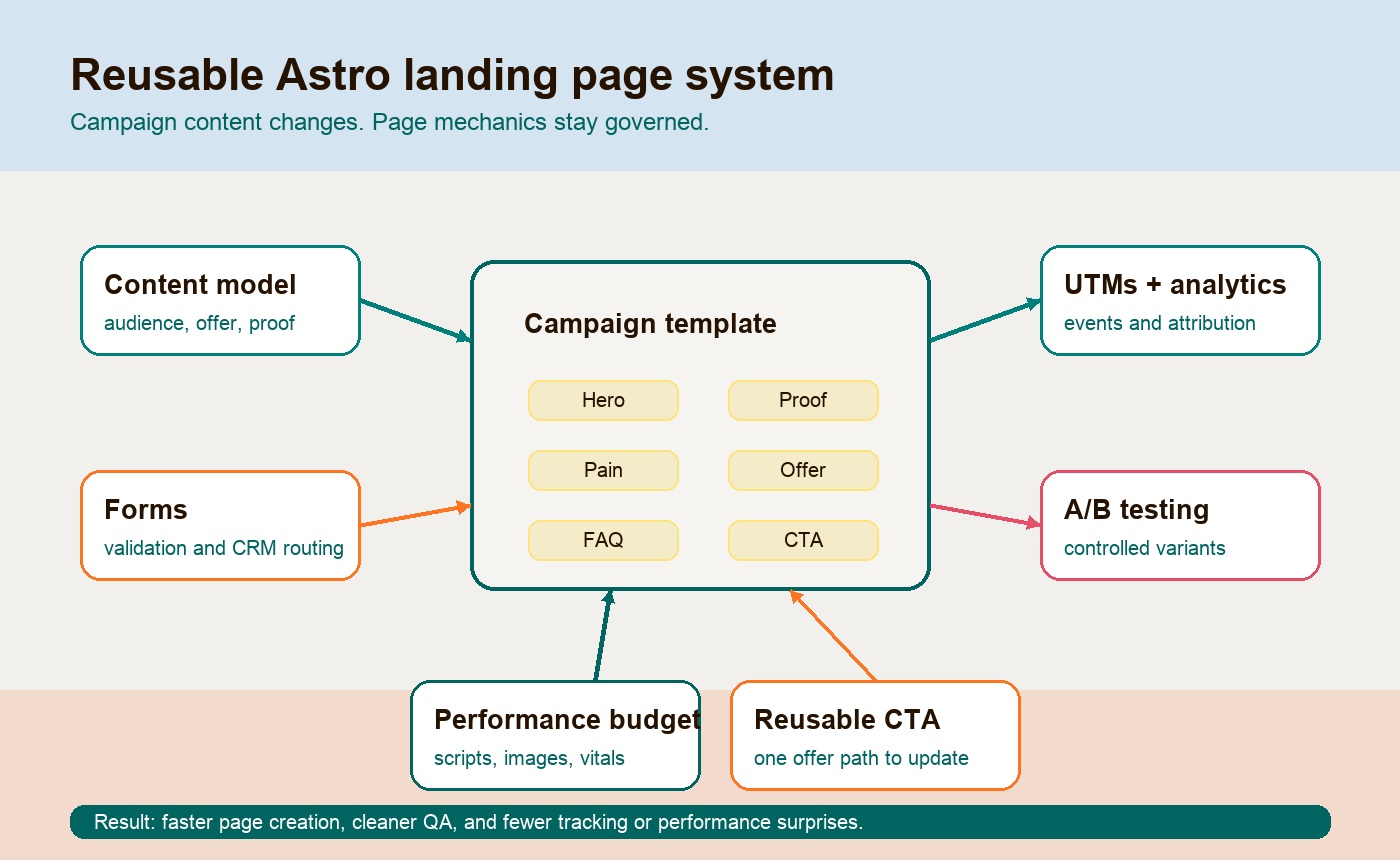
1. A content model for campaign pages
Start by defining the fields every campaign page needs. Astro content collections are useful here because they let a team structure page content with frontmatter or data files, then use that content inside templates.
A practical campaign model might include:
| Field | Why it matters |
|---|---|
audience |
Keeps the page written for a specific buyer, segment, region, or use case. |
offer |
Separates the actual conversion offer from general page copy. |
primaryPain |
Prevents generic messaging by naming the problem the page is built around. |
proofPoints |
Stores testimonials, metrics, logos, case notes, or credibility claims in one place. |
ctaLabel and ctaHref |
Keeps calls to action consistent and easy to swap. |
formId or formRoute |
Connects the page to the right lead capture flow. |
utmCampaign |
Makes attribution part of the page setup, not a launch-day afterthought. |
metaTitle, metaDescription, canonical |
Keeps search and sharing metadata consistent. |
schemaType |
Supports structured data where it helps the page. |
This is the difference between “make another page like the last one” and “create another campaign entry that uses the system.”
2. Reusable landing page sections
Most marketing site landing pages use the same strategic ingredients. The copy changes, but the page logic repeats.
A good Astro template can turn those ingredients into reusable sections:
| Section | Job on the page |
|---|---|
| Hero | State the audience, problem, offer, and next action quickly. |
| Proof | Show why the reader should believe the claim: clients, outcomes, examples, reviews, or operator detail. |
| Pain | Name the cost of staying with the current process, platform, or workaround. |
| Offer | Explain what the buyer gets and what changes after they take action. |
| Process | Reduce uncertainty by showing the steps, timeline, handoff, or delivery model. |
| FAQ | Answer buying objections without bloating the main pitch. |
| CTA | Give the page a clear next step with consistent copy, URL, and tracking. |
| Schema/meta | Give search engines, social platforms, and AI systems a clearer page description. |
The template should not make every page look identical. It should give the team strong defaults. For example, a webinar page may skip process and emphasize agenda. A paid search page may use shorter proof and a stronger form. A migration offer page may need risk language, a decision table, and an FAQ.
The reusable system gives marketing controlled variation instead of random page drift.
Builder one-off pages vs Astro templates
Visual builders are often good for the first few campaign pages. They become less useful when the business needs repeatability, attribution discipline, performance control, and cleaner ownership.
| Decision area | One-off builder page | Astro template system |
|---|---|---|
| Speed to first page | Often very fast | Slower until the template exists |
| Speed to tenth page | Slows down as copies diverge | Faster because the system is reusable |
| Brand consistency | Depends on manual discipline | Baked into components and design tokens |
| Forms | Often embedded or patched page by page | Centralized routes, validation, and success states |
| Analytics | Easy to paste, easy to drift | Shared event patterns and page fields |
| UTMs | Often managed outside the page | Can be captured, stored, and passed consistently |
| A/B testing | Quick to launch, harder to isolate cleanly | Cleaner variants if the template controls the differences |
| Performance | Can degrade through embeds and scripts | Easier to enforce budgets and component rules |
| SEO and schema | Page-by-page setup | Centralized metadata and schema defaults |
| Long-term cost | Hidden in repeated cleanup | Front-loaded, then lower per page |
The tradeoff is straightforward. A builder optimizes for immediate page creation. Astro templates optimize for repeatable campaign operations.
Forms, UTMs, analytics, and experiments need a plan
The conversion layer is where many landing pages fail quietly. The page looks fine, but the campaign data is incomplete, the lead source is unclear, or the form behaves differently from other pages.
Astro can support simple HTML forms, third-party embeds, or server-side form handling through endpoints and API routes. The official Astro docs include patterns for building forms and API endpoints, which is enough for many marketing flows: validation, spam checks, CRM handoff, redirect logic, and clean success states.
For campaign attribution, use UTM parameters deliberately. Google Analytics documents standard campaign parameters such as utm_source, utm_medium, utm_campaign, utm_term, and utm_content in its campaign URL guidance. The landing page template should preserve those parameters through the conversion path and pass them to the form or CRM where possible.
For analytics, define the events once:
| Event | Use it for |
|---|---|
landing_page_view |
Confirm campaign traffic is reaching the intended page. |
primary_cta_click |
Track top-of-page and bottom-of-page CTA engagement separately if useful. |
form_start |
See whether the form itself creates friction. |
form_submit_success |
Measure real conversion, not just button clicks. |
form_submit_error |
Catch validation, spam, or integration issues quickly. |
faq_open |
Learn which objections visitors are checking before converting. |
A/B testing should also be designed into the system. Test one meaningful variable at a time: headline angle, proof type, CTA offer, form length, or page sequence. If every variant changes layout, copy, proof, form placement, and tracking at once, the test may produce a winner without teaching the team why it won.
Performance budgets keep fast landing pages fast
Fast landing pages need rules, not vibes. A performance budget is a defined limit on page weight, scripts, images, fonts, third-party tags, or user experience metrics. web.dev describes performance budgets as limits on metrics that affect site speed.
For Astro campaign templates, a practical budget might include:
| Budget item | Example rule |
|---|---|
| JavaScript | Keep default pages static; hydrate only interactive islands. |
| Images | Compress hero images, use defined dimensions, and avoid oversized uploads. |
| Fonts | Limit font families, weights, and render-blocking behavior. |
| Third-party scripts | Load only what the campaign needs and audit every tracking tag. |
| Forms | Avoid slow embeds when a lightweight form route can do the job. |
| Core Web Vitals | Check LCP, CLS, and INP before publishing priority campaigns. |
This is where Astro’s static-first model helps. It does not stop a team from adding heavy scripts. It gives the team a better default and a clearer place to enforce rules.
Example budgets and a campaign acceptance test
The following are illustrative team budgets, not measured Hapy results or universal limits: at most 100 KB of compressed first-party JavaScript on initial load, a 200 KB hero image, and no additional third-party tag without an owner. Adjust these against the target devices, connection speeds, and actual conversion requirements.
For a hypothetical webinar campaign, record hours from approved copy to launch and defects found during QA for the last three comparable pages. After introducing the template, record the same measures for three new pages, including template maintenance time. A drop from eight to five hours would be three hours of capacity per page under those assumptions; it would not prove a conversion lift.
Before launch, require all tested form submissions to reach the correct CRM destination once, preserve test UTMs, and render usable error and keyboard-focus states. Test consent accepted and declined. Compare representative mobile pages under identical lab conditions, then monitor real-user performance when there is enough traffic. For a conversion experiment, predefine the primary metric, minimum detectable effect, sample-size calculation, and stopping rule; do not declare a winner from a few early leads.
A sample Astro landing page template structure
A reusable Astro JS landing page template does not need to be complicated. It needs to separate campaign content from page mechanics.
At a high level, the structure might look like this:
src/
  content/
    campaigns/
      astro-migration-audit.md
      ecommerce-speed-audit.md
  components/
    campaign/
      CampaignHero.astro
      ProofStrip.astro
      PainSection.astro
      OfferSection.astro
      ProcessSteps.astro
      CampaignFAQ.astro
      CampaignCTA.astro
      LeadForm.astro
  layouts/
    CampaignLayout.astro
  pages/
    campaigns/
      [slug].astro
The page template pulls one campaign entry by slug, renders the shared sections, applies metadata, and wires the correct CTA and form behavior.
The content entry might contain the campaign-specific parts:
---
title: "Astro Migration Risk Audit"
audience: "Marketing teams with slow WordPress, Webflow, or Framer sites"
primaryPain: "New pages take too long and every launch reopens platform issues."
offer: "A migration risk audit before rebuilding the site."
ctaLabel: "Get the audit"
ctaHref: "/get-started/"
utmCampaign: "astro_migration_audit"
schemaType: "Service"
---
The template owns the repeatable logic:
- Hero layout and CTA placement.
- Proof and pain section order.
- Form validation, hidden attribution fields, and success state.
- Metadata, canonical, Open Graph, and schema defaults.
- Analytics event names.
- Performance rules for images, scripts, and hydrated components.
That is what makes future pages cheaper. The team is not rebuilding the page. It is filling the system with a sharper offer.
Build once, then campaigns get cleaner
The migration note matters: Astro is most valuable when the team treats campaign pages as part of the website system, not a side project bolted onto the old stack.
In some cases, the right move is not a full site rebuild. One incremental implementation option is to keep the legacy site in place, launch Astro campaign pages in a subdirectory, and route traffic through a proxy. That can make sense when the current site cannot be replaced quickly but campaign pages need better performance and control now.
The cleaner long-term move is usually to migrate the durable marketing site into Astro, then let campaign pages share the same components, content models, CTAs, analytics rules, and brand system. Hapy’s Astro migration process is built around that exact question: what should be preserved, what should be rebuilt, and what should be left alone.
Once the system exists, the economics change:
- The first template is the investment.
- The next page is mostly content, offer strategy, proof, and QA.
- Future pages inherit the performance, metadata, form, tracking, and CTA rules.
- Campaign learnings improve the system instead of disappearing into one-off pages.
That is the real reason to use Astro templates for marketing campaigns. Speed is the visible benefit. Repeatability is the durable one.
FAQ
Is Astro good for landing pages?
Yes. Astro is a strong fit for landing pages that need fast static HTML, clean SEO control, reusable sections, and limited interactivity. It is especially useful when marketing teams need many campaign pages that share a common structure.
Do Astro landing pages require a full site migration?
No. Astro landing pages can be introduced incrementally through a subdirectory, proxy, or parallel campaign app. A full migration is worth considering when the broader marketing site also suffers from platform drag, slow launches, weak content models, or messy tracking.
Are Astro templates better than landing page builders?
Astro templates are better when repeatability, performance, tracking, SEO control, and long-term ownership matter more than instant visual editing. Builders can still be useful for short-lived experiments or teams that prioritize no-code editing above system control.
What should every marketing landing page template include?
A practical template should include a hero, proof, pain, offer, process, FAQ, reusable CTA, form handling, analytics events, UTM capture, metadata, schema, and a performance budget. Not every page needs every section, but the system should support them.
The buyer takeaway
An Astro landing page is not just a faster page. It is a chance to turn campaign production into a reusable system: content models, sections, forms, analytics, UTMs, A/B testing rules, performance budgets, CTAs, and schema all working from the same foundation.
Use a builder when the page is disposable and visual speed matters most. Use Astro templates when campaign pages are becoming a repeatable growth channel and the team needs cleaner ownership.
Build the system once. Make the next campaign page cheaper, faster, and easier to trust.