AI workflow automation tools help teams connect apps, trigger actions, classify information, draft responses, route work, and reduce manual handoffs. AI workflow deployment is different. Deployment means the workflow is reliable enough to run inside the business with clean inputs, permissions, human checkpoints, monitoring, adoption, and measurable value.
That difference is where most automation projects either create operating leverage or become another tool to babysit.
The market is full of useful tools: Zapier, Make, n8n, Power Automate, Dify, Flowise, LangGraph, CrewAI, custom API layers, and internal scripts. The tool matters. But the tool is not the operating system. A working deployment has to decide what the AI can read, what it can change, when it should stop, who reviews exceptions, and how the team knows whether the workflow improved the business.
That is why this topic fits closely with Hapy’s Business Systems & Automation work. More tools are rarely the first answer. The better question is which workflow deserves automation, what needs to be redesigned first, and what evidence will prove the system is safe enough to scale.
For the surrounding decisions, use the business process automation strategies guide to pick the workflow, the AI automation guide to set guardrails, and the AI automation ROI guide before scaling. If the workflow needs an employee-facing interface, compare it with internal tools examples too.
If the team is still choosing where AI should sit inside operations, start with practical AI automation use cases before comparing tools.
What are AI workflow automation tools?
AI workflow automation tools are platforms or frameworks that use AI models inside a business process. They can summarize a sales call, classify a support ticket, extract fields from a PDF, enrich a lead, draft an email, route an approval, update a CRM, or trigger follow-up work across connected systems.
The simplest tools work like visual builders. A trigger starts the workflow, a few steps transform the data, an AI model handles language or judgment, and downstream apps receive the result. This is useful for sales operations, marketing operations, support operations, finance admin, recruiting, internal reporting, and knowledge work.
More technical frameworks give engineers deeper control over state, memory, retrieval, tool calls, testing, and failure handling. That matters when the AI workflow is not a helper sitting beside the business, but a production path that affects customers, revenue, compliance, records, or operational decisions.
A practical definition:
AI workflow automation uses AI models, business rules, integrations, and review steps to move work through a repeatable process when the inputs require interpretation.
That last phrase matters. If the workflow is fully predictable, standard automation or workflow automation may be cheaper, clearer, and easier to govern. AI belongs where the work contains language, documents, judgment, exceptions, or changing context.
Tools and deployment solve different problems
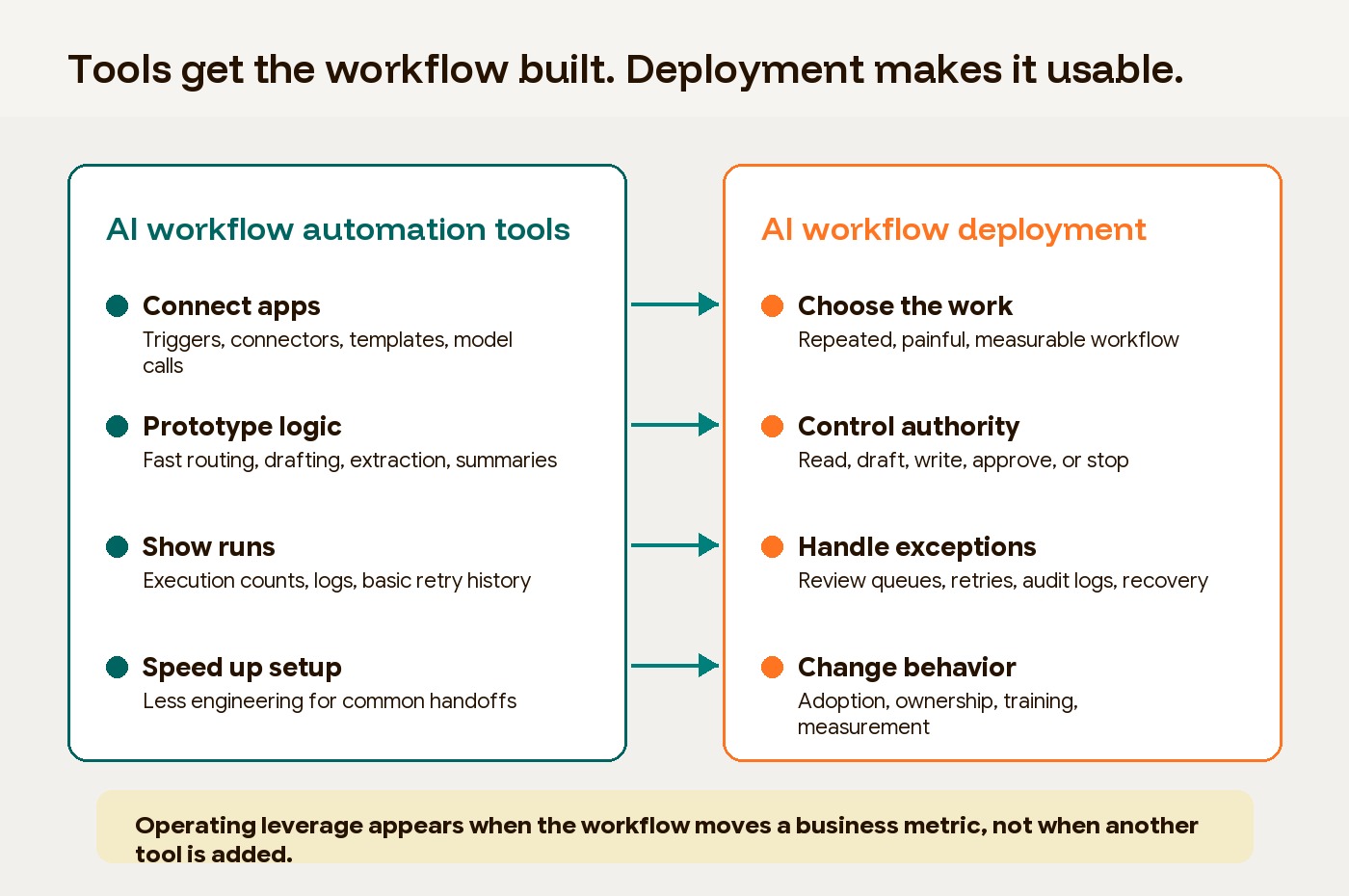
Tools make it easier to build a workflow. Deployment makes it safe and useful enough to run.
Buying the best AI workflow automation software does not answer the deployment questions. It may give the team connectors, a canvas, templates, model access, logs, and fast iteration. It does not automatically give the business clean data, authority boundaries, exception queues, adoption habits, evaluation sets, or ROI measurement.
| Decision area | Tool question | Deployment question |
|---|---|---|
| Workflow selection | Can this platform automate the steps? | Is this the right workflow to automate first? |
| Inputs | Can it connect to our apps and files? | Are the source fields clean, current, and machine-readable? |
| Permissions | Can it access the right systems? | What is it allowed to read, write, approve, or escalate? |
| Human review | Can we add an approval step? | Which decisions require a person, and what should reviewers check? |
| Reliability | Does it have logs and retries? | What happens when the model is wrong, uncertain, slow, or unavailable? |
| Adoption | Can users run it? | Will the team trust it and change how work gets done? |
| Measurement | Does it show executions? | Did cycle time, error rate, throughput, cost, or customer experience improve? |
This is the buyer trap. A tool demo shows the happy path. Deployment has to handle the ordinary mess: duplicate records, missing fields, unclear ownership, stale source documents, edge cases, permissions, approvals, and people who quietly keep using the old spreadsheet because they do not trust the new workflow yet.
Why tools alone do not create operating leverage
Tools create operating leverage only when the workflow changes how output grows relative to cost. Hapy’s glossary defines operating leverage as the ability to grow output, margin, or impact faster than cost. AI can help, but only if it removes real constraints in the operating model.
The evidence points in that direction. McKinsey’s 2025 global AI survey found that 88% of respondents reported regular AI use in at least one business function, yet only about one-third said their organizations had begun scaling AI across the enterprise. The same survey found that only 39% reported any enterprise-level EBIT impact from AI, while high performers were nearly three times as likely as others to have fundamentally redesigned individual workflows.
Deloitte’s 2026 State of AI in the Enterprise press release makes a similar point: only 30% of organizations reported redesigning key processes around AI, while 37% said they were using AI at a surface level with little or no change to the underlying business process.
That is the practical divide. AI adoption can spread through a company without changing the way work gets done. AI deployment requires a stronger operating choice: which process should change, who owns it, and which metric should move?
The workflow selection test
The best AI workflow automation tools will still underperform if the first workflow is poorly chosen. Start with work that is repeated, painful, measurable, and constrained enough to test.
Strong candidates usually have five traits:
| Signal | What to look for |
|---|---|
| Repetition | The work happens often enough that small improvements compound. |
| Interpretation | Emails, PDFs, tickets, forms, transcripts, or notes need classification or extraction. |
| Clear owner | One person or team can define the current process and accept the new one. |
| Available data | The needed inputs exist and can be accessed with reasonable cleanup. |
| Measurable baseline | The team knows current cycle time, manual touches, error rate, backlog, or cost. |
Weak candidates usually have the opposite pattern: unclear ownership, low volume, inconsistent source data, high-risk decisions, no baseline metric, or a process nobody can explain the same way twice.
That does not mean the workflow is impossible. It means the first step is process cleanup, not AI deployment.
The deployment layers that change the work
AI-driven workflow automation becomes operational only when the surrounding system is designed. The model is one part of the workflow. The deployment layer decides whether the output can be trusted, acted on, and improved.
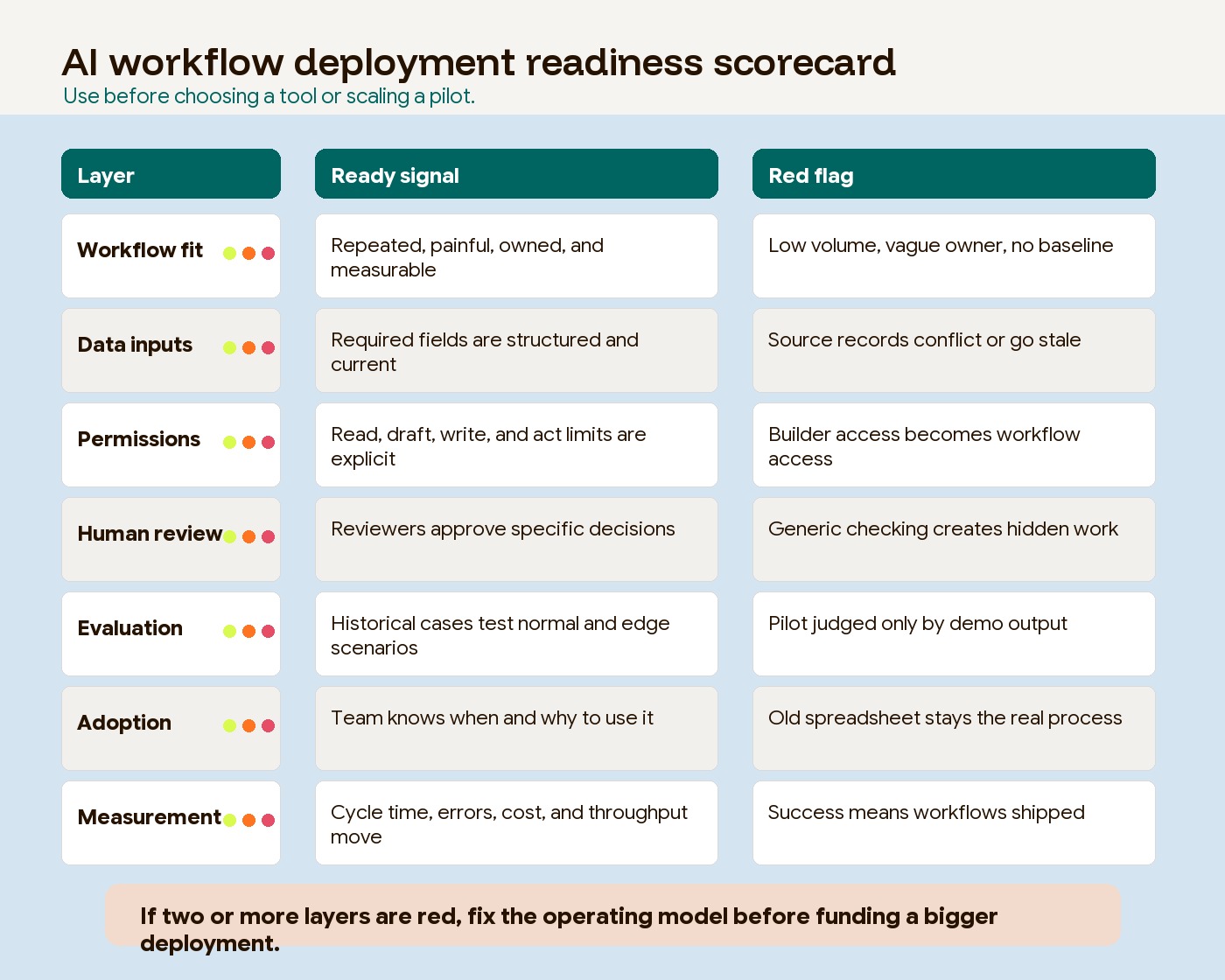
1. Data inputs and source quality
AI workflows fail quietly when the input layer is vague. A prompt can summarize a customer note, but it cannot fix a CRM where account status, renewal date, support tier, and contract owner are inconsistent across fields.
Before choosing tools, map the source data:
- Which systems are authoritative?
- Which fields are required for the workflow to act?
- Which fields are optional context?
- How fresh does the data need to be?
- What should happen when a required field is missing?
- Who can correct the source record?
This is where machine-readable inputs beat human-readable dashboards. Dashboards help leaders inspect the business. Deployed workflows need structured fields, schemas, identifiers, timestamps, and documented source rules.
2. Permission boundaries
An AI workflow should not inherit broad access simply because the builder has broad access. Permissions should match the job.
There are four levels to define:
| Permission level | Example |
|---|---|
| Read | Pull account context, ticket history, or invoice fields. |
| Draft | Prepare a response, summary, task, or recommended update. |
| Write | Update CRM fields, change status, create records, or send internal notifications. |
| Act externally | Email a customer, approve a refund, submit an order, or trigger a payment-related step. |
Most early deployments should stop at read, draft, or internal write actions. External actions need stronger controls: approval, logs, rollback paths, audit trails, and a named accountable owner.
NIST’s AI Risk Management Framework is useful here because it frames AI risk as something to manage across design, development, use, and evaluation, not as a one-time compliance check. For business teams, the plain-language version is simple: define the risk before the workflow gets authority.
3. Human checkpoints
Human-in-the-loop design is not a sign that automation failed. It is how a workflow learns where judgment still matters.
Good checkpoints are specific. “Review output” is too vague. Better checkpoints ask the reviewer to approve a clear decision:
- Is the customer intent classified correctly?
- Is the extracted invoice amount correct?
- Does the drafted response cite the right policy?
- Should this case be escalated because confidence is low?
- Is the recommended next step allowed under the current account terms?
The review queue should also produce data. Track why reviewers edit, reject, or override the workflow. Those reasons become the next improvement backlog.
4. State, memory, and durability
Simple automations can be stateless. A form arrives, the workflow runs, and the process ends. Deployed AI workflows often need state: what has already happened, which case is waiting on a person, which output was approved, and what should resume after an interruption.
LangGraph’s current documentation describes persistence through checkpointers and stores, which support thread-scoped state, human-in-the-loop workflows, fault tolerance, and longer-term memory. Temporal describes itself as a platform that guarantees durable execution of application code. The buyer implication is not that every project needs those exact tools. The implication is that production workflows need a plan for pause, resume, retry, and recovery.
If an AI workflow touches important operations, ask:
- Can it resume after a crash without duplicating work?
- Can a human approve a step tomorrow without losing context?
- Can the team inspect what happened in a specific run?
- Can failed steps retry safely?
- Can the workflow reverse or compensate for an earlier action?
Those questions are deployment questions. They rarely show up in a basic tool comparison.
5. Evaluation and monitoring
Traditional software can often be tested with exact expected outputs. AI workflows need a different evaluation habit because outputs can vary.
For a practical first deployment, build a small evaluation set from historical cases. It does not need to be academic. Start with 50 to 100 real examples that represent normal work, edge cases, sensitive cases, and known failure patterns. For each one, define what a good outcome looks like.
Track metrics such as:
- Classification accuracy.
- Extraction accuracy by field.
- Policy compliance.
- Human approval rate.
- Reviewer edit rate.
- Escalation rate.
- Time saved per case.
- Rework caused by the workflow.
Monitoring should continue after launch. A workflow that performs well in testing can drift when source data changes, policies change, volume increases, or users begin relying on it in new ways.
Low-code tools, code-first frameworks, and hybrid systems
The tool category should follow the deployment need.
Low-code and no-code builders are useful when the workflow is clear, the risk is moderate, and the team needs speed. They are especially strong for app-to-app movement, internal notifications, data formatting, approvals, and simple AI steps. n8n’s current pricing page, for example, says its plans are based on monthly workflow executions and include unlimited users and workflows. That pricing model can be attractive when a team wants many internal workflows without paying per seat.
Code-first frameworks are useful when the workflow needs custom state, stronger testing, complex branching, retrieval, proprietary business logic, or integration with production infrastructure. They are not automatically better. They are better when the cost of ambiguity, downtime, or uncontrolled behavior is high.
Hybrid systems are common for serious internal operations. A visual tool handles triggers, credentials, routine integrations, and notifications. A code layer handles reasoning, validation, retrieval, state, or specialized business logic. The result is often more practical than forcing every step into one tool.
Use this simple fit map:
| Workflow type | Better starting point |
|---|---|
| Simple SaaS handoff | Low-code automation tool |
| Structured approval routing | Rules-based workflow or BPM layer |
| Legacy screen work | RPA or API replacement project |
| Messy document intake | AI extraction plus validation and review |
| Customer-facing or regulated action | Custom deployment with governance and audit logs |
| Cross-system operating layer | Hybrid low-code plus code-first architecture |
The wrong move is buying a platform because it looks advanced, then forcing the business process to match the tool.
How to measure whether deployment worked
Do not measure AI workflow deployment by number of workflows shipped. Measure whether the work changed.
Use a before-and-after baseline:
| Metric | What it tells you |
|---|---|
| Cycle time | Did the process move faster from intake to completion? |
| Manual touches | Did the team reduce avoidable handoffs or checking? |
| Exception rate | Did fewer cases get stuck, or did the workflow surface exceptions earlier? |
| Error or rework rate | Did output quality improve, or did AI create hidden cleanup work? |
| Adoption | Are people using the workflow without being chased? |
| Throughput | Can the same team handle more volume without equivalent headcount growth? |
| Cost per completed case | Did model, platform, review, and maintenance costs still leave a gain? |
The last metric is easy to ignore. AI workflow automation software can look inexpensive during a pilot and expensive in production if every case needs human correction, every API call triggers model usage, or every edge case requires engineering support.
The goal is not full automation at any cost. The goal is a workflow the business can trust, improve, and run.
A buyer checklist before choosing a tool
Before comparing vendors, answer these questions in plain language:
- Which workflow are we improving?
- What is the current baseline for time, cost, error rate, backlog, or customer impact?
- Which parts are deterministic rules, and which parts require interpretation?
- What data does the workflow need, and where does that data live?
- What can the AI read, draft, write, or trigger?
- Which decisions need human approval?
- What is the failure mode if the workflow is wrong?
- How will we test the workflow before launch?
- Who owns monitoring after launch?
- What metric proves the workflow created operating leverage?
If those answers are unclear, buying a tool will not make them clear. It will only make the uncertainty move faster.
FAQ
What is AI workflow automation?
AI workflow automation is the use of AI models inside a repeatable business process to interpret inputs, make recommendations, draft outputs, route work, or trigger actions. It is most useful when the workflow contains language, documents, judgment, exceptions, or changing context that standard rules cannot handle cleanly.
What are the best AI workflow automation tools?
The best AI workflow automation tools depend on the workflow. Simple app-to-app handoffs often fit low-code tools. Complex, stateful, customer-facing, or regulated workflows often need code-first architecture, stronger evaluation, and durable execution. The better buying question is not “which tool is best?” It is “which tool fits this workflow’s risk, data, authority, and measurement model?”
How is deployment different from AI workflow automation software?
AI workflow automation software helps build and run the steps. Deployment defines the operating model around those steps: data quality, permissions, review queues, testing, monitoring, ownership, adoption, and success metrics. Software can make a workflow possible. Deployment makes it reliable enough for the business to trust.
When should a workflow stay rules-based?
A workflow should stay rules-based when the inputs are structured, the decision logic is explicit, and the business needs deterministic behavior. AI is better reserved for interpretation, classification, extraction, summarization, and judgment-heavy exceptions.
Where Hapy fits
For Hapy Co, AI workflow deployment sits between capability judgment and an engagement model that can make the operating system usable. The work is not only picking software. It is deciding what should change in the business.
That usually means:
- Choosing one high-value workflow instead of automating scattered tasks.
- Cleaning the input layer before adding model logic.
- Separating deterministic rules from AI judgment.
- Defining permission boundaries before connecting tools.
- Keeping human review where risk or ambiguity remains.
- Measuring the workflow against business outcomes, not demo quality.
The best AI workflow automation tools can help a team move faster. A deployed AI workflow changes how work gets done. That is the difference between adding another clever system and creating real operating leverage.


