AI automation is the use of AI models, workflow logic, integrations, and human review gates to handle business processes that include judgment, language, documents, exceptions, or messy data. It is different from traditional automation because the system is not only moving information from one place to another. It is interpreting the information before deciding what should happen next.
That distinction is where most business teams get into trouble. AI can read a support thread, extract fields from a vendor invoice, summarize a sales call, draft a report, or answer an internal policy question. But if that interpretation is wired directly into approvals, financial changes, customer messages, or compliance actions, a small model error can become an operational problem.
The practical goal is not to replace every workflow with an AI agent. It is to design AI automation that knows when to act, when to ask for clarification, and when to stop.
If the workflow itself is still unclear, start with a business process automation strategy before choosing models, agents, or tooling.
This matters now because AI adoption has moved from experimentation to business infrastructure. McKinsey’s 2025 global AI survey found that 88% of respondents reported regular AI use in at least one business function, up from 78% the previous year. The question for business teams is no longer whether AI tools will enter daily operations. The question is whether those tools will be governed well enough to trust.
What AI automation means for business teams
Traditional automation works best when the inputs are structured and the rules are stable. A workflow can move form data into a CRM, send an approval notification, update a spreadsheet, or route a ticket based on a dropdown value. This is useful, cheap, fast, and predictable.
AI workflow automation extends that model to work that contains ambiguity. It can interpret emails, transcripts, PDFs, chat threads, contracts, support histories, and internal documents. That makes it useful for business teams, because real operations rarely arrive in clean database rows. For a broader operating-layer view, compare this with Hapy’s guide to connecting dashboards, workflows, and AI.
The simplest mental model is this:
| Layer | What it does | Best handled by |
|---|---|---|
| Perception | Reads, classifies, extracts, summarizes, or reasons over messy inputs. | AI models, document parsers, retrieval systems |
| Control | Applies business rules, permissions, thresholds, routing, and approvals. | Deterministic workflow logic |
| Execution | Updates systems, sends messages, creates records, or triggers tasks. | APIs, integrations, automation platforms |
| Assurance | Tests, logs, reviews, and improves the workflow over time. | Evals, dashboards, human review |
The mistake is asking the AI model to own every layer. Business teams should let AI help with perception, but keep control, execution, and assurance as explicit system design choices.
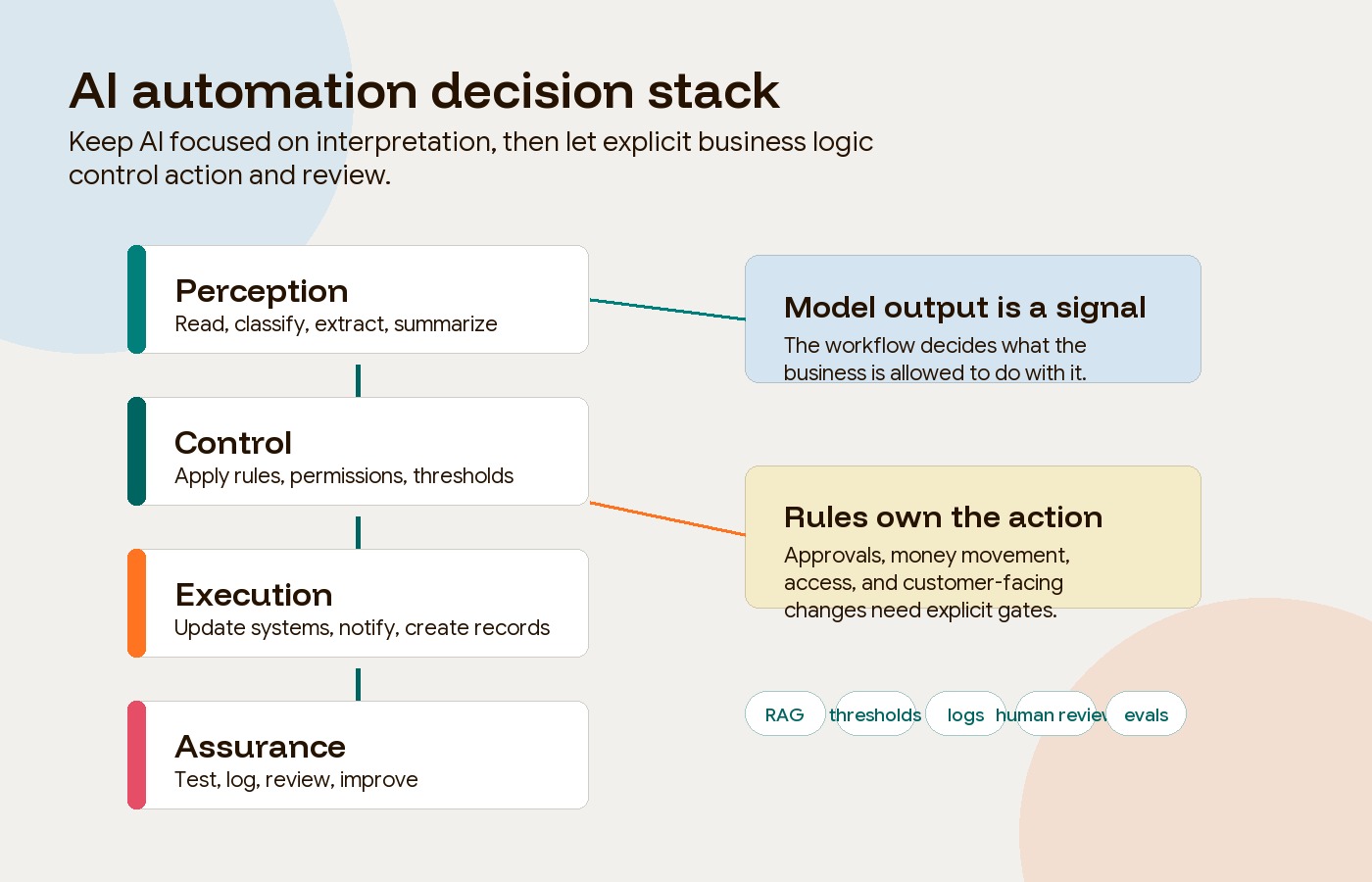
AI workflow automation should separate judgment from action
An AI workflow is safer when the model’s interpretation is treated as a signal, not a command. A support agent can classify a ticket as low risk. A finance workflow can identify a likely invoice match. A sales workflow can suggest a lead score. But the next step should still pass through rules that the business can inspect.
For example, a customer support workflow should not simply ask an AI model to answer every inbound message. A stronger design uses the model to classify intent, retrieve relevant knowledge, draft a response, and estimate confidence. Then deterministic rules decide what happens:
| Automation posture | Confidence | Business consequence | Better action |
|---|---|---|---|
| Auto-resolve | High | Low | Send a grounded answer from approved knowledge. |
| Draft-only | High | High | Let AI draft, but require a human to review and send. |
| Clarify first | Low | Low | Ask for missing details or route with a summary. |
| Human-only | Low | High | Block AI action and escalate directly. |
This posture table is useful beyond support. It applies to sales routing, finance reconciliation, internal knowledge, onboarding, compliance review, and reporting. The model can help the team move faster, but the workflow should still define where judgment belongs.
Retrieval-augmented generation is often part of that design. In RAG, the AI system retrieves relevant source material before answering, which helps anchor the response in approved content instead of only the model’s general training. IBM describes retrieval-augmented generation as a way to connect generative AI to external knowledge sources so answers can be more current and domain-specific.
RAG helps, but it does not remove the need for rules. The workflow still needs confidence thresholds, citation checks, escalation paths, and logs.
Where AI automation works best
Business teams should start with workflows where AI’s interpretation layer removes clear friction, but where the consequences can be controlled.
Customer support
AI can classify ticket intent, detect sentiment, summarize long threads, retrieve help-center answers, draft replies, and route complex cases to the right person. The best support workflows keep high-risk issues away from full automation: billing disputes, legal threats, data deletion requests, accessibility complaints, and major customer churn signals should route to a human.
Sales operations
AI can reduce CRM hygiene work by summarizing calls, extracting next steps, enriching accounts, and identifying pipeline risk. The control layer still matters because bad enrichment can create bad prioritization. Sales teams should define which fields AI can update directly, which fields require rep confirmation, and which account changes should trigger manager review.
Finance operations
Finance teams can use AI to read invoices, remittances, receipts, purchase orders, and bank statements. The most useful workflows often combine AI extraction with deterministic matching rules. Let AI read messy documents, then let the system compare totals, vendors, dates, purchase orders, and tolerances through auditable logic.
Automated reporting
AI is useful for turning validated data into narrative explanations, but it should not be asked to invent numbers or manage raw spreadsheet logic inside a prompt. A stronger reporting workflow normalizes the data, validates it, retrieves the right template, asks the model to draft only the narrative sections, and renders the final report through a structured template.
Internal knowledge
Internal knowledge bots work when employees can ask questions where they already work, such as Slack or Teams, and receive answers from a governed knowledge base. They fail when the source material is stale, permissions are ignored, or the bot answers from memory without citing documents. Internal RAG should respect access controls and show employees where the answer came from.
Use readiness gates before you automate
The best first AI automation project is rarely the flashiest one. It is the workflow where pain, volume, feasibility, and risk line up.
Use readiness gates before committing budget:
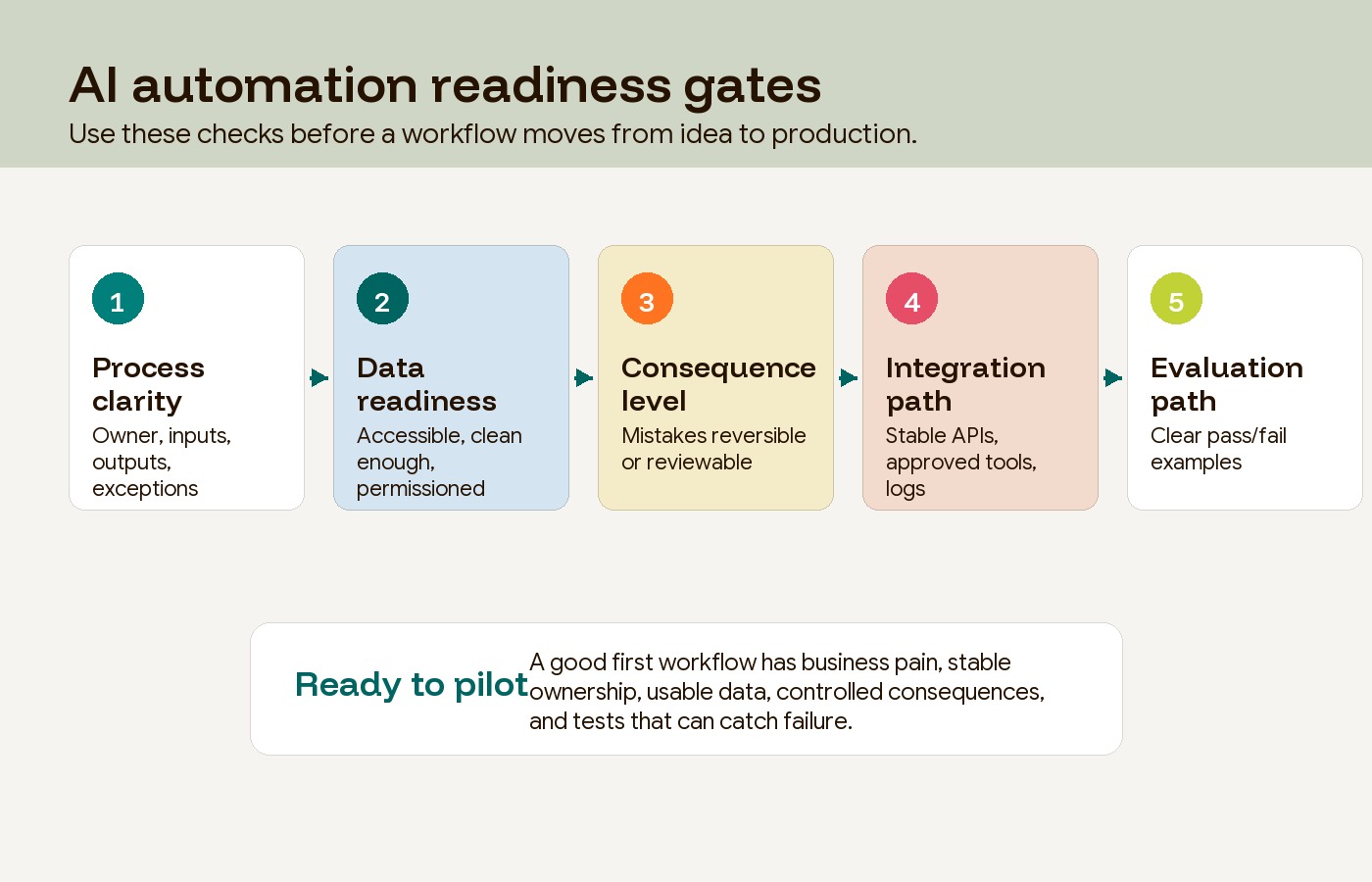
Start with workflows that are frequent, measurable, and painful enough to matter. Avoid starting with workflows that have unclear ownership, unstable rules, poor source data, or high-stakes consequences with no review path.
When an outside team is needed, evaluate AI automation agencies against these same gates so the buying decision stays tied to workflow reliability instead of tool hype.
A simple decision filter helps:
| Gate | Pass signal | Warning signal |
|---|---|---|
| Process clarity | The team can describe the workflow, owner, inputs, outputs, and exceptions. | Each department describes the process differently. |
| Data readiness | Source data is accessible, reasonably clean, and permissioned. | Key documents live in inboxes, local drives, or undocumented exports. |
| Consequence level | Mistakes are reversible or can be caught before action. | Mistakes affect money, legal status, access, health, employment, or customer trust. |
| Integration path | The workflow can connect to systems through APIs, approved tools, or stable exports. | The workflow depends on fragile screen scraping or manual copy-paste. |
| Evaluation path | The team can define what a good output looks like and test it repeatedly. | Success depends on vibes, one-off demos, or executive enthusiasm. |
This is the practical difference between using AI and operationalizing AI. A demo can look impressive with one clean example. A workflow needs to survive messy inputs, edge cases, permissions, outages, and people using it on a bad Tuesday.
Governance is part of the workflow, not a policy PDF
AI governance becomes real when it changes how a workflow behaves. A policy document matters, but the operating system needs controls that run at the moment of use.
The NIST AI Risk Management Framework is useful because it frames AI risk through four functions: govern, map, measure, and manage. For business teams, that translates into practical questions:
- Who owns the workflow after launch?
- Which data can the system access?
- Which actions require human review?
- How are errors, bias, drift, and security issues detected?
- What logs prove what happened?
- How can the workflow be paused or rolled back?
Regulation is also moving in this direction. The European Commission explains that the EU AI Act uses a risk-based model, with stricter obligations for high-risk systems and transparency duties for some AI interactions. Even teams outside the EU should treat this as a useful design signal: the more consequential the workflow, the more evidence, oversight, and auditability it needs.
Governance should not make every AI project slow. It should make the risk visible enough that teams can move with judgment.
Build evals before you scale
AI automation needs testing that looks more like product QA than a tool demo. A programmatic eval gives the system a known input, checks the output against expected behavior, and records whether it passed.
Anthropic’s guidance on evaluating AI agents makes a practical point: teams can start early with a small set of real tasks instead of waiting for a large benchmark. As a starting heuristic, assemble 20 to 50 permissioned examples from actual tickets, documents, calls, or reports. This is a discovery sample, not a statistically validated release threshold. Expand it to cover each important intent, user group, permission boundary, and rare but consequential failure; repeat nondeterministic runs.
Once those evals expose the real failure patterns, Hapy’s AI automation ROI guide helps compare workflow baseline, operating cost, governance effort, and production evidence before scaling agents.
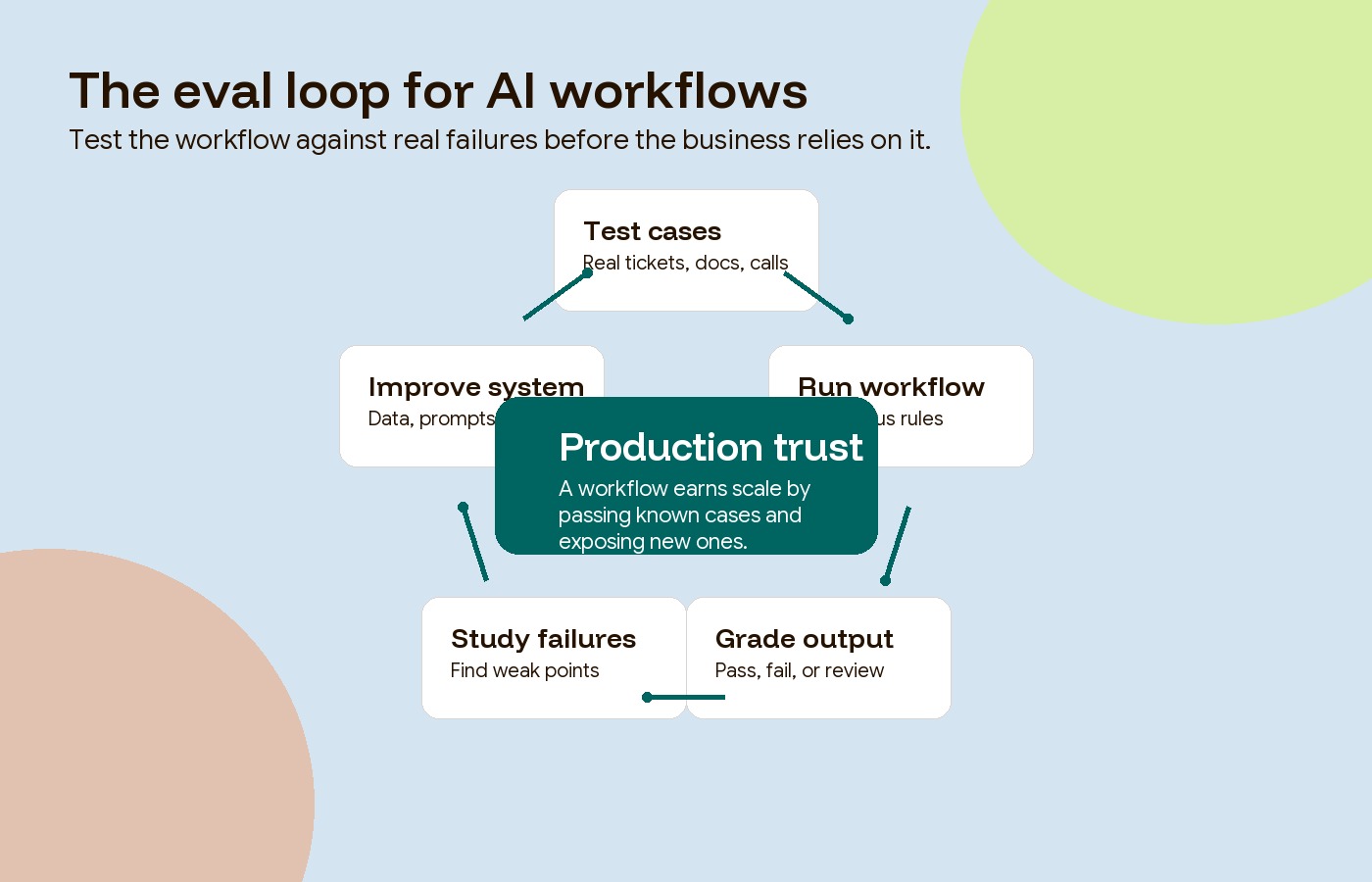
A useful eval set includes both positive and negative cases. If you are testing an internal policy bot, include questions it should answer and questions it should refuse. If you are testing invoice matching, include clean matches, small tolerances, duplicate invoices, missing purchase orders, and vendor-name variations. If you are testing support triage, include normal requests, ambiguous requests, prompt-injection attempts, refund demands, and legal threats.
The goal is not to prove that the AI is smart. The goal is to learn where the workflow breaks before customers, employees, or finance teams have to discover it for you.
Worked example: invoice intake in draft mode
This is an illustrative test plan, not a Hapy client result. Suppose a finance team measures 100 invoices taking eight minutes each to enter and check: 800 minutes of baseline work. In a trial, 80 drafts take three minutes each to verify, while 20 exceptions still take eight minutes: 400 minutes in total. If reviewing failures and maintaining the workflow takes another 120 minutes, the potential capacity released is 280 minutes, not 400. It becomes cash savings only if an actual expense falls.
Include duplicate invoices, mismatched totals, missing purchase orders, unreadable scans, and unauthorized vendor changes. Require every duplicate to be blocked and every unresolved mismatch to reach a named reviewer before posting. Any unauthorized posting stops the pilot regardless of time saved. Compare correction rates and total review effort with the baseline before expanding; these hypothetical numbers do not establish production reliability.
A practical AI automation guide for rollout
AI automation should roll out in phases, starting with the process rather than the platform.
Phase 1: Map the workflow
Pick one workflow with clear business pain. Document the current steps, owner, systems, handoffs, exceptions, cycle time, error rate, and manual effort. Do not automate a process the team cannot explain.
Phase 2: Fix ingestion first
Before building complex logic, make sure the system can reliably read the inputs. That may mean document parsing, email classification, transcript extraction, structured forms, or clean exports. Store intermediate data as structured JSON or database records rather than hidden prompt text.
Phase 3: Add rules and review gates
Define which actions can happen automatically and which require human review. Set thresholds for confidence, transaction value, customer segment, legal risk, data sensitivity, and exception handling. Make the workflow auditable.
Phase 4: Test against real failures
Convert manual checks, support examples, bug reports, edge cases, and known exceptions into eval cases. Track pass rates and failure categories. Improve prompts, retrieval, data cleaning, routing rules, and human review paths based on the failures.
Phase 5: Scale only after ownership is clear
Once the workflow works under real conditions, expand volume or add adjacent processes. Keep a named owner, quality dashboard, incident path, and review cadence. AI automation is not a one-time setup. It is an operating capability.
What business teams should do next
The safest way to begin is to choose one workflow where AI can help with interpretation while the business keeps control of action. Good candidates include support triage, sales-call summaries, invoice intake, internal knowledge search, reporting narratives, onboarding handoffs, and compliance documentation.
The wrong starting point is a broad mandate to “add AI agents” across the company. That usually creates scattered tools, shadow AI usage, inconsistent data access, and workflows nobody owns.
When the same workflow could be handled by deterministic automation, compare AI automation vs RPA before adding model behavior to the process.
If the next decision is whether to hire a fast automation shop or a deeper build partner, use the AI automation agency vs tech partner guide to separate workflow speed from production ownership.
For Hapy Co clients, this is where AI and automation capability should connect with business systems and automation work: clarify the workflow, design the operating model, build the right integrations, and keep human judgment where the business needs it.
An AI automation guide is only useful if it changes the next decision. Start with one workflow. Separate perception from control. Add review gates. Build evals. Then scale the pieces that keep passing under real operating pressure.
Common questions about AI automation
What is the difference between AI automation and traditional automation?
Traditional automation follows fixed rules against structured inputs. AI automation can interpret unstructured inputs such as emails, PDFs, call transcripts, support conversations, and internal documents. The strongest systems combine both: AI handles perception, while deterministic workflow logic controls action.
Which business process should be automated first with AI?
Start with a high-volume, measurable workflow where mistakes are reversible or reviewable. Support triage, sales-call summaries, invoice intake, reporting narratives, and internal knowledge search are often better first candidates than legal approvals, financial decisions, hiring decisions, or customer-facing account changes.
Does RAG prevent hallucinations?
RAG reduces risk by grounding responses in retrieved source material, but it does not eliminate hallucinations. Teams still need source checks, confidence thresholds, refusal rules, escalation paths, and evals that test whether the system answers only from approved information.
When does AI automation need a human in the loop?
Use human review when confidence is low, the business consequence is high, the source data is incomplete, the user is asking for a sensitive action, or the workflow affects money, access, contracts, legal exposure, employment, health, or customer trust.


