Business process automation AI is useful when a workflow needs to interpret messy inputs, documents, emails, customer conversations, or exceptions before deciding what should happen next. RPA and rules-based workflow automation are better when the work is stable, structured, repetitive, and needs a clear audit trail.
That is the real debate. The question is not whether AI automation is more advanced than RPA. The question is which layer should own which part of the process.
For operators, the wrong choice is expensive in both directions. Add AI to a deterministic workflow and you may introduce latency, variance, monitoring cost, and governance work the process did not need. Force RPA onto a messy workflow and you may end up maintaining brittle bots that fail every time a screen, form, or document layout changes.
Use this article as a myth test. AI automation, robotic process automation, workflow automation, and human-in-the-loop systems are not replacements for one another. They are different operating layers.
If you need the broader category definition first, Hapy’s guide to business process automation explains how BPA connects workflows, tools, rules, and AI. If you already know the workflow involves language, documents, or judgment, the AI automation guide is the companion piece.
For a more practical list of where AI belongs inside operations, use the AI automation use cases guide before turning the decision into a platform search.
What is AI automation?
AI automation uses AI models, workflow logic, integrations, and review gates to move work through a business process when the inputs are not perfectly structured. It can classify requests, extract fields from documents, summarize conversations, route cases, draft responses, detect anomalies, and recommend next steps.
The important word is “automation,” not “AI.” A production workflow still needs triggers, permissions, logs, data validation, ownership, exception handling, and a way to stop when the system is uncertain.
McKinsey’s 2025 global AI survey found that 88% of respondents reported regular AI use in at least one business function, but only one-third said their organizations are scaling AI across the enterprise. That gap is the operating reality behind AI automation. Adoption is easy. Reliable workflow ownership is harder.
Myth 1: AI automation is the upgraded version of RPA
AI automation is not simply RPA with a smarter engine. RPA and AI automation solve different problems.
IBM describes robotic process automation as software robots that perform repetitive digital tasks by interacting with applications and systems. In practice, RPA is useful when the process is predictable and the system does not have a clean API. A bot can copy information from a portal, enter data into a legacy ERP, download reports, reconcile fields, or move records between stable screens.
AI automation is useful when the process contains interpretation. It can read a support email, understand intent, classify a document, extract entities from a contract, compare a vendor invoice against historical patterns, or turn a call transcript into structured follow-up tasks.
The better comparison is this:
| Layer | Best at | Weakness |
|---|---|---|
| Rules-based workflow automation | Routing, approvals, notifications, status changes, and system updates based on explicit rules | Breaks when the workflow has too many undefined exceptions |
| RPA | Repetitive screen-level work in legacy systems or tools without usable APIs | Brittle when interfaces, fields, layouts, or timing change |
| AI automation | Interpreting unstructured or variable inputs before routing or drafting an action | Needs validation, governance, monitoring, and cost control |
| Human-in-the-loop systems | Reviewing exceptions, approving high-risk actions, and improving the workflow from real cases | Slower than full automation and needs queue design |
The operator lesson: do not ask one layer to do all four jobs.
Myth 2: RPA is outdated
RPA is still the better choice when the workflow is stable, repetitive, auditable, and tied to systems that are hard to integrate. Calling it outdated usually means the buyer is comparing technology labels instead of process requirements.
Use RPA or standard automation when:
- The input is already structured, such as a CSV, spreadsheet, database row, or fixed form.
- The business rule is explicit, such as “if approval status is complete, create the record.”
- The target system has a stable interface but no good API.
- The process needs deterministic behavior and step-by-step logs.
- Speed and cost predictability matter more than interpretation.
- A failure should stop the process rather than produce a best-guess answer.
That last point matters. In finance, compliance, access control, payroll, inventory updates, and ledger-related workflows, a hard stop is often safer than a plausible but wrong output.
Microsoft’s current Power Automate pricing is a useful reminder of why standard automation remains attractive: many workflow automations can be priced as predictable per-user or per-bot subscriptions. AI-heavy workflows may add variable model, retrieval, evaluation, monitoring, and review costs. Sometimes that cost is justified. Sometimes it is simply the wrong layer.
Myth 3: Rules-based workflow automation is too simple
Rules are not the enemy of AI automation. Rules are how the business keeps control.
Rules-based workflow automation is the right layer for clear routing, approvals, notifications, field validation, status changes, SLA timers, and handoffs between systems. It is often the cleanest answer for internal operations because it makes the business logic inspectable.
For example, a support workflow may not need AI to decide whether a ticket is overdue. A workflow rule can read the timestamp, service level, account tier, and owner, then escalate the ticket. AI may help classify the original message or summarize the thread, but the escalation rule should be deterministic.
The strongest AI automation projects usually combine both:
- AI reads or classifies a messy input.
- A schema validates the output.
- Rules decide what action is allowed.
- A human reviews exceptions or high-risk decisions.
- The system logs what happened.
That structure is less glamorous than “autonomous agents,” but it is much easier to run.
A practical decision grid for automation layers
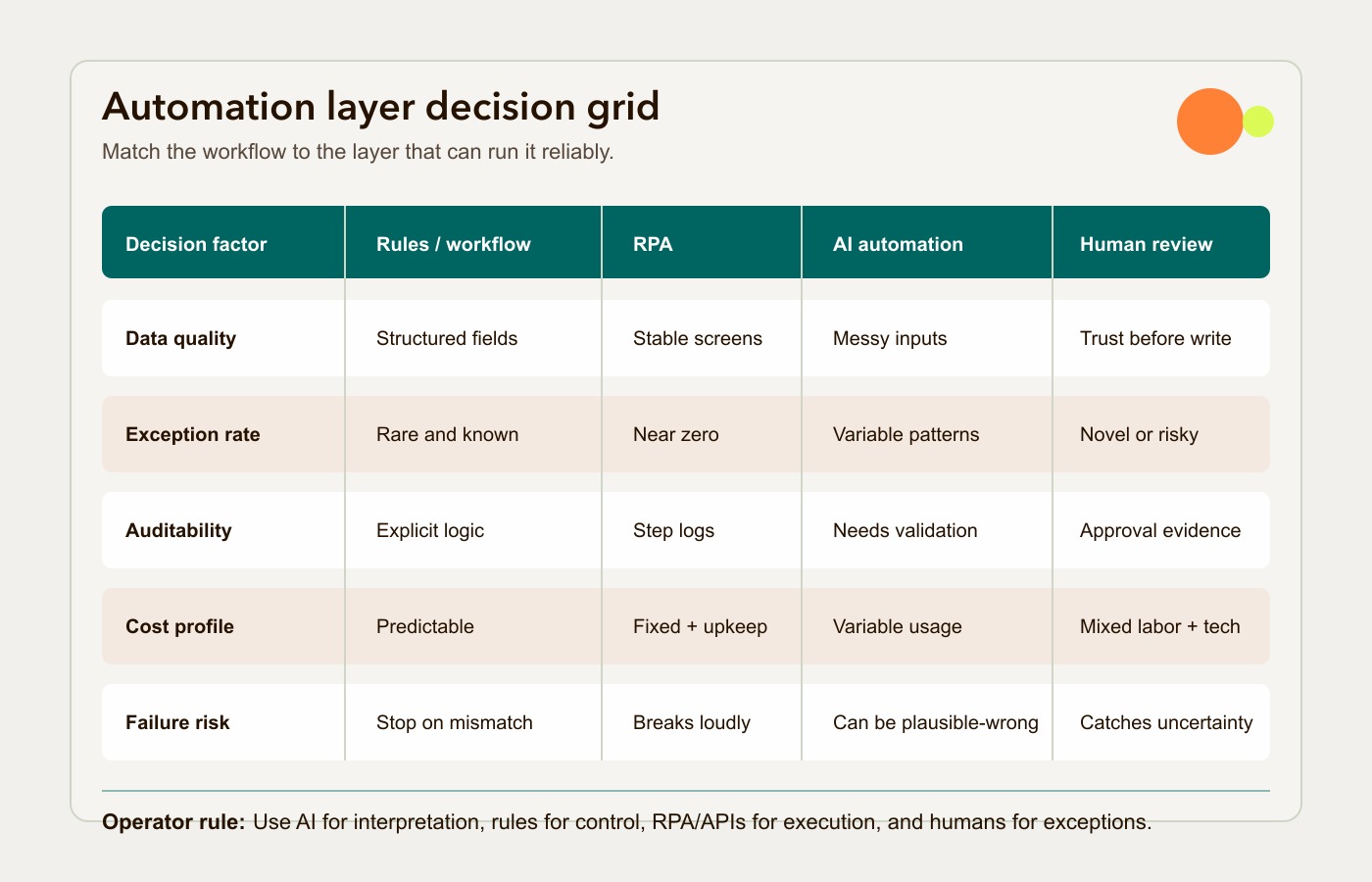
Use this grid before buying a platform, hiring an agency, or asking an internal team to build an agent. Score the workflow against the five criteria that usually decide the architecture: data quality, exception rate, auditability, cost, and failure risk.
If the workflow is already live or close to launch, the business process automation benefits guide shows which improvements should appear first and what to measure by day 90.
| Decision factor | Rules-based workflow automation | RPA | AI automation | Human-in-the-loop |
|---|---|---|---|---|
| Data quality | Best when data is structured and fields are consistent | Best when forms, screens, and templates are stable | Useful when inputs are unstructured or inconsistent | Useful when data is messy but final action must be trusted |
| Exception rate | Best when exceptions are rare and known | Best when exceptions are near zero | Useful when variations are common and patternable | Best when exceptions are frequent, high-risk, or novel |
| Auditability | Strong because logic is explicit | Strong because bot actions can be logged step by step | Weaker unless outputs are validated and logged | Strong when review decisions and approvals are captured |
| Cost profile | Predictable platform and implementation cost | Bot licensing plus maintenance that varies with interface changes and recovery work | Variable usage, evaluation, monitoring, and governance cost | Mixed cost: slower throughput but better control |
| Failure risk | Can stop on a detected failure or silently apply a wrong rule | Can stop on a detected error or write incorrect data without failing | Can produce plausible wrong outputs if unchecked | Reduces risk by catching low-confidence or high-impact cases |
Deterministic execution is not proof of correctness. A bot can successfully write the wrong amount to the wrong account. Check postconditions against the intended record and value, reconcile source and destination totals, use stable transaction IDs to prevent duplicate replays, and alert a named owner when checks fail. Test partial completion and recovery before enabling retries.
The grid does not pick a winner. It tells you where the workflow should be split.
If data quality is high, exception rate is low, auditability is strict, cost needs to be fixed, and failure risk is high, use rules or RPA. If data quality is uneven, exceptions are frequent, and the process contains language or judgment, use AI for interpretation but keep action behind rules and review gates.
Where RPA or standard automation is the better choice
AI should not be the default layer for every workflow. There are many cases where standard automation is cheaper, faster, safer, and easier to explain.
Bank reconciliation with fixed rules
If a finance team is matching bank transactions against known invoice IDs, dates, amounts, and vendor records, rules-based automation is usually enough. The system can match exact fields, apply tolerance rules, flag exceptions, and create an audit trail. AI may help read an unusual remittance email, but it should not be the layer deciding ledger truth.
High-volume status updates
When a process only needs to update shipment status, inventory counts, CRM stages, or approval states based on structured events, standard workflow automation is a better fit. AI inference adds cost and latency without adding much judgment.
Legacy system data entry
If an old ERP, claims system, or government portal has no API but a stable interface, RPA can be a practical bridge. A bot can log in, enter approved data, download confirmations, and save evidence. AI may help prepare the data upstream, but the final entry can remain deterministic.
Compliance workflows with zero tolerance for variance
When the process affects money, legal exposure, health data, account access, employment status, or regulated reporting, the business should be slow to give AI direct authority. NIST’s AI Risk Management Framework is useful here because it frames AI risk through governance, mapping, measurement, and management rather than tool enthusiasm.
In these workflows, AI can assist, summarize, extract, or draft. The actual decision often belongs with rules, approvals, logs, and accountable humans.
Where AI automation earns its keep
AI automation is strongest when the workflow has real operating friction that deterministic systems cannot handle well.
Good candidates include:
- Support triage where customers describe problems in natural language.
- Invoice intake where suppliers use different formats and email patterns.
- Sales operations where call notes, emails, and CRM fields need to become structured next steps.
- Claims, onboarding, or compliance review where documents vary but the review policy is known.
- Internal knowledge workflows where employees need answers from scattered policies, project notes, and documentation.
- Reporting workflows where validated numbers need a narrative explanation for managers.
The common pattern is not “AI replaces the workflow.” The pattern is “AI makes the messy input legible, then the workflow decides what is allowed.”
That distinction matters for cost and trust. A model that extracts fields from an invoice is doing perception. A workflow rule that checks totals, purchase order status, vendor identity, and approval thresholds is doing control. An API or RPA bot that writes the approved record is doing execution. A human reviewer handling low-confidence cases is doing assurance.
If the workflow has production value, separate those responsibilities.
Human-in-the-loop is not a compromise
Human-in-the-loop design is often treated as a temporary phase before full automation. That is the wrong mental model for many business processes.
Human review is the right architecture when confidence is low, consequences are high, or exceptions are the work. It gives the business a way to use AI without pretending every edge case is solved.
A good review queue should show:
- The original source material.
- The AI’s extracted fields or recommendation.
- The confidence score or reason for escalation.
- The policy or rule that applies.
- The action the reviewer can approve, edit, reject, or route.
- The log of what changed and who approved it.
The review queue should also feed improvement. If the same exception is resolved the same way 200 times, it may be ready for a rule. If every exception is different, keep it human-led.
This is where Hapy’s Business Systems & Automation work tends to sit: map how the business actually runs, decide which layer belongs where, and build the workflow so operators can trust it.
How to choose the right automation layer
Start with the workflow, not the platform.
- Map the current process, including handoffs, systems, owners, exceptions, and hidden workarounds.
- Identify the input type: structured data, fixed documents, screens, emails, conversations, PDFs, or mixed sources.
- Define the consequence of a wrong action.
- Decide which steps need interpretation and which need deterministic control.
- Estimate the full operating cost: build, licensing, maintenance, model usage, evaluation, review, and support.
- Choose the smallest reliable layer that can handle the work.
- Run a pilot with real exceptions before scaling.
For many teams, the answer will be a layered system: workflow automation for routing, RPA for legacy execution, AI for interpretation, and humans for exceptions. That is not a lack of ambition. It is architecture that respects how operations actually fail.
If you are still deciding what to automate first, use Hapy’s business process automation strategy to score candidate workflows before choosing a tool. If the decision has moved into budget and scale, the AI automation ROI guide can help separate demo value from production value.
The bottom line for operators
Business process automation AI is valuable when it handles ambiguity that rules and RPA cannot handle cleanly. It is risky when buyers use it to avoid process design, data cleanup, governance, or ownership.
RPA is valuable when legacy systems need predictable screen-level execution. Rules-based automation is valuable when the business logic is clear and auditability matters. Human-in-the-loop systems are valuable when exceptions, judgment, or risk cannot be removed from the process.
The practical choice is rarely “AI vs RPA.” It is which layer should read, decide, act, and review. Choose that clearly and the automation becomes easier to operate. Blur those layers and even a smart system can become another workflow the team has to babysit.
Common questions
What is the difference between AI automation and RPA?
RPA follows fixed steps to perform repetitive digital tasks, often by interacting with screens or applications. AI automation interprets variable inputs such as emails, documents, conversations, or images before supporting a workflow decision. Many production systems use both.
Is AI automation part of business process automation?
Yes. AI automation is one layer inside business process automation. BPA is the broader discipline of improving and automating workflows across people, systems, data, and decisions. AI is useful when the workflow needs interpretation, not just routing.
When should a workflow stay rules-based?
Keep a workflow rules-based when inputs are structured, exceptions are rare, decisions are explicit, auditability is strict, and the cost of a wrong action is high. Finance, compliance, access, payroll, and inventory workflows often need deterministic control.
When is human-in-the-loop automation worth it?
Human-in-the-loop automation is worth it when AI can reduce the review burden but should not act alone. Use it for low-confidence outputs, high-risk actions, novel exceptions, incomplete data, sensitive customer issues, and workflows where approval evidence matters.