Business process automation strategies only work when they start with one real workflow, a clear owner, visible exceptions, and a measurable operating target. The useful question is not “What can we automate?” It is “Which workflow is frequent, painful, measurable, and stable enough to improve this week?”
For an ops lead, the first move should be practical: choose one workflow, map the normal path and exception paths, assign owners, select the smallest tool layer that can handle the work, and measure whether cycle time, errors, rework, or customer friction improve after launch.
If you need the broader category definition first, Hapy’s guide to business process automation explains BPA, workflow automation, RPA, and AI automation at a category level. This playbook is narrower. It is the operator checklist for deciding what to automate first and how to keep the project from becoming another tool rollout.
If your team needs concrete patterns, start with the business process automation examples guide. If the work is still informal, document the workflow with how to document a business process before automation; if the organization is smaller and tool-shy, the small business automation guide explains why simple workflows often stall before software is the problem.
The Week-One SOP for Automation Strategy
Use the first week to produce a decision, not a slide deck. By the end of the week, the team should know which workflow will be piloted, who owns it, which exceptions are allowed, which tool layer fits, and what success will be measured against.
| Day | Operator action | Output |
|---|---|---|
| 1 | List 5-10 candidate workflows from ops, finance, sales, support, HR, and reporting | Candidate backlog with business owner names |
| 2 | Score each workflow on frequency, effort, error rate, compliance risk, and customer impact | Ranked shortlist |
| 3 | Map the current workflow, including systems, handoffs, wait states, and side channels | Current-state workflow map |
| 4 | Map exceptions, owners, approval rules, data fields, and stop conditions | Exception map and owner model |
| 5 | Choose the tool layer, define baseline metrics, and approve a 30-day pilot | Pilot brief with success metrics |
The reason for this sequence is simple: automation fails quietly when the workflow is not understood. People keep approving in chat. Reports still get patched in spreadsheets. Exceptions disappear into side conversations. A tool may be live, but the business is still operating manually.
IBM describes business process analysis as examining a process to understand how it works and how it can be improved. That framing is useful for automation because the goal is not to digitize every existing step. The goal is to remove waste, reduce avoidable handoffs, clarify ownership, and then automate the redesigned path.
Choose the First Workflow With a Scorecard
The first workflow should be important enough to matter and contained enough to learn from. Avoid the two common traps: choosing a tiny workflow with no business value, or choosing a politically loaded workflow where every case is an exception.
Use the following 1–5 scores as an editorial prioritization heuristic, not a validated ranking model. Record the evidence for each candidate and calibrate the bands to your own volumes and consequences. A good first pilot usually scores high on frequency, manual effort, error rate, and customer impact, with manageable compliance risk. A high-risk process can still be automated, but it needs stronger review gates and audit controls.
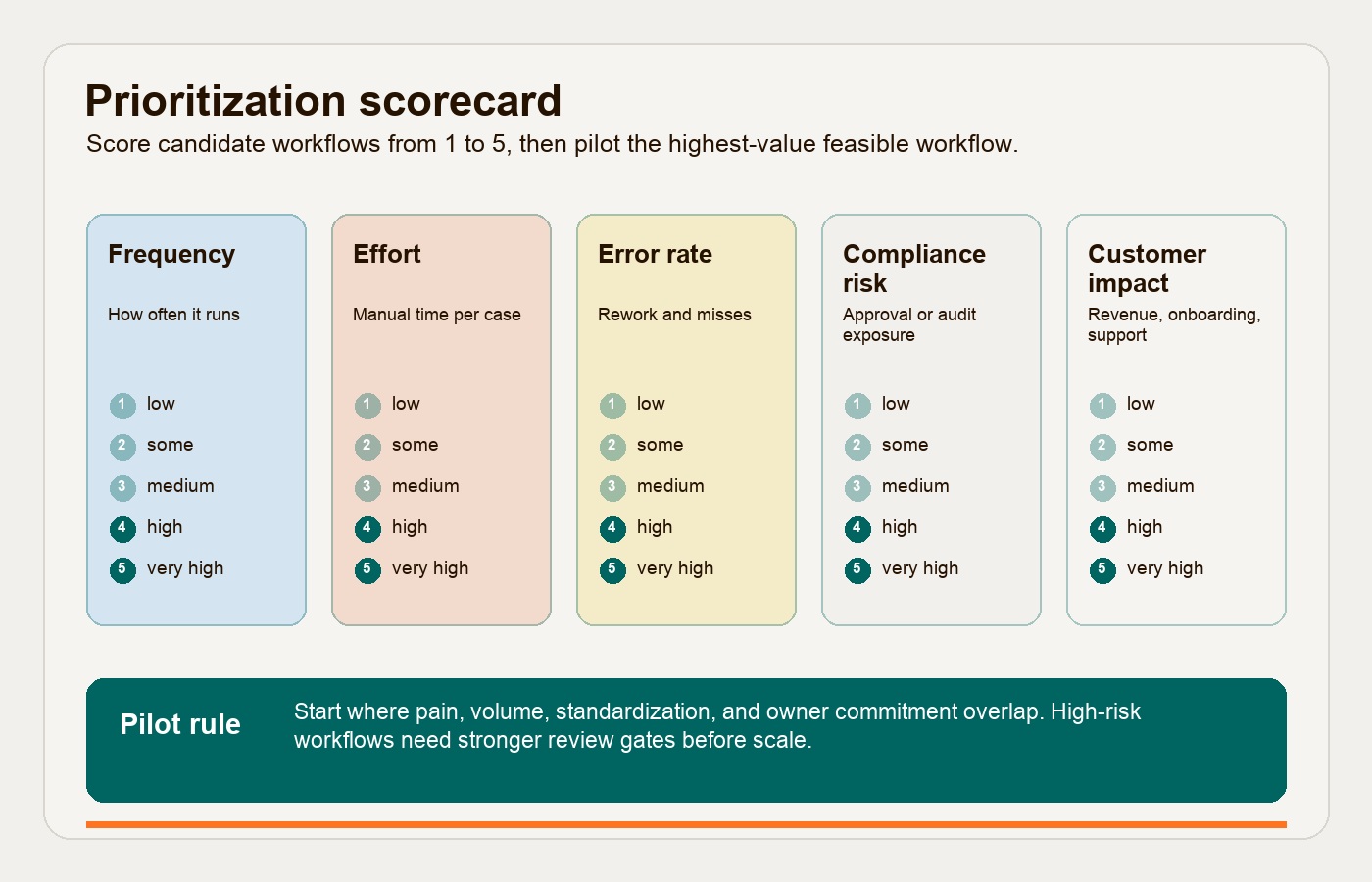
| Criteria | Score 1 | Score 3 | Score 5 |
|---|---|---|---|
| Frequency | Happens monthly or less | Happens weekly | Happens daily or many times per day |
| Manual effort | Less than 15 minutes per case | 15-60 minutes per case | More than 60 minutes per case or several people involved |
| Error rate | Rare errors with low cleanup cost | Some rework or missed fields | Frequent rework, duplicate entry, or wrong routing |
| Compliance risk | Low consequence if delayed or wrong | Some approval, privacy, or audit concern | Money, access, customer commitment, regulated data, or legal exposure |
| Customer impact | Internal convenience only | Affects internal service levels | Affects onboarding, support, delivery, billing, or revenue experience |
Add the scores, then add judgment. A workflow with a high compliance score should not automatically go first. It may need a preparation phase: better data, clearer policies, approval routing, and stronger logs. The best first candidate is often the one where pain and feasibility overlap.
Strong first workflows often include:
- Approval routing for discounts, refunds, purchases, contracts, access, or hiring steps.
- Reporting workflows that require repeated exports, cleanup, reconciliation, and narrative updates.
- Onboarding workflows for customers, employees, vendors, or partners.
- Support triage where requests need classification, routing, escalation, and status visibility.
Weak first workflows often include:
- Processes nobody owns.
- Processes with unstable rules or unresolved policy disagreement.
- Low-volume work that annoys people but does not change business performance.
- High-stakes decisions where the team has not defined approval authority or evidence requirements.
- Workflows where the source data is too messy to route or validate reliably.
Map the Workflow Before Choosing Tools
Business process automation strategies should make the work visible before they make it faster. Start with the current path, not the ideal future-state diagram.
Map these details in one page:
| Workflow element | What to capture | Why it matters |
|---|---|---|
| Trigger | What starts the work: form, email, ticket, CRM stage, invoice, calendar event, file upload | Automation needs a clean start condition |
| Required data | Fields, documents, IDs, totals, dates, customer records, owner fields | Bad inputs create downstream exception work |
| Systems | CRM, ERP, spreadsheet, help desk, database, inbox, Slack, portal, warehouse system | Tool choice depends on integration reality |
| Handoffs | Every person, team, queue, or system that touches the work | Handoffs create delay and accountability gaps |
| Decisions | Approval thresholds, routing rules, review gates, risk checks | Decisions need rules, owners, and logs |
| Outputs | Record created, status changed, message sent, report updated, task assigned | The system needs a clear definition of done |
| Baseline | Cycle time, wait time, error rate, rework, volume, cost, SLA misses | Improvement needs a before state |
Do this with the people who perform the work. Desktop observation, ticket review, system logs, and a few real examples are usually more useful than a conference room version of the process.
For this planning framework, distinguish two process-discovery layers: process mining for end-to-end system event logs and task mining for desktop-level actions such as clicks, copy-paste work, and app switching. Most teams do not need enterprise mining tools for the first pass, but the distinction is useful. Some bottlenecks live between systems. Others live inside one person’s repetitive task.
Map Exceptions Before You Automate the Happy Path
The happy path is rarely what breaks automation. Exceptions do.
Build an exception map before implementation. For each exception, define what should happen, who owns the decision, what evidence is required, whether automation should stop, and how the case should be reported later.
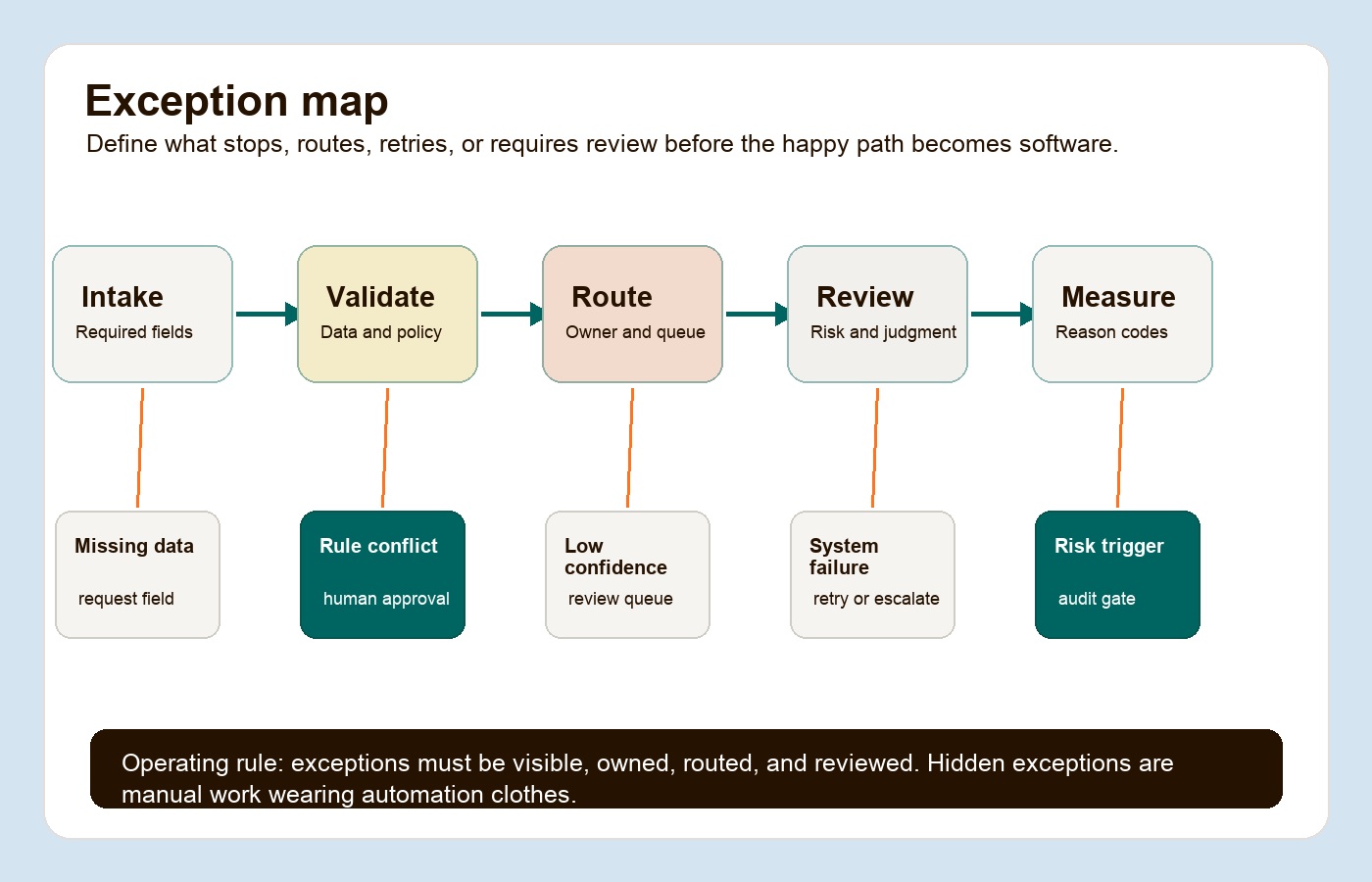
| Exception type | Example | Automation behavior | Owner |
|---|---|---|---|
| Missing data | Invoice has no PO number, onboarding form misses tax ID, support ticket lacks account ID | Stop, request missing field, keep status visible | Workflow owner or intake owner |
| Rule conflict | Discount exceeds threshold, approval policy disagrees with contract terms | Route for human review with reason code | Business approver |
| Low confidence | AI cannot classify a support request or extract fields from a document reliably | Send to review queue, log confidence and correction | Queue manager |
| System failure | API timeout, duplicate record, failed file upload, permission denied | Retry where safe, then escalate with technical details | Technical owner |
| Risk trigger | Regulated data, customer commitment, payment change, access request, legal clause | Require approval and audit log before action | Risk or compliance owner |
This is also where AI automation needs discipline. McKinsey’s 2025 global AI survey found that 88 percent of respondents reported regular AI use in at least one business function, but only 39 percent reported any enterprise-level EBIT impact from AI. The same research points to workflow redesign as a key difference for high performers. In other words: adoption is not the same as operating leverage.
If AI is part of the workflow, use Hapy’s AI automation guide to separate interpretation, control, execution, and assurance. AI can classify, extract, summarize, and draft. Rules, permissions, review gates, and logs should control what the business actually does.
If the team is comparing platforms first, the AI workflow automation tools vs deployment guide separates tool demos from the deployment work around data, permissions, review, adoption, and ROI.
Define Owners Before You Define Automations
Every workflow needs more than a tool admin. It needs accountable owners.
Use a simple owner model:
| Role | Accountable for | Practical responsibility |
|---|---|---|
| Business owner | Business outcome and policy decisions | Defines success, approves rules, resolves tradeoffs |
| Workflow owner | Day-to-day process quality | Monitors queues, exceptions, adoption, and rule changes |
| Technical owner | Integrations, permissions, reliability, and observability | Owns APIs, failures, logs, security, and rollback |
| Data owner | Data quality, field definitions, source systems, retention | Defines required fields, validation, and access rules |
| Review owner | Human decisions and exception queues | Makes sure escalations are handled and learned from |
Do not hide ownership inside a group name. “Finance” is not an owner. “Revenue operations” is not an owner. Name the role and the person for the pilot period.
The owner model should also define what the automation is not allowed to do. For example:
- It can assign a refund request to the right approver, but cannot issue the refund above a threshold.
- It can draft a support response, but cannot send a customer-facing message for high-risk categories.
- It can update a CRM stage when required fields are complete, but cannot overwrite source-of-truth account data without validation.
- It can prepare a weekly report narrative, but cannot publish numbers that were not reconciled.
For AI-enabled or sensitive workflows, NIST’s AI Risk Management Framework is a useful governance reference because it focuses on managing risk across the design, development, use, and evaluation of AI systems. For access-heavy workflows, NIST’s ABAC guidance defines attribute-based access control as authorization based on subject, object, action, and environment attributes. That is a practical pattern when automations cross departments, systems, data sensitivity levels, or time-bound approval windows.
Select Tools by Workflow Layer
Tool selection should come after workflow scoring, exception mapping, and ownership. Otherwise the vendor demo becomes the strategy.
Use the smallest reliable layer that can handle the work:
| Workflow need | Better-fit tool layer | Use when |
|---|---|---|
| Simple routing and reminders | Workflow automation or low-code orchestration | The process has structured inputs, clear owners, and basic approval rules |
| Legacy screen work | RPA | The target system has no useful API but has stable screens and repeatable steps |
| Cross-functional approvals | BPM, DPA, or case management | The workflow needs statuses, queues, role-based approvals, and audit trails |
| Messy documents or messages | AI-assisted automation | The system needs to classify, extract, summarize, or draft from unstructured inputs |
| Strategic internal workflow | Custom software and integrations | The process is specific, high-value, and poorly served by generic tools |
| Commodity process | SaaS workflow feature | The process is standard and not a source of differentiation |
One integration tradeoff to test is that presentation-layer bots can be fast, but brittle when user interfaces change. APIs and workflow orchestration are usually more durable when the process needs to scale across systems. RPA still has a place, especially for legacy systems, but it should be a deliberate bridge rather than the default architecture.
Microsoft’s Komatsu Australia case shows this mixed-layer approach in a practical finance workflow. The team used Power Automate, AI Builder, cloud flows, and desktop flows to process PDF invoices, validate data, and work with a legacy IBM AS400 system without an API. Microsoft reports the process involved more than 1,100 invoices from a single supplier and a trained document model with a 99 percent accuracy score. The operator lesson is not “buy this tool.” It is “match each layer to the constraint.”
Measure Success With Baseline, Pilot, and Operating Metrics
Measure business process automation strategies at the workflow level. Avoid vague claims like “improved efficiency” unless the team can show what changed.
Start with the baseline:
| Baseline metric | What to capture |
|---|---|
| Volume | Cases per day, week, or month |
| Cycle time | Time from trigger to done |
| Wait time | Time spent waiting on owner, customer, vendor, system, or approver |
| Touch time | Human effort per case |
| Error rate | Missing fields, duplicate records, wrong routing, wrong amounts, failed handoffs |
| Exception rate | Share of cases leaving the standard path |
| Rework | Corrections, reopened tickets, report patches, manual overrides |
| Customer impact | SLA misses, onboarding delays, billing disputes, support escalations, revenue delay |
Then define a pilot target. Thirty days and the numbers below are illustrative planning choices, not benchmarks or promised results. Extend the period to include the relevant business cycle and enough cases to assess failures. Example targets are:
- Reduce intake-to-assignment time from 24 hours to under 2 hours.
- Reduce missing-field rework by 50 percent.
- Cut approval wait time from 3 days to 1 day for standard requests.
- Remove 5 hours of weekly report preparation.
- Route 90 percent of support tickets to the right queue on first pass.
- Keep high-risk decisions at 100 percent human approval until enough evidence exists.
After launch, track operating metrics every week:
| Metric | Pass signal | Warning signal |
|---|---|---|
| Adoption | Work enters the official workflow | People keep using chat, email, or spreadsheets |
| Exception rate | Exceptions are visible and classified | Exceptions bypass the system |
| Override count | Overrides fall as rules improve | Managers keep correcting the automation |
| Data quality | Required fields are complete and validated | Missing data creates manual cleanup |
| SLA performance | Queues and timers show real improvement | Dashboard looks green while work happens elsewhere |
| Owner review | Rules and issues are reviewed weekly | Nobody is accountable after launch |
For AI-heavy workflows, use Hapy’s AI automation ROI guide before scaling. Model usage, review time, evaluation work, monitoring, vendor fees, and exception handling all belong in the cost model.
Illustrative measurement example
Suppose a reporting workflow previously took six hours each week. After a pilot, preparation takes two hours and reconciliation plus maintenance takes one hour. That would release three hours per week, assuming comparable reports and no hidden correction work. Count late reports and corrected figures alongside time; a faster report with incorrect totals fails the pilot. This is hypothetical arithmetic, not a Hapy delivery result or a promise of cash savings.
Four Practical Workflow Examples
Use these examples as templates. The details will change, but the operating pattern is reusable.
Approval Workflow
A discount, refund, purchase, or contract approval workflow is a good candidate when approvals are frequent, threshold-based, and delayed by unclear routing.
Start by mapping request type, amount, customer tier, contract status, required evidence, approver level, and SLA. Automate intake validation, routing, reminders, status visibility, and escalation. Keep human approval for threshold breaches, policy exceptions, regulated commitments, and high-value customer decisions.
Measure approval wait time, number of chasers, outside-system approvals, exception rate, and downstream rework.
Reporting Workflow
A reporting workflow is a good candidate when someone repeats the same export, cleanup, reconciliation, and narrative update every week.
Start by identifying source systems, trusted metrics, manual transformations, owners for each number, and where the report is used. Automate extraction, validation checks, refresh timing, anomaly flags, and draft commentary where appropriate. Keep human review for final interpretation and business recommendations.
Measure prep time, data correction count, late reports, stakeholder questions, and recurring manual patches.
Onboarding Workflow
Customer, employee, vendor, or partner onboarding is a good candidate when the process has repeated steps, required documents, access provisioning, training tasks, approvals, and status updates.
Start by mapping the onboarding trigger, required fields, document checks, system setup, welcome messages, account access, training completion, and handoff to the operating team. Automate task creation, document reminders, account setup where safe, status updates, and escalation for missing information.
Measure time to onboard, missing-field rate, stalled cases, first-week support issues, and handoff quality.
Support Workflow
Support triage is a good candidate when incoming requests are frequent, varied, and routed manually.
Start by mapping request categories, customer tier, SLA, issue severity, owner queue, escalation rules, and required context. Automate classification, queue assignment, SLA timers, duplicate detection, and draft summaries. If AI is used, keep review gates for refunds, commitments, cancellations, account access, legal language, or sensitive customer situations.
Measure first-pass routing accuracy, time to first response, SLA breaches, reopen rate, escalations, and customer satisfaction.
Change Management Belongs in the SOP
Automation changes how people work, so adoption cannot be a launch-day announcement.
Prosci’s ADKAR model frames successful individual change through Awareness, Desire, Knowledge, Ability, and Reinforcement. For operators, translate that into five practical actions:
| ADKAR stage | Automation action |
|---|---|
| Awareness | Explain why this workflow is changing and what current pain it fixes |
| Desire | Show how the change removes repetitive work, confusion, or customer friction |
| Knowledge | Give role-specific instructions for the new workflow and exception paths |
| Ability | Let people practice on real cases with support during the pilot |
| Reinforcement | Review adoption, exceptions, and wins every week until the behavior sticks |
This matters because automation failure often looks like non-use. People do not revolt. They route around the system. The simplest adoption metric is whether real work enters the official workflow without side-channel correction.
The Operator Checklist
Use this checklist before approving a pilot.
| Checklist item | Pass signal |
|---|---|
| Workflow chosen | One workflow has a named business outcome and pilot scope |
| Scorecard completed | Frequency, effort, error rate, compliance risk, and customer impact are scored |
| Current state mapped | Trigger, systems, owners, handoffs, data, decisions, and outputs are visible |
| Exceptions mapped | Known exceptions have stop rules, owners, reason codes, and reporting paths |
| Owners assigned | Business, workflow, technical, data, and review owners are named |
| Tool layer chosen | The solution matches the workflow constraint instead of vendor preference |
| Baseline captured | Volume, cycle time, touch time, error rate, exception rate, and rework are known |
| Pilot target approved | The team knows what should improve in 30 days |
| Review cadence set | Weekly review covers adoption, exceptions, failures, and rule changes |
| Scale gate defined | The workflow must meet evidence thresholds before broader rollout |
The scale gate is important. Do not expand an automation because the demo worked. Expand it because the workflow performed better under real operating pressure.
Common Questions About Business Process Automation Strategies
What is the best first business process to automate?
The best first process is frequent, measurable, rules-based enough to route, painful enough to matter, and owned by someone who can make decisions. Approvals, reporting, onboarding, and support triage often work well because they create visible cycle-time, error, and exception data.
Should an ops team choose a tool before mapping the workflow?
No. Choose the workflow first. Mapping trigger, data, owners, handoffs, decisions, exceptions, and success metrics makes tool selection much clearer. A low-code workflow tool, RPA bot, AI layer, BPM platform, SaaS feature, or custom integration may all be right depending on the constraint.
When should AI be used in business process automation?
Use AI when the workflow has unstructured inputs such as emails, PDFs, support messages, transcripts, notes, or documents. Use deterministic workflow rules for permissions, approvals, thresholds, status changes, and execution. AI should make messy work legible; it should not quietly own high-risk business decisions.
How long should the first automation pilot run?
Thirty days or 100 completed cases can be starting heuristics for a contained pilot, but neither proves reliability. Include peak periods, month-end work, rare exceptions, and relevant user groups. Lower-volume or consequential workflows may need a longer observation period and targeted failure tests. Predefine adoption, data-quality, review, and business-outcome gates.
Start Narrow, Then Earn the Rollout
The most useful business process automation strategies do not start with a platform mandate. They start with a workflow that an ops lead can observe, score, improve, pilot, and measure.
Pick the first workflow with a scorecard. Map the exceptions before the happy path becomes software. Name the owners before writing rules. Choose the tool layer after the workflow is understood. Measure success against the baseline, not the promise.
For teams outgrowing spreadsheets, manual approvals, disconnected systems, or reporting workarounds, Hapy’s Business Systems & Automation work focuses on this practical middle ground: clarify how the business runs, build the right operating layer, and keep human judgment where the risk requires it.


