AI automation ROI is the measurable business return from using AI models, workflow logic, integrations, and human review to improve a specific business process. The useful unit is not “AI adoption.” It is a workflow with a before state, a cost base, a quality bar, and evidence that the new system performs better in production.
That distinction matters because AI use is now widespread, but financial impact is still uneven. McKinsey’s 2025 global AI survey found that 88% of respondents report regular AI use in at least one business function, while only 39% attribute any EBIT impact to AI. Gartner’s April 2026 survey of infrastructure and operations leaders found that only 28% of AI use cases fully succeed and meet ROI expectations, with 20% failing outright.
The lesson is not that AI automation is overhyped. It is that ROI appears when a team redesigns the work around measurable outcomes. A chatbot, agent, or automation layer can create value, but only when it is tied to a real operating constraint: slow handoffs, expensive review work, error-prone data entry, support backlog, invoice matching, sales follow-up, reporting drag, or engineering bottlenecks.
For Hapy Co clients, this is the practical question: should the next AI automation project be funded, hardened, redesigned, or stopped? The answer should come from evidence, not enthusiasm.
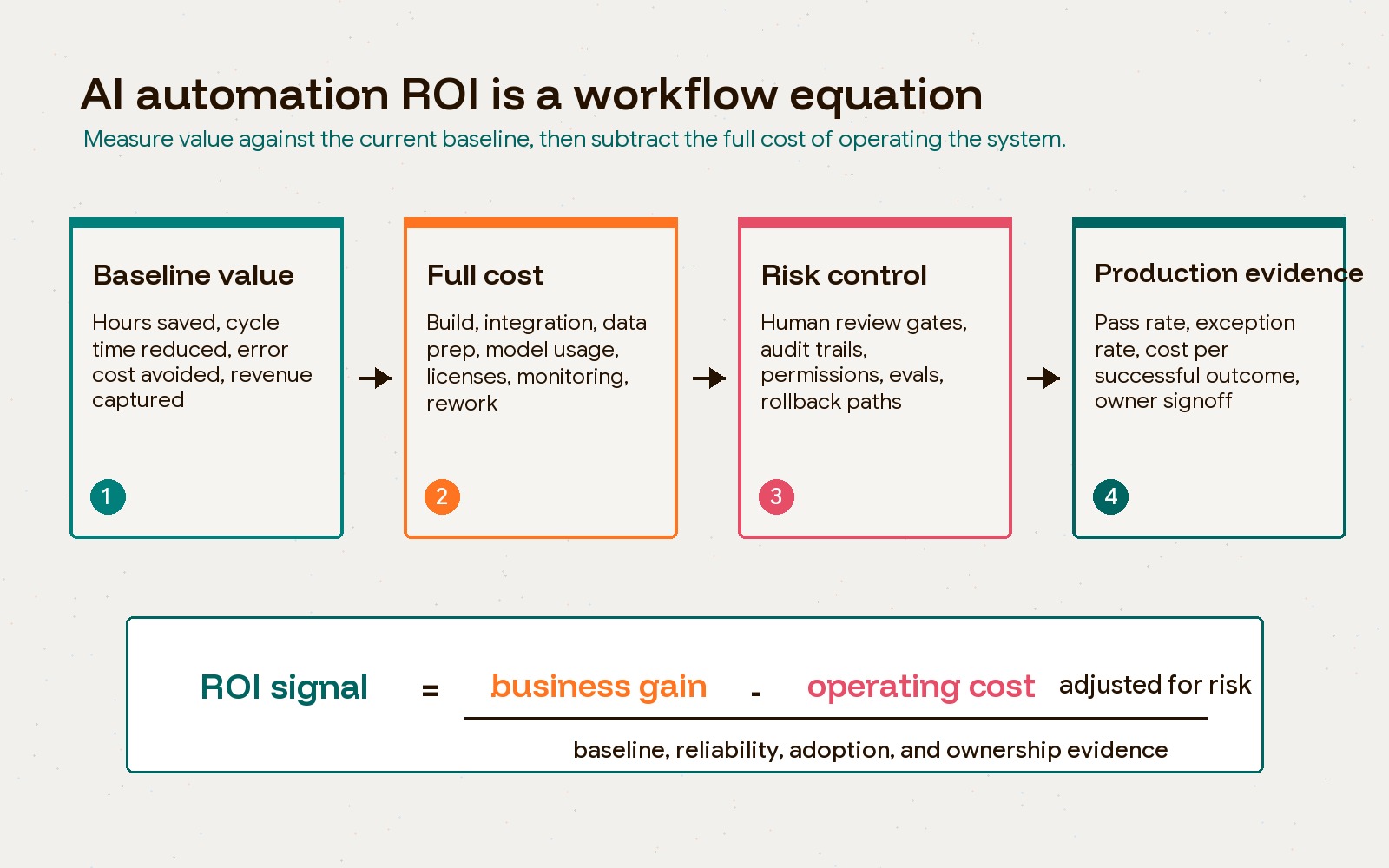
What counts as AI automation ROI?
AI automation ROI counts only when the workflow produces a measurable improvement after the full operating cost is included. Time saved is part of the case, but it is not the whole case. The better model is:
| ROI input | What to measure |
|---|---|
| Baseline value | Current volume, manual hours, cycle time, error rate, delay cost, missed revenue, support backlog, or operational risk |
| Business gain | Hours removed, faster response, higher throughput, fewer errors, recovered revenue, better conversion, or reduced rework |
| Full operating cost | Discovery, integration, data cleanup, model usage, vendor fees, human review, monitoring, retraining, security, and maintenance |
| Risk adjustment | Failure modes, legal exposure, customer impact, data sensitivity, audit needs, and rollback paths |
| Production evidence | Pass rate, exception rate, cost per successful outcome, adoption, incident log, and owner signoff |
The trap is measuring only the visible tool cost. A $200 monthly automation tool can still be expensive if it creates exception work, duplicate records, compliance review, or a workflow nobody trusts. A $100,000 custom system can be cheap if it removes a durable bottleneck from revenue, finance, or delivery.
Microsoft and IDC’s sponsored Business Opportunity of AI research reported that organizations were realizing an average 3.7x return on generative AI investment. That is a useful directional signal, not a number to paste into every business case. The work still has to be measured inside your own workflow, with your own costs and failure patterns.
An illustrative ROI calculation
Suppose a workflow handles 1,000 cases per month. A comparable baseline takes 12 minutes per case; the pilot takes 5 minutes including review and corrections. That releases about 117 hours monthly. At an assumed loaded labor cost of $40 per hour, the capacity value is about $4,667 per month.
Assume a $12,000 setup cost and $1,500 monthly operating cost, including licenses, model usage, support, and monitoring. Over twelve months at steady volume:
- Modeled capacity value: about $56,000.
- Total cost: $12,000 + (12 × $1,500) = $30,000.
- Capacity-based ROI: ($56,000 − $30,000) ÷ $30,000 ≈ 87%.
These are invented planning inputs, not a Hapy client result or an expected return. Saved hours are not cash savings unless spending actually falls, such as reduced overtime or an avoided contractor expense. If salaries stay the same, record redeployed capacity separately and name the work it will support. Do not also count revenue from that capacity without evidence of incremental margin; that would risk double counting.
Repeat the calculation with lower adoption, half the volume, more review time, and delayed rollout. Compare similar case types and include unsuccessful cases in cost per completed outcome. Scale only if quality remains acceptable and the business owner can explain how the benefit will be realized.
The best AI automation business cases start with a painful workflow
The strongest AI automation ROI usually comes from workflows that are frequent, measurable, and constrained by interpretation work.
Traditional automation moves structured data through rules. AI automation is useful when the input is messier: emails, transcripts, contracts, invoices, support threads, PDFs, internal knowledge, sales notes, product feedback, or long-form reports. AI can classify, extract, summarize, compare, draft, and recommend. The workflow should still decide what happens next.
Good first candidates often include:
- Support triage, response drafting, and escalation summaries.
- Sales call summaries, CRM updates, lead routing, and follow-up drafting.
- Invoice intake, purchase order matching, and finance exception review.
- Internal knowledge search with cited source documents.
- Operations reporting where validated data needs a written narrative.
- Engineering work where AI helps with code understanding, tests, migration support, and review preparation.
Weak candidates have the opposite profile. They have unclear ownership, inconsistent source data, low volume, high legal or financial consequence, or no agreed definition of success. If the team cannot describe the current process in plain language, it is not ready for an agent. Start with a business process automation strategy before choosing the AI stack.
AI automation ROI depends on workflow redesign, not tool access
Buying AI seats rarely creates durable ROI by itself. It may make individuals faster, but the company only sees operating leverage when the workflow changes.
Deloitte’s 2026 State of AI in the Enterprise research found that agentic AI is expected to spread quickly, with nearly three in four companies expecting at least moderate use within two years. The same research points to the governance gap: only 21% of surveyed companies report a mature model for governing autonomous agents.
That is where ROI gets fragile. An agent that can read a customer thread, retrieve a policy, draft a response, and update a CRM is more powerful than a static chatbot. It is also more exposed. The system now touches permissions, customer experience, data quality, brand risk, and operational auditability.
The right design separates four layers:
| Layer | AI’s role | Business control |
|---|---|---|
| Perception | Read, classify, extract, summarize, or reason over messy inputs | Approved source access and confidence thresholds |
| Control | Recommend routing, risk level, next action, or draft output | Deterministic rules, permissions, and review gates |
| Execution | Trigger updates, messages, tasks, records, or reports | API limits, approval rules, logs, and rollback |
| Assurance | Test outputs, monitor drift, compare outcomes, and surface incidents | Evals, dashboards, ownership, and review cadence |
The common mistake is asking the model to own all four layers. That makes the demo fast and the production system brittle. A healthier AI workflow lets the model help with interpretation while deterministic logic controls action.
The hidden cost of AI automation is usually operating cost
AI automation cost is not only the model, tool, or build fee. The full cost includes the work needed to make the workflow reliable enough to use.
Plan for these cost categories:
| Cost category | Why it matters |
|---|---|
| Workflow discovery | The process has to be mapped before it can be automated safely |
| Data readiness | Documents, fields, permissions, naming, and source quality often need cleanup |
| Integration work | APIs, authentication, rate limits, retries, and error handling create real engineering cost |
| Human review | High-risk actions still need approval, sampling, and quality checks |
| Evals and QA | AI outputs need test cases, pass/fail rules, regression checks, and edge cases |
| Observability | The team needs logs, traces, model cost, latency, failure states, and alerts |
| Ongoing ownership | Prompts, retrieval sources, workflows, vendors, and policies change over time |
This is why a narrow automation can be a better first investment than a broad agent mandate. If an AI workflow removes 20 hours a week from a finance process, the value is easy to test. If a company launches a general “AI operating layer” across every department, the cost and accountability can blur quickly.
The same logic applies to software teams. Google’s 2025 DORA research found that AI-assisted software development is now widespread and can increase throughput, but it also warns that higher AI adoption can increase delivery instability when the engineering system is weak. A separate randomized controlled study from METR found that experienced open-source developers were 19% slower on assigned tasks when using early-2025 AI tools, despite expecting to be faster.
That does not mean AI coding tools are bad. It means ROI must be measured across the full delivery loop: implementation, review, testing, rework, deployment, maintainability, and incident recovery. Faster typing is not the same as faster delivery.
Governance is part of the ROI model
Governance is often framed as a brake on innovation. In AI automation, it is part of the return.
Without governance, teams spend more time cleaning up bad actions, checking uncertain outputs, explaining failures, and rebuilding trust. With the right controls, the business can safely automate more of the work because the system knows when to stop.
The NIST AI Risk Management Framework is useful here because it treats AI risk as something to govern, map, measure, and manage. For a business workflow, that translates into practical questions:
- What data can the AI access?
- Which actions can happen automatically?
- Which actions require human approval?
- What does the system do when confidence is low?
- What logs prove what happened?
- Who owns incidents, corrections, and model or prompt changes?
These questions are not theoretical. In the Air Canada chatbot case, the British Columbia Civil Resolution Tribunal held Air Canada responsible after its chatbot gave incorrect bereavement fare information to a customer. The decision is a useful reminder that customer-facing AI is not “just a tool” when people rely on its output.
If an AI workflow can affect money, access, contracts, legal rights, employment, customer commitments, or production systems, the ROI case should include approval gates and auditability from the start. That is where Hapy’s AI automation guide is a useful companion: the goal is not to slow the work down, but to make the workflow trustworthy enough to scale.
A 90-day evidence plan for AI automation ROI
AI automation should move through a short evidence cycle before the company commits to scale. Treat ninety days as an illustrative planning window. Low-volume workflows, seasonal demand, long sales cycles, or infrequent high-consequence exceptions may need a longer trial before the evidence supports scaling.
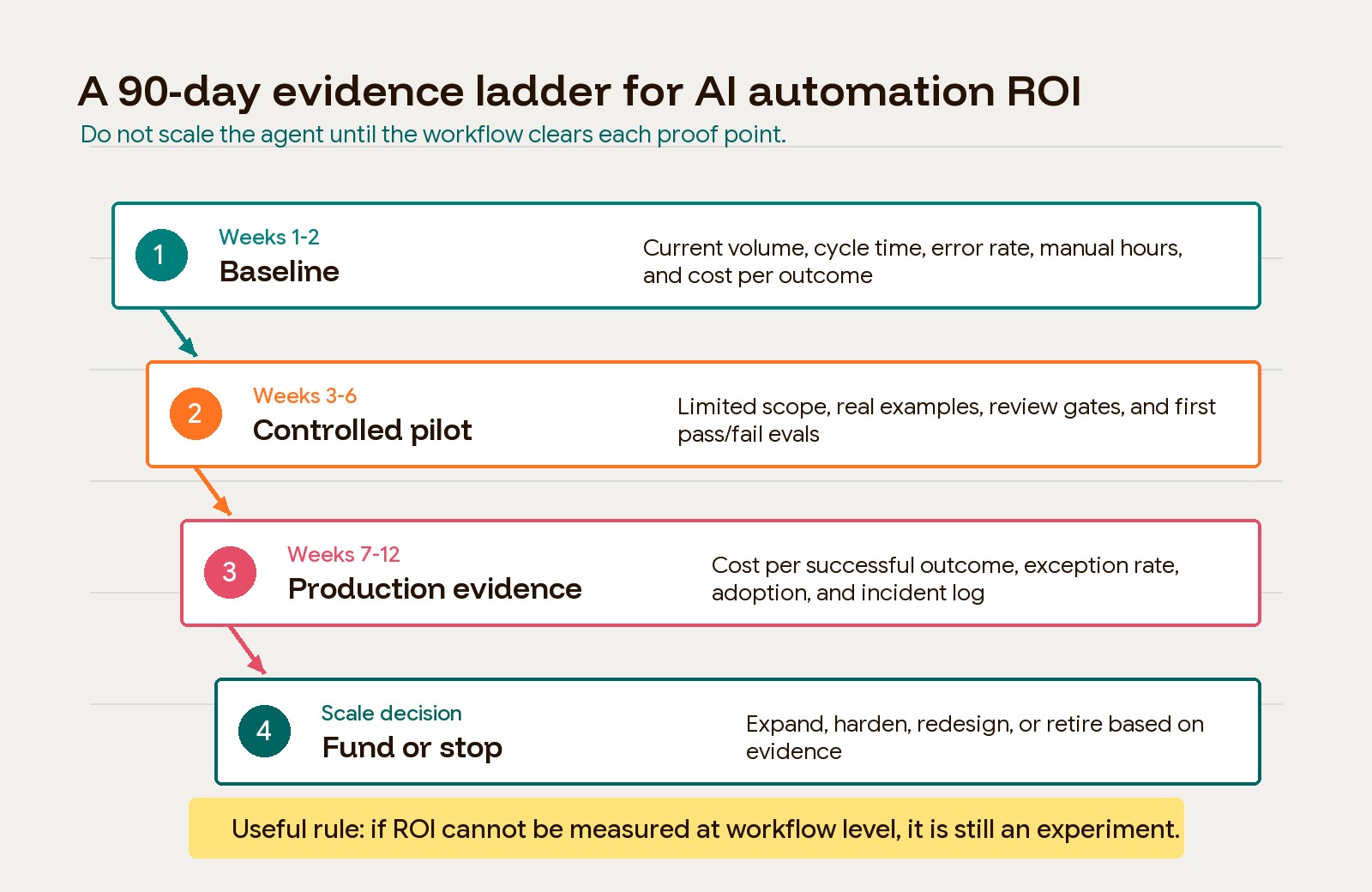
Weeks 1-2: baseline the current workflow
Start with the “before” state. Document the workflow owner, systems involved, monthly volume, current cycle time, manual hours, error rate, exception types, delay cost, and business consequence. If the workflow supports revenue, finance, compliance, support, or delivery, connect the baseline to a money or risk metric.
Do not skip this step. Without a baseline, every later claim becomes anecdotal.
Weeks 3-6: run a controlled pilot
Limit the pilot to one clear workflow and one measurable outcome. Use real examples, not only clean demo inputs. Add review gates where the consequence is high or the system is uncertain. Build a small eval set from past cases, including normal examples and failure examples.
At this stage, the team should be able to answer:
- What percentage of cases can the workflow handle without human correction?
- Which cases should never be automated?
- What does each successful outcome cost?
- How much review work remains?
- What data or integration gaps are blocking reliability?
Weeks 7-12: measure production evidence
Move from pilot performance to operating performance. Track cost per successful outcome, exception rate, review time, model and vendor cost, latency, user adoption, incident count, rollback events, and business owner confidence.
This is where many AI projects lose their shine. A workflow that looked strong in 50 curated examples may struggle with messy inputs, missing fields, API failures, permission mismatches, or edge cases. That is not failure by itself. It is the evidence needed to decide whether to harden, narrow, or stop the project.
Scale decision: fund, harden, redesign, or retire
At the end of the cycle, make one of four decisions:
| Decision | When it fits |
|---|---|
| Fund | The workflow has measurable gain, manageable cost, and clear ownership |
| Harden | The value is real, but reliability, security, or observability needs investment |
| Redesign | The workflow matters, but the current process, data, or integration model is flawed |
| Retire | The project cannot show enough value after full cost and risk are included |
The discipline is important. Not every AI automation project deserves to scale. Some should become standard operating systems. Some should stay as internal assistive tools. Some should be shut down before they become an expensive layer of ambiguity.
Where AI automation usually pays back first
The most reliable ROI tends to appear where the business already has an expensive queue of work and a clear definition of a good outcome.
Support teams can measure response time, containment, escalation quality, customer satisfaction, and review hours. Finance teams can measure invoice cycle time, exception volume, reconciliation effort, and reporting delay. Sales teams can measure follow-up speed, CRM completeness, meeting-to-next-step conversion, and pipeline hygiene. Engineering teams can measure PR cycle time, review quality, deployment stability, rework, and incident load.
The higher-risk areas are not off limits, but they require stronger controls. Hiring, healthcare, legal, finance approvals, account access, contractual commitments, and customer-facing decisions need review gates, policy constraints, and logs before automation can be trusted.
The practical buyer question is not “Can AI do this?” It usually can, at least in a demo. The better question is “Can this workflow perform better with AI after we include total cost, risk, and ownership?”
Build, buy, or partner?
The right build model depends on the workflow’s importance.
Buy or configure an existing tool when the process is standard, the data is already available, and the consequence of mistakes is low. Use an AI automation agency vs tech partner comparison when the work sits between workflow orchestration and custom systems. Bring in a deeper technical partner when the automation touches core business logic, customer experience, proprietary data, regulated workflows, security, or long-term product architecture.
If the right model is an external workflow specialist, compare AI automation agencies by production evidence, stack ownership, governance, monitoring, and exit terms rather than demo quality alone.
For some companies, the best first move is not custom AI software. It is a better operating layer around a known workflow. Hapy’s Business Systems & Automation work sits in that practical zone: map the business process, connect the right systems, automate the repeatable handoffs, and keep human judgment where the risk justifies it.
If the automation becomes a durable product, internal platform, or customer-facing workflow, treat it like real software. That means architecture, QA, observability, ownership, and cost control. AI can accelerate the work, but it does not remove the need for technical judgment.
The practical takeaway
AI automation ROI is not created by adding AI to a workflow. It is created by making a workflow measurably faster, cheaper, safer, or more scalable after the full cost of operating the system is included.
The strongest teams start with a painful workflow, baseline the current state, separate AI judgment from business action, measure production evidence, and make a disciplined scale decision. They do not chase agents for their own sake. They fund the automation that survives contact with real work.
Use this rule before increasing budget: if AI automation ROI cannot be measured at the workflow level, it is still an experiment. That may be fine. Just do not price it like infrastructure until the evidence is there.