To document a business process before automating it, capture the trigger, input, owner, steps, decisions, exceptions, systems, output, and success metrics. That is enough to show whether the workflow is repeatable, measurable, and safe to improve with software.
The usual automation mistake is not choosing the wrong tool first. It is automating work nobody has actually written down. In operator forums, sales teams, finance teams, and automation threads, the pain is often the same: someone wants a bot, but the team cannot agree who owns the workflow, where the real exceptions happen, or what should happen when the data is missing.
That is how bad automation starts. A hidden spreadsheet becomes business logic. A chat approval becomes a control point. A senior employee’s memory becomes the exception path. Software can make those patterns faster, but it will not make them clearer.
If you are still choosing what to automate first, Hapy’s business process automation strategy guide covers workflow scoring and prioritization. This article is narrower: a short SOP for documenting one workflow before you automate it.
For examples after the workflow is documented, use the business process automation examples guide. If the work crosses teams, systems, and approval rules, the business process management examples article shows how to model the redesign.

Why Undocumented Work Creates Bad Automation
Undocumented work creates bad automation because the system ends up copying the informal process, not the intended process. The workflow may look simple from the outside, but the real process usually includes judgment calls, missing fields, side-channel approvals, duplicate entry, and recovery steps that never made it into the SOP.
IBM describes business process analysis as examining a process to understand how it works and how it can be improved. That is the right mindset before automation. The goal is not to draw a beautiful process map. The goal is to find the parts of the work that are unclear, wasteful, risky, or ready to standardize.
Bad automation usually starts with three missing pieces:
- Unclear owners. The workflow moves, but no one is accountable for the outcome.
- Hidden exceptions. The normal path is known, but missing data, unusual requests, delays, and disputes are handled informally.
- Undefined success. The team wants automation, but has not measured cycle time, error rate, rework, cost, queue size, or customer impact.
Document those first. Then decide whether the right answer is a workflow rule, a CRM change, a dashboard, a no-code automation, RPA, AI support, or custom software.
Use This Template to Document Business Process Work
Use this lightweight template for business process documentation. It is intentionally smaller than a full enterprise process model, because most teams need a useful operating artifact before they need formal notation.
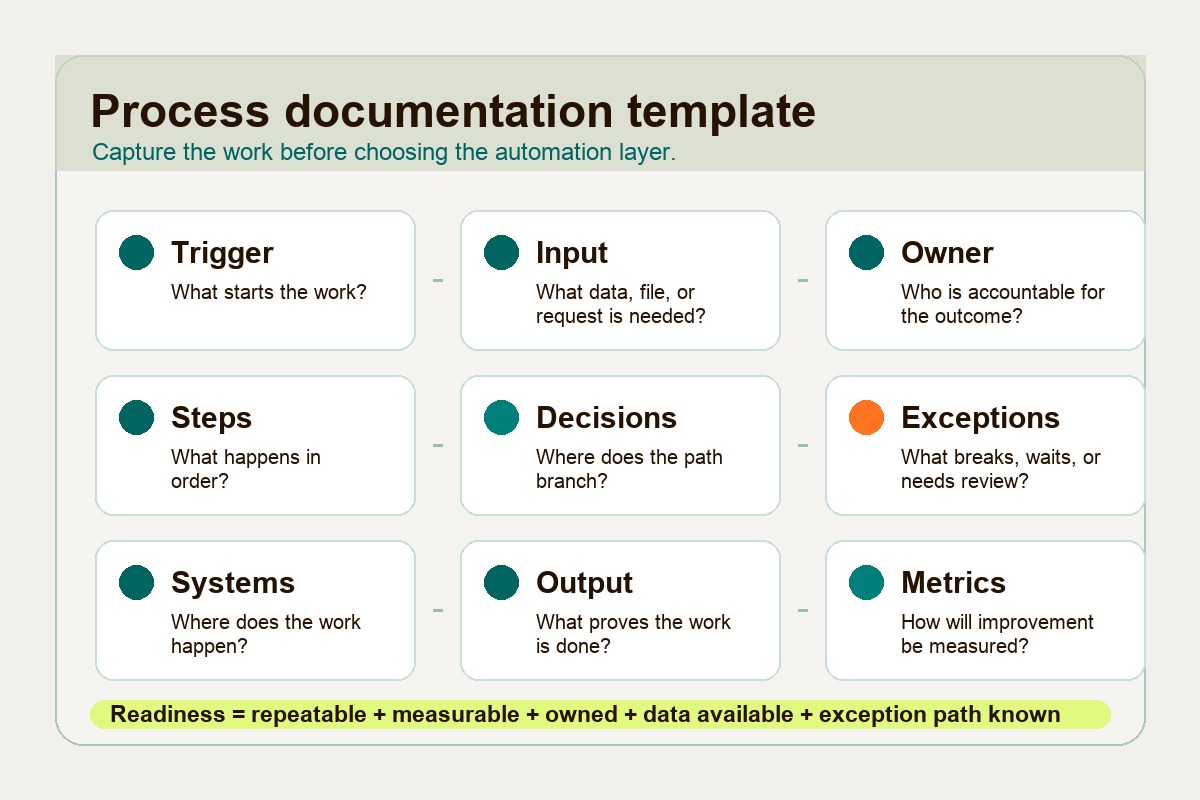
| Field | What to write down | Practical test |
|---|---|---|
| Trigger | The event that starts the process | Can everyone identify when the workflow begins? |
| Input | The form, email, file, record, or data needed | Can the process start without asking for missing information? |
| Owner | The person accountable for the outcome | Is one role responsible, even if several people contribute? |
| Steps | The normal path from start to finish | Can a new team member follow the steps without guessing? |
| Decisions | The points where the path branches | Are the rules explicit enough to configure or review? |
| Exceptions | The cases that break, pause, or need judgment | Does every common exception have a fallback path? |
| Systems | The tools, sheets, databases, inboxes, and apps involved | Does the map show where data is created, copied, or updated? |
| Output | The thing that proves the work is complete | Is completion visible to the next person or system? |
| Metrics | The numbers that show whether the process improved | Do you have a baseline before changing the workflow? |
For complex, cross-functional workflows, use a stronger modeling standard. The BPMN specification gives business and technical teams a shared notation for events, activities, gateways, message flows, and data objects. That is useful when a process crosses departments, tools, compliance boundaries, or automation engines.
For a simple operator workflow, start with the table above. If the table cannot be completed cleanly, the process is not ready for automation yet.
Before and After Example: Lead Intake
Lead intake is a good example because it looks easy until the exceptions appear. A team may say, “When a lead comes in, assign it to sales.” The real workflow is usually messier.
| Area | Before documentation | After documentation |
|---|---|---|
| Trigger | A form fill, referral, email, LinkedIn message, or partner handoff may start the process | A new lead starts only when it enters the CRM or approved intake form |
| Input | Some leads have company size, budget, source, and urgency; others have only a name and email | Required fields are source, company, contact, need, region, and consent status |
| Owner | Marketing, sales, and founders all touch leads, but ownership changes by context | Revenue operations owns the intake rules; sales owns follow-up after assignment |
| Steps | Someone reviews the lead, checks fit, asks missing questions, and assigns it manually | The CRM validates fields, scores fit, routes to the right owner, and creates a follow-up task |
| Decisions | High-value leads are handled faster, but the rule is informal | Leads above a defined score go to sales; unclear leads go to review; spam is suppressed |
| Exceptions | Duplicate leads, missing budget, bad email, partner leads, and existing customers are handled case by case | Each common exception has a named queue, owner, and resolution rule |
| Systems | Website form, inbox, CRM, spreadsheet, Slack, and calendar all hold part of the process | CRM becomes the source of truth; chat is notification only, not the workflow record |
| Output | A lead may be assigned, ignored, or discussed without a clear status | Every lead ends as assigned, disqualified, duplicate, pending review, or converted |
| Metrics | The team feels slow, but has no baseline | Intake-to-assignment time, response time, conversion rate, duplicate rate, and review queue size are tracked |
The after version is not just more organized. It changes what automation can safely do. Now the system can validate required fields, assign owners, notify sales, route exceptions, and measure whether the change helped.
Without that documentation, the automation would probably move incomplete leads faster into the wrong place.
Automation Readiness Checklist
Use this checklist before you automate a business process. A process does not need to be perfect, but it should be clear enough that automation will reduce friction instead of locking in confusion.
| Readiness check | Pass when… | If not, do this first |
|---|---|---|
| Repeatable | The same basic workflow happens often enough to justify automation | Standardize the common path before building anything |
| Measurable | You know the current cycle time, error rate, queue size, rework, or cost | Capture a simple baseline for two to four weeks |
| Owned | One role is accountable for the process outcome | Assign an owner before assigning a tool |
| Data available | Required inputs are structured, accessible, and trusted enough to use | Clean the intake fields, source systems, and permissions |
| Exception path known | Common exceptions have clear routing and stop conditions | List the top five exceptions and decide who handles them |
| Human judgment defined | The team knows which decisions should stay manual or reviewed | Add approval gates instead of forcing full automation |
| System of record clear | Everyone knows where the official status lives | Pick one source of truth and make side channels secondary |
If several boxes fail, the next step is not automation. It is workflow cleanup. That might mean simplifying the form, removing an approval, consolidating spreadsheets, assigning ownership, or defining what “done” means.
If most boxes pass, the workflow is ready for a contained automation pilot. Hapy’s main business process automation guide includes broader examples across finance, support, HR, sales, and operations. For teams cleaning up messy tools, spreadsheets, and manual workflows, Hapy’s Business Systems & Automation work is built around that operating layer.
Keep the Documentation Short Enough to Use
Good workflow documentation should be detailed enough to prevent guessing and short enough for operators to update. A five-page map that nobody trusts is worse than a one-page checklist the team actually maintains.
Keep the first version simple:
- Name the workflow.
- State the business outcome.
- Fill in the template.
- Map the normal path.
- List the top exceptions.
- Choose the success metrics.
- Review it with the people who do the work.
Do not document only the manager’s version of the process. Watch the work happen. Review real tickets, invoices, leads, requests, or cases. Ask operators where they wait, copy data, fix errors, chase approvals, or keep a private spreadsheet because the official system is missing context.
That is where the automation requirements live.
The Practical Rule
Document a business process before automation so the team can see the work clearly enough to improve it. If the process has no owner, no baseline, no exception path, or no clear output, automation will mostly speed up ambiguity.
The best first automation is usually not the flashiest. It is the workflow where the team can say: here is what starts it, here is what must be true, here is who owns it, here is what happens when it breaks, and here is how we will know it got better.
That is the point where automation becomes useful instead of decorative.


