Business process automation examples are most useful when they show the operating design, not only the tool category. The practical question is not “Which app should we buy?” It is “Which workflow happens often enough, breaks visibly enough, and has clear enough ownership to automate without making the business more fragile?”
That distinction matters because many automation projects fail before the software has a fair chance. A workflow with no owner, messy source data, and informal exception handling will not become reliable just because it is moved into Zapier, Make, Power Automate, a CRM workflow, or a custom system. Automation makes the current process faster. If the current process is unclear, it can make confusion faster too.
This guide covers 12 real workflows worth automating before buying another tool: lead intake, quote approvals, onboarding, ticket triage, invoice follow-up, reporting, inventory alerts, document review, QA checks, handoffs, renewal reminders, and management dashboards. For each one, the important design questions are the same: what triggers the workflow, who owns it, what data is required, how risky the automation is, and what should remain human.
If you need the broader operating model first, Hapy’s Business Systems & Automation work is built around the same principle: clean the workflow, define the ownership, then automate where it improves control. For a deeper planning layer, read Hapy’s business process automation strategy guide before choosing platforms.
If the work is still undocumented, start with how to document a business process before automation. If the process is already complex enough to redesign, the companion business process management examples guide shows one workflow from current state to redesigned state.
Why examples beat tool lists
Teams need examples because “automation” can mean anything from a reminder to a payment action. A useful comparison starts with a recurring delay, the person who owns it, and the consequence of a wrong action.
That mix matters. Buyers are not only looking for definitions. They are trying to decide whether a tool category maps to work they actually recognize.
Tool documentation points in the same direction. Zapier describes workflow automation as connecting apps so work can move through triggers and actions. Make’s template library is organized around repeatable scenarios across CRM, support, documents, finance, inventory, and reporting. Microsoft Power Automate documents approvals, cloud flows, templates, and desktop flows for teams already working inside Microsoft 365.
Those categories are useful, but they do not replace workflow design. Before buying business process automation tools, define the owner and the exception path. If no one owns the workflow, no one will maintain the rules. If no one knows what happens when the automation cannot decide, exceptions will leak back into Slack, email, spreadsheets, and private workarounds.
Rule-based automation vs AI-assisted automation
Rule-based automation is best when the inputs are structured, the business rules are stable, and the next action can be decided from known fields. AI-assisted automation is better when the workflow has messy language, documents, notes, images, or judgment support. The safest designs often combine both: AI interprets the messy input, while rules control the action.
| Automation type | Best for | Example workflow | What to guard |
|---|---|---|---|
| Rule-based automation | Structured inputs, stable rules, clear thresholds | Route a lead by territory, send a renewal reminder, escalate an overdue approval | Bad fields, duplicate records, outdated routing rules |
| AI-assisted automation | Unstructured text, documents, summaries, classification, confidence scoring | Classify support tickets, extract fields from invoices, summarize contract changes | Model error, hallucination, bias, missing context, overconfident output |
| Hybrid automation | Messy intake followed by deterministic business logic | AI reads a document, then rules check totals, owner, threshold, and approval path | Letting the AI own the final decision instead of only preparing it |
| Human-led workflow with automation support | High-stakes decisions, ambiguous exceptions, customer-sensitive judgment | Quote exceptions, contract review, customer escalations, QA signoff | Automating accountability instead of administrative work |
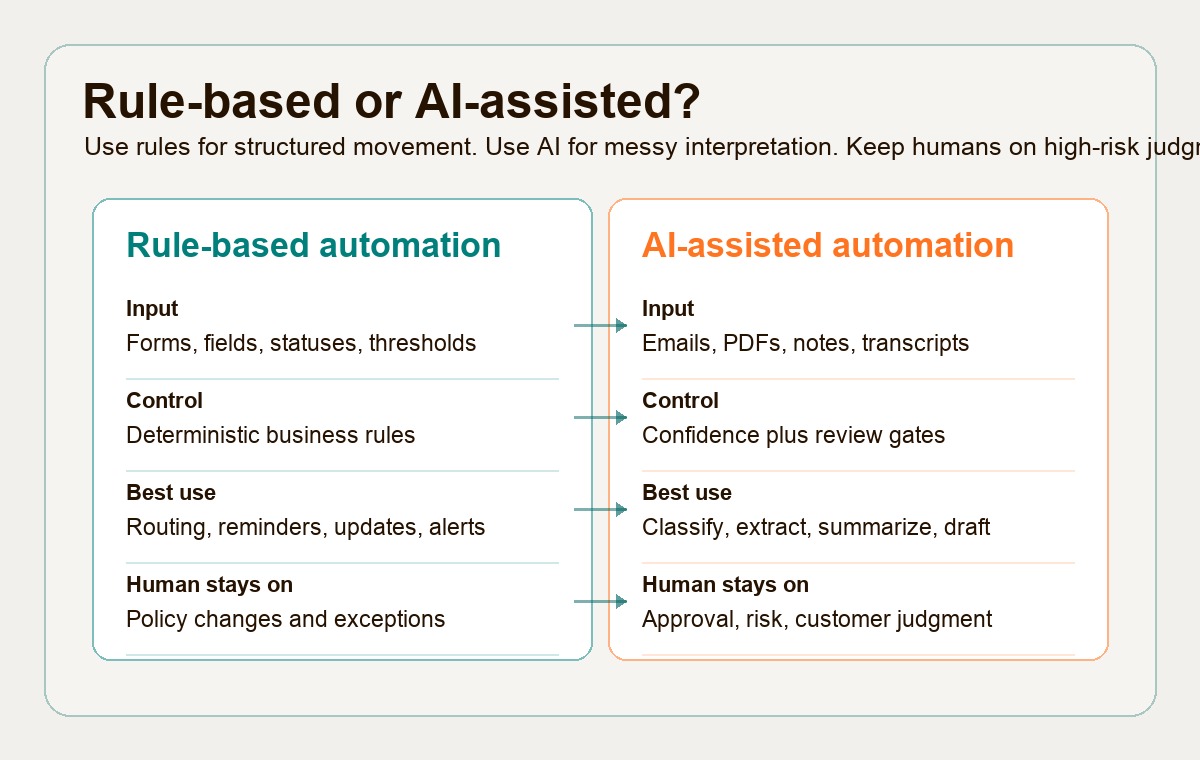
Use this as a practical rule: automate movement, reminders, validation, drafting, routing, logging, and reporting before you automate judgment.
A small scorecard for deciding what to automate
Do not start with the workflow that sounds most impressive. Start with the workflow where the business case is clear and the risk is manageable.
Use this Hapy heuristic to describe each candidate from 1 to 5. Keep value, readiness and consequence separate; do not add them into one permission-to-build score:
| Criterion | 1 means | 5 means | Why it matters |
|---|---|---|---|
| Frequency | Happens occasionally | Happens daily or many times per week | Frequent workflows create enough savings and data to improve |
| Error cost | Mistakes are easy to reverse | Mistakes affect money, customers, compliance, or trust | High error cost may justify automation, but needs stronger review |
| Handoff count | One person owns most of the work | Several teams pass work between systems | More handoffs usually mean more delay, rework, and status chasing |
| Data quality | Inputs are inconsistent or incomplete | Inputs are structured, required, and reliable | Automation depends on usable data, not good intentions |
| Customer impact | Mostly internal convenience | Directly affects customer response, delivery, or retention | Customer-facing workflows deserve priority and careful safeguards |
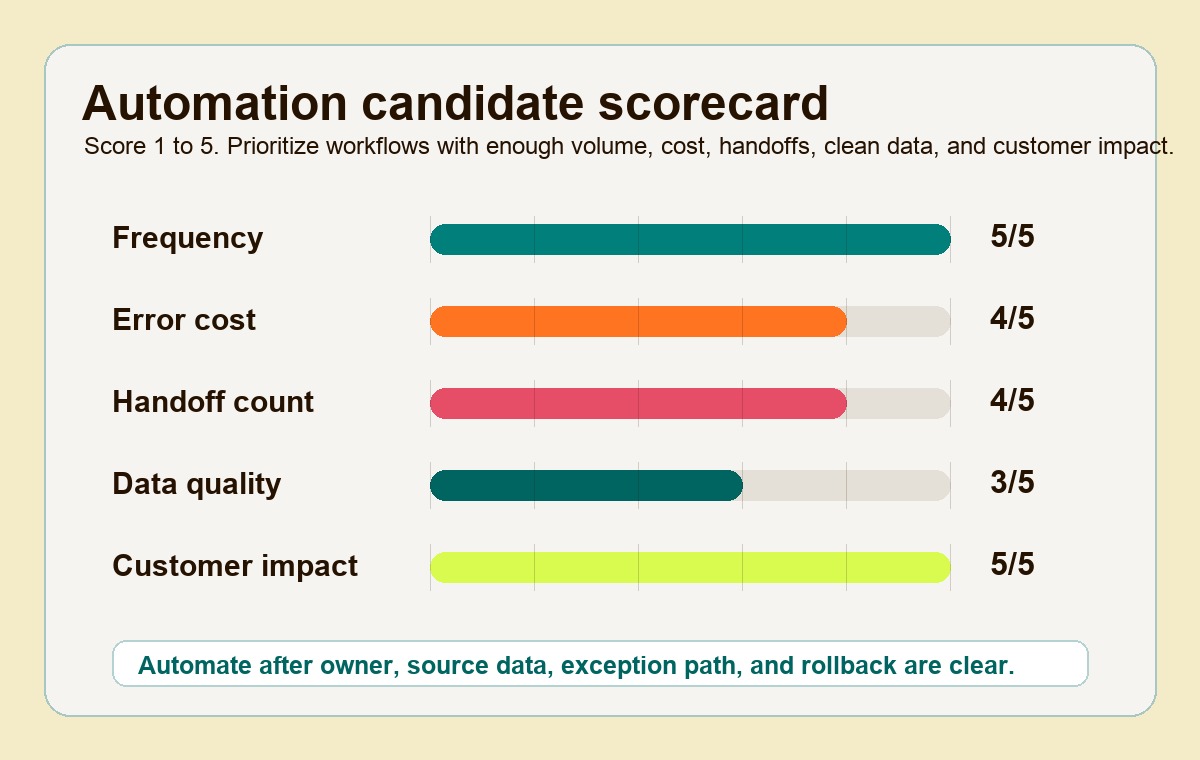
Rank potential value using frequency and handoff count. Record customer impact and error cost as consequence flags, and data quality as a readiness gate. Stop autonomous execution if data access is unauthorized, critical inputs are unreliable, no owner can recover a failure, or a harmful action has no approval boundary. High value cannot override those gates.
For example, a hypothetical invoice-reminder workflow scores frequency 5, handoffs 3, error cost 4, data quality 2, and customer impact 4. It has useful volume but is not ready to send messages automatically: stale payment status could trigger incorrect collection emails. First reconcile the ledger, draft reminders for finance approval, and measure false reminders and review time in a small pilot.
12 business process automation examples worth mapping
Use these examples as workflow patterns, not plug-and-play recipes. The right implementation depends on your systems, approval rules, customer promises, data quality, and internal capacity.
| Workflow | Trigger | Owner | Data needed | Risk level | What should remain human |
|---|---|---|---|---|---|
| Lead intake and routing | Website form, inbound email, paid campaign lead, referral form, event scan | Sales operations or revenue operations | Contact details, company, source, region, service interest, consent status, duplicate check | Medium | ICP judgment for strategic accounts, disqualification rules, sensitive outreach decisions |
| Quote approvals | Sales rep requests a quote, discount, custom scope, or pricing exception | Sales manager with finance or delivery input | Deal value, margin target, scope, timeline, discount, delivery capacity, legal terms | High | Final approval for unusual pricing, margin tradeoffs, custom commitments, contractual risk |
| Customer or client onboarding | Deal moves to closed-won, payment clears, contract is signed | Customer success, delivery lead, or operations manager | Signed agreement, plan or scope, kickoff date, stakeholders, required assets, access needs | Medium | Relationship handoff, kickoff framing, risk review for complex accounts |
| Ticket triage | Customer email, chat, support form, portal ticket, monitoring alert | Support lead or service operations | Customer tier, issue category, product area, urgency, SLA, sentiment, account history | Medium to high | Escalations, refunds, legal threats, sensitive customer communication |
| Invoice follow-up | Invoice sent, payment due date approaching, payment missed, PO mismatch | Finance operations or accounts receivable | Invoice number, amount, due date, customer, PO, payment status, account owner | Medium | Customer-sensitive collection tone, disputed invoices, payment plan decisions |
| Recurring reporting | Data refresh, end of week, month close, campaign close, board reporting date | Operations, finance, marketing ops, or data owner | Source systems, metric definitions, date ranges, owner notes, thresholds, prior period | Medium | Interpretation, executive narrative, tradeoff decisions, metric changes |
| Inventory alerts | Stock falls below threshold, reorder point reached, demand spike, supplier delay | Operations, procurement, or inventory manager | SKU, stock count, forecast, lead time, open orders, supplier status, sales velocity | Medium | Supplier negotiation, substitution decisions, demand planning changes |
| Document review | Contract, proposal, policy, invoice, onboarding packet, or compliance document uploaded | Legal ops, finance ops, compliance, or delivery operations | Document type, owner, version, required fields, clause library, approval threshold | High | Legal interpretation, exception approval, final signoff, customer-facing commitments |
| QA checks | Build ready for review, content ready to publish, data import completed, release candidate created | QA lead, delivery lead, or content owner | Checklist, acceptance criteria, test results, change log, affected systems, known risks | Medium | Final quality decision, business acceptance, risk tradeoff for release timing |
| Cross-team handoffs | Status changes from one stage to the next, task completed, dependency cleared | Process owner for the end-to-end workflow | Current owner, next owner, required assets, due date, blockers, completion criteria | Low to medium | Accountability for ambiguous blockers and priority conflicts |
| Renewal reminders | Contract renewal window opens, subscription term nears end, usage drops, account risk appears | Customer success or account management | Renewal date, contract value, usage, health score, open issues, decision-maker, terms | Medium | Commercial negotiation, relationship judgment, churn-risk conversation |
| Management dashboards | Workflow events update, data sync completes, KPI threshold changes, review cadence begins | Business owner with systems or data support | Trusted source data, metric definitions, targets, segments, refresh schedule, exception notes | Medium | Strategic interpretation, KPI redesign, corrective actions, performance conversations |
The pattern across all 12 examples is simple: automate the coordination layer first. That means intake, validation, assignment, reminders, status updates, audit trails, and dashboard events. Keep humans responsible for judgment, tradeoffs, customer-sensitive decisions, and exceptions with real business consequences.
1. Lead intake and routing
Lead intake is a good early automation candidate because the trigger is clear and the cost of delay is visible. A form submission or inbound email can create a CRM record, check for duplicates, apply source attribution, assign the right owner, and alert the sales team.
The risk is false confidence. Bad enrichment data or weak scoring rules can push a real opportunity into nurture or over-prioritize a poor-fit account. Keep a manual review path for strategic leads, enterprise accounts, unusual referrals, and missing data.
2. Quote approvals
Quote approvals should not live in private chat threads. Automation can package the request, calculate margin bands, route by threshold, capture approvals, and log the decision back to the CRM or project system.
The human part is the commercial judgment. A system can flag a low-margin quote. It should not decide that a team should accept strategic delivery risk, unusual payment terms, or a custom promise without a named approver.
3. Onboarding
Onboarding automation works when the client, customer, or employee has a defined first path. It can create kickoff tasks, request missing assets, provision access, send welcome materials, and notify the delivery owner when prerequisites are complete.
Do not remove the relationship handoff. A good onboarding workflow reduces setup drag so the human kickoff is more useful, not more generic.
4. Ticket triage
Ticket triage is a strong hybrid automation example. Rules can route by customer tier, product area, SLA, and issue type. AI can help classify intent, summarize long messages, detect sentiment, and suggest a category.
Keep high-risk tickets with humans. Billing disputes, legal threats, security issues, accessibility complaints, account cancellation, and public complaints should be routed quickly, but not treated as routine auto-responses.
5. Invoice follow-up
Invoice follow-up automation is usually less about pressure and more about consistency. The workflow can remind account owners before due dates, notify finance when payment is late, attach invoice context, and update status when payment is received.
Humans should still handle disputes, relationship-sensitive reminders, payment plans, and accounts with strategic context. The automation should prevent silence, not create robotic collection behavior.
6. Recurring reporting
Reporting automation should move data, validate definitions, refresh views, and create a draft narrative from approved metrics. It should not turn stale spreadsheets into polished slides that nobody trusts.
The human layer is interpretation. Leaders still need to decide why a metric moved, what action to take, and whether the metric definition itself needs to change.
7. Inventory alerts
Inventory alerts are a classic rule-based workflow because thresholds, reorder points, lead times, and supplier statuses can be modeled clearly. Automation can alert operations when a product, part, or material is at risk before the customer feels it.
Keep humans involved in substitutions, supplier negotiation, demand overrides, and allocation decisions. The system should surface the problem early, not make every procurement call.
8. Document review
Document review can benefit from AI-assisted extraction and comparison. A workflow can identify document type, extract key fields, compare clauses against a template, flag missing signatures, and route the file to the right reviewer.
Final interpretation belongs to a human when the document affects legal exposure, money, employment, compliance, or customer commitments. Let the system prepare the review. Do not let it quietly approve what the business has not authorized.
9. QA checks
QA automation can enforce checklists, run tests, collect evidence, block missing approvals, and log known risks. In software, content, data imports, and operations, the basic pattern is the same: make quality visible before work moves forward.
The release decision should remain human when risk is material. Automation can say which checks passed. A delivery owner still decides whether the business can accept the remaining risk.
10. Cross-team handoffs
Handoffs are often where work disappears. Automation can create the next task when a prior step is complete, attach context, assign the owner, set the due date, and escalate if the handoff stalls.
The human question is priority. When a blocker is ambiguous or two teams disagree on sequencing, the workflow should escalate to a named owner instead of looping reminders indefinitely.
11. Renewal reminders
Renewal reminders work well because the trigger is predictable. The workflow can notify account owners 120, 90, 60, and 30 days before renewal, summarize usage, flag open issues, and create a customer outreach plan.
Keep the actual renewal conversation human. The automation should make sure the account owner enters the conversation prepared, not replace the relationship.
12. Management dashboards
Dashboards become more trustworthy when they are fed by workflow events instead of hand-built status updates. A management dashboard can show cycle time, wait time, overdue work, exception volume, owner load, SLA risk, and customer impact.
The dashboard should not become the boss. Leaders still need to interpret the signal, ask whether the metric is measuring the right behavior, and decide what to change.
Where common automation tools fit
Business process automation tools are not interchangeable. The right fit depends on the shape of the workflow.
Zapier is often useful for straightforward app-to-app automations with clear triggers and actions. Its guidance on workflow automation is strongest for teams that need to move work between everyday SaaS tools quickly.
Make is useful when a workflow needs more visual branching, data transformation, routers, and multi-step scenarios. Its template library shows common patterns across CRM, e-commerce, finance, documents, support, and reporting.
Microsoft Power Automate is a natural fit when the business already runs on Microsoft 365, Teams, SharePoint, Excel, Outlook, and Dynamics. Microsoft documents approval workflows, cloud flows, and desktop flows for teams that need both cloud integration and RPA-style automation.
The tool choice should come after the workflow map. If a process needs a single trigger and two actions, a lightweight automation tool may be enough. If it needs permissions, audit trails, custom data models, multiple user roles, and dashboards, the team may need a stronger internal system or custom workflow layer.
The warning sign: buying before the exception path is clear
The fastest way to waste money on automation is to buy a tool for the happy path only.
Every workflow needs an exception path before launch:
- What happens when the required data is missing?
- Who reviews low-confidence AI output?
- Who approves a rule change?
- What happens when an API is down?
- Where does duplicate data get resolved?
- Who can override the workflow?
- How does the team know the automation failed?
- What gets logged for audit and learning?
If those questions are unanswered, the tool demo is ahead of the operating design. The next step is not procurement. It is a workflow map, a named owner, a small pilot, and a scorecard that shows whether the process is ready.
How to pilot one workflow before scaling
Pick one workflow from the list and run a contained pilot.
- Map the current workflow from trigger to outcome.
- Name the owner, backup owner, systems, inputs, outputs, and exception path.
- Score frequency, error cost, handoff count, data quality, and customer impact.
- Decide what should be rule-based, AI-assisted, and human-reviewed.
- Build the smallest working version in the existing stack where possible.
- Track baseline and pilot metrics: cycle time, wait time, error rate, exception volume, manual overrides, and customer impact.
- Review the workflow after 30 days before adding adjacent automations.
This is how business process automation becomes an operating capability instead of another tool in the stack. The examples are the starting point, not the finish line. The real value comes when the business knows which work should move automatically, which decisions still need people, and which exceptions deserve their own designed path.


