A WordPress to Astro migration is not just a front-end rebuild. It is a website migration, a CMS decision, a redirect project, a content cleanup, and an analytics parity exercise happening at the same time.
The move makes sense when WordPress has become slower than the marketing team needs: too many plugins, brittle themes, security updates, messy content, and landing pages that take too long to ship. Astro can help because its islands architecture renders most of a page as static HTML and only loads JavaScript for the interactive components that need it, according to the official Astro islands documentation.
The risk is that a faster site can still lose search visibility if the migration drops URLs, changes canonicals, loses metadata, breaks images, or stops tracking conversions. Treat this as an SEO launch system, not a design refresh.
For the broader platform decision, compare Astro vs WordPress first. If the move is already likely, pair this checklist with a website migration audit and the full website migration SEO checklist before launch.
When should a WordPress site move to Astro?
A WordPress site should move to Astro when the current stack is blocking speed, security, ownership, or campaign delivery. The strongest cases are marketing sites, content hubs, product pages, docs, and landing-page systems where the public site can be mostly static but still needs selective interactivity.
Look for these triggers before recommending a rebuild:
- Plugin drag: SEO, forms, caching, page builders, redirects, schema, and tracking depend on a fragile plugin stack.
- Performance issues: Core Web Vitals work has become a recurring maintenance task instead of a one-time cleanup.
- Security maintenance: WordPress core, themes, plugins, user roles, and database exposure require constant patching.
- Brittle themes: small content or plugin changes create layout bugs because pages rely on a visual builder or old theme framework.
- Messy content: posts, pages, media, revisions, shortcodes, categories, and metadata have drifted over years.
- Slow landing-page delivery: marketing needs reusable page patterns, cleaner components, and faster launch cycles.
Do not migrate only because Astro is fashionable. If the site is a true application, has heavy logged-in behavior, or works well enough with a smaller optimization pass, the better move may be to fix WordPress, simplify plugins, or rebuild only the pages that are creating business drag.
Pre-migration inventory
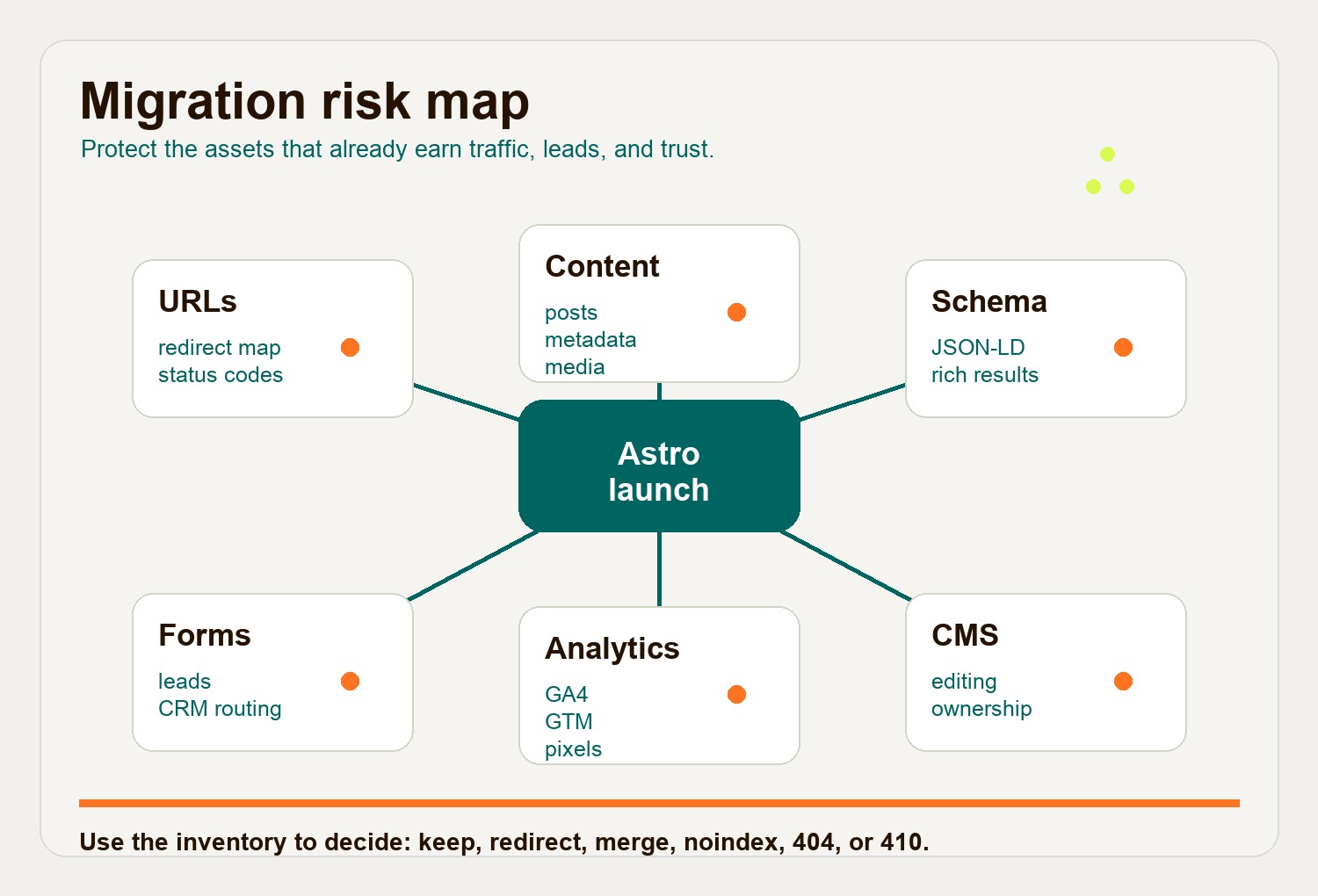
The pre-migration inventory is the part of the project that protects SEO. Before rebuilding templates, create one working inventory that combines the current site crawl, WordPress exports, analytics, Search Console, redirect plugins, server rules, and paid media landing pages.
At minimum, capture these items:
| Inventory item | What to capture | Why it matters |
|---|---|---|
| URLs | Live pages, posts, taxonomy pages, redirects, PDFs, gated assets, and high-value historical URLs | Prevents lost pages, surprise 404s, and missed redirect rules |
| Templates | Homepage, landing pages, blog posts, category pages, author pages, case studies, and legal pages | Shows what needs a reusable Astro layout rather than one-off rebuild work |
| Posts and pages | Titles, body content, slugs, publish dates, modified dates, authors, categories, tags, and excerpts | Keeps content structure intact during the CMS move |
| Media | Image paths, file names, alt text, captions, featured images, Open Graph images, PDFs, and download URLs | Prevents broken images and protects accessibility metadata |
| Redirects | Plugin redirects, server redirects, legacy campaign URLs, uppercase variants, trailing slash rules, and deleted content | Gives the launch team a redirect map before DNS changes |
| Metadata | Meta titles, descriptions, canonicals, robots directives, Open Graph tags, and Twitter card tags | Prevents search snippets and sharing previews from regressing |
| Schema | Article, Breadcrumb, Organization, Product, FAQ, LocalBusiness, and other JSON-LD blocks | Preserves rich-result eligibility where it already exists |
| Forms | Contact forms, lead magnets, newsletter forms, hidden fields, thank-you pages, spam controls, and CRM routing | Prevents lost leads after launch |
| Analytics | GA4 property, GTM container, pixels, conversion events, consent tags, UTM rules, and paid media imports | Keeps reporting and bidding signals continuous |
| Integrations | CRM, email platform, payment tools, scheduling, search, memberships, personalization, and APIs | Identifies dynamic work that may need serverless routes or a CMS integration |
This is also where you decide what not to migrate. Thin tags, duplicate archives, obsolete landing pages, old author pages, and expired campaign URLs should be mapped intentionally: keep, consolidate, redirect, noindex, or return a proper 404/410.
Choose the content model before the build
The content decision shapes the entire WordPress migration checklist. Do this before component design, because the editing workflow determines how content moves through Astro.
Option 1: Full static export
Use a full static export when the site has a manageable content library and the team is comfortable with Git, Markdown, MDX, or a lightweight editor on top of the repository.
This path usually gives the cleanest rebuild. WordPress is retired, content is cleaned into Markdown or MDX, images are normalized, and templates are rebuilt around Astro content collections. Astro says content collections are designed for structured sets such as blog posts, product descriptions, and other repeatable content, with schema validation and type safety.
Choose this when performance, security, and ownership matter more than keeping the WordPress editing screen.
Option 2: Headless WordPress
Use headless WordPress when the editorial team still needs the WordPress dashboard, permissions, plugins, or publishing workflow.
In this model, WordPress remains the CMS and Astro becomes the public front end. Astro’s official WordPress guide notes that WordPress can be used as a headless CMS and connected through the built-in REST API or GraphQL plugins. The WordPress REST API handbook explains that the API exposes posts, pages, taxonomies, and other data as JSON.
This can be a good transitional model, but it is not maintenance-free. WordPress still needs updates, hosting, security controls, editorial governance, and preview handling.
Option 3: Astro content collections with a new CMS
Use Astro content collections with a new CMS when the team wants a cleaner editing workflow but not necessarily Git-based editing. Sanity, Storyblok, Payload, Decap, Contentful, and other CMS options can feed Astro at build time or request time.
This path is usually best when the current WordPress content model is part of the problem. It lets you design content types around how the marketing site actually works: services, journal posts, authors, landing pages, testimonials, case studies, locations, and FAQs.
The SEO-safe launch checklist
Google’s site-move guidance is simple in principle and unforgiving in execution: prepare the new site, create a URL mapping, implement redirects, and monitor both old and new URLs after launch. Google’s documentation also says ranking fluctuation can happen during a move while pages are recrawled and reindexed, which is why the checklist matters.
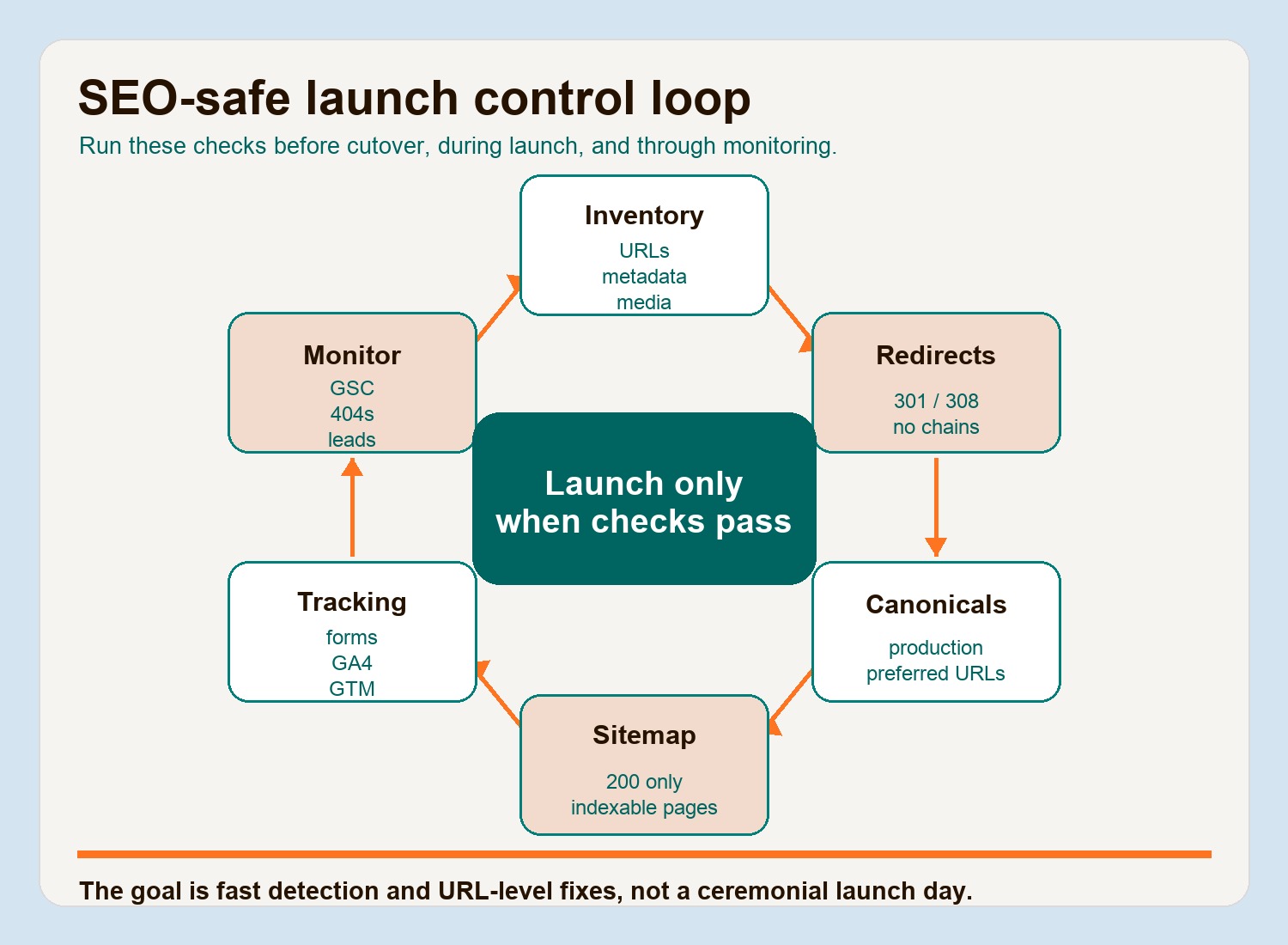
Use this website migration SEO checklist as the launch control:
-
Freeze the URL inventory. Export the final legacy URL list from WordPress, crawler data, Search Console, analytics, sitemap files, redirect plugins, and server rules. Mark each URL as keep, redirect, merge, noindex, 404, or 410.
-
Build one-to-one redirect rules. Every meaningful old URL should resolve directly to its best new equivalent. Google recommends permanent server-side redirects such as 301 or 308 where possible and warns against long redirect chains in its site move documentation.
-
Preserve or improve canonical tags. Each indexable Astro page needs a production canonical URL. Google treats canonicalization as a way to identify the preferred URL among duplicates, so do not let staging domains, trailing slash variants, or paginated paths point to the wrong target.
-
Rebuild metadata from the inventory. Carry over or rewrite meta titles, meta descriptions, Open Graph images, robots directives, and social card tags. Do not let the new system generate generic defaults across the site.
-
Recreate schema deliberately. Rebuild existing JSON-LD for Article, Breadcrumb, Organization, Product, FAQ, LocalBusiness, or other page types where it still fits the page. Test important templates with Google’s Rich Results Test before launch.
-
Generate a clean sitemap. The live sitemap should include only indexable, canonical, 200-status URLs. Google’s sitemap guidance frames sitemaps as a way to help search engines discover important URLs, but they are not a substitute for clean internal links or redirects.
-
Crawl staging against the old site. Compare titles, headings, canonicals, metadata, schema, image references, internal links, and status codes. Fix missing images, broken links, wrong slugs, and staging canonicals before DNS changes.
-
Verify forms and analytics. Submit every lead form, test thank-you states, confirm CRM delivery, check GA4 realtime reports, verify GTM triggers, and confirm ad platform conversion events if paid campaigns depend on the site.
-
Launch during a lower-risk window. Avoid major campaign launches, product announcements, and peak traffic periods. Keep the old WordPress install accessible privately for recovery, but do not let it remain indexable as a duplicate site.
-
Monitor for 8 weeks. Watch Search Console indexing, crawl stats, 404s, sitemap submissions, organic landing pages, rankings, leads, conversion events, and paid campaign performance. Fix issues by URL, not by broad guesses.
Common migration risks and how to avoid them
Most WordPress to Astro migration problems are not caused by Astro. They come from missing inventory, unclear ownership, rushed redirects, and content decisions made after the build has already started.
| Risk | What goes wrong | Prevention |
|---|---|---|
| Lost URLs | Old posts, PDFs, taxonomy pages, or campaign pages return 404s | Build the URL map from crawler data, WordPress exports, analytics, Search Console, and redirect plugins |
| Missing images | Old /wp-content/uploads/ paths break or alt text is lost |
Download and map media assets, preserve alt text, and test rendered pages before launch |
| Changed slugs | New clean URLs accidentally replace URLs that already rank | Keep ranking URLs where possible; redirect only when the new URL is clearly better |
| Broken internal links | Pages link through old WordPress paths or redirect chains | Rewrite internal links to final Astro URLs before launch |
| Analytics gaps | GA4, GTM, pixels, or conversion events stop firing | Create tracking parity tests and verify realtime data before DNS changes |
| CMS confusion | Editors do not know whether to update WordPress, Markdown, or a new CMS | Decide the content model early and document ownership before handoff |
| Schema loss | Rich-result markup disappears during template rebuild | Audit current JSON-LD, rebuild it in shared Astro metadata components, and validate templates |
| Canonical mistakes | Staging URLs, duplicate slash variants, or paginated pages become canonical | Generate canonicals from the production site URL and crawl staging for mistakes |
Technical checks inside the Astro build
Astro will not automatically solve SEO because the framework is fast. The build still needs SEO decisions encoded in layouts, data models, and deployment behavior.
Set these controls in the project:
- Use a shared metadata component for title, description, canonical, Open Graph, Twitter card, robots, and schema behavior.
- Validate content frontmatter so missing descriptions, invalid dates, or overlong titles fail before deployment.
- Keep pages semantic: one H1, clean heading order, descriptive image alt text, and useful internal links.
- Generate the sitemap from the same URL source the templates use.
- Keep redirects in version control when the list is small, and use edge-level redirect tools for large legacy maps.
- Test the production build, not only the local development server.
- Keep important pages readable in HTML without relying on client-side rendering for core content.
The point is not to make Astro imitate WordPress. The point is to rebuild the site as a smaller, more controlled publishing system.
What to do in the first 48 hours after launch
The first 48 hours are for detection, not celebration. Have one person own the issue log and triage by severity.
Check these first:
- Homepage, top organic landing pages, and top paid landing pages return 200.
- Top legacy URLs redirect directly to the correct new URL.
- Sitemap is live and submitted in Search Console.
- Robots.txt allows production crawling and references the correct sitemap.
- Canonicals point to production URLs.
- Key templates render expected metadata and schema.
- Lead forms reach the CRM or inbox.
- GA4 realtime reports show traffic and conversion events.
- Paid media URLs and UTM parameters land on the right pages.
- Search Console starts showing expected discovery and indexing behavior.
Then keep a daily watchlist for the first week and a weekly watchlist through week 8. Separate normal migration volatility from fixable errors: spikes in 404s, missing canonical pages, sitemap exclusions, dropped conversion events, or sudden declines isolated to a specific directory.
When Hapy Co should help
If the project is a small blog, a careful internal team may be able to migrate from WordPress to Astro with the checklist above. If the site carries meaningful organic traffic, paid acquisition, lead generation, or content operations, the migration deserves a risk audit before the rebuild.
Hapy Co’s Astro website migration engagement is built around that exact problem: preserve what is already working, rebuild what is slowing the team down, and launch without casually risking SEO, analytics, forms, redirects, or the content workflow.
The practical rule is simple: do not start the Astro build until the migration inventory exists. A fast new site is only a win if the business keeps its rankings, links, leads, and ability to publish.