Astro content collections vs headless CMS is not really a tooling question. It is an ownership question. Use repo-authored content loaded into Astro collections when it can live safely in the codebase, follow a predictable schema, and change through a controlled publishing process. Move content into a headless CMS when non-technical teams need daily editing, previews, approvals, permissions, localization, or page assembly without asking engineering to touch every change.
That is the buyer decision. Astro content collections are a structured loading, validation, and query layer. Their source may be repo files or a remote service. A headless CMS is an authoring system, and it can feed that same layer: CMS → collection loader → schema validation → Astro template. Choosing a CMS does not require abandoning collections.
The mistake is treating this as all-or-nothing. Choose a split only when the publishing workflow needs it. Stable content can stay in repo files. High-change, editor-owned content can move to a CMS, with both sources loaded into collections. Runtime data can come from APIs. The job is to decide what should move where before the migration turns into a content-model cleanup project.

If you are already rebuilding a marketing site, make this decision during migration planning. Hapy’s Migrate to Astro work starts with URL structure, content ownership, templates, redirects, and publishing flow because the content architecture determines how the site will actually be operated after launch. If the next question is which CMS to choose, pair this with our Astro CMS selection guide.
For adjacent platform decisions, compare Astro vs WordPress, Webflow to Astro, and Framer to Astro before deciding where content should live.
The plain-language difference
Astro content collections are best understood as a typed content layer inside the project. The official Astro content collections docs describe a pattern where content is organized into collections and validated through a schema. In practice, that means each journal post, glossary entry, case study, or service page can have required fields such as title, description, author, category, image, publication date, and body content.
That structure matters because it keeps templates predictable. If a page needs a meta description, cover image, category, and canonical URL, the collection schema can make those fields explicit. If a field is missing or the wrong type, the build can fail before the broken page ships.
A headless CMS solves a different problem. Astro’s own CMS guide says a CMS lets teams write content and manage assets outside the Astro project, often with visual editing, standard content types, collaboration, and dashboard-like workflows. In a headless CMS Astro setup, the CMS does not own the frontend. It owns the authoring experience and content database. Astro still renders the public site.
Use the short version:
| Question | Repo-authored content feeding collections | CMS-authored content, optionally feeding collections |
|---|---|---|
| Where does content live? | In the codebase or repo-managed files | In a separate CMS database |
| Who edits it? | Developers, technical marketers, technical writers | Marketing, sales, content, regional, legal, or product teams |
| What protects quality? | Schema validation, reviews, build checks | Fields, permissions, workflows, previews, approvals |
| What changes fastest? | Content that changes weekly or monthly | Content that changes daily, campaign by campaign, or by region |
| What is the risk? | Engineering becomes the editing bottleneck | CMS complexity grows beyond the content need |
What should stay in repo-authored collections?
Keep the source content in repo files and load it through collections when the page type is structured, template-driven, and not edited constantly by non-technical teams.
Good examples include:
- Journal posts with stable frontmatter, author, category, cover image, and article body.
- Glossary entries where every item follows the same definition format.
- Case studies with predictable fields such as client, industry, challenge, solution, result, and services.
- Documentation or technical guides written by engineers or technical writers.
- Legal pages that change rarely and should have version history.
- Service pages where the template is controlled and edits happen through planned releases.
- Resource-library entries that need clean metadata more than visual page building.
For these content types, collections reduce operational noise. The site can enforce required metadata, generate listing pages, create schema markup, build RSS feeds, and keep internal links under developer review. The marketing team still gets a clean publishing system if the process is designed well, but the source of truth remains the repo.
Astro’s Content Loader API also means collections do not have to be only local Markdown. A collection can be loaded from files or from another source through a loader. That gives teams room to start simple, then connect remote content later without throwing away the Astro template layer.
What should move to a headless CMS?
Move content into a headless CMS when the operating workflow matters more than repo simplicity.
A headless CMS is usually justified when:
- Non-technical editors need to update pages without Git, Markdown, or pull requests.
- Campaign landing pages change often and need previews before launch.
- Multiple people edit, review, approve, and schedule content.
- Permissions matter, such as legal, regional, agency, or product-team access.
- Localization requires translated fields, regional variants, fallback behavior, and publishing status by locale.
- Content is reused across many surfaces, such as testimonials, pricing proof, integrations, industries, authors, CTAs, or comparison criteria.
- The business needs a media library, asset governance, or image approvals.
This does not mean every marketing page should move to a CMS. It means editor-owned content should not be trapped in engineering releases. If the sales team needs to update industry pages, the product team needs to add integration entries, or regional teams need localized campaign pages, the CMS becomes an operating tool, not a decoration.
The cleanest headless CMS Astro model is still structured. Do not give editors a blank canvas for every page unless visual page assembly is the actual requirement. Model the content fields, let the CMS handle editing and workflow, and let Astro render those fields through controlled components.
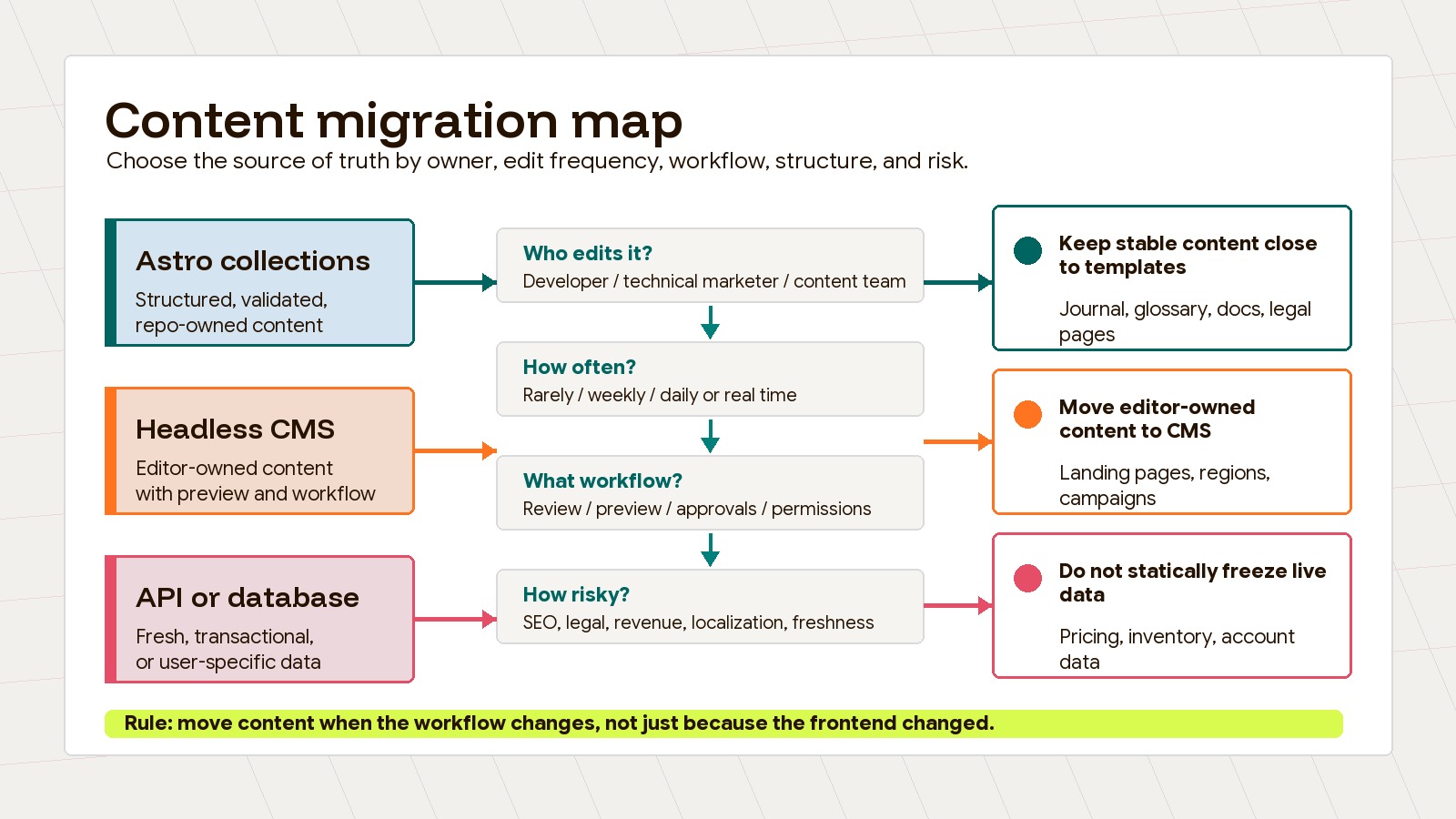
Migration mapping table: what should move where?
Use a migration table before exporting content. It prevents the common failure mode where everything is dumped into a CMS because the team is already migrating, or everything stays in files because the first build was developer-led.
| Current source | New source | Owner | Schema fields | Edit frequency | Risk |
|---|---|---|---|---|---|
| Existing blog or journal posts in WordPress, Webflow, or Markdown | Astro content collections | Marketing with developer review | title, metaDescription, author, category, date, coverImage, body, related links | Weekly or monthly | Medium: preserve URLs, images, authors, categories, and redirects |
| Glossary spreadsheet or ad hoc docs | Astro content collections | Marketing ops or SEO | term, excerpt, definition, related terms, dateModified | Monthly or quarterly | Low: keep entries short, consistent, and internally linked |
| Case studies in PDFs, decks, or CMS pages | Astro content collections or headless CMS | Sales, marketing, delivery lead | client, industry, challenge, solution, services, result, quote, image | Monthly or quarterly | Medium: proof claims need review and client approval |
| Service pages in Webflow, WordPress, or static pages | Astro content collections if controlled; CMS if sales edits often | Marketing lead and service owner | headline, intro, proof, services, process, FAQs, CTA, SEO fields | Monthly or campaign-based | Medium: uncontrolled edits can weaken positioning |
| Legal pages in static files or CMS pages | Astro content collections or repo-managed Markdown | Legal or leadership with developer publishing | effectiveDate, jurisdiction, policy body, version notes | Rarely | High: accidental edits, missing dates, or unclear version history |
| Landing pages in a page builder | Headless CMS with constrained components | Demand generation or growth | campaign, audience, hero, proof, offer, form, modules, experiment notes | Weekly or daily | High: visual freedom can break design, tracking, and performance |
| Documentation in Git, MDX, or Notion | Astro content collections for technical docs; CMS for non-technical help center | Product, support, or engineering | title, product area, version, steps, code examples, screenshots, related docs | Weekly or monthly | Medium: stale docs create support and trust risk |
| Pricing, inventory, account data, or product availability | API, database, or live data layer | Product or operations | productId, price, availability, plan, region, timestamp | Hourly or real time | High: static builds can show stale commercial data |
The table is intentionally boring. That is the point. Content architecture gets easier when every row has an owner, fields, edit frequency, and risk. A migration without those columns is only a file transfer.
When not to overbuild a CMS
Do not add CMS complexity just because “marketing needs a CMS.” Ask what marketing actually needs to change.
If a page changes twice a year, a full CMS workflow may add more risk than value. Someone has to design content types, manage permissions, handle previews, maintain webhooks, secure API tokens, train editors, support image rules, and keep the CMS schema aligned with Astro components. That is worth it for high-change content. It is overkill for static policies, controlled service pages, or a glossary that updates once a quarter.
CMS overbuild usually shows up in three ways:
- Every page becomes a custom layout, so the design system loses control.
- Editors can change fields that should be governed by templates, SEO rules, or compliance review.
- The team pays for workflows, localization, and permissions before it has enough publishing volume to need them.
The better default is progressive complexity. Start content types in Astro collections when they are stable and structured. Move specific content types into a CMS only when ownership, edit frequency, collaboration, or localization demand it.
A practical decision framework
Before deciding, score each content type against five questions:
| Decision factor | Keep authoring in repo files when… | Move to a headless CMS when… |
|---|---|---|
| Editor skill | Editors can work through Markdown, Git, tickets, or a controlled submission process | Editors need a dashboard and should not touch the repo |
| Change frequency | Updates are planned and relatively infrequent | Updates are frequent, campaign-driven, or time-sensitive |
| Workflow | Review can happen in pull requests or release QA | Drafts, approvals, scheduling, permissions, and previews matter |
| Structure | Fields are predictable and template-owned | Content is relational, reusable, localized, or assembled by editors |
| Risk | Build validation and code review reduce risk | Bottlenecking edits through engineering creates more risk |
Then choose one of four routes:
- Keep it in Astro collections when the schema is simple, the content is stable, and technical review is acceptable.
- Add a Git-based CMS when editors need a friendlier interface but content should remain repo-owned.
- Move it to a headless CMS when marketing operations need previews, permissions, workflow, localization, or reuse.
- Leave it in an API or database when the data is transactional, user-specific, or too fresh for static builds.
This is also where content model migration becomes useful. Do not migrate pages as blobs. Convert them into fields that match the way the site sells: audience, service, pain point, proof, offer, CTA, FAQ, related case study, and internal links. Astro can then render those fields consistently whether they come from local collections or a CMS.
How to migrate without making a mess
Start with an inventory, not a tool shortlist. Export URLs, titles, owners, source system, page type, traffic value, conversion role, update frequency, and known risks. Then group pages by content type.
For each group, define:
- Source of truth: repo files, CMS, Git-based CMS, API, or database. Record the collection loader separately.
- Owner: the person or team allowed to change the content.
- Required fields: the minimum schema needed to publish safely.
- Preview path: how the owner reviews the page before launch.
- Publishing path: pull request, CMS publish, scheduled publish, or deploy.
- Rollback path: how the team reverses a bad edit.
This planning step matters more than the CMS brand. A weak content model in a premium CMS will still produce messy pages. A strong content model in Astro collections can outperform a CMS if the editing workflow is honest about who owns the work.
An example split for an Astro marketing site
For a technical publishing team with occasional marketer-owned campaigns, one possible split looks like this. In this table, “Astro collections” means repo-authored files loaded into collections; CMS sources can also use collections.
| Content type | Recommended source |
|---|---|
| Journal posts | Astro collections unless non-technical publishing volume is high |
| Glossary entries | Astro collections |
| Case studies | Astro collections for controlled proof; CMS if sales and marketing update often |
| Service pages | Astro collections for strategic pages; CMS for campaign variants |
| Legal pages | Repo-managed collections with clear version dates |
| Landing pages | Headless CMS only when marketers need frequent page assembly and previews |
| Docs | Astro collections for technical docs; CMS for support-owned help content |
| Pricing or availability | API, database, or carefully cached live source |
The authoring decision is ultimately about keeping the right friction in the right place; collection validation can remain in either architecture. Collections add useful friction where content quality, validation, and template control matter. A headless CMS removes harmful friction where non-technical teams need to publish, preview, localize, and collaborate without waiting on engineering.
The winning architecture is not the one with the most flexible CMS. It is the one where every content type has a clear home, a clear owner, and a publishing path that matches how often the business actually changes it.