The custom software development process is the sequence of decisions that turns a business workflow into working software: discovery, requirements, architecture, UX, development, QA, launch, and maintenance. For buyers, the process matters because each phase should reduce uncertainty before the next phase gets expensive.
The common mistake is treating the process as a vendor production line. Discovery produces a brief, design produces screens, development produces code, QA finds bugs, launch goes live. That version sounds tidy, but it hides the real work: deciding how the business should run, what data has to move, where exceptions happen, who approves what, and what must be true before users can depend on the system.
Large technology projects are fragile when those decisions stay vague. In an October 2012 article based on a database of more than 5,400 IT projects as of June 2012, McKinsey and the University of Oxford reported that large IT efforts—defined as initial budgets above US$15 million—ran 45% over budget and 7% over time on average, while delivering 56% less value than predicted. Those historical large-project averages are context, not a failure forecast for a smaller custom build. The lesson for buyers is not “avoid custom software.” It is “do not buy a build before the workflow, risk, and operating model are understood.”
If you are still deciding whether custom is the right path, start with Hapy’s guide to customised software. If the build path is already clear and budget is the main question, pair this playbook with the guide to custom software development cost and the deeper risk-based view of custom software development cost by risk.
If vendor selection is the next decision, use the custom software development partner scorecard before comparing proposals.
If you need the full buyer-side service checklist, the custom software development services guide explains what discovery, UX, architecture, QA, launch, maintenance, and ownership should include.
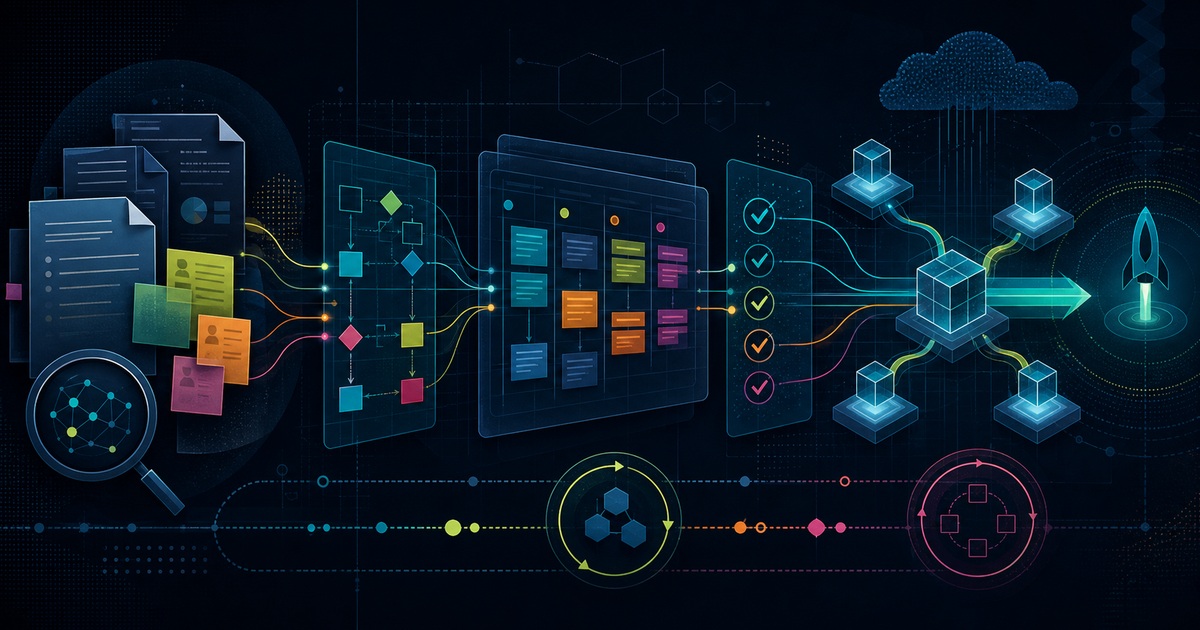
Quick answer: the custom software development process
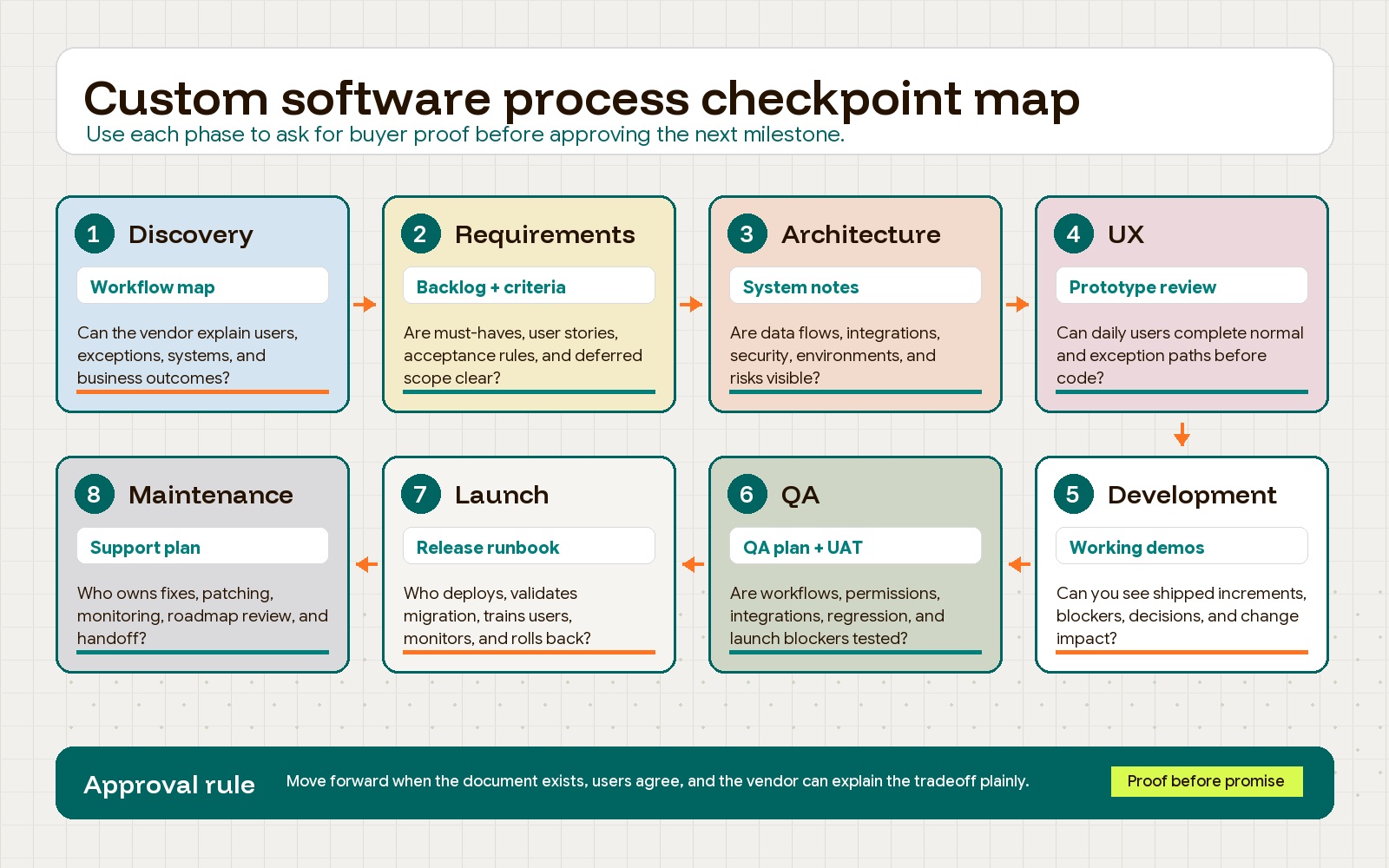
A practical custom software development process has eight phases:
- Discovery: Define the business problem, workflow, users, constraints, data, integrations, and success criteria.
- Requirements: Turn the workflow into prioritized user stories, acceptance criteria, non-functional requirements, and a first-release boundary.
- Architecture: Decide how the system will be structured, how data will move, what should be custom, and which risks need technical proof.
- UX and prototyping: Test the workflow with users before the team commits it to code.
- Development: Build in reviewable increments with visible progress, working software, and disciplined change control.
- QA and UAT: Validate the system against business scenarios, security needs, data rules, and launch readiness.
- Launch: Deploy with a release plan, migration plan, communication plan, monitoring, and rollback path.
- Maintenance: Operate, support, improve, patch, and measure the software after it becomes part of the business.
Buyers should not approve the next stage only because the calendar says it is time. Approve it when the right questions have been answered and the right documents exist.
1. Discovery: start with the workflow, not the feature list
Discovery should explain how the business actually works before anyone turns the problem into screens and tickets. The goal is to expose the workflow, not to collect every idea the business might want someday.
A good discovery phase should answer:
- What work is slow, expensive, fragile, or impossible with the current tools?
- Who uses the process every day, and what do they need to decide or complete?
- Which handoffs, approvals, exceptions, and escalations happen outside the happy path?
- Which systems hold the source data?
- What must the software improve: cycle time, error rate, customer experience, reporting, compliance, capacity, revenue, or cost?
- What would make the project fail even if the screens look good?
This is where buyers can tell whether a vendor understands the business workflow. A weak vendor jumps from “what features do you need?” to “we can build that.” A stronger partner asks to see the current process, the spreadsheets, the CRM stages, the manual workarounds, the exception cases, the reports people trust, and the places where staff quietly ignore the existing software.
Buyer checkpoint: Ask the vendor to describe the workflow back to you without using engineering language. If the explanation misses roles, exceptions, approvals, source systems, or operational constraints, discovery is not finished.
2. Requirements: turn the workflow into buildable decisions
Requirements are not a giant wish list. They are a decision system for what should be built, what should wait, and how the team will know each feature works.
For buyers, the key requirement artifacts are:
- Business goals and success criteria.
- User roles and permissions.
- User stories or job stories.
- Acceptance criteria for each important workflow.
- Non-functional requirements such as security, performance, accessibility, reliability, audit logging, and data retention.
- Integration and reporting requirements.
- Out-of-scope items and deferred ideas.
The Agile Manifesto principles emphasize frequent working software, close collaboration between business people and developers, and welcoming changing requirements when they improve the product. That does not mean requirements should be loose. It means the team should define enough to build responsibly while keeping room to learn.
Prioritization matters here. Use a simple framework such as must-have, should-have, could-have, and won’t-have, or a now-next-later roadmap. The purpose is not ceremony. It is to protect the first release from becoming a collection of every stakeholder’s favorite edge case.
Buyer checkpoint: Pick one critical workflow and ask the vendor to write the acceptance criteria. Strong criteria name the starting condition, user action, expected result, error cases, permissions, and reporting effect. Thin criteria usually say only “user can submit form.”
3. Architecture: decide how the system should survive real use
Architecture is where the team decides how the software will be structured so it can be built, tested, secured, changed, and operated. Buyers do not need to become architects, but they do need to know which architecture decisions affect business risk.
At minimum, architecture should cover:
- Data model and ownership: what the system stores, where the source of truth lives, and how records relate.
- Integrations: which external systems connect, what data moves, how often it syncs, and what happens when the connection fails.
- Security and access control: how users authenticate, which roles exist, and what sensitive actions require extra control.
- Build approach: what should be custom, what should be configured in existing tools, and what can be deferred.
- Hosting and infrastructure: where the system runs, how environments are separated, and how monitoring works.
- Scalability and reliability assumptions: expected user load, transaction volume, uptime needs, and failure tolerance.
Security should not be a late-stage checklist. NIST’s Secure Software Development Framework gives software teams and purchasers a shared vocabulary for secure development practices, including protecting the development environment, producing secure software, responding to vulnerabilities, and verifying security outcomes.
The architecture conversation should also expose tradeoffs. A simple modular system may be better than a fashionable distributed architecture. A standard SaaS integration may be better than rebuilding a commodity function. A manual admin review may be safer than automating a high-risk decision on day one.
Buyer checkpoint: Ask the vendor to explain the proposed architecture in a one-page diagram and a plain-language memo. If the diagram cannot show users, systems, data flows, environments, integrations, and failure points, the architecture is still too fuzzy for a confident build estimate.
4. UX and prototyping: test the work before it becomes code
UX is not just visual design. In custom software, UX is how the work gets done. A buyer should care less about whether the prototype looks polished and more about whether daily users can complete the real workflow without workarounds.
Useful UX work includes:
- User flow maps for core tasks.
- Wireframes for complex screens, dashboards, forms, and approval paths.
- Clickable prototypes for high-risk workflows.
- Field-level decisions for forms, imports, filters, and reports.
- Empty states, error states, permission states, and mobile or tablet states where relevant.
- Feedback sessions with the people who will use the software daily.
Do not review prototypes with only executives or managers. They may understand the business outcome, but they often miss the small operational details that make software usable: which fields are copied from another system, which exceptions require a supervisor, which report gets exported every Friday, and which shortcut the team uses when a customer is waiting.
Buyer checkpoint: Put the prototype in front of real users and ask them to complete one normal case and one exception case. If the prototype only handles the happy path, the team has not tested the workflow.
5. Development: build in reviewable releases
Development should turn agreed requirements and designs into working software in small, reviewable increments. The buyer should have enough visibility to see progress, make decisions, and catch mismatches before they become expensive.
A practical cadence usually includes:
- Sprint or weekly planning tied to the prioritized backlog.
- Short progress reviews with the product owner and technical lead.
- Regular demos of working software, not only status slides.
- Clear change request rules for new scope.
- Visible backlog, open risks, blockers, and decisions.
- Code review, automated checks, and deployment to a test or staging environment.
Working software is the best progress signal. A status report can say the team is 80% done while the hardest integration, migration, or permission logic remains unresolved. A demo exposes reality. It shows whether the user can complete the workflow, whether the data behaves correctly, and whether the system is drifting from the business problem.
Change control should be practical, not punitive. Small clarifications are normal. Larger additions should be written down with cost, timeline, architecture, QA, and launch impact. This protects both sides from pretending new scope is free.
Buyer checkpoint: Ask to see the current backlog, the latest working demo, and the open decision log. If the vendor cannot show what is done, what is next, what is blocked, and what changed, the process is too opaque.
6. QA and UAT: prove the software works where it matters
QA should run throughout development, not at the end when the project is already late. The point is not just to find bugs. The point is to prove that the software supports the business workflow under realistic conditions.
A strong QA plan should combine:
- Unit tests for important logic.
- Integration tests for data moving between systems.
- End-to-end tests for critical workflows.
- Manual exploratory testing for usability, edge cases, and odd user behavior.
- Security and access-control checks.
- Performance checks where load or speed matters.
- Regression testing before release.
- User acceptance testing with buyer-side representatives.
User acceptance testing is where business people validate the system against agreed requirements. It should test the workflows that make the software valuable: approvals, exceptions, reports, permissions, imports, notifications, audit trails, and the handoffs between roles.
Do not let UAT become “click around and tell us if anything looks wrong.” Give testers scenarios, expected outcomes, data sets, and pass-fail criteria. The more operational the software, the more disciplined UAT needs to be.
Buyer checkpoint: Ask for the QA plan before the final month of development. If testing is described as something that happens after the developers finish, expect defects, integration surprises, and launch risk.
7. Launch: plan the release before the release week
Launch is not just deployment. It is the controlled transfer of software from a build environment into business use.
A release plan should cover:
- What is included and excluded in the release.
- Who approves the release.
- Which data will be migrated and how it will be validated.
- Which users or departments launch first.
- What training or internal communication is needed.
- What monitoring and alerts will be active.
- What support channel users should use after launch.
- What rollback steps apply if something fails.
- Which known issues are acceptable and which block release.
For critical workflows, phased rollout is usually safer than a big-bang launch. Start with a department, location, user group, or workflow slice. Watch the system under real usage. Fix the early issues. Then expand.
The release should also include an adoption plan. Good custom software can still fail if the business does not update process documentation, train users, retire old workarounds, and define who owns future decisions.
Buyer checkpoint: Ask the vendor to walk through launch day hour by hour: who does what, what happens if migration fails, who can approve rollback, and how users report urgent issues. If the plan is “we deploy and monitor,” keep pushing.
8. Maintenance: budget for ownership after launch
The launch is the start of ownership. After the system is live, the business will need support, monitoring, security updates, bug fixes, performance tuning, small improvements, vendor updates, and sometimes larger roadmap work.
The internal app maintenance plan should define:
- Support hours and response times.
- Bug severity levels and resolution expectations.
- Hosting, monitoring, backup, and alerting responsibilities.
- Security patching and dependency updates.
- Data retention, access review, and audit requirements.
- Roadmap review cadence.
- Ownership of documentation, credentials, repositories, environments, and analytics.
- Handover expectations if the vendor relationship ends.
Maintenance is also where technical debt becomes visible. If the build skipped documentation, tests, architecture discipline, or release planning, every future change becomes slower and more expensive. Hapy’s guide to technical debt cost explains how that debt shows up as rework, incidents, QA drag, and reduced delivery speed.
Buyer checkpoint: Ask what happens 30, 60, and 90 days after launch. A serious vendor can describe hypercare, bug triage, performance monitoring, backlog grooming, and handoff. A build-only vendor often treats launch as the end of the job.
Buyer checkpoints by phase
Use this checklist before you approve a phase, compare vendors, or sign off on a milestone.
| Phase | What the buyer should verify | Vendor signal to look for |
|---|---|---|
| Discovery | The vendor can explain the real workflow, users, exceptions, systems, and business outcome | Talks about operations before features |
| Requirements | The backlog separates must-have workflow needs from later ideas | Writes acceptance criteria, not vague feature labels |
| Architecture | Data, integrations, security, environments, and failure paths are visible | Explains tradeoffs in plain language |
| UX | Daily users can test normal and exception paths before build | Designs around tasks, not only screens |
| Development | Working software is reviewed regularly against the backlog | Shows demos, blockers, decisions, and change impact |
| QA | Testing covers business scenarios, integrations, permissions, and regression risk | Shares a QA plan early |
| Launch | Migration, training, monitoring, support, and rollback are planned | Has a release runbook, not just a deploy date |
| Maintenance | Ownership, support, patching, and improvement cadence are defined | Treats post-launch operations as part of the product |
Documents buyers should expect from a serious software vendor
The documentation set does not need to be heavy for every project. A small internal tool does not need the same level of formality as a regulated enterprise platform. But buyers should still expect clear written artifacts that reduce ambiguity.
| Document | What it should answer | Why buyers need it |
|---|---|---|
| Roadmap | What will be delivered now, next, and later? | Keeps scope tied to business goals instead of stakeholder noise |
| Prioritized backlog | What work is ready for sprint planning? | Gives development, QA, and buyers one source of truth |
| Architecture notes | How will the system, data, integrations, security, and environments work? | Exposes technical risk before it becomes rework |
| QA plan | What will be tested, how, by whom, and against which pass-fail rules? | Prevents launch from depending on informal clicking |
| Release plan | What ships, who approves, how migration works, and how rollback happens? | Makes production launch predictable |
| Maintenance plan | Who supports, monitors, patches, improves, and owns the system after launch? | Protects long-term ownership and operating continuity |
For a lightweight project, these can be concise. For a high-risk project, they should be detailed enough that a new technical lead could understand the system, the release, and the open risks without relying on sales-call memory.
Vendor questions that reveal workflow understanding
Ask every serious vendor the same workflow questions and compare the quality of the answers.
- Which part of our workflow is the software actually changing?
- Which users make decisions, and which users only enter or consume data?
- What exceptions are most likely to break the happy path?
- Which system is the source of truth for each important record?
- Does data need to flow one way or both ways?
- What happens if an integration fails for an hour?
- Which approval, audit, or compliance steps must be preserved?
- Which reports or dashboards will leaders use to trust the system?
- Which first-release features are learning tools, and which are operationally critical?
- What should we not build yet?
The best answers are specific. They may even slow the sale down. That is a good sign. A vendor that understands your workflow will usually challenge scope, flag risk, and explain tradeoffs before promising a timeline.
Red flags in the custom software development process
Watch for these process problems before they become contract problems:
- A vendor quotes a full build from a short call and a feature list.
- Discovery produces generic personas but no workflow map, data map, or risk list.
- Requirements contain feature names without acceptance criteria.
- Architecture is described only as a tech stack.
- UX reviews exclude the people who will use the software daily.
- Progress reports mention percentage complete but do not show working software.
- QA is scheduled only at the end.
- Launch has no migration, monitoring, support, or rollback plan.
- Maintenance is treated as optional even though the software will run a real business process.
- The contract does not clarify IP ownership, repository access, documentation, warranties, change requests, or handoff.
The red flag underneath most of these is the same: the process is optimized to close the deal, not to reduce delivery risk.
How to use this playbook before hiring a vendor
Before you sign, ask the vendor to produce a short pre-build plan that includes:
- The business workflow they believe they are improving.
- The first-release goal.
- The must-have users, roles, data, integrations, and reports.
- The highest-risk assumptions.
- The documents they will produce.
- The review cadence.
- The change request process.
- The launch and support approach.
Then compare that plan against the proposal. If the proposal is mostly features and hours, the vendor is selling production capacity. If it explains workflow, risk, tradeoffs, documents, QA, launch, and ownership, the vendor is closer to a software partner.
For buyers comparing outside teams, Hapy’s guide to choosing a custom software development partner can help structure the evaluation. If the software is replacing manual work, spreadsheets, or disconnected SaaS tools, the Business Systems & Automation engagement can help clarify which workflows should be standardized before they are automated.
The custom software development process is not valuable because it creates ceremony. It is valuable because it forces the right decisions in the right order. Start with the workflow. Define the requirements. Prove the architecture. Test the UX. Build in reviewable increments. Validate with real users. Launch with a plan. Maintain the system like an operating asset. That is how custom software becomes a business system instead of an expensive code project.


