Business process management examples are most useful when they show the work moving through a real business, not when they explain BPM as an abstract discipline. A strong BPM example should make four things visible: the current state, the bottleneck, the redesigned state, and the automation opportunity.
This playbook uses one workflow - invoice intake and approval - because it has the right kind of operating complexity. It crosses suppliers, finance, purchasing, managers, and the ERP. It contains structured data, unstructured documents, approvals, exceptions, audit needs, and enough repetition to justify workflow redesign.
The lesson applies beyond finance. The same pattern works for customer onboarding, sales handoffs, employee onboarding, claims review, procurement, support triage, field operations, and reporting workflows. Map the work first. Then decide whether the fix is BPM, workflow automation, RPA, AI, custom software, or a smaller process change.
If you need the broader category definition first, Hapy’s guide to business process automation explains how BPA connects workflows, tools, rules, integrations, and AI. If you are choosing which process to fix first, the workflow automation strategy guide is the companion piece.
If your team needs a lighter starting point, use how to document a business process before automation before modeling the full BPM flow. For a wider list of candidate workflows, compare these patterns with business process automation examples.
What a good BPM example should include
A good BPM example should show how work actually moves. It should name the trigger, the owner, every meaningful handoff, the systems involved, the exception path, and the metric that proves whether the process improved.
IBM describes process mapping as a way to visually represent a workflow so teams can understand the process, its components, owners, timelines, and improvement areas. That matters because most workflow problems are not hidden inside one task. They sit between tasks: in waiting time, duplicate entry, unclear ownership, poor intake, approval lag, and workarounds outside the system.
Use this minimum structure for any business process management example:
- Trigger: What starts the workflow?
- End state: What counts as complete?
- Lanes: Which roles, departments, vendors, customers, or systems touch the work?
- Current-state steps: What happens today, including unofficial workarounds?
- Bottlenecks: Where does work wait, repeat, fail, or lose ownership?
- Redesigned state: What should happen after the process is cleaned up?
- Automation layer: Which steps should be automated, assisted, or left human-owned?
- Controls: What rules, dashboards, audit logs, and exception paths keep the process reliable?
- Metrics: What changed in cycle time, handoffs, rework, cost, volume, or customer impact?
BPMN can help when the process needs precision. IBM defines BPMN as the global standard for modeling business processes, with events, activities, gateways, sequence flows, message flows, and swimlanes. For most business audiences, start with a simple swimlane. Add BPMN detail only when the model needs to guide implementation.
Business process management examples should show the process in action
Here is the concrete workflow for this playbook: invoice intake to payment scheduling in a mid-sized operating business.
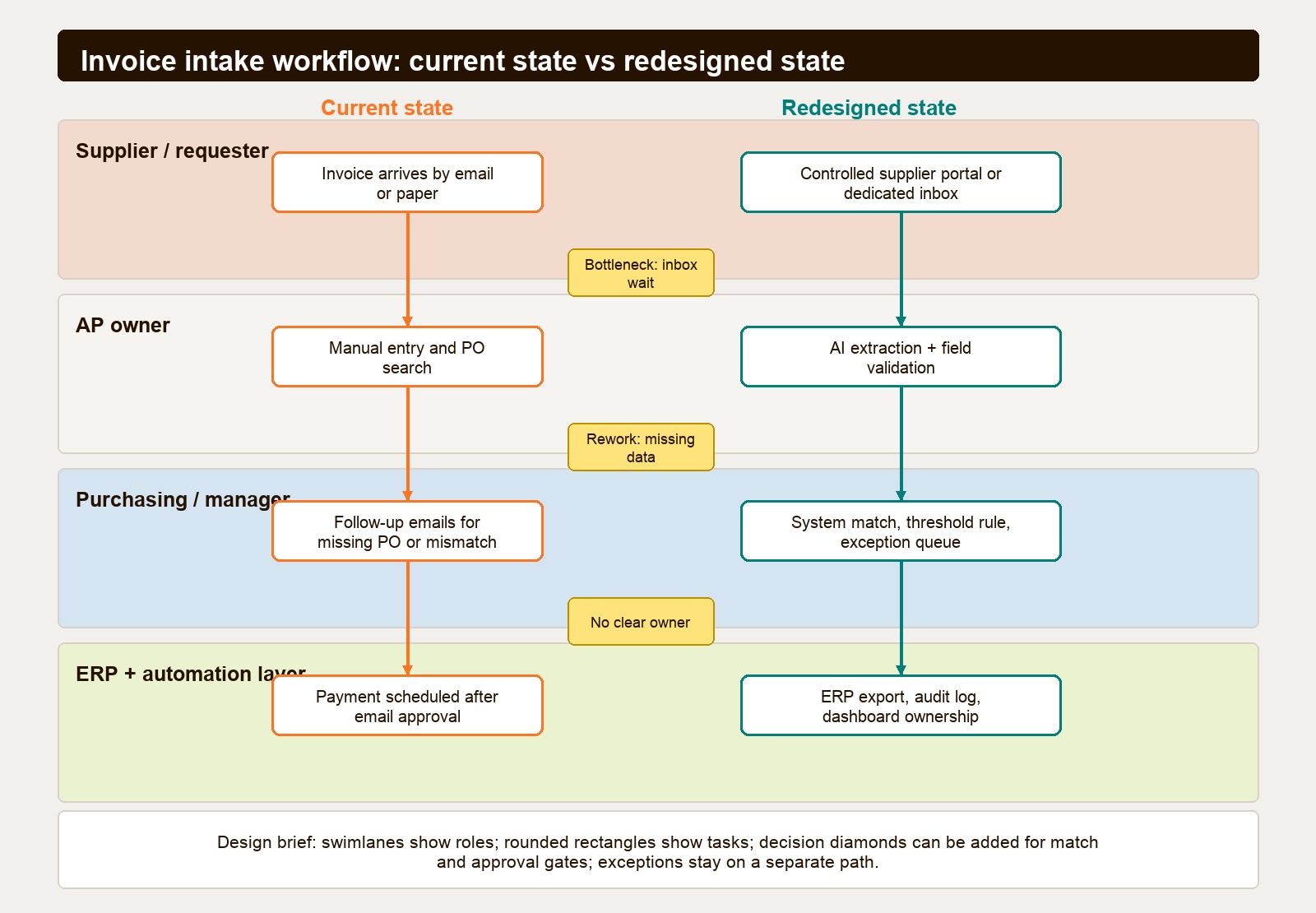
The current workflow looks manageable until it is mapped. Suppliers send invoices by email and sometimes paper. Finance scans or downloads the invoice. An AP clerk enters invoice data into the ERP. The clerk searches for the purchase order. If the PO is missing, purchasing is emailed. If the PO exists but the amount or quantity does not match, the vendor or requester is emailed. If everything matches, the invoice is routed to a manager for approval. The manager approves by email. Finance schedules payment.
That is a normal workflow. It is also fragile.
The work has too many inboxes, too much manual typing, no controlled intake point, no clear exception queue, and weak visibility for finance leadership. The process may look like a finance problem, but the real issue is operating design. Nobody can manage the end-to-end flow because no single system or owner sees it clearly.
Current state
Current-state mapping should describe reality, not policy. The official SOP may say invoices are reviewed within two business days. The actual workflow may show approvals sitting in email for a week because the manager is traveling, the PO number is missing, or nobody knows whether purchasing or finance owns the next action.
For this example, the current state has six common failure points:
- Intake is uncontrolled because invoices arrive through email, paper, and forwarded attachments.
- Data entry depends on manual reading, copying, and typing.
- PO matching happens after intake instead of at the point where missing information can be stopped.
- Approval routing depends on individual inbox behavior.
- Exceptions are hidden in email threads, not managed in a queue.
- Finance cannot see the status of every pending invoice without asking people for updates.
The bottleneck is not only manual entry. The larger bottleneck is uncertainty. The team does not know which invoices are clean, which are waiting, which are disputed, and who owns each delay.
Bottleneck diagnosis
Use the map to separate active work from waiting time. In many workflows, the visible task is not the main delay. The invoice may take only minutes to enter, but then sit for days while someone finds a PO, asks a vendor a question, or waits for approval.
A practical bottleneck review asks:
| Bottleneck question | What to look for | Likely fix |
|---|---|---|
| Where does work wait? | Email approvals, unassigned requests, pending vendor replies | Queue ownership, reminders, thresholds |
| Where does work repeat? | Re-keying invoice fields, duplicate status updates | Intake validation, OCR or extraction, system sync |
| Where does work leave the system? | Slack, email, spreadsheets, personal notes | Central dashboard or case record |
| Where do exceptions pile up? | Missing PO, quantity mismatch, blocked vendor | Dedicated exception lane |
| Where does judgment matter? | Disputed charge, unusual supplier, high-value invoice | Human review with better context |
This is where the BPM lens is useful. The question is not “Which tool can automate AP?” The question is “What should the workflow do with clean invoices, incomplete invoices, mismatches, and high-risk approvals?”
Redesigned state: one straight-through path and one exception path
The redesigned state should simplify the common path and isolate the exceptions.
In this example, suppliers send invoices to one controlled intake point: a supplier portal or dedicated AP inbox. The system extracts invoice fields, validates required data, and checks the invoice against the PO and receiving record. Clean, low-risk invoices move through the straight-through path. Mismatches, missing POs, blocked vendors, or high-value invoices move into an exception queue with an assigned owner.
The redesigned workflow has five design rules:
- Standardize intake before automating anything downstream.
- Validate required fields before the invoice becomes AP work.
- Use system matching for clear rules: PO exists, receiving record exists, amount within threshold, vendor active.
- Route exceptions to a dashboard with role ownership, not to a private inbox.
- Keep human judgment where risk, ambiguity, or supplier relationship context matters.
That design makes the process easier to automate because the workflow now has clean paths. Automation is not being asked to guess what the business failed to define.
Before and after table for the invoice workflow
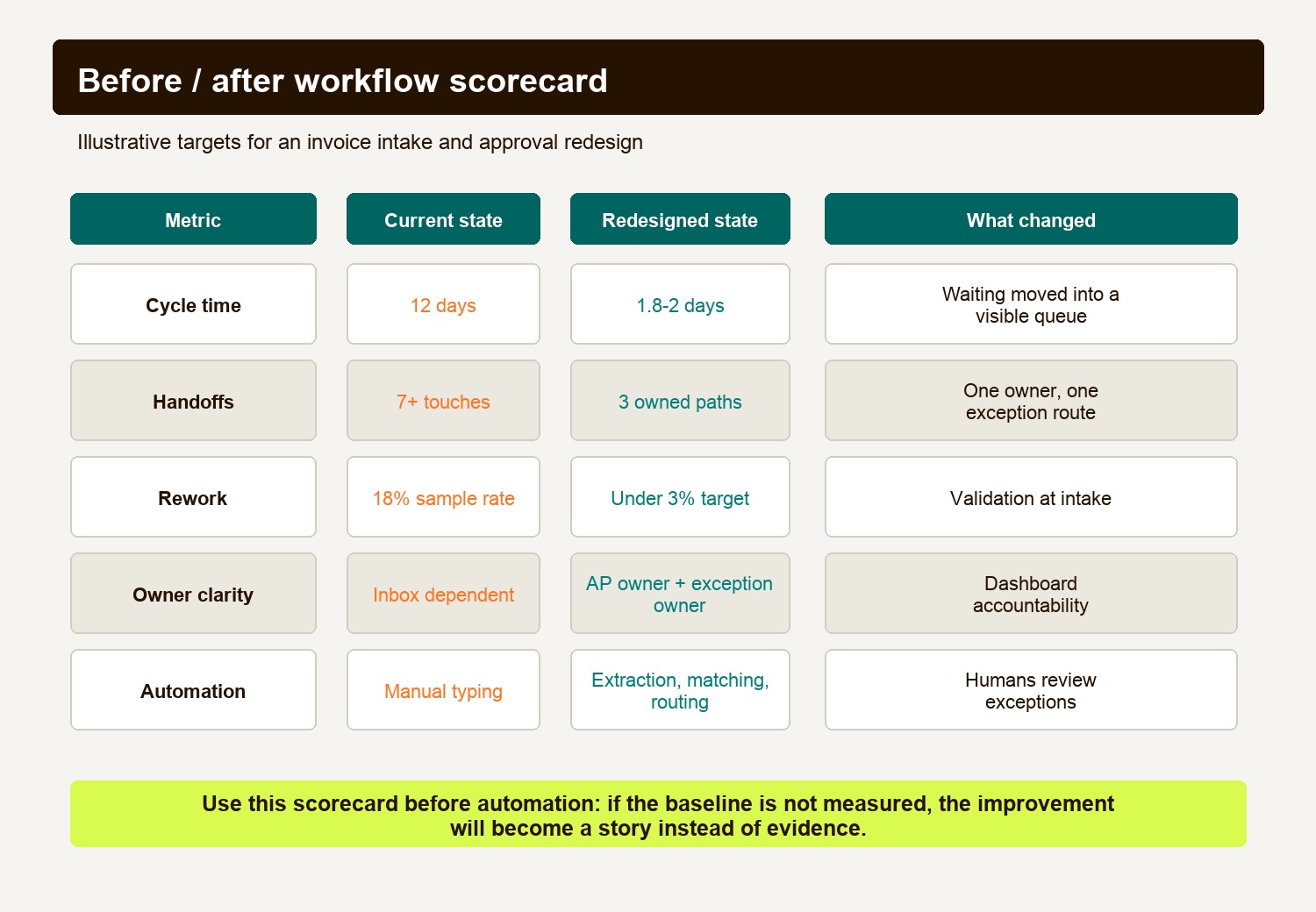
All figures below are hypothetical baseline assumptions and design targets, not measured Hapy or customer results. They illustrate how to set up a comparison; they do not forecast an improvement. Establish your own baseline using logs and frontline observation, and compare the same invoice population and measurement window after the pilot.
| Metric | Hypothetical baseline | Proposed target or design | Intended mechanism |
|---|---|---|---|
| Average cycle time | 12 days | 1.8-2 days | Waiting time moves from private inboxes to a visible queue with alerts and thresholds. |
| Handoffs | 7+ touches | 3 owned paths | Intake, straight-through processing, and exception handling each get an owner. |
| Rework rate | 18% assumed rework | Under 3% target | Required fields, PO checks, and vendor validation happen earlier. |
| Owner clarity | Unclear after email routing | AP owner plus exception owner | Work is assigned by status and reason, not by who last replied. |
| Manual entry time | High repeated typing | Mostly exception review | Extraction and matching remove repetitive keying from clean invoices. |
| Visibility | Status found by asking people | Dashboard by invoice status | Finance can see clean, waiting, disputed, and approved invoices in one view. |
For external proof that this pattern can create measurable value, Microsoft reported that Komatsu Australia used Power Automate and AI Builder for an invoice processing workflow involving nearly 52,000 invoices annually; one supplier automation processed 1,100 invoices in three weeks and saved an estimated 300 hours of work per year. A separate healthcare process improvement case on PubMed Central used Lean Six Sigma and RPA to reduce process time by 380 minutes and improve process cycle efficiency from 69.07% to 95.54%.
The useful point is not that every company should copy those workflows. The useful point is that the teams measured the baseline, redesigned the process, and then automated the right layer.
Automation opportunities in this BPM example
Automation should not be applied evenly across the workflow. Some steps need rules. Some need integration. Some need AI assistance. Some need human review. A good BPM playbook separates them before implementation.
| Workflow step | Automation opportunity | Keep human control when |
|---|---|---|
| Supplier intake | Dedicated inbox, portal, required fields, attachment validation | A strategic supplier needs special handling. |
| Invoice reading | OCR or AI extraction for vendor, date, amount, tax, PO, line items | Confidence is low or the document format is new. |
| PO matching | ERP lookup, three-way match, threshold rules | Quantity, price, or receiving data conflicts. |
| Approval routing | Role-based assignment, reminders, SLA alerts | The approval involves budget, contract, or compliance judgment. |
| Exception handling | Dashboard queue by reason code and owner | The exception needs negotiation or business context. |
| Payment scheduling | ERP export, payment status update, audit log | Vendor is blocked, invoice is disputed, or cash timing needs review. |
| Reporting | Cycle time, backlog, exception rate, late payment risk | Leadership needs to change policy or staffing. |
If the workflow is mostly routing and approvals, a workflow automation platform may be enough. If it needs process governance, modeling, auditability, and cross-team orchestration, BPM becomes more relevant. If the workflow is proprietary or poorly served by standard tools, compare BPM vs custom automation before buying a large suite.
If AI enters the workflow, keep it in the interpretation layer first. Let AI classify documents, extract fields, summarize exceptions, and recommend routing. Let deterministic rules and human review own final approvals, payments, compliance decisions, and high-risk exceptions. Hapy’s AI automation guide covers that control model in more detail.
SOP: how to map and redesign a workflow
Use this SOP when you need a practical business process management example for your own team.
- Pick one workflow with visible drag.
Choose a process with enough volume to matter, but not so much risk that the first project becomes politically impossible. Good candidates include invoice intake, support routing, quote approval, customer onboarding, employee onboarding, access provisioning, expense approval, and reporting close.
- Define the trigger and done state.
Write one sentence for each. For invoice intake, the trigger is “supplier invoice received through an approved intake channel.” The done state is “invoice approved, scheduled for payment, recorded in the ERP, and visible in the AP dashboard.”
- Bring the real operators into the room.
Include the process owner, frontline performers, downstream reviewers, system admin, and someone neutral enough to challenge assumptions. The map will be wrong if it is built only from policy documents.
- Map the current state in swimlanes.
Use lanes for roles and systems. Capture the actual path, including email, spreadsheets, side messages, manual checks, delays, and informal approvals. Mark every decision point and every place where the process leaves the official system.
- Add baseline metrics.
Measure cycle time, active work time, wait time, volume, rework, exception rate, handoffs, backlog, cost per transaction, and customer or vendor impact. If you cannot measure everything at first, start with cycle time, handoffs, and rework.
- Diagnose waste and bottlenecks.
Look for duplicate entry, waiting, unnecessary approvals, missing information, unclear ownership, avoidable reviews, system switching, and exception loops. Do not start with automation ideas. Start with the workflow failure.
- Design the future state.
Create a clean path for normal work and a separate path for exceptions. Remove unnecessary steps. Move validation earlier. Assign owners by role. Decide which decisions can be rule-based and which require judgment.
- Choose the automation layer.
Use standard workflow automation for routing, reminders, statuses, and approvals. Use RPA when a legacy system has no clean integration. Use AI when the input is unstructured and needs classification or extraction. Use custom software when the workflow is strategic, specific, or poorly served by standard tools.
- Pilot before rollout.
Run the redesigned workflow on a controlled slice: one supplier group, one region, one customer type, or one internal queue. Track the baseline against the new state. Fix adoption issues before scaling.
- Monitor and improve.
The workflow is not done when it launches. Review exception reasons, SLA misses, field validation failures, user workarounds, and downstream complaints. Feed those findings into the next iteration.
Checklist: is this workflow ready for BPM or automation?
Use this checklist before investing in tooling.
- The workflow has a clear start and end point.
- One person is accountable for overall performance.
- Every role and system touchpoint is known.
- Current-state steps have been validated with frontline operators.
- Manual workarounds are documented instead of hidden.
- Cycle time and wait time are measured separately.
- Handoffs and approval points are counted.
- Common exception reasons are known.
- Required input data is defined.
- The team knows which steps are rules-based and which need judgment.
- The future state has a straight-through path and an exception path.
- The dashboard owner is named.
- The rollout has a pilot scope.
- Success metrics are agreed before implementation.
- Human review remains in place for high-risk outcomes.
Missing several items suggests more process mapping is needed. A single missing critical control, such as an approval owner for payments, can block rollout regardless of the count.
Playbook: choose BPM, workflow automation, RPA, AI, or custom software
A commercial evaluation should begin with the shape of the work, not the vendor category.
| Situation | Better first choice | Reason |
|---|---|---|
| Simple approval or notification flow | Workflow automation | Fast to configure and usually enough for routing, reminders, and statuses. |
| Cross-functional process with governance needs | BPM platform | Better fit for process models, audit trails, role ownership, monitoring, and exception handling. |
| Repetitive work in a legacy system | RPA | Useful when the system has no API and the task is stable enough for bot execution. |
| Messy documents, emails, or language-heavy intake | AI-assisted automation | Helps classify, extract, summarize, and route information before rules take over. |
| Proprietary workflow tied to business advantage | Custom software | Better when the process is too specific, strategic, or economically important for a generic tool. |
| Still unclear ownership and messy policy | Process redesign first | Automation will only hard-code confusion. |
This is where Hapy’s Business Systems & Automation work usually starts: map the operating pain, define the workflow, then build or connect the system that fits. The value is not “more automation.” The value is clearer ownership, less manual drag, better visibility, and fewer workflows held together by inbox memory.
What to measure after launch
A BPM project should leave behind an operating dashboard, not only a new workflow diagram.
Track these metrics after launch:
| Metric | Why it matters | Review cadence |
|---|---|---|
| Cycle time | Shows whether the full workflow is faster. | Weekly until stable, then monthly. |
| Wait time | Shows where work sits idle. | Weekly. |
| Exception rate | Shows whether intake quality and rules are improving. | Weekly. |
| Rework rate | Shows whether errors are being prevented earlier. | Monthly. |
| SLA misses | Shows where ownership or capacity is failing. | Weekly. |
| Manual touches per transaction | Shows whether automation is reducing handoffs. | Monthly. |
| User workarounds | Shows whether the official workflow is usable. | Monthly. |
| Downstream complaints | Shows whether the fix moved the problem elsewhere. | Monthly. |
The most important metric is often not cost. It is control. A workflow that is visible, owned, and measured can keep improving. A workflow hidden in email cannot.
Common questions about business process management examples
What is a business process management example?
A business process management example shows how a repeatable workflow is mapped, analyzed, redesigned, implemented, and monitored. A useful example includes the current state, bottlenecks, future state, automation opportunities, owners, exceptions, and before/after metrics.
What is the difference between BPM and workflow automation?
Workflow automation usually moves tasks, approvals, notifications, and data between steps. BPM is broader. It includes process modeling, governance, monitoring, ownership, exception handling, and continuous improvement across an end-to-end business process.
When should a workflow use BPMN?
Use BPMN when business and technical teams need a shared, precise model for process execution, integration, or governance. Use a simpler swimlane when the main goal is alignment, diagnosis, and decision-making.
What is the best first BPM workflow to improve?
The best first workflow has meaningful volume, visible pain, measurable impact, manageable risk, and clear ownership. Invoice intake, customer onboarding, support routing, quote approval, employee onboarding, and reporting close are common starting points.
The practical takeaway
The strongest business process management examples do not start with a tool demo. They start with a workflow people recognize.
Pick one process. Map the current state. Name the bottlenecks. Design the straight-through path and the exception path. Measure the before state. Then choose the lightest automation layer that can run the redesigned workflow with control.
That is how BPM becomes useful: not as theory, but as a way to make work visible, owned, measurable, and easier to improve.


