Business process automation can reduce manual handoffs, approval delays, reporting work, and rework. The 30/60/90-day sequence below is an illustrative operating plan, not a measured delivery benchmark. Benefits can arrive together or in a different order depending on the workflow and release scope.
That order matters for operators. A CFO, COO, sales ops lead, or service manager does not need another generic list of automation advantages. They need to know what should improve first, what should be measured, and which signals mean the workflow is not ready to scale.
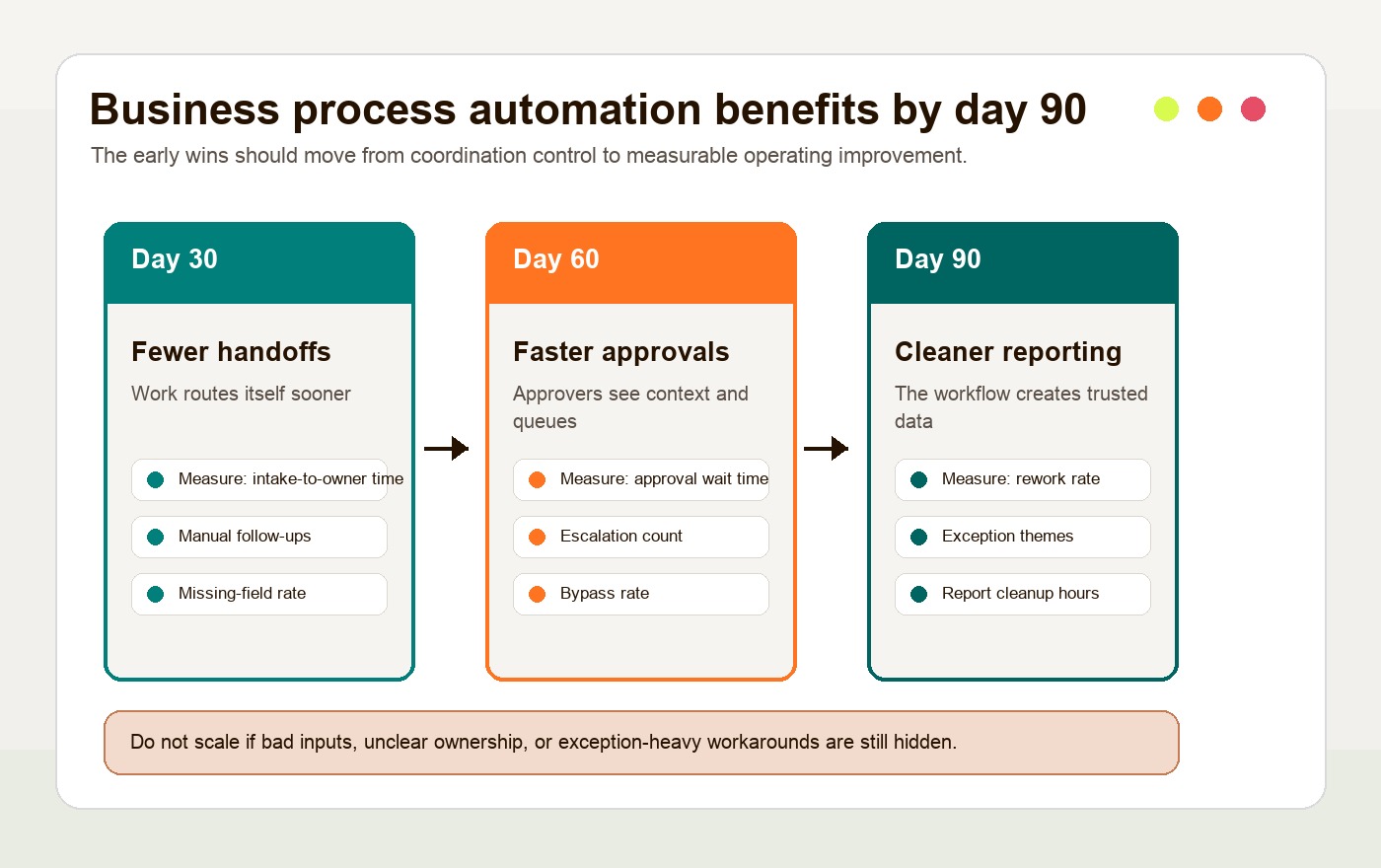
This plan assumes one bounded workflow, a named owner, stable access to source systems, and enough weekly cases to observe routine work and exceptions. Low-volume or seasonal workflows need longer observation. Advance on evidence, not elapsed days:
| Timeframe | Improvement to investigate | What to watch |
|---|---|---|
| First 30 days | Fewer handoffs, faster routing, less manual follow-up | Bad intake fields, unclear owners, exceptions still handled in side channels |
| Days 31-60 | Faster approvals, cleaner status visibility, fewer duplicate updates | Approval rules that do not match reality, managers bypassing the workflow |
| Days 61-90 | Cleaner reporting, lower rework, stronger operating rhythm | Reports that look clean while manual fixes still happen outside the system |
If the team needs the broader category definition first, Hapy’s guide to business process automation covers BPA, RPA, workflow automation, and AI automation at a higher level. This article provides a staged way to measure a workflow after automation goes live.
If the team is small and still avoiding obvious workflow cleanup, the small business automation guide explains why simple automations often need process clarity before tool setup.
If the current process still depends on spreadsheets for approvals, status, and reporting, the spreadsheet operations automation guide is a better first diagnostic than another tool shortlist.

Why Business Process Automation Benefits Arrive in Waves
The first business process automation benefit is usually not cost reduction. It is control over the flow of work.
Manual workflows lose time in queues, repeated updates, unclear ownership, approval chasing, and rework. Automation can remove some of that delay quickly because routing, notifications, validation, and status changes become system behavior instead of memory work.
That does not mean the business is transformed on launch day. It means one workflow begins producing better operating signals. Those signals then help the team decide what to fix next.
This is why process analysis matters before tool selection. IBM describes business process analysis as examining a process to understand what works, what needs improvement, and how improvements should be made. For automation, that analysis should capture the current workflow, owners, systems, cycle time, wait time, error rate, rework, exception volume, and reporting gaps.
Without that baseline, leaders can only say the new workflow feels faster. With it, they can see which business process automation benefits are real.
First 30 Days: Fewer Handoffs and Faster Routing
In the first 30 days, automation should reduce the number of places work has to wait for a person to notice it.
This is the most visible early win because many manual workflows are really coordination problems. A sales lead waits for assignment. A refund waits for approval. A vendor invoice waits for coding. A support request waits for triage. A report waits for somebody to merge three exports.
Good early automation does not need to be fancy. It can:
- Create the right record when an intake form is submitted.
- Assign the next owner based on account type, region, value, or request category.
- Notify the right person when required fields are missing.
- Move a request to the next status when prerequisites are complete.
- Send reminders before a service-level deadline is missed.
- Log when a handoff happened and who owns the next action.
The operator benefit is not only speed. It is fewer hidden dependencies. When the workflow assigns ownership and records timestamps, the team can see whether the delay is caused by intake quality, approval capacity, system access, unclear policy, or an exception the automation should not handle alone.
What to Measure in the First 30 Days
Measure the first 30 days with workflow-level metrics, not broad productivity claims.
Useful early metrics include:
| Metric | Why it matters |
|---|---|
| Intake-to-assignment time | Shows whether routing is faster and ownership is clearer |
| Number of manual follow-ups | Shows whether the workflow is reducing status chasing |
| Missing-field rate | Shows whether intake quality is good enough for automation |
| Exception rate | Shows how often work leaves the standard path |
| Manual override count | Shows where operators still distrust or outgrow the workflow |
If those numbers improve, the automation is removing coordination drag. If they do not, the problem is probably not the tool. It is usually the intake design, routing rule, owner model, or exception path.
Days 31-60: Faster Approvals and Cleaner Status Visibility
Once routing and exception ownership are working, test whether approvals and status visibility improve; days 31 to 60 are a suggested review window.
This is where business process automation benefits move from “the work got routed faster” to “the work is easier to manage.” Approval rules become explicit. Managers can see what is waiting. Operators no longer need to ask whether a request is stuck, approved, rejected, missing context, or ready for the next step.
A before-and-after view makes the shift clearer:
| Workflow moment | Before automation | After automation |
|---|---|---|
| Intake | Request arrives by email, chat, spreadsheet, or form with inconsistent fields | Request enters one structured intake path with required fields and category logic |
| Assignment | Someone manually decides who owns it | Ownership is assigned from rules, workload, region, value, or account type |
| Approval | Approver is chased in Slack, email, or meetings | Approval task is created with context, threshold, due date, and escalation rule |
| Status | Team asks for updates or checks several tools | Status is visible from the workflow, with timestamps and blockers |
| Exceptions | Edge cases are handled informally | Known exceptions route to the right person with a reason code |
| Reporting | Weekly report is patched from exports | Workflow produces consistent events for dashboards and review |
This phase is also where automation exposes policy problems. If every approval is an exception, the approval policy is not ready. If managers keep approving outside the system, the workflow is not trusted. If requests bounce between teams, ownership is unclear.
Those are useful findings. The goal is not to pretend the automation solved every operating issue. The goal is to use the first 60 days to make the workflow honest.
Keep Human Judgment Where It Belongs
Approvals are a good place to separate automation from judgment. Low-risk, threshold-based approvals can often move automatically. Higher-risk decisions should be routed, prepared, and logged by the system, but still reviewed by a human.
This becomes more important when AI is part of the workflow. Hapy’s AI automation guide uses a useful model: AI can help with perception, such as reading, classifying, extracting, or summarizing messy inputs, while deterministic workflow logic should control permissions, thresholds, approvals, and execution.
The best approval automation does not remove accountability. It removes avoidable waiting around accountability.
Days 61-90: Cleaner Reporting and Lower Rework
Once the workflow has produced enough comparable cases and consistent events, review reporting quality and rework. Days 61 to 90 are an example window, not proof that the sample is sufficient.
The team can ask better questions:
- Which step creates the longest wait?
- Which intake fields are most often missing or wrong?
- Which approval thresholds create unnecessary delay?
- Which exceptions repeat often enough to deserve their own path?
- Which customers, vendors, teams, or regions create the most rework?
- Which automation rule is saving time, and which one is creating cleanup?
This is where lower rework becomes measurable. If automation validates fields, enforces sequence, reduces duplicate entry, and routes exceptions earlier, operators should spend less time correcting the same mistake after the fact.
A healthcare process study published on PubMed Central is a useful example of why measurement matters. The team used Lean Six Sigma and robotic process automation to improve medical expense claims processing, reducing process time by 380 minutes and improving process cycle efficiency from 69.07% to 95.54%. The transferable lesson is not the exact hospital workflow. It is the sequence: measure the current process, remove waste, automate the right steps, and then track whether the process actually improved.
In a more everyday finance example, Microsoft’s Komatsu Australia case describes a Power Automate and AI Builder workflow that reached production in four weeks, automated more than 1,000 supplier invoices annually, and saved an estimated 300 hours per year. The useful point for operators is the narrowness of the case. It was not “automate finance.” It was one supplier invoice workflow with a clear baseline and measurable time savings.
Where Automation Fails Before Benefits Compound
Automation fails when the business asks software to compensate for unclear operations.
The failure usually appears in three places: bad inputs, unclear ownership, and exception-heavy processes.
Bad Inputs
Bad inputs make automation brittle. Missing fields, inconsistent names, duplicate records, stale spreadsheets, poorly formatted documents, and vague request categories all create cleanup work downstream.
Automation can validate inputs, but it cannot magically know what the business meant. If the intake form asks weak questions, the workflow will route weak data faster. If documents arrive in inconsistent formats, the system needs parsing rules, confidence thresholds, and exception handling before it should act.
Fix this by tightening intake before scaling:
- Make required fields truly required.
- Use controlled choices where free text creates ambiguity.
- Validate IDs, totals, dates, account names, and owner fields.
- Create a reason code for missing or rejected information.
- Review failed intakes weekly during the first 90 days.
Unclear Ownership
Unclear ownership turns automation into a faster blame loop.
Every workflow needs an owner for the process, not just a user for the next task. The owner decides how rules change, how exceptions are handled, which metrics matter, and when the workflow should be redesigned.
If ownership is unclear, operators will create side paths. They will approve in chat, patch records manually, and maintain private spreadsheets because the official process does not match real work.
This is why Hapy’s Business Systems & Automation work starts with the operating model, not only the software. A dashboard, internal tool, or automation is useful only when people trust it enough to run the business through it.
Exception-Heavy Processes
Some workflows are exception-heavy by nature. Complex pricing, custom contracts, escalated support, disputed invoices, legal review, hiring decisions, and high-value customer issues often need judgment.
These workflows can still benefit from automation, but the posture should change. Instead of fully automating the decision, the system should prepare the work:
- Gather the right context.
- Draft the record or response.
- Check required fields.
- Flag risks and missing information.
- Route the case to the right reviewer.
- Log the decision and reason.
If exceptions are the work, automate support around the decision, not the decision itself.
A 90-Day Operator Checklist
Use this checklist before calling an automation project successful.
| Question | Pass signal | Warning signal |
|---|---|---|
| Did handoffs decrease? | Intake, assignment, and routing happen without manual chasing | People still ask “who owns this?” in chat |
| Did approvals speed up? | Approval queues, due dates, and escalation rules are visible | Managers approve outside the workflow |
| Did reporting improve? | The workflow creates trusted status, timing, and exception data | Weekly reports still require manual patches |
| Did rework decrease? | Duplicate entry, missing fields, and correction loops are falling | Operators maintain side spreadsheets |
| Are exceptions understood? | Known exceptions have reason codes and owners | Edge cases disappear into informal workarounds |
| Is there a named owner? | One person owns workflow quality and rule changes | Tool admin exists, but no process owner exists |
The strongest signal is not that the workflow has zero exceptions. Real operations have exceptions. The signal is that exceptions are visible, named, routed, and reviewed.
How to Use These Benefits in an Automation Business Case
A useful automation business case should connect the 30/60/90 sequence to dollars, risk, and operating capacity.
Start with the baseline:
- Current monthly volume.
- Average cycle time.
- Number of handoffs.
- Approval wait time.
- Error or rework rate.
- Manual hours spent on status updates, duplicate entry, and report cleanup.
- Cost of delay, missed revenue, compliance exposure, or customer friction.
Then define an evidence target and review date. Avoid vague goals such as “improve efficiency.” Set locally justified targets, for example: reduce intake-to-assignment time by 70%, cut approval wait time from three days to one day, reduce missing-field rework by half, or remove five hours of report preparation each week.
For an employee-facing system, the internal web app ROI model turns those baseline measures into a practical time-saved, cost, adoption, and business-impact case.
McKinsey’s 2025 global AI survey found that 88% of respondents reported regular AI use in at least one business function, but only 39% attributed any EBIT impact to AI. That gap is a useful warning for automation leaders. Adoption is not the same as business impact. The business case has to prove that a specific workflow improved.
If the project includes AI agents or AI-assisted workflow logic, use Hapy’s AI automation ROI guide to include operating cost, governance, production evidence, and scale decisions before expanding the system.
Business Process Automation Benefits Are Operational, Not Abstract
The best business process automation benefits are not abstract promises about transformation. They are visible changes in how work moves: fewer handoffs, faster approvals, cleaner reporting, and lower rework.
Use the sequence to organize investigation. Before expanding, require complete ownership records, tested exception paths, a comparable baseline, and no unacceptable quality regression. Agree a minimum case count and observation period for each workflow before the pilot; extend the pilot if important case types have not occurred.
That sequence also keeps expectations honest. If the first 30 days do not produce clearer ownership and fewer manual follow-ups, the team should not rush into a broader rollout. Fix the inputs, rules, exceptions, and ownership first.
For teams outgrowing scattered tools, manual approvals, spreadsheet reporting, or fragile internal workflows, Hapy’s custom ERP vs internal tools guide can help decide whether the next move is workflow cleanup, an internal tool, a dashboard layer, or a larger operating system.
The operator move is to start narrow, measure honestly, and scale only the automation that keeps working under real operating pressure.


