AI automation use cases only matter when they change how work moves. The useful question is not “Where can we add AI?” It is “Which operational decision, handoff, approval, report, or quality check gets better because AI can interpret messy information faster than a person?”
That distinction matters because AI adoption is already broad, but operating value is uneven. McKinsey’s 2025 global AI survey found that 88% of respondents reported regular AI use in at least one business function, while only 39% reported any enterprise-level EBIT impact from AI. The same survey found that high performers were nearly three times as likely to redesign workflows.
The lesson for operators is simple: AI is not the operating system. AI is a useful interpretation layer inside an operating system.
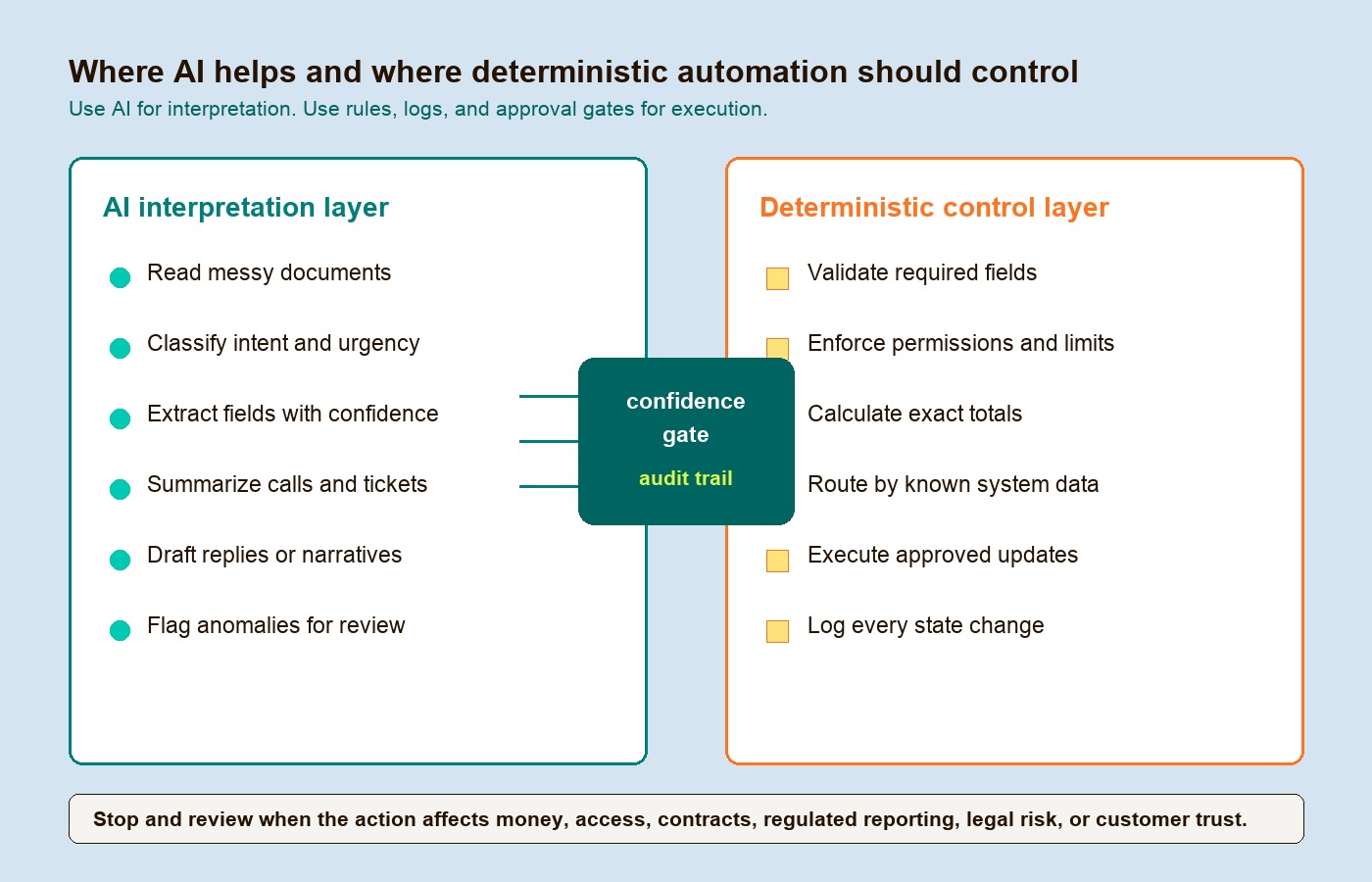
Use AI for intake, classification, summarization, extraction, anomaly detection, drafting, and decision support. Use deterministic workflow automation for permissions, thresholds, calculations, audit logs, approvals, system updates, and anything that must produce the same result every time.
If your team needs the broader implementation model first, Hapy’s AI automation guide explains how to separate perception, control, execution, and assurance. If the problem is scattered tools, manual reporting, and unclear handoffs, Hapy’s Business Systems & Automation work is the practical operating layer this article points toward.
If you are comparing platforms before the workflow is defined, use the AI workflow automation tools vs deployment guide to separate tool selection from production ownership. If the decision is between AI, RPA, rules, and human review, start with business process automation AI vs RPA.

The real pattern behind AI automation use cases
The strongest AI automation use cases share one pattern: the workflow starts with messy input, but the business still needs a controlled output.
That messy input may be a support message, PDF, invoice, transcript, email thread, service request, call recording, spreadsheet attachment, sales note, or operational exception. AI can read it, classify it, extract fields, summarize the situation, and recommend the next step. Then workflow logic should decide what happens next.
Think of the system in two layers:
| Layer | What it should do | Why it matters |
|---|---|---|
| AI interpretation layer | Read, classify, extract, summarize, compare, draft, detect anomalies | Handles unstructured work that rigid rules struggle with |
| Deterministic control layer | Validate fields, enforce permissions, calculate totals, route by explicit rules, log events, trigger approvals | Keeps the workflow auditable, repeatable, and safe |
This is also why generic tool lists are weak. A tool list tells you what software exists. An operator needs to know which decision changes, which person remains accountable, what data must be trusted, and where automation must stop.
A scorecard for choosing the right use case
The ratings below are illustrative judgments for a team with existing systems, accessible records, and human review capacity. They are not measured industry benchmarks. Replace them with scores for your workflow. For impact, 1 means occasional convenience and 5 means a frequent critical bottleneck; for effort, 1 means one existing integration and 5 means several unproven integrations; for readiness, 1 means unavailable or unapproved data and 5 means representative, permissioned, labeled examples; for risk, 1 means reversible internal drafts and 5 means consequential actions affecting rights, money, or access. Use intermediate scores for mixed cases, and make prohibited actions a stop condition regardless of score.
| Operational category | Impact | Implementation effort | Data readiness | Risk | Best first move |
|---|---|---|---|---|---|
| Intake | 5 | 3 | 4 | 3 | Extract and validate fields from messy requests before they enter the system |
| Routing | 4 | 2 | 4 | 2 | Classify ambiguous messages, then let rules assign owners and queues |
| Support | 5 | 4 | 3 | 4 | Start with summaries, suggested replies, and low-risk self-service |
| Reporting | 4 | 4 | 3 | 4 | Let AI translate questions into governed queries, not calculate the numbers |
| QA | 4 | 2 | 4 | 2 | Audit more interactions against a fixed rubric, then sample human review |
| Approvals | 4 | 5 | 3 | 5 | Use AI to prepare evidence, but keep final authorization deterministic |
| Handoffs | 4 | 5 | 3 | 4 | Standardize state, owners, and schema checks before adding AI |
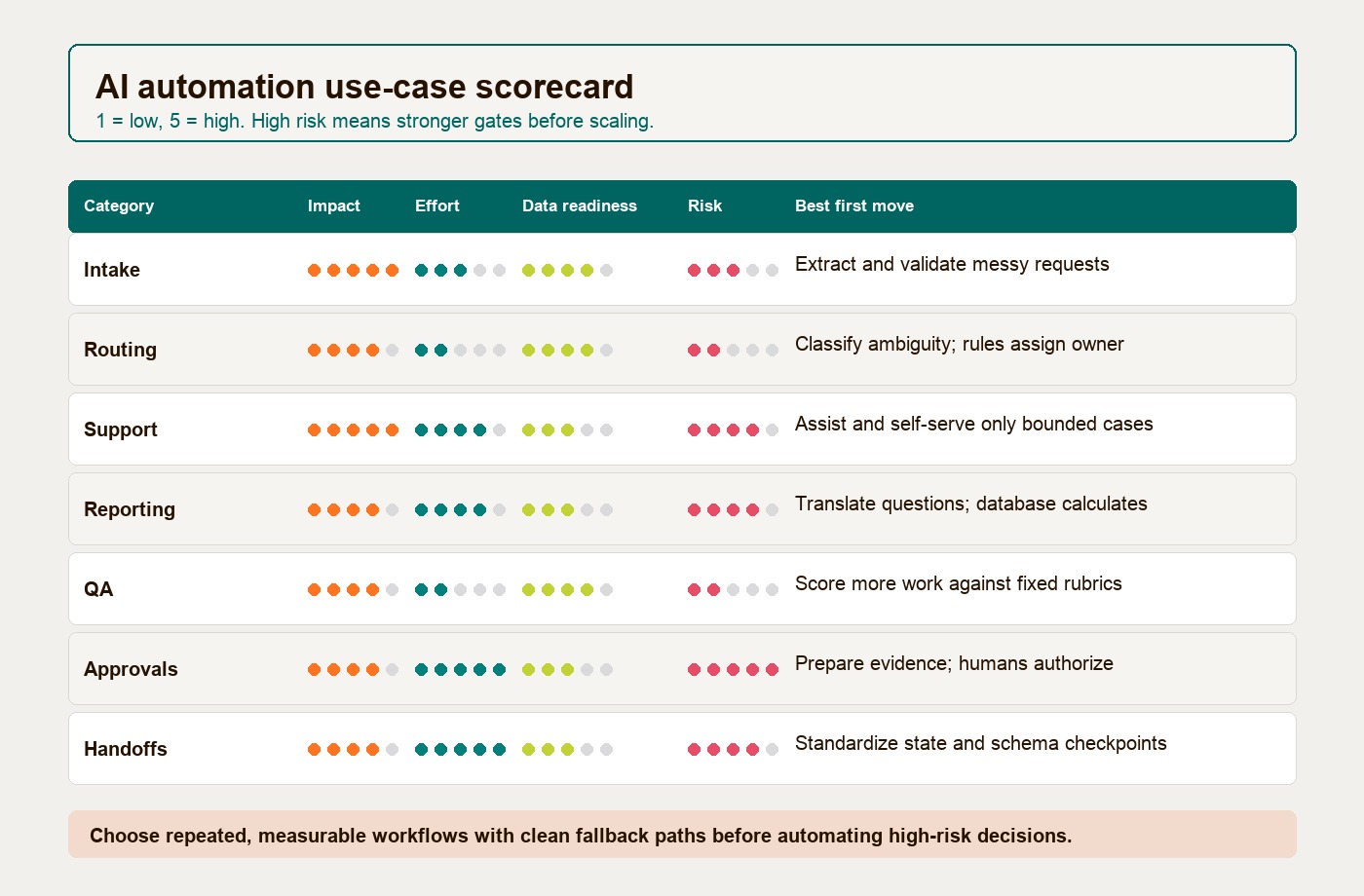
For example, consider an illustrative invoice-intake pilot that only drafts records. With frequent manual entry, one working connector, reviewed sample invoices, and mandatory human approval, a team might assign impact 4, effort 2, readiness 4, and risk 3. Giving the system payment authority would change the risk assessment and require a separate decision.
The best first project is usually not the flashiest. It is the workflow with repeated volume, painful manual handling, decent source data, clear ownership, and a low-risk fallback when the AI is uncertain.
Avoid any use case where no one owns the workflow, the source data is unreliable, the business rule is still being negotiated, or a wrong action could affect money, access, legal rights, customer trust, or regulated reporting.
1. Intake: turn messy requests into structured work
Intake is one of the cleanest AI automation use cases because incoming work is often inconsistent before it becomes operational. Customers send emails. Vendors send PDFs. Sales reps add notes. Patients, applicants, candidates, tenants, or partners submit partial forms. Operations teams then spend time reading, copying, correcting, and chasing missing details.
AI helps when it extracts required fields, identifies missing information, classifies the request type, summarizes the context, and prepares the record for validation. The workflow outcome is not “AI read a document.” The outcome is that the next person receives a complete, structured case with the right fields, source references, confidence score, and exception status.
Good intake automations usually include:
- Required-field validation before a case is created.
- Duplicate checks against CRM, ERP, ticketing, or account records.
- Confidence thresholds that send weak extractions to review.
- Source snippets so a reviewer can see why a field was extracted.
- A clear status for “ready,” “missing information,” or “needs human review.”
Do not use AI when the input is already a standard transaction. If a system receives clean form data, a fixed CSV, a database row, or a standardized API payload, deterministic validation is safer, faster, cheaper, and easier to audit.
2. Routing: classify ambiguity, then let rules assign ownership
Routing improves when AI handles ambiguity at the edge of the workflow. A support ticket may mention billing, product defects, urgency, sentiment, and account risk in one message. A sales lead may describe a need without selecting the right service category. An internal request may be written in plain language instead of a structured queue.
AI can classify intent, urgency, topic, sentiment, language, product area, missing context, and likely owner. But the final routing should still be controlled by rules that the business can inspect.
For example, AI may classify an inbound request as “enterprise billing dispute with renewal risk.” Deterministic routing should then check account tier, renewal date, geography, ownership, SLA, and escalation policy before assigning the queue.
Do not use AI for exact territory assignment, VIP flags, SLA timers, application IDs, role ownership, or other fields already available in a system of record. If the CRM says the billing state is New York, a model should not be asked to decide the territory. A rule should.
3. Support: automate resolution only where the answer is bounded
Support is the category where AI creates the most visible change and the most visible risk.
Klarna’s 2024 AI assistant announcement became a widely cited benchmark because the company said the assistant had handled 2.3 million conversations in its first month and performed work equivalent to 700 full-time agents. Those are historical, company-reported figures, not an independent measurement of service quality or a forecast of another team’s savings. They should not be treated as permission to automate every support decision.
The safer operator pattern is staged:
| Support stage | AI can help with | Automation boundary |
|---|---|---|
| Agent assist | Summarize history, draft replies, retrieve policy, suggest next step | Human sends the answer |
| Low-risk self-service | Answer known questions from approved knowledge and account context | Escalate when confidence, sentiment, or policy risk is low |
| Workflow action | Prepare refund request, cancellation reason, replacement order, or escalation summary | Rules and approval gates execute the transaction |
| Sensitive escalation | Detect legal threats, safety issues, fraud signals, harassment, or account compromise | Immediate human review |
Zendesk describes modern AI support agents as systems that can resolve issues independently and assist human agents. The word “resolve” needs discipline. Resolution is appropriate when the policy is clear, the data is available, the action is reversible, and the confidence threshold is high. Anything involving legal claims, major refunds, account deletion, production incidents, security permissions, or customer-sensitive exceptions should be routed to a human.
4. Reporting: let AI translate questions, not invent numbers
Reporting is a useful AI automation use case when leaders need faster access to operational data but depend on analysts or engineers for every query. AI can translate a plain-language question into a governed query, summarize results, explain metric movement, and draft a narrative for review.
The boundary is firm: AI should not be the calculator of record.
A useful design pattern combines retrieval of approved metric definitions, query generation, restricted database access, and validation of results. Treat this as a proposed architecture to test, not evidence that a model can produce trustworthy business math on its own. In a production reporting workflow, the model may help interpret the question “What changed in renewals last week?” but the database should calculate revenue, churn, renewal count, segment totals, and period-over-period movement.
Use AI for:
- Translating business questions into query candidates.
- Finding the right metric definition or dashboard.
- Summarizing variance drivers for analyst review.
- Explaining what changed in plain language.
- Creating first-draft operating notes.
Do not use AI for ledger totals, tax calculations, inventory counts, SOX-controlled reporting, commission payouts, margin math, or board metrics that must reconcile exactly. Those belong in governed data models, database queries, spreadsheets with controlled formulas, or reporting pipelines with audit trails.
5. QA: review more work, but keep the rubric fixed
Quality assurance is a strong fit when the team has a fixed rubric but not enough reviewer capacity. Call centers, support teams, onboarding teams, sales teams, service operations, and compliance teams often review only a sample of work. AI can expand coverage by scoring transcripts, tickets, notes, chats, or case files against predefined criteria.
The useful shift is not replacing QA judgment. It is making QA less dependent on random sampling.
AI can flag missing disclosures, weak authentication steps, tone issues, escalation misses, unclear summaries, policy drift, repeated customer effort, and patterns that deserve coaching. Human reviewers should still calibrate the rubric, audit samples, review borderline cases, and update the scoring logic when the business changes.
Do not use AI for objective operational metrics. Shift adherence, hold time, response time, transaction count, reopened ticket count, SLA breach time, and utilization should come from timestamps and system logs. Asking a language model to infer those numbers is slower and less reliable than reading the source data.
6. Approvals: prepare the decision, do not automate accountability
Approvals are high-impact because they slow down procurement, finance, sales, legal, hiring, operations, and delivery. They are also one of the easiest places to over-automate.
AI is useful before the decision. It can extract contract terms, compare invoice lines against purchase orders, summarize vendor changes, identify missing documents, flag unusual discounts, detect policy exceptions, and prepare the approval packet.
The approval itself should be deterministic. A rules engine should check spend limit, role authority, policy threshold, required evidence, account status, budget owner, margin guardrail, or contract clause. A human should approve the high-risk or ambiguous cases.
This aligns with current governance expectations. The NIST AI Risk Management Framework is built to help organizations manage AI risks across design, development, use, and evaluation, and ISO/IEC 42001 defines an AI management system for organizations that provide or use AI-based products or services. In plain operator terms: if AI touches approvals, the business needs documented ownership, controls, monitoring, and evidence.
Do not use AI as the final approver for payments, loans, refunds, discounts, access changes, employment decisions, legal commitments, vendor contracts, or regulated determinations. Let AI prepare the case. Let policy and accountable humans make the decision.
7. Handoffs: make cross-system work visible
Handoffs are where operational quality often leaks. Sales hands off to delivery. Support hands off to engineering. Finance waits for operations. Marketing sends leads to sales. A spreadsheet becomes a dashboard. A ticket becomes a project. A contract becomes onboarding tasks.
AI helps when the handoff contains unstructured context: notes, calls, emails, PDFs, screenshots, transcripts, tickets, or change logs. It can summarize what happened, extract commitments, identify missing owners, map the next action, and produce a handoff brief.
The control layer still matters more than the summary. Every handoff should define:
- Trigger: what event starts the handoff.
- Owner: who accepts the work.
- Required data: what must be present before the work moves.
- Status: what state the item enters next.
- Exception path: what happens when the handoff is incomplete.
- Audit trail: what was changed, by whom, and when.
Do not use AI for clean schema transformations, API syncs, scheduled reminders, ETL jobs, role-based notifications, or simple status changes. If the system can express the step as “when X happens, update Y and notify Z,” deterministic automation is the safer answer.
Where AI should not be used
Some automation decisions are better without AI. This is not anti-AI. It is good system design.
Use deterministic workflow automation when:
| Scenario | Safer automation layer | Why AI is the wrong default |
|---|---|---|
| Exact calculations | Database, spreadsheet formula, reporting model | The number must reconcile exactly |
| Permissions and access | Identity rules, RBAC, ABAC, approval gates | The decision must be explainable and enforceable |
| Standard routing | CRM fields, territory tables, SLA rules | The answer already exists in structured data |
| Payments and refunds | Policy engine plus human approval | Mistakes affect money and trust |
| Compliance reporting | Governed data pipeline | The audit trail matters as much as the output |
| System synchronization | API, webhook, ETL, queue | The mapping is known and should be repeatable |
| Safety or legal escalation | Trigger rules plus specialist queue | False negatives are too costly |
The simplest rule: use AI where interpretation is the bottleneck. Use deterministic automation where control is the requirement.
How to pilot one use case without creating another fragile system
Start with one workflow. Write down the current path before building anything:
- What triggers the work?
- Who owns it?
- What data is required?
- Which decisions are currently manual?
- Which decisions are policy-based?
- What can go wrong?
- What should happen when confidence is low?
- What metric proves the workflow improved?
Then build the smallest useful version. For intake, that may mean extract fields and route exceptions. For routing, classify the message but keep assignment rules deterministic. For support, draft replies before allowing self-service. For reporting, generate query candidates before publishing executive narratives. For approvals, prepare the packet before automating any authorization.
Measure outcomes at the workflow level: cycle time, touch count, missing-field rate, reassignment rate, first-contact resolution, review coverage, approval delay, exception volume, rework rate, and human override rate.
If those numbers improve and the exception path stays clean, expand. If the team keeps correcting the automation outside the system, pause and fix the workflow design.
The operator takeaway
The best AI automation use cases do not replace operations. They make operations easier to control.
Use AI to read the messy parts of work: intake, routing signals, support context, report questions, QA transcripts, approval evidence, and handoff notes. Use deterministic automation to control the parts where the business needs repeatability: validation, permissions, calculations, status changes, approvals, logs, and system updates.
For teams outgrowing spreadsheets, manual handoffs, unclear reporting, or fragile workflow tools, Hapy’s Business Systems & Automation work focuses on that practical middle layer: clean the inputs, define what matters, and automate the work without handing accountability to a model.


