The choice between no-code vs custom software used to be simple: move fast with a visual builder, or pay engineers to build the real thing. That is no longer the right frame.
In 2026, there are at least four practical build paths: no-code platforms, low-code platforms, AI code tools, and custom software. Each can be the right answer. Each can also become expensive if it is used for the wrong job. For the broader background, Hapy’s no-code movement guide explains why visual development became popular in the first place.
The useful question is not “which tool is best?” It is: how much ownership, governance, performance, and flexibility does this system need if it works?
If the work is a quick prototype, campaign tool, intake form, or low-risk internal workflow, no-code can be the fastest route to signal. If the work is a serious product, customer-facing workflow, regulated system, or operational backbone, no-code should usually be treated as validation, not the final architecture. AI code tools change the economics because they can produce standard code faster, but they do not remove the need for human judgment, architecture, security review, or code ownership.
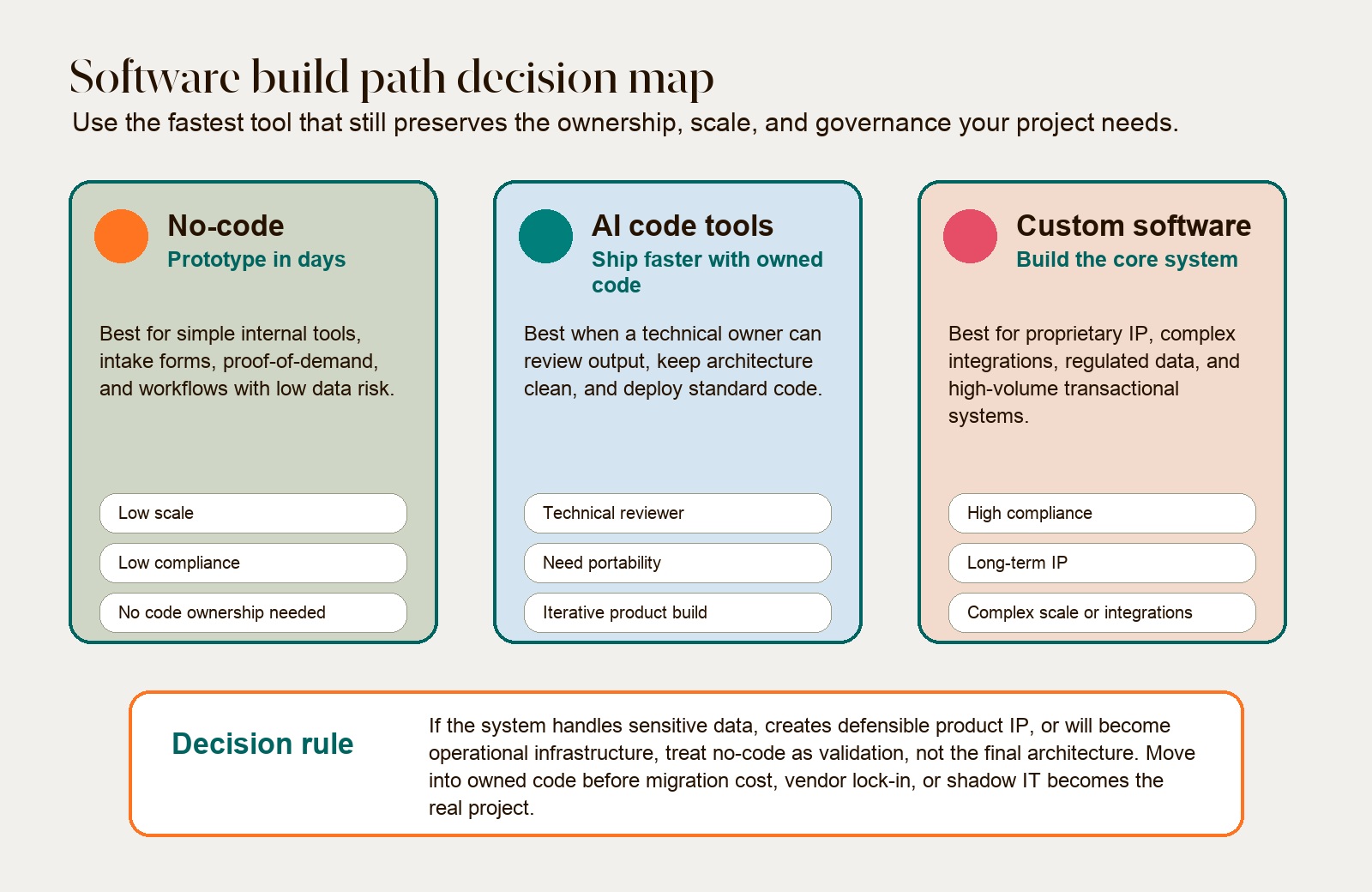
No-code vs custom software: the short answer
No-code is best when speed matters more than ownership. Custom software is best when the system is strategically important, technically complex, or exposed to meaningful risk. AI code tools can assist custom development, but speed and portability depend on the product, generated dependencies, and the team’s review process.
Market-growth forecasts do not establish which approach fits an individual workflow. Compare the proposed system against actual data, permissions, integration, ownership, and operating requirements.
That shift is useful. Business teams often understand the workflow better than centralized engineering does. They can move quickly, test assumptions, and stop waiting in a backlog. But speed without ownership creates a second problem: the company may not know where its data lives, how the workflow is secured, whether the code can be exported, or what it will cost to rebuild if the prototype becomes important.
The stronger operating principle is simple: use no-code to learn, use AI-assisted code to move, and use custom architecture when the system becomes part of the business.
What each build path is actually good for
No-code platforms such as Bubble, Adalo, Glide, and similar visual builders are useful because they remove the first layer of software friction. Non-technical teams can assemble screens, forms, databases, and workflows without writing code. IBM describes no-code as a way for users to build applications through visual interfaces and prebuilt components, while low-code still involves some developer involvement.
That makes no-code a good fit for:
- Simple internal tools.
- Intake forms and lightweight approval flows.
- MVP demos where the main goal is customer reaction.
- One-off operational tools that will not become core infrastructure.
- Early workflow validation before a larger build.
If the use case is employee-facing operations software, compare the workflow against these internal tools examples before deciding whether no-code, low-code, or custom code is the right path.
Low-code platforms such as Retool, Mendix, OutSystems, and Microsoft Power Apps raise the ceiling. They still use visual building, but they allow developers or technical operators to add scripts, connectors, custom logic, and enterprise controls. Google Cloud frames the difference clearly: low-code is designed to speed development while still allowing code-level customization. That makes low-code more useful for enterprise portals, admin tools, workflow automation, and internal systems that need governance but not a fully bespoke product team.
AI coding products vary: some edit an existing repository, while others bundle generation with managed databases, hosting, or proprietary services. Do not infer portability from a downloadable source folder. Build the exported project in a separate environment, identify service dependencies, test data export, and check license and plan terms for the exact product and version under consideration.
Custom software remains the highest-control path. It is still the best answer when the product depends on proprietary logic, regulated data, high performance, unusual integrations, deep workflow nuance, or long-term technical advantage. AI can help here too, but the architecture still needs human ownership. If you need concrete patterns, compare this against Hapy’s custom software examples.
The hidden cost is not launch cost. It is rebuild risk.
No-code and low-code can reduce setup work when their existing components fit the problem. Compare scoped quotes for discovery, configuration, integration, testing, hosting, support, and exit work. Hapy’s custom software development cost guide helps separate launch cost from ownership cost.
But the first build is not the full cost. The real financial question is: what happens if the workflow becomes important?
A platform may remain suitable for years, or require migration when permissions, performance, integrations, data access, or vendor terms no longer fit. This guide has no verified population-level rewrite rate or migration-cost benchmark.
Price exit work as a scenario: data export and cleanup, logic reconstruction, integration changes, parallel operation, testing, and staff training. A hypothetical team might compare 10 days to configure a pilot with 25 days to build a custom version, then separately estimate 15 days to migrate if a known requirement arrives. These are planning inputs, not Hapy outcomes or expected savings. A lower initial estimate only helps if the platform meets mandatory controls.
At Hapy, this is why we tend to separate validation from architecture. A founder may need a fast MVP to get user signal. An operator may need a quick dashboard to understand a bottleneck. But if the signal is strong, the next move is not always “keep adding plugins.” Often, it is to move the winning workflow into a system the business can actually own.
AI code tools change the speed equation, not the accountability equation
AI-assisted development is the most important change in this decision. It compresses the distance between a prototype and real software. A technical founder, engineer, or agency team can now use AI to scaffold interfaces, generate API routes, refactor modules, write tests, and explore implementation options with potential time savings that should be measured after review and correction.
The Model Context Protocol is one reason this category is getting more powerful. The official MCP specification describes a standard way for AI applications to connect with external tools, data sources, files, prompts, and workflows. In practice, that means AI coding environments can become more context-aware: they can reason across a codebase, inspect logs, run tests, and interact with live development systems instead of responding to static prompts.
Salesforce’s engineering team published a useful example. In a November 2025 engineering write-up, Salesforce described using Cursor, Windsurf, and Claude to turn spreadsheet-based migration tracking into a dynamic dashboard in three days. The team was migrating 1,200 notification policies and 250,000 alert configurations, and the dashboard supported validation for 4.3 million daily notifications across two regions. Salesforce said work that would typically take six to eight weeks was compressed into three days in that case, with AI helping engineers connect domain data, APIs, ownership signals, and validation workflows in one tool.
That is the promise. The caution is in the same story. Salesforce also noted that early unstructured prompts led to unmanageable code, where simple tasks produced files with more than 1,000 lines and little modularity. The team improved quality by adding rules, shared context, and stronger engineering structure.
That is the right lesson for AI code tools: they reward teams that already know how to steer software. They are not magic product teams. They are leverage for people who can define the system, review the code, and keep the architecture clean.
Ownership and IP are now part of the software decision
Code ownership is one of the biggest differences between no-code, AI code tools, and custom software.
With many no-code platforms, the company owns the app configuration and data, but not a clean, portable source codebase. The system runs inside the platform’s hosting model, runtime, pricing structure, and feature limits. That can be fine for a temporary tool. It is dangerous for a product where the codebase itself is part of the asset.
AI-generated code introduces a different ownership issue. The U.S. Copyright Office’s registration guidance for works containing AI-generated material says copyright protection still depends on human authorship. The practical takeaway for software teams is not “avoid AI.” It is: document human contribution, architecture decisions, review, refactoring, and original implementation work.
For business software, this means AI should be used as an accelerant, not as an invisible author. Teams should be able to show:
- Who made the product and architecture decisions.
- Which parts were generated, reviewed, rewritten, or rejected.
- How the code was tested for quality, security, and license risk.
- Why the final implementation reflects human judgment.
That is especially important for proprietary products. If a company is building defensible software, “the AI generated most of it” is not a strong ownership story. A better model is: AI handles scaffolding and routine implementation, while humans define the architecture, business logic, user experience, security model, and final code quality.
Security and compliance should decide earlier than teams want
The riskiest no-code and AI automation projects are often the ones that look harmless at the start. A team builds a simple workflow. Then it adds customer data. Then it adds role-based access. Then it connects to payments, patient records, legal files, or internal financial data. By the time IT or legal sees it, the workflow is already in daily use.
That is shadow IT: systems that matter to the business but sit outside normal governance.
In regulated industries, this can become a hard blocker. The HIPAA Security Rule requires covered entities and business associates to protect electronic protected health information through administrative, physical, and technical safeguards. HHS guidance on technical safeguards under the HIPAA Security Rule covers access controls, audit controls, integrity controls, person or entity authentication, and transmission security.
For a healthcare workflow, that means the tool choice has to answer practical questions before build starts:
- Will the vendor sign a Business Associate Agreement?
- Is data encrypted in transit and at rest?
- Are audit logs tamper-resistant and useful?
- Can access be limited by role and need?
- Are connected AI providers using zero-retention or enterprise data controls?
- Can the system be self-hosted or deployed in compliant infrastructure if required?
The same logic applies outside healthcare. Legal, finance, insurance, education, logistics, and enterprise sales teams all handle sensitive operational data. The more sensitive the data, the less comfortable the team should be with an ungoverned visual workflow or an AI tool that sends context through unclear data paths.
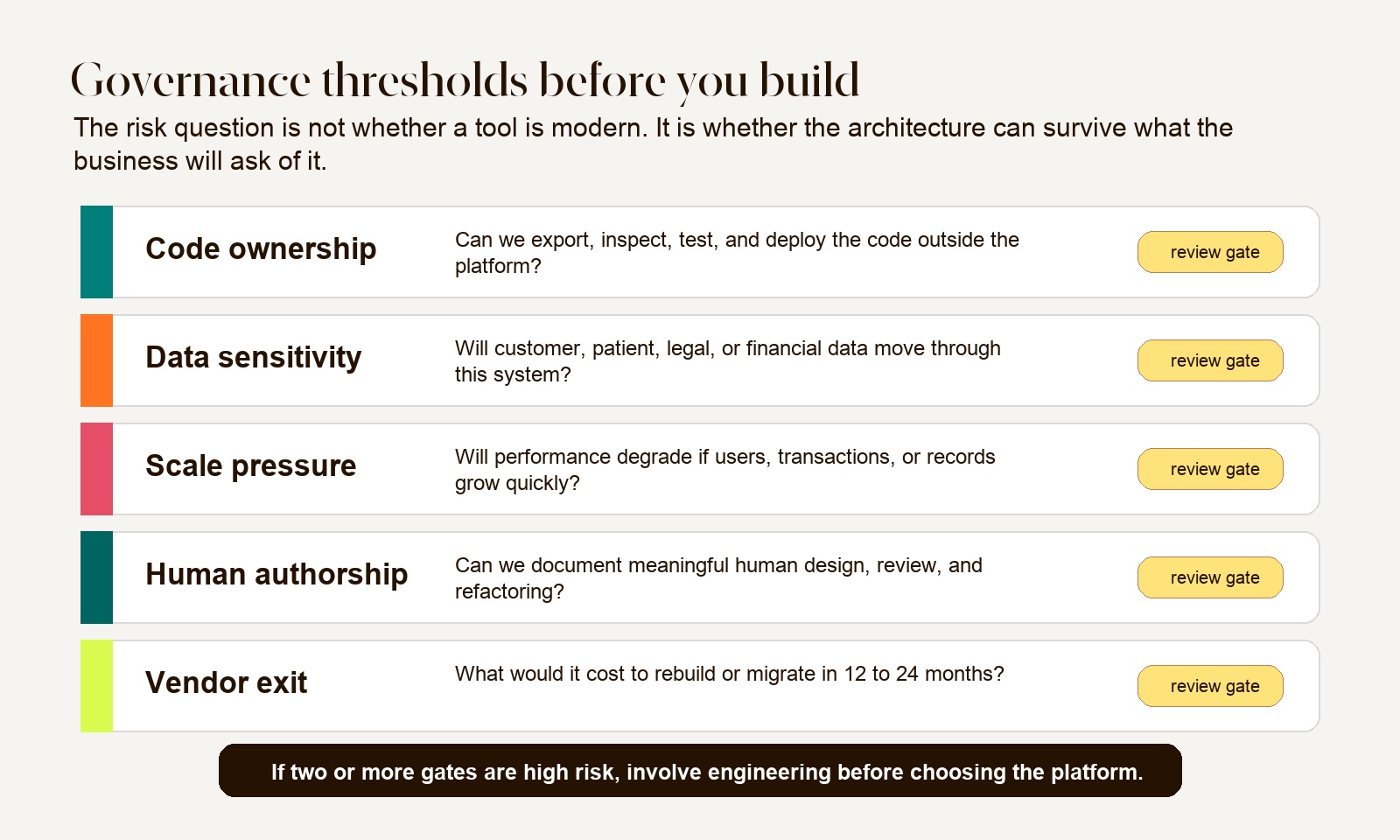
Review evidence before accepting generated or configured software
For each candidate, assign a technical reviewer and retain the results of these checks:
- Dependency inventory, license obligations, security advisories, and patch ownership.
- Secret handling, data sent to model providers, retention settings, and approved access scope.
- Server-side permissions, input validation, file handling, and negative tests for forbidden actions.
- Critical workflow tests, failure recovery, deployment instructions, and independent data export.
- Product terms covering generated output, embedded components, hosting, and termination.
A code download, security badge, or passing scanner does not settle these questions. Record unresolved findings and who accepts them before the system handles production data.
A practical selection framework
Use this framework before choosing a tool. It is intentionally blunt because tool enthusiasm is usually louder than risk.
Choose no-code when the job is validation
No-code is the right starting point when the goal is to prove a workflow, not to create a permanent system. Use it for prototypes, simple internal processes, landing-page-style apps, lightweight admin tools, and early MVPs where the data is low-risk and the logic is straightforward.
The key is to define the exit condition before you build. For example: “If this workflow is used by more than 50 active users, touches customer financial data, or becomes part of daily operations, we review the architecture.” That prevents a prototype from becoming accidental infrastructure.
Choose low-code when governance matters but the system is mostly internal
Low-code works when the company needs faster delivery but also needs admin controls, repeatable workflows, permissioning, connectors, and some developer extension. It can be a strong fit for internal dashboards, employee portals, CRM extensions, operational workflows, and enterprise automations.
The risk is platform dependency. Before committing, check whether the business can export data cleanly, integrate with existing systems, manage permissions centrally, and maintain the workflow without creating a single-person bottleneck.
Choose AI code tools when speed and ownership both matter
AI code tools are worth evaluating when a team wants assistance producing code it can independently operate. They are strongest when paired with a technical reviewer who can guide architecture, enforce coding standards, manage tests, and keep the repository clean.
This is often the right path for a serious MVP, custom dashboard, SaaS prototype, workflow-heavy web app, or internal tool that may become important later. Verify the resulting repository and deployment path rather than assuming a speed or ownership advantage.
Choose custom software when the system is strategic
Custom software is the right answer when the system creates proprietary advantage, supports regulated operations, handles high transaction volume, depends on complex integrations, or needs a long useful life. It costs more upfront because the team is not only building screens. It is making architecture, security, deployment, data, and maintenance decisions that determine whether the system can survive success.
AI can reduce delivery time here, but it should not replace engineering accountability. The point is not to write every line manually. The point is to make sure the company owns what matters.
When the real question is SaaS economics versus owning the workflow, Hapy’s build vs buy software guide gives a broader TCO model before choosing no-code, low-code, AI-assisted code, or a custom build.
How Hapy thinks about this decision
For founders, the mistake is usually overbuilding before the market has said anything. For operators, the mistake is usually underbuilding after the workflow has already become important.
Those are opposite mistakes, but they come from the same missing step: defining what the system needs to prove now, and what it must become later if it works.
If you are validating a product, Hapy’s MVP development work is built around the smallest useful version: enough product to create signal, not so much that the team burns months on assumptions. No-code, AI-assisted prototypes, and custom code can all fit that process depending on the proof needed.
If you are cleaning up operations, Hapy’s Business Systems & Automation work starts with the real workflow: spreadsheets, tools, handoffs, reporting gaps, and decisions that are currently slower than they should be. If the choice is mainly about process tooling, compare BPM vs custom automation before treating no-code, low-code, or custom code as the answer. The goal is not to add more software. It is to build a system the business can trust.
The right build path is the one that matches the risk curve. Move fast when the question is still uncertain. Add ownership when the workflow starts to matter. Bring in engineering when the system touches sensitive data, proprietary logic, or scale.
Conclusion: choose the path based on what happens if it works
The no-code vs custom software decision is really a commitment decision. No-code is excellent when you need speed and the downside is low. Low-code is useful when internal workflows need more structure and governance. AI code tools are powerful when you need both speed and code ownership. Custom software is still the right answer when the system is strategic, regulated, complex, or core to how the business competes.
The practical rule is this: choose the cheapest path that can answer today’s question, but do not confuse today’s prototype with tomorrow’s architecture.
If the thing works, it will attract more users, more data, more integrations, more edge cases, and more business dependency. That is when the original tool decision starts to matter. The best teams plan for that moment before it arrives.


