Build vs buy software decisions are not really about whether custom development is better than SaaS. They are about which parts of the business should stay generic and which parts are too important to rent from a vendor’s roadmap.
The short answer: buy standard software for standard work. Build custom software when the workflow is proprietary, economically sensitive, integration-heavy, or central to how the company wins. The expensive mistake is not buying SaaS. The expensive mistake is staying with packaged software after it has become workflow debt.
Off-the-shelf tools often win the first budget meeting because they look faster and cheaper. A subscription starts this quarter. A custom build asks for discovery, design, engineering, QA, maintenance, and leadership attention. But the first-year comparison misses the costs that matter most over time: license expansion, customization, middleware, reporting gaps, manual workarounds, renewal increases, and the operational penalty of forcing the business to fit the tool.
This article turns the build vs buy software decision into a 36-month total cost of ownership model. It is written for founders, operators, CFOs, CTOs, and business leaders deciding whether to buy a SaaS platform, build a custom system, or create a hybrid operating layer across the tools they already use.
If the workflow is still early and the goal is market signal, start with Hapy’s guide to custom software development cost. If the work is mainly operational routing, compare this against BPM vs custom automation.
Build vs buy software: the practical answer
The best build vs buy software decision starts with process criticality, not software category. If a workflow is common, regulated in a standard way, and already solved by mature tools, buying is usually the right default. If the workflow affects margin, customer experience, speed, data advantage, or proprietary service delivery, custom ownership deserves serious consideration.
That view is not anti-SaaS. CIO.gov makes a similar point from a public-sector lens: building bespoke software should be the exception, reserved for mission-unique needs that shared or commercial solutions cannot address. The same rule works for private companies. Do not build a payroll system for pride. Do consider building the system that runs the part of the business competitors cannot copy.
Use this plain-English split:
| Decision area | Buy off-the-shelf | Build custom | Connect with middleware |
|---|---|---|---|
| Best fit | Standard business function | Differentiating workflow | Mixed stack with one broken operating layer |
| Cost profile | Low setup, recurring license growth | Higher upfront, workload-dependent operating cost | Moderate upfront, targeted integration cost |
| Main risk | Vendor lock-in and workflow debt | Scope creep and maintenance burden | Brittle integrations if architecture is weak |
| Good examples | Payroll, basic accounting, commodity CRM | Proprietary quoting, field ops, internal SaaS, domain-specific AI workflow | CRM plus ERP plus dashboard plus approval workflow |
| Decision signal | The vendor’s default process is good enough | The default process weakens the business | The tools are fine, but the handoffs are not |
The strategic question is not “Can we build this?” Most teams can build more than they should. The better question is “Would owning this workflow create enough control, margin, speed, or customer value to justify the responsibility?”
Why off-the-shelf software gets expensive after the first year
Packaged software is usually cheap at the edge and expensive at scale. The first-year subscription is only one line in the model.
The cost grows in five places:
- Licenses expand as more employees, contractors, customers, partners, or locations need access.
- Premium tiers force companies to pay for broad bundles just to unlock one important feature.
- Customization and implementation fees rise when the tool does not match the workflow.
- Middleware and manual data work appear when APIs, schemas, and reporting do not line up.
- Vendor renewal pricing adds uncertainty the buyer does not control.
Recent software spend benchmarks make that renewal risk more visible. Vertice’s 2026 SaaS inflation tracker reported March 2026 SaaS inflation at 13.2% year over year, based on more than $30 billion in processed spend. Zylo’s 2026 SaaS Management Index reported that organizations now spend an average of $55.7 million on SaaS annually, up 8% year over year in its dataset.
Those numbers do not mean every SaaS renewal will jump by the same amount. They do mean a serious build vs buy software model should include renewal scenarios, not just today’s quote.
Custom software has its own recurring costs. Maintenance, security updates, hosting, dependency changes, support, and small product improvements do not disappear after launch. ISBSG notes that software maintenance often represents 65% to 85% of an application’s total ownership cost across its life. That is why a build decision must include maintenance from day one, not treat it as a future surprise.
A 36-month TCO model for build vs buy software
The cleanest way to compare options is to model total cost of ownership over 36 months. One-year math often favors packaged SaaS. Three-year math exposes whether the subscription is still buying leverage or quietly creating a compounding operating tax.
The model should include:
- Upfront build, implementation, or migration cost.
- Licensing by users, data, transactions, modules, or AI add-ons.
- Annual renewal increases.
- Customization and consultant fees.
- Middleware, API, and data integration costs.
- Reporting and business intelligence workarounds.
- Training and onboarding.
- Internal labor spent on manual workarounds.
- Maintenance, hosting, security, and support.
- Switching cost if the tool becomes embedded.
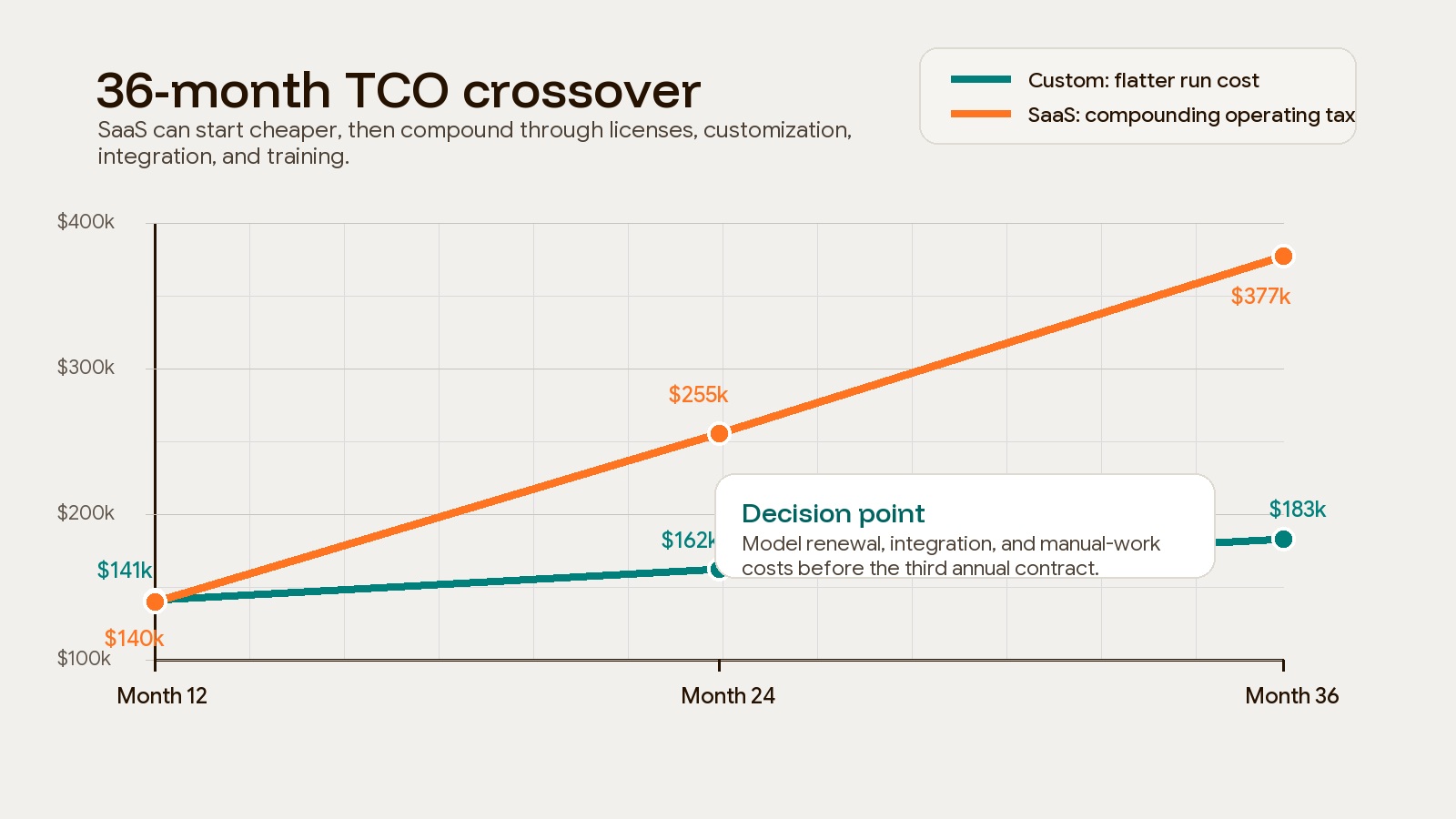
The following USD scenarios are illustrative arithmetic, not quotes, market benchmarks, or reported client outcomes. Each covers implementation plus three full operating years after launch. Development lead time, financing, tax, downtime, major new features, and exit costs are excluded and must be added where relevant. No discounting is applied.
TCO through year n = upfront cost + sum of annual operating costs through year n. Annual operating cost includes licensing, hosting, maintenance, administration, and distinct workaround labor. Never count the same hours twice.
| Scenario and option | Upfront | Year 1 operations | Year 2 operations | Year 3 operations | 36-month total |
|---|---|---|---|---|---|
| A: custom | $120,000 | $21,000 | $21,000 | $21,000 | $183,000 |
| A: SaaS | $30,000 | $110,000 | $115,500 | $121,275 | $376,775 |
| B: custom | $320,000 | $80,000 | $80,000 | $85,000 | $565,000 |
| B: SaaS | $0 | $150,000 | $180,000 | $210,000 | $540,000 |
In scenario A, custom operations assume $6,000/year hosting and $15,000/year maintenance. SaaS operations assume $60,000 licensing, $20,000 integration/admin support, and $30,000 distinct workaround labor in year one, with the combined amount increasing 5% annually. This is a deliberately expensive SaaS-fit problem, not a typical subscription. If a configured alternative reduces SaaS operating cost to $40,000/year with the same $30,000 setup, its three-year total is $150,000 and buying wins.
Scenario B assumes a larger custom build and ongoing support burden. Its SaaS totals grow by $30,000 each year as modeled usage expands. Custom remains $25,000 more expensive at year three; ownership needs a separate strategic justification.
For sensitivity, doubling scenario A’s custom maintenance to $30,000/year raises its total to $228,000. Add a delayed-launch case and a major integration-replacement case before deciding. The illustration above shows a possible crossover; it should not be used to infer your crossing month.
Copy this worksheet into a spreadsheet and replace every input with a dated quote or measured baseline:
option,upfront,year_1_operations,year_2_operations,year_3_operations,total
custom_A,120000,21000,21000,21000,183000
saas_A,30000,110000,115500,121275,376775
custom_B,320000,80000,80000,85000,565000
saas_B,0,150000,180000,210000,540000
The total formula for each spreadsheet row is =SUM(B2:E2), adjusted to that row. Record seats, transaction volumes, annual increases, support hours and rates, migration overlap, and exclusions beside each quote.
The lesson is simple: the crossover point is not universal. It depends on user growth, feature packaging, integration burden, renewal terms, maintenance quality, and how much manual work the bought system creates.
Workflow debt is the hidden cost in the build vs buy decision
Workflow debt is what accumulates when a tool is almost right, but not right enough.
It shows up as spreadsheet exports, duplicate entry, status meetings, side-channel approvals, manual reconciliations, and reporting formulas that live outside the system of record. At first, these workarounds feel harmless. Later, they become the real operating system.
This is where off-the-shelf software can become more expensive than the invoice suggests. A vendor bill is easy to see. The time spent compensating for the tool is harder to measure.
Watch for these warning signs:
| Warning sign | What it means | What to check |
|---|---|---|
| Spreadsheet dependency | Teams export data to finish daily work | Which report or workflow is missing inside the tool? |
| Human middleware | People manually move data between tools | Which handoff should be automated or owned? |
| Process deformation | The team changes good work to match bad software | Is the tool improving the workflow or forcing it? |
| Exception creep | Temporary workarounds become standard | How many “special cases” now happen every week? |
| Reporting gaps | Leadership cannot trust dashboard numbers | Where is the source of truth breaking? |
| Integration fatigue | Every system needs glue work | Is the stack missing a real operating layer? |
| AI workflow failure | Agents or automations stall on manual screens | Are the interfaces structured enough for non-human work? |
That last point matters more now. AI-assisted development is lowering some build friction. McKinsey estimated that generative AI could affect 20% to 45% of current software engineering spending through productivity impact. Microsoft Research found that developers using GitHub Copilot completed a coding task 55.8% faster than a control group in its experiment.
Those findings do not mean custom software is suddenly cheap or risk-free. They do mean the old assumption that “buy is always faster and build is always slow” is weaker than it used to be. The bigger issue is whether the resulting system can support the way modern work actually moves: through APIs, automations, dashboards, review loops, and AI-assisted operations.
Build, buy, or connect: the decision matrix
Most companies do not need a pure build or pure buy answer. They need a portfolio answer.
Keep commodity systems off the shelf. Own the workflows that make the business different. Connect the messy middle with a deliberate operating layer instead of another fragile spreadsheet-and-zap chain.
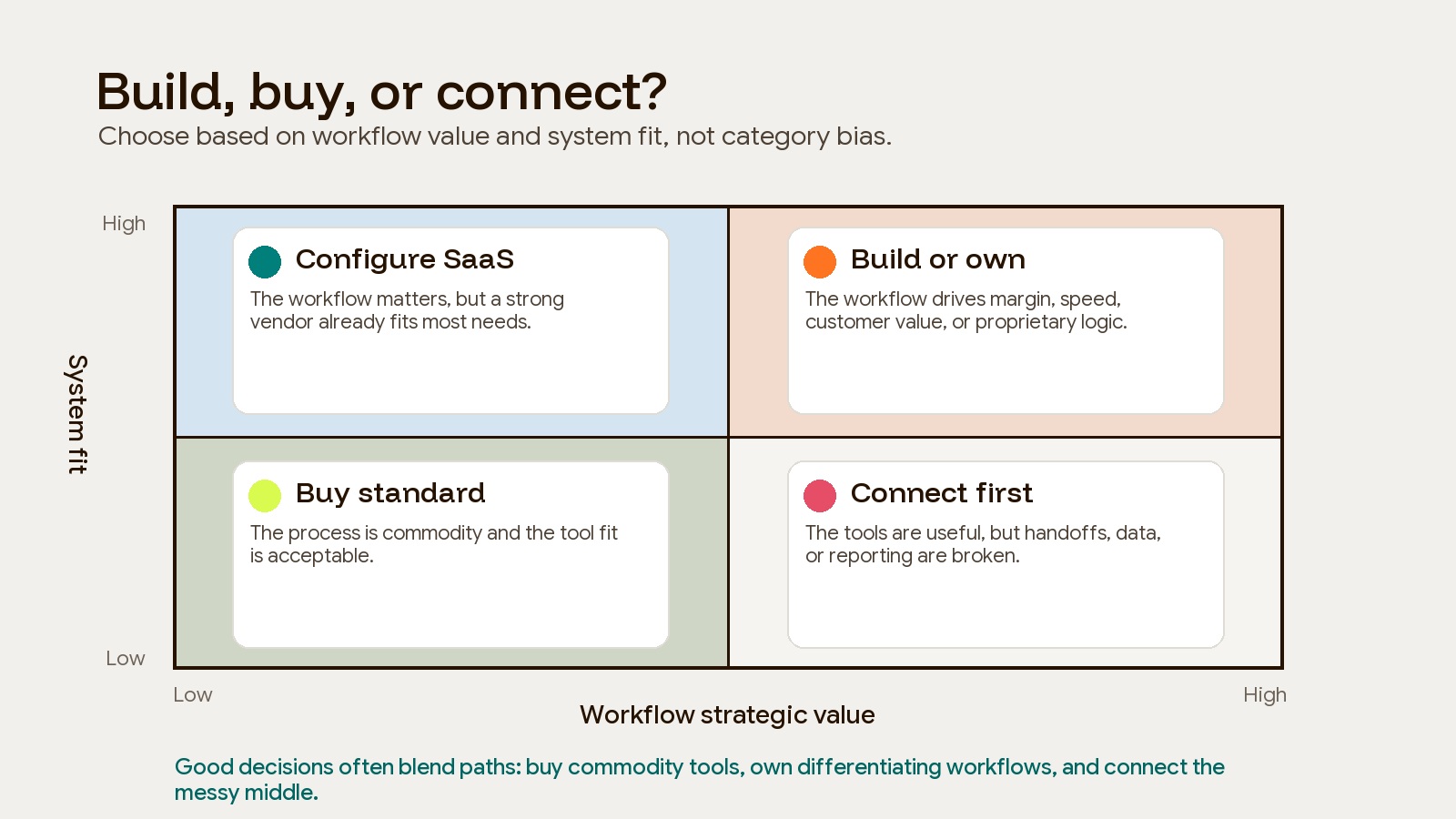
Use this matrix before signing a new annual contract or approving a custom build:
| Question | If the answer is yes | Likely path |
|---|---|---|
| Is this workflow standard across most companies? | The business gains little from owning it | Buy |
| Does this workflow directly affect margin, speed, or customer experience? | The workflow may be a strategic asset | Build or hybrid |
| Does the tool force manual work every week? | The invoice understates the real cost | Connect or build |
| Are reporting and data access restricted? | Leadership may lose decision quality | Connect or build |
| Will user count, locations, partners, or agents expand quickly? | Per-seat pricing may compound | Model custom or hybrid |
| Does the workflow need auditability and governance more than uniqueness? | Process control matters more than bespoke UX | BPM or configured SaaS |
| Is the business still validating demand? | Full ownership may be premature | MVP, no-code, or low-code first |
This is also where Business Systems & Automation work becomes useful. Many companies do not need a large custom rebuild first. They need to clean the inputs, define what matters, and connect the workflows that already run the business.
How to run a defensible build vs buy software analysis
A defensible analysis does not start with vendor demos. It starts with the work.
1. Map the workflow before mapping the software
Document the real process, including exceptions. Where does the work start? Who touches it? Which systems hold the data? Where do approvals happen? Which steps are manual because the tool cannot support the real workflow?
IBM describes business process management as a discipline for discovering, modeling, analyzing, measuring, improving, and optimizing business processes. That matters because the software decision should follow the process diagnosis, not the other way around.
2. Separate commodity work from differentiating work
Mark each workflow as commodity, important, or differentiating.
Commodity workflows should usually be bought. Important workflows can often be configured or connected. Differentiating workflows deserve a deeper ownership conversation because they shape how the business competes.
3. Build a 36-month cost model
Model at least three scenarios:
- Conservative: user count and workflow complexity stay mostly flat.
- Expected: normal growth, routine renewal increases, moderate customization.
- Stress case: faster user growth, premium tier unlocks, integration changes, AI or automation volume, and higher internal support effort.
Do not hide internal labor. If the system requires five people to spend two hours a week reconciling data, that is part of the cost. If leadership spends hours debating whose dashboard is right, that is part of the cost too.
4. Price maintenance honestly
For custom software, include hosting, monitoring, support, security patches, dependency updates, regression testing, documentation, and small changes. A build with no maintenance budget is not cheaper. It is underfunded.
For off-the-shelf software, include implementation, admin time, vendor support, renewals, add-ons, integrations, data migration, reporting workarounds, and switching risk.
5. Choose the smallest ownership move that solves the real constraint
Ownership does not always mean a full custom platform. Sometimes the right answer is:
- Keep the SaaS system but build a custom reporting layer.
- Use a low-code workflow for a department-level process.
- Build middleware that connects CRM, ERP, and operations data.
- Replace only the strategic workflow while leaving commodity systems alone.
- Build an MVP first, then decide whether the workflow deserves long-term ownership.
If you are comparing no-code, low-code, AI code tools, and custom software, Hapy’s no-code vs custom software guide can help narrow the build path before you commit to architecture.
For a narrower sales and service decision, the custom CRM build-versus-buy guide applies the same ownership test to workflows, integrations, reporting, and seat-based costs.
Operations teams making the same decision around stock, purchasing, and warehouse workflows can use the custom inventory management app guide to compare packaged, custom, and hybrid models.
The real decision: control, not code
Build vs buy software is a control decision disguised as a cost decision.
Buying gives you speed, vendor support, predictable features, and a lower starting cost. Building gives you fit, ownership, data control, workflow control, and the ability to adapt the system as the business changes. Connecting gives you a middle path when the tools are useful but the operating layer is broken.
The right answer depends on what the workflow is worth.
If the process is standard, buy it. If the process is strategic, model ownership. If the tools are good but the handoffs are bad, connect them. And if the current stack forces your team to run the business through spreadsheets, manual approvals, and workaround rituals, the SaaS bill is no longer the full cost of the software.
That is the moment the build vs buy software question becomes worth revisiting.
FAQ
What is the biggest mistake in build vs buy software analysis?
The biggest mistake is comparing upfront build cost against first-year SaaS cost. A serious analysis compares total cost of ownership over 36 months or more, including renewals, add-ons, customization, integrations, internal labor, workflow debt, switching cost, maintenance, hosting, and support.
When does off-the-shelf software become more expensive than custom software?
Off-the-shelf software becomes more expensive when licensing, premium tiers, customization, integrations, reporting gaps, manual workarounds, and renewal increases compound faster than a custom system’s maintenance and hosting costs. The crossover often appears after user count, workflow complexity, or automation volume increases.
Should every company build custom software for strategic workflows?
No. Strategic importance makes custom software worth evaluating, not automatically correct. The company still needs a clear workflow, budget, maintenance plan, technical ownership, and enough expected value to justify the upfront cost. Sometimes a hybrid middleware layer is the better first move.
How should AI change the build vs buy decision?
AI changes both sides of the decision. It can reduce some development effort, but it also increases the need for structured APIs, clean data, auditable workflows, and systems that automated agents can navigate. A tool built only for human clicking may become a bottleneck when operations become more automated.