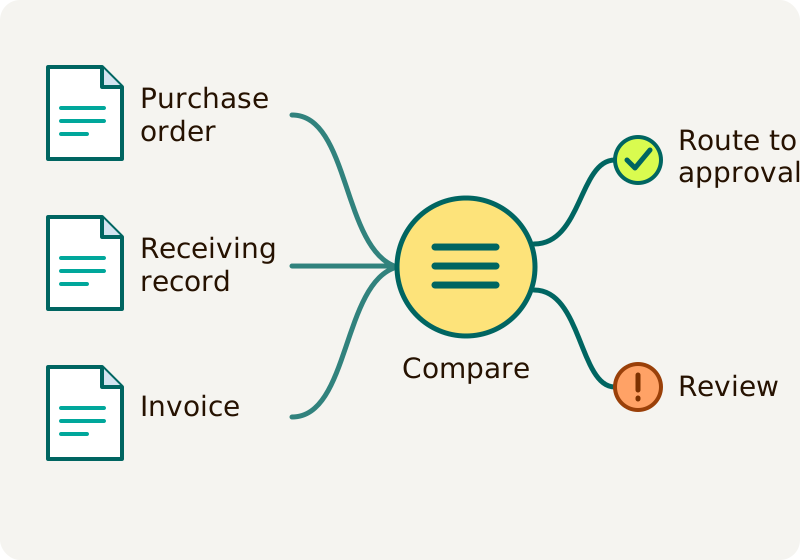
Three-way matching checks a supplier invoice against the purchase order and a record of what was received before it moves to approval. Use it for purchases where the quantity, price or delivery matters. If the documents disagree, hold the invoice and send the specific issue to the person who can resolve it. A match is a useful check, but it does not replace duplicate-payment or payment-authorization controls.
TL;DR
- Three-way matching compares the purchase order, receiving record and supplier invoice before an invoice moves to approval.
- If 60 of 100 ordered units arrive, an invoice for all 100 needs review; the received 60 at $40 each support $2,400 before tax and shipping.
- A match does not rule out a duplicate bill. Check the supplier, invoice number and prior payment records separately.
- In Ardent Partners' 2025 survey of 204 finance and accounts-payable leaders, the average invoice-exception rate was 18.4%; most respondents represented larger businesses.
- BILL lists automatic three-way matching under custom-priced Enterprise, with availability varying by accounting system; its $89-per-user Corporate plan lists two-way matching.
- In a hypothetical 400-invoice monthly pilot, $3,600 of setup pays back in eight months if the stated staff-time and support assumptions hold.
- Start with your existing accounting software when it handles the checks. Add a specialist tool or custom integration only when a tested gap justifies the extra cost and upkeep.
What does each document prove?
The purchase order records what the business authorized. The receiving record shows what arrived or what work was accepted. The invoice states what the supplier is asking to be paid. Compare them at the line-item level, not only by the final total: two errors can cancel each other out in a total while leaving individual items wrong.
| Record | Check | Typical owner |
|---|---|---|
| Purchase order | Supplier, item, quantity, agreed unit price and relevant terms | Purchasing |
| Receiving record | What actually arrived or was accepted, including the date and quantity | Receiving or the person accepting the work |
| Supplier invoice | Supplier, invoice number, billed quantities, prices, tax and other charges | Accounts payable |
The records do different jobs. A purchase order for 100 units is not evidence that 100 arrived. An invoice can be accurate to the order and still include goods the business has not received. Microsoft’s matching example compares invoice prices with the order and invoiced quantities with product receipts; the exact policy and tolerance settings belong to the business.
What happens when a delivery is incomplete?
Hold the unsupported amount and ask for a correction or an authorized resolution. Do not treat the unreceived quantity as accepted merely because it appears on the purchase order.
Imagine a business orders 100 valves at $40 each. The order totals $4,000 before tax and shipping. Receiving records 60 valves, but the supplier sends an invoice for all 100.
| Record | Quantity | Unit price | Amount before tax and shipping |
|---|---|---|---|
| Purchase order | 100 | $40 | $4,000 |
| Receiving record | 60 | — | — |
| Supplier invoice | 100 | $40 | $4,000 |
The receipt supports 60 × $40 = $2,400 of goods. The other $1,600 covers 40 units that have not been recorded as received. Accounts payable should hold the invoice, ask receiving to confirm the record, and ask the supplier to correct the bill or explain the difference. If the contract permits partial billing, a corrected $2,400 invoice can proceed through the normal checks. A later invoice for the remaining 40 needs its own receipt and must not reuse the 60 already matched. Tax, freight and any agreed price changes need separate checks.
This example is hypothetical. It shows why a match must track which receipt quantities have already been used, especially when one order has multiple deliveries or invoices. If a system cannot show that allocation, keep the disputed portion in human review.
Who resolves a mismatch?
Send the exception to its source and keep the invoice on hold until an authorized person records the resolution. A finance employee should not have to guess whether the problem is a late receipt, a changed order or a supplier error.
| Exception | First action | What closes it |
|---|---|---|
| Goods arrived but no receipt is recorded | Ask receiving to verify the delivery. | The responsible person records the accepted quantity and date. |
| Quantity or price differs | Ask purchasing and the supplier to check the order and invoice. | A corrected record or an approved, documented exception under the business’s policy. |
| Freight or tax differs | Check the agreed terms and the invoice detail. | The correct charge is recorded or an authorized exception is documented. |
| Possible duplicate | Compare the supplier, invoice number and prior bills and payments. | Accounts payable confirms a duplicate, correction or separate legitimate charge. |
| Supplier bank details changed | Hold the payment and verify the change through an independently confirmed contact. | The authorized supplier-change procedure is complete. |
A tolerance is a permitted difference set before a bill arrives, such as an approved rounding limit. It is not permission to ignore an unexplained price change. Record who can set and approve tolerances, what they cover and when a person must investigate. A receiving record and a payment approval should also have clear owners; one automated status should not silently stand in for every decision.
A three-way match alone does not detect every duplicate. Search existing and paid bills using the supplier and invoice number, then investigate likely near-matches that differ in formatting, amount or date. A repeated number is a reason to investigate, not proof by itself. The US Government Accountability Office’s payment-control guidance discusses duplicate-payment checks in a federal setting; each business must set controls suited to its own process.
Exceptions are normal enough to plan for. In Ardent Partners’ 2025 survey of 204 accounts-payable and finance leaders, the reported average invoice-exception rate was 18.4%. The sponsor-funded study included businesses from several regions, and 54% of respondents represented organizations with more than $1 billion in revenue. It is a useful reason to budget for review, not a forecast for a small business.
Should you use two-way or three-way matching?
Use three-way matching when proof of receipt or accepted work is needed before payment. Use a two-way check when the business has an approved reason to compare an invoice with the order without a separate receiving record, such as a low-risk recurring service under its policy. That choice accepts a different control: the documents do not independently show that goods arrived.
For a service, the receiving evidence might be an approved timesheet, completed milestone or service-acceptance record. Agree on what counts before work starts. A fourth quality-inspection record can add another check when acceptance depends on testing, but more documents are useful only if someone records and acts on the result.
The broader business process automation examples guide shows where this check fits in the whole supplier-payment process. Three-way matching is one control within that process; it does not by itself approve the supplier, verify bank details or send a payment.
Should you buy a tool or connect the systems you have?
Start with your existing accounting system if it records orders, receipts, invoices and approvals well enough for the actual workload. A standard accounts-payable tool is a stronger next step when it handles the matching and exception rules your team needs. Consider a custom integration when a specific gap between existing systems remains important after testing those options. Custom work also creates a responsibility to monitor and maintain the connection.
Published prices are useful starting points, but the plans below do not cover the same work. Prices were checked November 16, 2026.
| Option | Published reference | What the price does not establish |
|---|---|---|
| Specialist accounts-payable software | BILL Corporate lists $89 per user per month and two-way matching. BILL lists purchase-order sync and automatic three-way matching under custom-priced Enterprise. | The Corporate price is not a three-way-matching quote. Enterprise features vary with the accounting software; payment and implementation fees can be additional. |
| Workflow platform | Power Automate Premium lists $15 per user per month, paid yearly. | A license is not a finished matching system. Data connections, implementation, support and any other required licenses or services are separate. |
| Custom integration | Hapy offers business systems and automation for agreed work connecting tools and improving workflows. | Scope, capacity and third-party costs need agreement. A recurring engagement is not a fixed-price quote for this matching workflow. |
Hapy sells automation services and has a commercial interest in this choice. If a standard tool covers the checks and integrations, use that simpler route. Before adding custom work, test the cases that would justify it: split deliveries, multiple invoices against one order, changed prices, duplicate bills and a failed update to the accounting system.
A first-year comparison
The following hypothetical US pilot compares the same 400 supplier invoices per month. It values staff time at an assumed $30 per hour. It is not a supplier quote or a measured Hapy result.
| Monthly cost or effort | Current manual check | Proposed workflow |
|---|---|---|
| Routine matching | 400 × 6 minutes = 40 hours | 400 × 2 minutes = 13.3 hours |
| Additional exception review | Included in the six-minute baseline | 5 hours |
| Value of staff time | $1,200 | $550 |
| Software and support | $0 incremental | $30 software + $170 support = $200 |
| Monthly total | $1,200 | $750 |
At these assumptions, the workflow releases about 21.7 staff hours a month and reduces the modeled monthly cost by $450. A $3,600 setup pays back in eight months. Over one year, manual checking totals $14,400; setup plus 12 months of the proposed workflow totals $12,600, a difference of $1,800.
The $30 software allowance equals two $15 monthly user licenses in this example; it does not establish that those licenses are sufficient. The comparison excludes the existing accounting system, taxes, payment fees and error losses for both options. It values capacity that staff can use elsewhere; payroll falls only if paid hours or a planned hire actually fall. If exception review or support costs more than assumed, the payback takes longer.
For context, APQC’s cross-industry benchmark, reported in October 2026 from 5,846 organizations, puts the median total accounts-payable cost at $6 per invoice. That measure includes personnel, systems, overhead and outsourced work across the whole process. The narrow matching calculation above is not directly comparable and does not predict your total cost.
How should you test a new workflow?
Use a small, non-paying pilot before the new process controls real payments. A two-week pilot is a planning example, not a delivery promise: the time needed depends on access, data quality and the systems involved.
- Choose a representative sample. Include complete matches, partial deliveries, price differences, missing receipts, duplicate bills and invoices for services.
- Compare the output with the real records. Check quantities already allocated to earlier invoices, the correct supplier and the reason for each hold. Record false matches and unnecessary exceptions.
- Keep one system responsible for real actions. During a shadow comparison, the new workflow can prepare a result but must not create a second bill or send a payment. Reconcile any failed or uncertain update before retrying it.
- Measure the work. Compare matching time, exception time, unresolved items and errors against the same sample and period. Include support time. Do not call a faster result safe if it misses a material discrepancy.
- Decide who can approve release. Name the person who owns exceptions, the person who can change rules and the payment approver. Agree how to pause the workflow and return to the existing process.
If the pilot shows that standard software handles the cases and staff can resolve exceptions, keep it. If the missing piece is a reliable connection between systems, define that gap and its owner before commissioning an integration.